This post was first published on the Alibaba Cloud Xianzhi community at A Practical Java Servlet Audit - Xianzhi Community; please cite the original source when reproducing it.
Thanks for reading!
0x00 Background
During a penetration test, I came across a JSP site. After getting into the admin panel with weak credentials, I found it had very few features and was not easy to exploit. A quick check yielded no breakthrough, yet the boss’s requirement was to get a shell as soon as possible…
After some sorting out, my thinking was: either take over the admin panel through vulnerabilities, or obtain the source code and charge in with white-box testing. White-box is great and also does a lot for improving audit skills, so we can try the following steps:
- Directory scanning. Use the
dirbusterwordlistdirectory-list-2.3-medium.txtwith thejspextension to scan; any tool you’re comfortable with works, e.g.dirseach
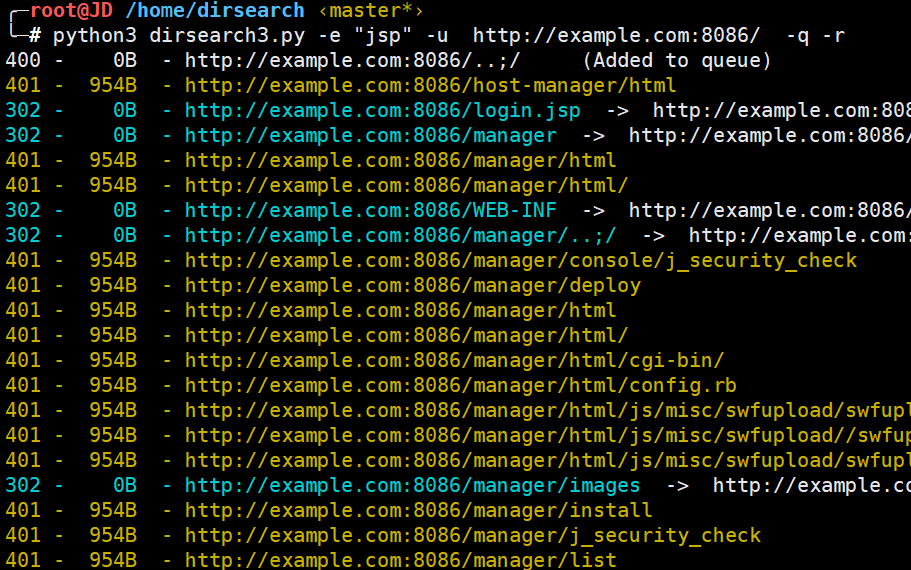
- Cloud-drive leaks. This system is not open source, so I figured the vendor probably left plenty of files on cloud drives when releasing it, and a simple search did return results. On a cloud-drive search engine, I found the vendor’s installation package, but it appeared to be a PE file that still needed installing, and it was unclear whether it was obfuscated/encrypted, so I set it aside for the time being.
Inner monologue: these days — you’d better not click on things recklessly.

- GitHub and GitLab leaks. Tried multiple keywords, all to no avail
- Use FOFA to find sites of the same type. This goes without saying — whether backup files weren’t deleted at release time, or ops staff were careless, such things are easy to discover. Meanwhile, on FOFA, searching by
favicon.icoor by title yields surprisingly impressive accuracy
As for tooling, I first went with broken5’s https://github.com/broken5/WebAliveScan, but after blasting away with 1024 threads, nothing turned up…
Wondering whether the wordlist just wasn’t strong enough, I next used the wordlist bundled with dirsearch (about 17,000 entries),
# With a big enough wordlist, nothing can't be taken down
python3 dirsearch3.py -e "jsp" -l ip_port.txt -t 50 --plain-text-report=ip_port_DirScan.txt  -q
Running it against the target list took a whole morning, but it finally paid off — web.rar. Sweet!
Night fell, open IDEA! Dawn came, close IDEA.
I found that while jsp code isn’t hard to read, with shaky fundamentals, auditing the code was enough to make your head hurt — hence the first chapter below.

0x01 Servlet Basics
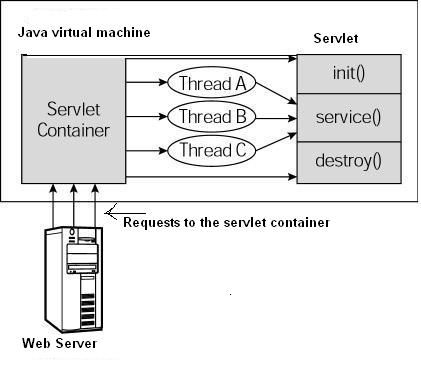
Under normal circumstances, the directory structure looks like this
exampleApp
└─images
└─WEB-INF
│   ├─classes     # Contains all Servlet classes and other class files [important]
│   │    └─com
│   │				└─example
│		│
│   └─lib					# Where the project's dependency packages are stored (.jar files)
└─web.xml					# The Servlet configuration file [important]
Defining routes
Routes can be defined in one of two places: Servlet annotations or web.xml; pick either one when configuring.
Ⅰ Annotations in Servlet
@WebServlet("/Hello")
public class HelloServlet extends HttpServlet{
  // Method that handles GET method requests
  public void doGet(HttpServletRequest request, HttpServletResponse response) throws ServletException, IOException {
		response.setContentType("text/html;charset=UTF-8");
		// implemented code
  }

  // Method that handles POST method requests
  protected void doPost(HttpServletRequest request, HttpServletResponse response) throws ServletException, IOException {
		response.setContentType("text/html;charset=UTF-8");
		// implemented code
  }
}
Before Servlet 3.0, you had to configure things in web.xml to use a Servlet. Since routing and logic aren’t implemented together in that style and it’s less familiar, let’s focus on it.
Ⅱ The configuration file web.xml
In a Java project, web.xml can configure web routes. It has many attributes, but we mainly care about two:
the corresponding class name ,** the route. Provides a default URL for the servlet: http://host/webAppPre fix/servlet/ServletName
<?xml version="1.0" encoding="ISO-8859-1"?>
<!DOCTYPE web-app
    PUBLIC "-//Sun Microsystems, Inc.//DTD Web Application 2.3//EN"
    "http://java.sun.com/dtd/web-app_2_3.dtd">
<web-app>
  <servlet>
    <servlet-name>HelloServlet</servlet-name>
    <servlet-class>com.example.HelloServlet</servlet-class>
  </servlet>

  <servlet-mapping>
    <servlet-name>HelloServlet</servlet-name>
    <url-pattern>/Hello</url-pattern>
  </servlet-mapping>
</web-app>
Ⅲ The jsp:useBean tag
Also, at the top of the jsp code, I saw heavy use of <jsp:useBean... — see lines 2–4 in the image.
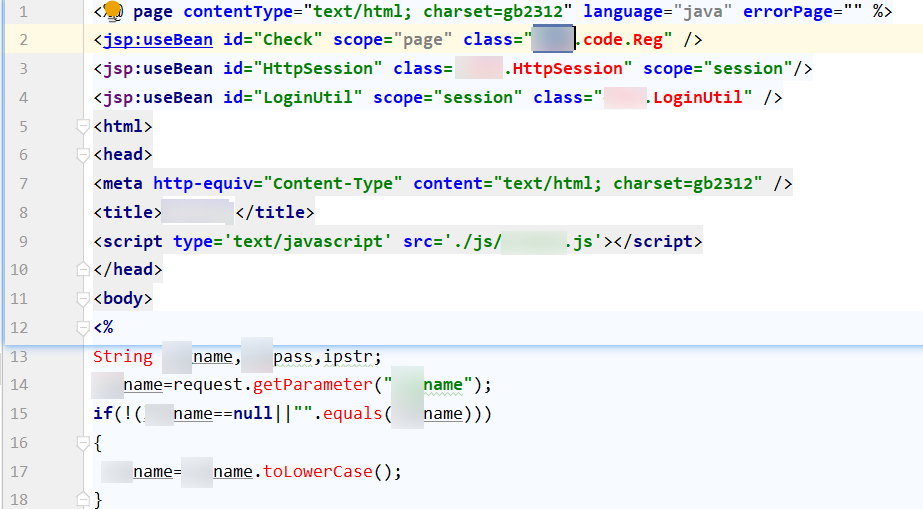
This thing is called the **<jsp:useBean>**** tag.** Its definition, summed up, is as follows:
The
<jsp:useBean>tag lets you declare aJavaBeanin a JSP and then use it.
- Once declared, the
JavaBeanobject becomes a scripting variable that can be accessed via scripting elements or other custom tags.- The syntax of the
<jsp:useBean>tag is as follows:
- The id value can be anything, as long as it doesn’t duplicate others in context; by convention it matches the last segment of the
class(HttpSession);- The scope value can be
page,request,session, orapplication, each corresponding to a different scope of effect. Be careful not to set the scope of a [bean that changes frequently] toapplicationorsession- The class value specifies the corresponding
javaclass; it’s generally a relative path starting fromWEB-INF/classes/(using a dot as the path separator)
<jsp:useBean id="HttpSession" scope="session" class="example.HttpSession"/>
As for JavaBean, I personally think of it as a kind of Java object that follows certain conventions and has certain characteristics.
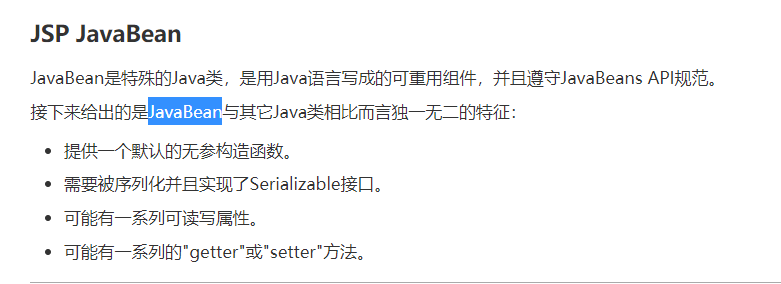
Therefore, when auditing, you just need to first look for sensitive functions in the JSP files, then use the tag definitions in the current file to locate the .class that defines the function, and the vulnerability is confirmed. IDEA makes viewing this very convenient.
Ⅳ Getting HTTP parameters
The way JSP retrieves request parameters is quite easy to understand, but for beginners there are still a few points to note.
<%@ page contentType="text/html; charset=gb2312" language="java" errorPage="" %>
    ...
<%
String id;
id = request.getParameter("id");

// handle Chinese characters
String name =new String(request.getParameter("name").getBytes("ISO-8859-1"),"UTF-8");
...
In the code above, request.getParameter is used to receive HTTP parameters sent by the client. As for the id parameter, it will be received by the server whether you submit it via GET or POST.
In other words: request.getParameter is compatible with both POST/GET parameters! A bit like PHP’s $_REQUEST.
Also, Chinese data has to be transcoded to display correctly.
Of course, JSP has other ways of getting parameters, but since they didn’t come up in this engagement, I won’t dwell on them. Interested folks can look into them yourselves.
Ⅴ File inclusion
In addition, file inclusion patterns also appeared in the project
<%@ include file="check.jsp"%>
After some study, this is a bit like file inclusion in PHP
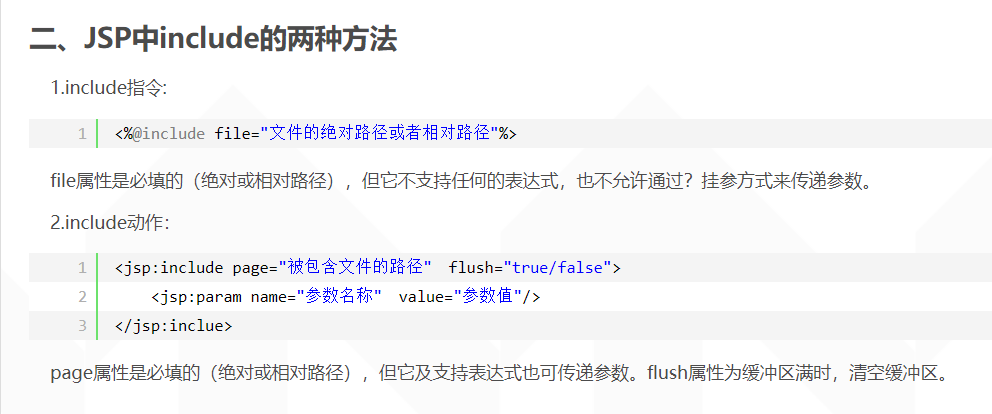
So let’s look at the contents of check.jsp,
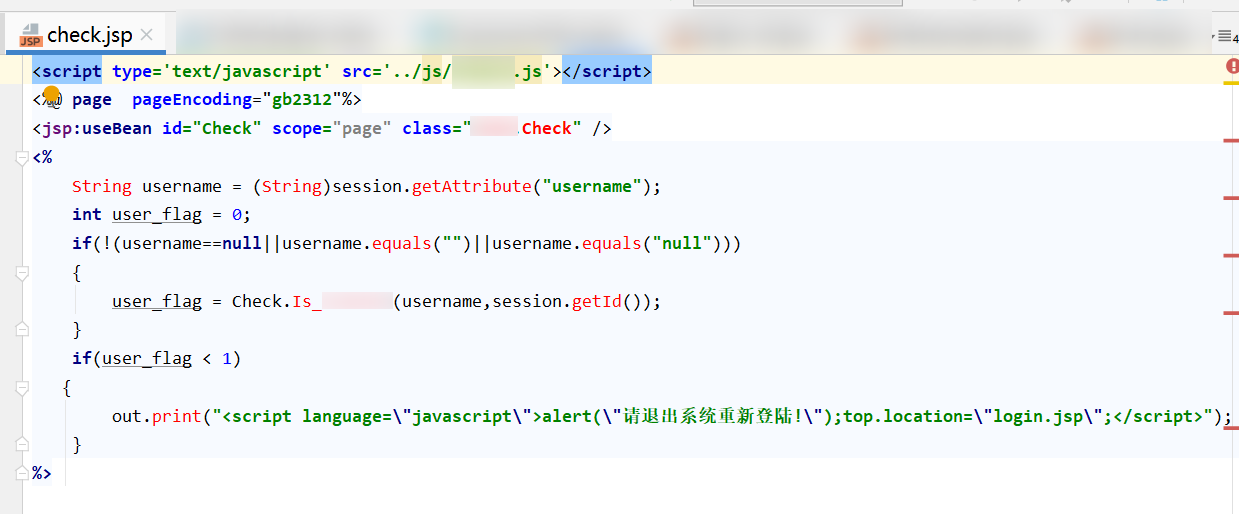
Clearly, as soon as the code below appears, it means this page’s functionality belongs to the admin backend.
<%@ include file="check.jsp"%>
One thing I still haven’t figured out, though: there’s no exit function, so why does the code after the include stop executing once it reaches out.print? Probably related to the servlet lifecycle. If anyone knows, please kindly enlighten me in the comments.
OK, that’s enough fundamentals — now let’s charge ahead and try to dig up a pre-auth RCE.
0x02 Backend SQLi
Easily found an injection point, with no filtering at all.

However, considering I might need SQLMAP for automated exploitation — an injection point of the delete type, better not.

So I went and found another injection point that concatenates a table name.

But here came another problem: I’d already grabbed a copy of this test environment’s database files during the earlier directory scan, yet after searching forever I couldn’t find any table starting with task_???
No choice but to FUZZ, using raft-large-words.txt from SecLists. Haha — useless, as expected!
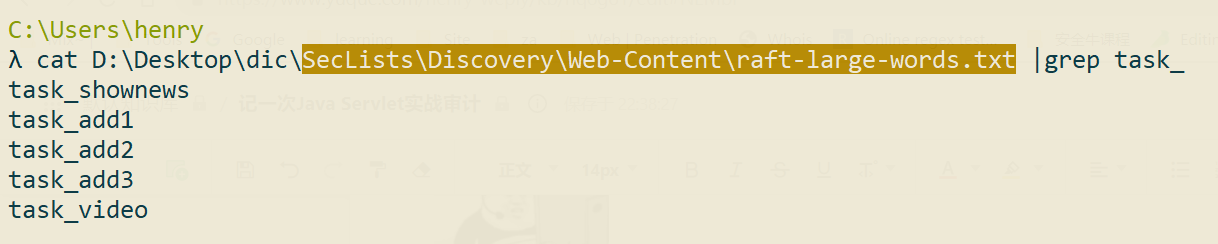
In the end, just audit it, right? Found a perfect injection point that neither harms the database nor requires any flashy FUZZing. The SQLMAP run results:
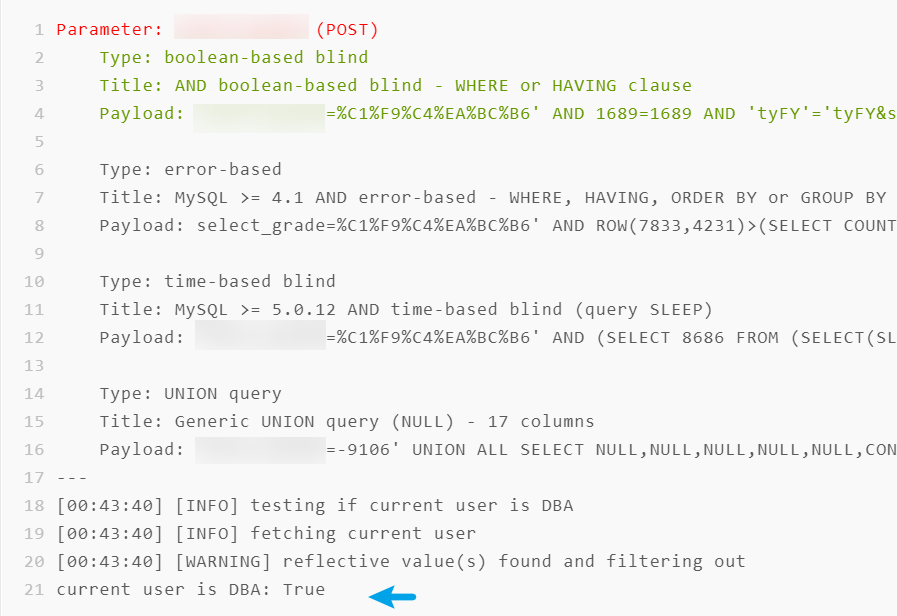
Note that we have DBA privileges, and judging by the case handling, the target is a Windows environment.
For me, first, I thought of using a UNC address for out-of-band injection (doable, but unnecessary given the union injection);
second, writing a webshell. Generally speaking, writing a webshell via injection on Windows is harder than on Linux, because the path is relatively harder to guess. However, since I had part of the system’s source code in hand, I quickly dug up the web path, C:\example, and tried using --os-shell to write a shell — no success. At first I guessed the environment had changed the drive letter, so I went through all 26 letters; none worked…

0x03 Path disclosure => backend getshell
Heaven never seals off all exits. I recalled that the target environment’s Tomcat seemed pretty terrible — it didn’t suppress errors and often leaked source code. Hehe!
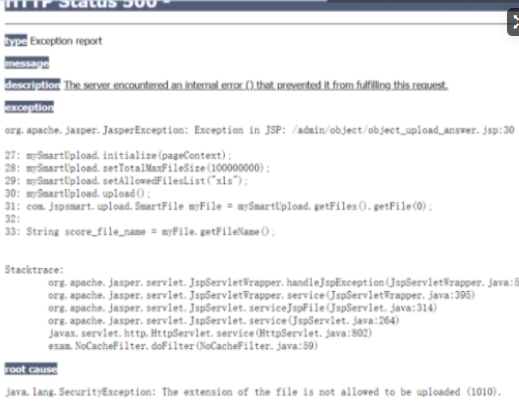
By making the backend backup function throw an error, I successfully obtained the path d:\exam\bak\
Then, via the SQLMAP --os-shell option, it didn’t take much effort to get SQLMAP’s shell, which allowed uploading arbitrary files.
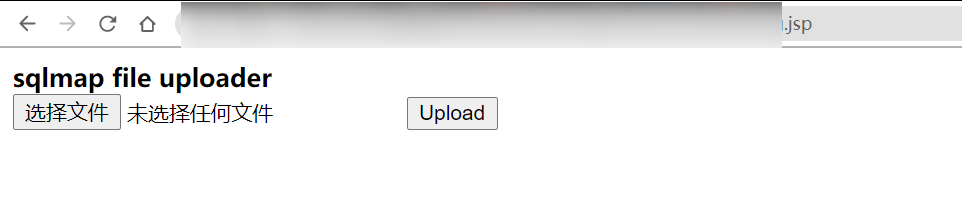
0x04 Pre-auth getshell
But back to the point: the target is taken down for now, but that was after all via weak credentials, and people would inevitably mock it as “not honoring the martial virtues.”
So, I searched globally for code that doesn’t include check.jsp and found a pre-auth SQL injection…

Good — a path to pre-auth getshell exists, though we’d need to know the target’s web path. But considering this product is almost always deployed as OEM servers sold to customers, it probably won’t vary much.
Thanks for reading. This post is mainly a simple code audit, and there are many places where my approach fell short — please feel free to point them out!
Refs
- https://www.runoob.com/servlet/servlet-writing-filters.html
- https://www.w3cschool.cn/jsp/jsp-javabean.html
- https://www.cnblogs.com/sharpest/p/6117629.html
0x05 Retrospective
TODO mind map.
1. Why not go after 401 authentication?
Mainly because I’m not skilled enough, and running 401 authentication through Burp felt a bit fiddly — above all the success rate is too low. So the optimization Actions boil down to two
Action
+Summarized the relevant experience: Those Little Things About 401 Authentication in Penetration Testing
- Developed the script BAP-Suite, pretty crude… and too lazy to fix it
2. Why not audit in depth from the start?
The initial way in was through weak credentials, so it might well have been a site millions had already hit. Looking for bugs: I didn’t dare fire up scanners, while manual testing was costly — had to take a different path and get the source code first. Makes sense, right? But I later found that hunting for source code is quite a bit of work too, so the optimization Actions can start from the following
Action
Developed a one-click source-code lookup system, integrating the GitHub API, Baidu cloud-drive search engines, gitlab/Gogs/HTTPServer findings on Fofa/Zoomeye/Shodan, etc.

(Just finished the README) 🤭