0x01 BackGround
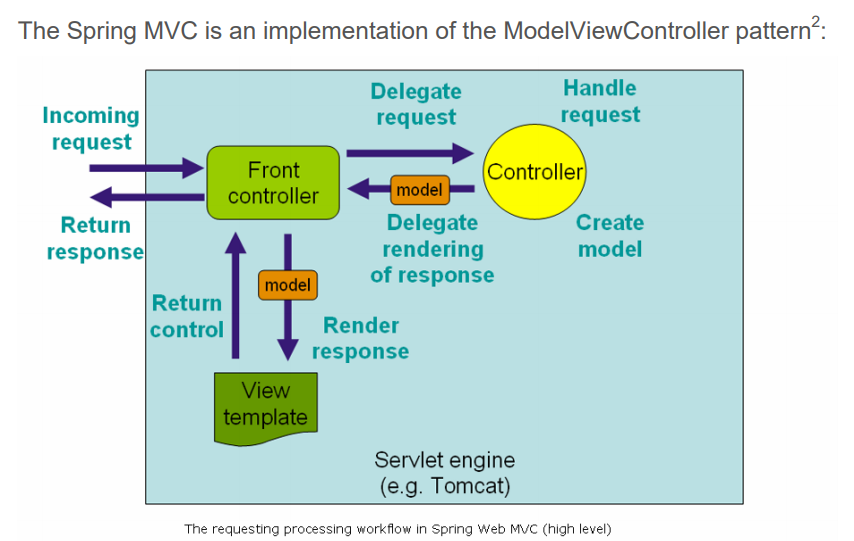
- Spring MVC, the Spring Web model-view-controller (MVC) framework
Software frameworks sometimes allow developers to automatically bind HTTP request parameters into objects, making it easier for developers to build with the framework. Updates to the framework or business implementation can introduce new parameters that, in turn, affect variables or object parameters in the program code that were not meant to be set.
Ruby on Rails, NodeJS, and Spring MVC all have this feature, and it frequently leads to vulnerabilities (it can be understood as property injection),
- Because of this vulnerability, Rails’ repository on GitHub was compromised in 2012, see: https://lwn.net/Articles/485675/
- Vulnerability name: Spring MVC Data Submission to Non-Editable Fields
- Vulnerability type: improper framework usage (business logic flaw)
Taking Spring MVC as an example, here is a demonstration of vulnerable code.
This is the class definition:
public class User {
     private String userid;
     private String username;
     private String phone;
     private String email;
     private boolean isAdmin;

     //Getters & Setters
   }
This is the controller that handles the request:
@RequestMapping(value = "/addUserInfo", method = RequestMethod.POST)
  public String submit(User user) {
     userService.add(user);
     return "successPage";
  }
This is a typical request:
POST /addUser
...
userid=bobbytables&password=hashedpass&email=bobby@tables.com
And this is the exploit that sets the value of the isAdmin class instance property on the User object:
POST /addUser
...
userid=bobbytables&password=hashedpass&email=bobby@tables.com&isAdmin=true
Depending on the scenario, this can lead to vulnerabilities such as broken access control (IDOR).
Of course, for this to become an actual vulnerability, a few conditions must line up — the prerequisites for the flaw to exist, including:
- The Views layer must have corresponding rendering logic, such as a form
- The corresponding
setterandgetterare implemented - There is a feature point that genuinely allows editing/adding, and it performs no server-side validation (or only client-side validation,
client side data validation)
0x02 White-box Check
- Developers blindly trust that the objects they obtain come from a trusted source, when in fact an attacker can arbitrarily modify the object’s values.
- It is hard to say exactly how widespread variable binding vulnerabilities and similar flaws are, but auto-binding vulnerabilities are indeed very broadly distributed (due to the nature of the feature that produces them).
- Moreover, variable binding vulnerabilities are not limited to HTTP parameters; in theory they can appear anywhere (JSON or XML), as long as the data can be converted and used for assignment.
- Of course, the actual impact of each variable binding vulnerability still depends on the business logic of the code and the various properties it uses.
1) @ModelAttribute on a method parameter
@RequestMapping(value="/owners/{ownerId}/pets/{petId}/edit", method = RequestMethod.POST)
	public String processSubmit(@ModelAttribute Pet pet) {//【1】
}
BindingResult
To inspect errors in data binding (missing parameters / type conversion failures), <font style="color:rgb(0, 0, 0);">BindingResult</font> is often used, for example:
@RequestMapping(value="/owners/{ownerId}/pets/{petId}/edit", method = RequestMethod.POST)
public String processSubmit(@ModelAttribute("pet") Pet pet, BindingResult result) {

    if (result.hasErrors()) {//【1’】
        return "petForm";
    }
    // ...
}
Parameter validation
There are two approaches. The first is the <font style="color:rgb(0, 0, 0);">@Valid</font> annotation for automatic validation, from JSR-303 (a Java Specification Request, Bean Validation); see Java Data Validation: JSR-303 — xueguchen’s blog on CSDN
@RequestMapping(value="/owners/{ownerId}/pets/{petId}/edit", method = RequestMethod.POST)
public String processSubmit(@Valid @ModelAttribute("pet") Pet pet, BindingResult result) {
							//【!】
    if (result.hasErrors()) {
        return "petForm";
    }

    // ...
}
Constraint	Details
@Null	The annotated element must be null
@NotNull	The annotated element must not be null
@AssertTrue	The annotated element must be true
@AssertFalse	The annotated element must be false
@Min(value)	The annotated element must be a number whose value must be greater than or equal to the specified minimum
@Max(value)	The annotated element must be a number whose value must be less than or equal to the specified maximum
@DecimalMin(value)	The annotated element must be a number whose value must be greater than or equal to the specified minimum
@DecimalMax(value)	The annotated element must be a number whose value must be less than or equal to the specified maximum
@Size(max, min)	The size of the annotated element must be within the specified bounds
@Digits (integer, fraction)	The annotated element must be a number whose value must be within acceptable bounds
@Past	The annotated element must be a date in the past
@Futuret	The annotated element must be a date in the future
@Pattern(value)	The annotated element must match the specified regular expression
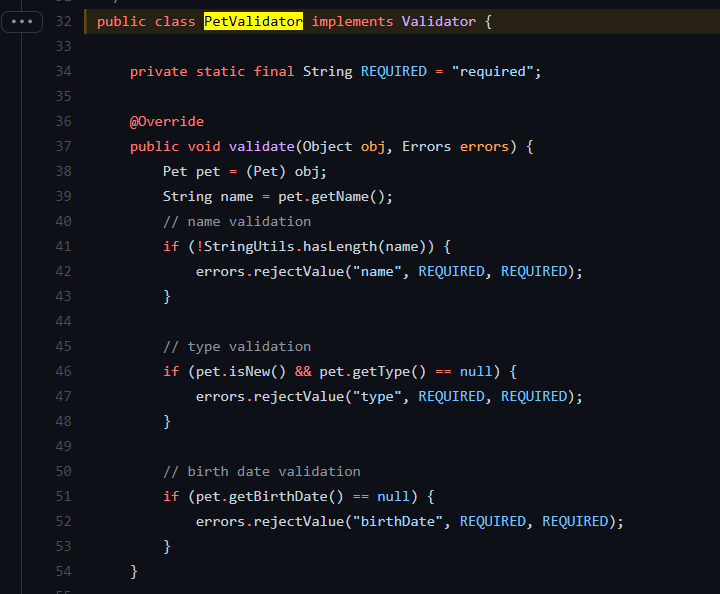
The second is a custom Validator:
@RequestMapping(value="/owners/{ownerId}/pets/{petId}/edit", method = RequestMethod.POST)
public String processSubmit(@ModelAttribute("pet") Pet pet, BindingResult result) {

    new PetValidator().validate(pet, result);//【1’’】
    if (result.hasErrors()) {
        return "petForm";
    }
    // ...
}
2) The @ModelAttribute annotation on a method
// Add one attribute
// The return value of the method is added to the model under the name "account"
// You can customize the name via @ModelAttribute("myAccount")

@ModelAttribute	//【1】
public Account addAccount(@RequestParam String number) {
    return accountManager.findAccount(number);
}

// Add multiple attributes

@ModelAttribute	//【2】
public void populateModel(@RequestParam String number, Model model) {
    model.addAttribute(accountManager.findAccount(number));
    // add more ...
}
3) The @SessionAttribute annotation on a class
Scope
By default, Spring MVC stores model data in the request scope.
Once the request ends, the data expires. To use it across pages, you need the session, and the @SessionAttributes annotation lets model data also be stored in the session scope.
@SessionAttributes(value={"names"},types={Integer.class})
@Controller
public class Test {
    @RequestMapping("/test")
    public String test(Map<String,Object> map){
        map.put("names", Arrays.asList("caoyc","zhh","cjx"));
        map.put("age", 18);
        return "hello";
    }
}
4) Specifying redirect and flash attributes (RedirectAttributes)
@Controller
public class ControllerOne {
	@RequestMapping(value="mybook", method = RequestMethod.GET)
	public ModelAndView book(){
		return new ModelAndView("book","book",new Book());
	}

	@RequestMapping(value = "/save", method = RequestMethod.POST)
	public RedirectView  save(@ModelAttribute("book") Book book, RedirectAttributes redirectAttrs) {												//【!】
		redirectAttrs.addAttribute("msg", "Hello World!");
		redirectAttrs.addFlashAttribute("book", book.getBookName());
		redirectAttrs.addFlashAttribute("writer", book.getWriter());

		RedirectView redirectView = new RedirectView();
		redirectView.setContextRelative(true);
		redirectView.setUrl("/hello/{msg}");
		return redirectView;
	}
}
RedirectView can be used as a URI template; template values are automatically substituted from the same keys in [Model or RedirectAttributes].
0x03 Black-box Detect
At first glance, finding auto-binding vulnerabilities with a “black-box” approach seems impossible. But there are still some methods:
- Typically, parameter names equal the object field names (though not necessarily, since this is configurable). Since fields are usually named in particular ways, we can distinguish them. Notably, auto-binding also works with HashMaps and arrays.
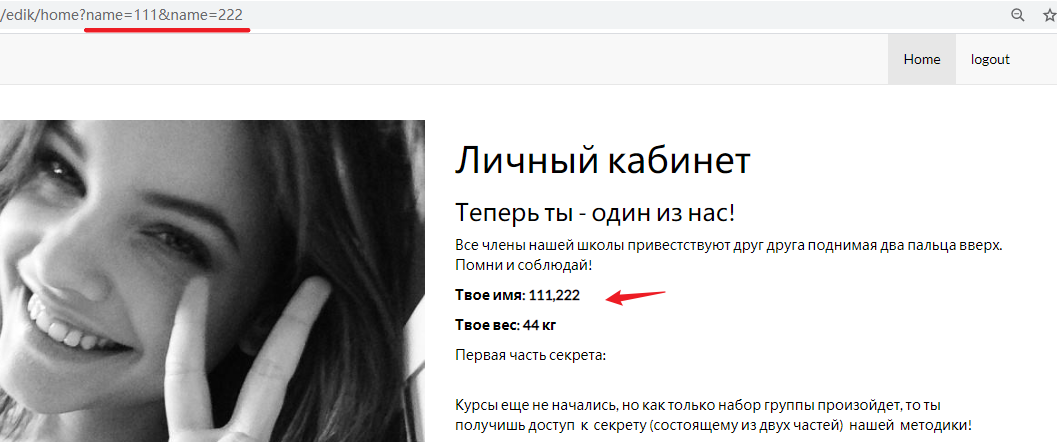
- Where auto-binding is used in a controller method, when we send two parameters with the same name, the value in the object will be the concatenation of the parameters, for example:
# Request with parameters:
?name=text1&name=text2

# Result:
ObjectWithNameField.name = text1,text2
It feels a bit like ASPX parameters:
In ASPX, there is a rather special behavior: when the parameter
idis submitted simultaneously via GET/POST/COOKIE, the server-side order in which it receives the parameteridis GET, POST, COOKIE, joined in between by commas
- FUZZ. Once we have collected all parameter names, we can send them to every entry point (URL) — even those that at first glance accept no parameters (e.g. resetViewQuestionHandler) — and check whether the responses differ from, or match, the responses without parameters.
0x04 Remediation Recommendations
- Include in the
DTOonly fields the user is allowed to edit:
public class UserRegistrationFormDTO {
     private String username;
     private String password;
     private String email;

     //Getters & Setters
   }
- Modify the
controllerlayer to accept only the parameters the user is allowed to change (explicitly declared):
@RequestMapping(value = "/addUserInfo", method = RequestMethod.POST)
  public String submit(String username,String phone,String email) {
     userService.add(username,phone,email);
     return "successPage";
  }
- You can also set up a whitelist:
@Controller
  public class UserController
  {
     @InitBinder
     public void initBinder(WebDataBinder binder, WebRequest request)
     {
        binder.setDisallowedFields(["isAdmin"]);
     }

     ...
  }
Refs
https://code.tutsplus.com/tutorials/mass-assignment-rails-and-you–net-31695
https://o2platform.files.wordpress.com/2011/07/ounce_springframework_vulnerabilities.pdf
- That paper also mentions
SPRING MVC MODELVIEW INJECTION,
- That paper also mentions
GitHub was hacked via the mass assignment vulnerability, https://lwn.net/Articles/485675/
- An interesting discussion: https://github.com/rails/rails/issues/5228
https://cheatsheetseries.owasp.org/cheatsheets/Mass_Assignment_Cheat_Sheet.html (recommended)
https://www.concretepage.com/spring/spring-mvc/spring-mvc-redirectview
Second update: